Sarrera
The NEXX X-Com 2 is a communication system designed for seamless integration with NEXX X.Vilitur and NEXX X.Vilijord helmets. This system allows riders to connect with their technology and communicate with up to 8 other riders over a distance of up to 1.6 kilometers (1.0 mile) in open terrain. It features Bluetooth 4.1, advanced audio distribution, noise cancellation, and an integrated FM radio.
Paketearen edukia
Instalazioa hasi aurretik, egiaztatu osagai guztiak daudela:
- 1 x X-Com 2 Main Module
- 1 x Urruneko kontrola
- Muntatzeko hardwarea (adibidez, clamps, adhesive mounts) - (Assumed)
- Speakers and Microphone Kit - (Assumed)
- USB Charging Cable - (Assumed)
- Erabiltzailearen eskuliburua (dokumentu hau)
Produktua amaituview
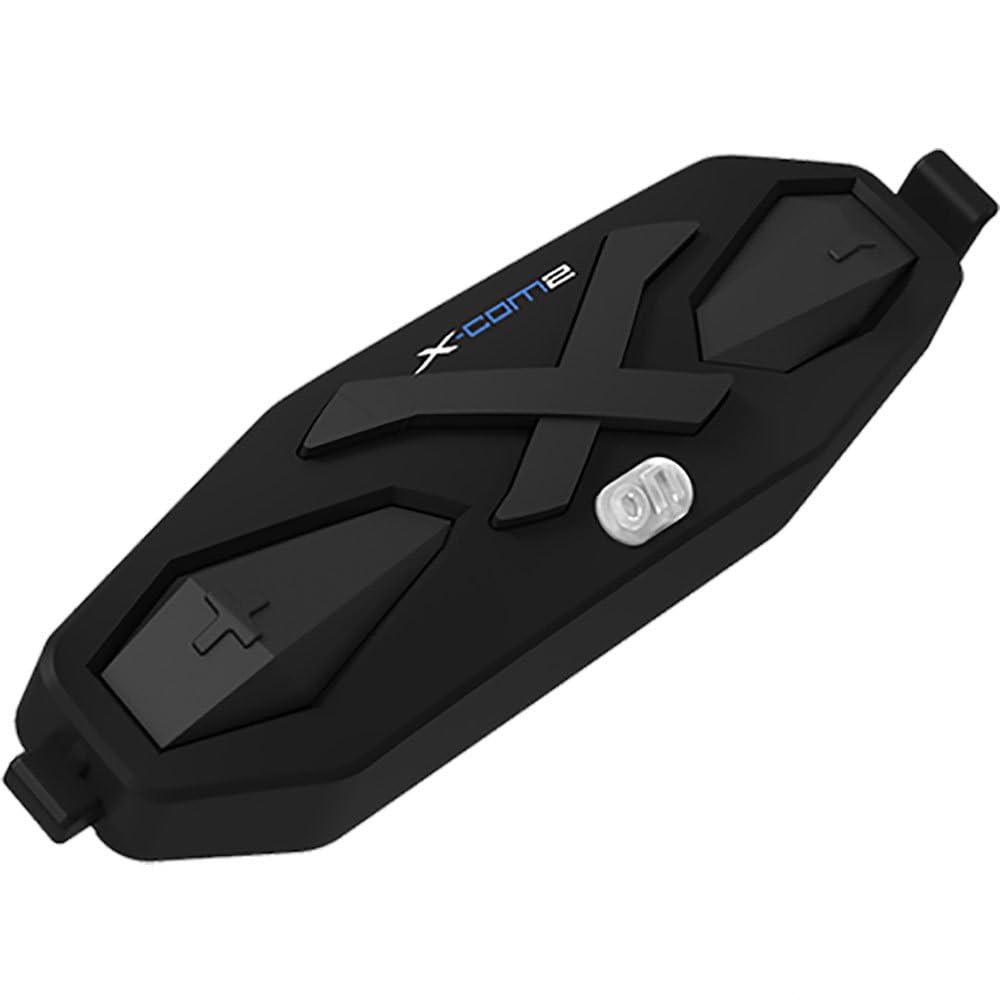
1. irudia: The NEXX X-Com 2 main module. This black, elongated unit features a prominent 'X' design, the 'X-Com2' logo, and several tactile buttons for operation, including a central power/function button and volume/navigation controls.
Main Module Components:
- Pizteko/Funtzio botoia: Central button for powering on/off, pairing, and accessing main functions.
- Bolumena igotzeko/hurrengo abestiaren botoia: Typically located on one side, used to increase volume or navigate forward.
- Bolumena jaisteko/aurreko abestiaren botoia: Typically located on the opposite side, used to decrease volume or navigate backward.
- Kargatzeko ataka: USB kargatzeko kablea konektatzeko.
- Speaker/Microphone Ports: For connecting the helmet's audio components.
Konfigurazioa eta Instalazioa
1. Mounting the Main Module:
- Identify the designated mounting area on your NEXX X.Vilitur or X.Vilijord helmet, usually on the left side.
- Aukeratu cl-ren arteanamp mount or adhesive mount based on your helmet type and preference.
- Securely attach the mounting bracket to the helmet.
- Slide the X-Com 2 main module onto the mounted bracket until it clicks into place.
2. Bozgorailuak eta mikrofonoa instalatzea:
- Carefully remove the helmet's interior padding to access the ear pockets.
- Place the speakers into the designated ear pockets, ensuring they are centered over your ears.
- Route the microphone boom towards your mouth, securing it within the helmet's chin bar area.
- Connect the speaker and microphone cables to the corresponding ports on the X-Com 2 main module.
- Reinstall the helmet's interior padding, ensuring cables are neatly tucked away and do not interfere with comfort or safety.
Funtzionamendu-argibideak
Piztu/Itzali:
- Piztu: Press and hold the Power/Function button for approximately 2 seconds until you hear an audible prompt.
- Itzali: Press and hold the Power/Function button for approximately 5 seconds until you hear an audible prompt.
Bluetooth bidezko lotura
- With the X-Com 2 powered off, press and hold the Power/Function button for 7 seconds until the LED flashes red and blue, indicating pairing mode.
- On your mobile device, enable Bluetooth and search for "NEXX X-Com 2".
- Select the device to pair. A voice prompt will confirm successful pairing.
Interfono funtzionaltasuna:
- The X-Com 2 supports intercom communication with up to 8 riders.
- Interfonoa abiaraztea: Briefly press the Intercom button (if available, or a specific combination of main buttons) to connect with the last paired intercom.
- Amaierako interfonoa: Briefly press the Intercom button again.
- Refer to the full manual for detailed instructions on multi-rider intercom pairing and group management.
FM irratia:
- Piztu/itzali FM irratia: Double-tap the Power/Function button.
- Eskaneatze estazioak: Press the Volume Up or Volume Down button to scan for the next available station.
- The unit supports 10 preset station memory.
Bolumen kontrola:
- Press the Volume Up button to increase audio volume.
- Press the Volume Down button to decrease audio volume.
Mantentzea
- Garbiketa: Erabili biguna, damp cloth to wipe the main module. Do not use harsh chemicals or abrasive cleaners.
- Kargatzen: Charge the device using the provided USB cable. A full charge takes approximately 2.5 hours. Avoid overcharging.
- Biltegiratzea: Store the X-Com 2 in a cool, dry place when not in use. If storing for extended periods, charge the battery every few months to maintain its lifespan.
- Bateria zaintzea: The unit uses a Lithium Polymer Battery. Do not expose to extreme temperatures.
Arazoak konpontzea
| Arazoa | Kausa posiblea | Irtenbidea |
|---|---|---|
| Gailua ez da pizten. | Bateria agortuta dago. | Kargatu gailua gutxienez 30 minutuz. |
| Ezin da telefonoarekin parekatu. | Device not in pairing mode; Bluetooth on phone is off; too many paired devices. | Ensure device is in pairing mode (flashing red/blue). Turn phone's Bluetooth off and on. Delete old Bluetooth connections on phone. |
| Interfonoaren konexio arazoak. | Eremutik kanpo; interferentzia; parekatze okerra. | Ensure riders are within 1.6 km (1.0 mile) in open terrain. Move away from sources of strong electromagnetic interference. Re-pair intercom units. |
| Poor audio quality / Noise. | Microphone not positioned correctly; excessive wind noise; Advanced Noise Control not active. | Adjust microphone closer to mouth. Ensure helmet vents are closed if causing excessive wind noise. Verify Advanced Noise Control is enabled (automatic). |
Zehaztapenak
- Eredua: 09SEN99200099999X-COM2
- Bluetooth bertsioa: 4.1
- Bluetooth Profiles: Entzungailuen Profile (HSP), Esku Libreko Profile (HFP), Audio Banaketa Pro aurreratuafile (A2DP), Audio Video Remote Control Profile (AVRCP)
- Intercom Working Distance: Up to 1.6 kilometers (1.0 mile) in open terrain
- Max Intercom Riders: Supports up to 8 riders
- Zarata baliogabetzea: Zarataren Kontrol aurreratua
- Kodeka: SBC kodeka integratua
- FM irrati-maiztasuna: 76 ~ 108MHz (10 preset station memory)
- Hitzaldi-denbora: 10 ordu
- Kargatzeko denbora: 2.5 ordu
- Bateria mota: Litio polimerozko bateria
- Funtzionamendu-tenperatura: -10 °C ~ 55 °C (-14 °F ~ 131 °F)
- Main Module Weight: 100 g (3.53 oz)
- Produktuaren neurriak: 8 x 7 x 8 hazbete
- Elementuaren pisua: 1.01 kilo
Bermea eta Laguntza
For specific warranty information and detailed support, please refer to the official NEXX website or contact NEXX customer service directly. Keep your proof of purchase for warranty claims.
NEXX Official Webgunea: www.nexx-helmets.com (Oharra: Hau leku-markatzailea da) URL, egiaztatu benetako ofiziala website for NEXX products)
Bezeroarentzako arreta: Refer to the contact information provided on the NEXX official webgunean edo zure produktuaren ontzian.


