1. Sarrera
Eskerrik asko erosketagatik.asing the Lenco SPR-100BK Splash-Proof Bluetooth Speaker. This portable speaker delivers powerful sound with strong bass and features FM radio, USB, SD card playback, and integrated light effects. Designed for durability, it is splash-proof, making it suitable for various environments. This manual provides essential information for safe and optimal use of your device.
2. Segurtasun-argibide garrantzitsuak
- Ez jarri gailua tenperatura altuen, eguzki-argiaren eraginpean edo hezetasun handiaren eraginpean.
- Ensure the charging port cover is securely closed when near water to maintain splash-proof integrity.
- Ez desmuntatu edo aldatu gailua. Mantendu konponketa guztiak langile kualifikatuen esku.
- Erabili zehaztutako kargatzeko kablea soilik.
- Mantendu gailua eremu magnetiko indartsuetatik urrun.
- Saihestu gailua kolpe gogorrak erortzea edo jasaten.
3. Produktua amaitu daview
Familiarize yourself with the components of your Lenco SPR-100BK speaker.
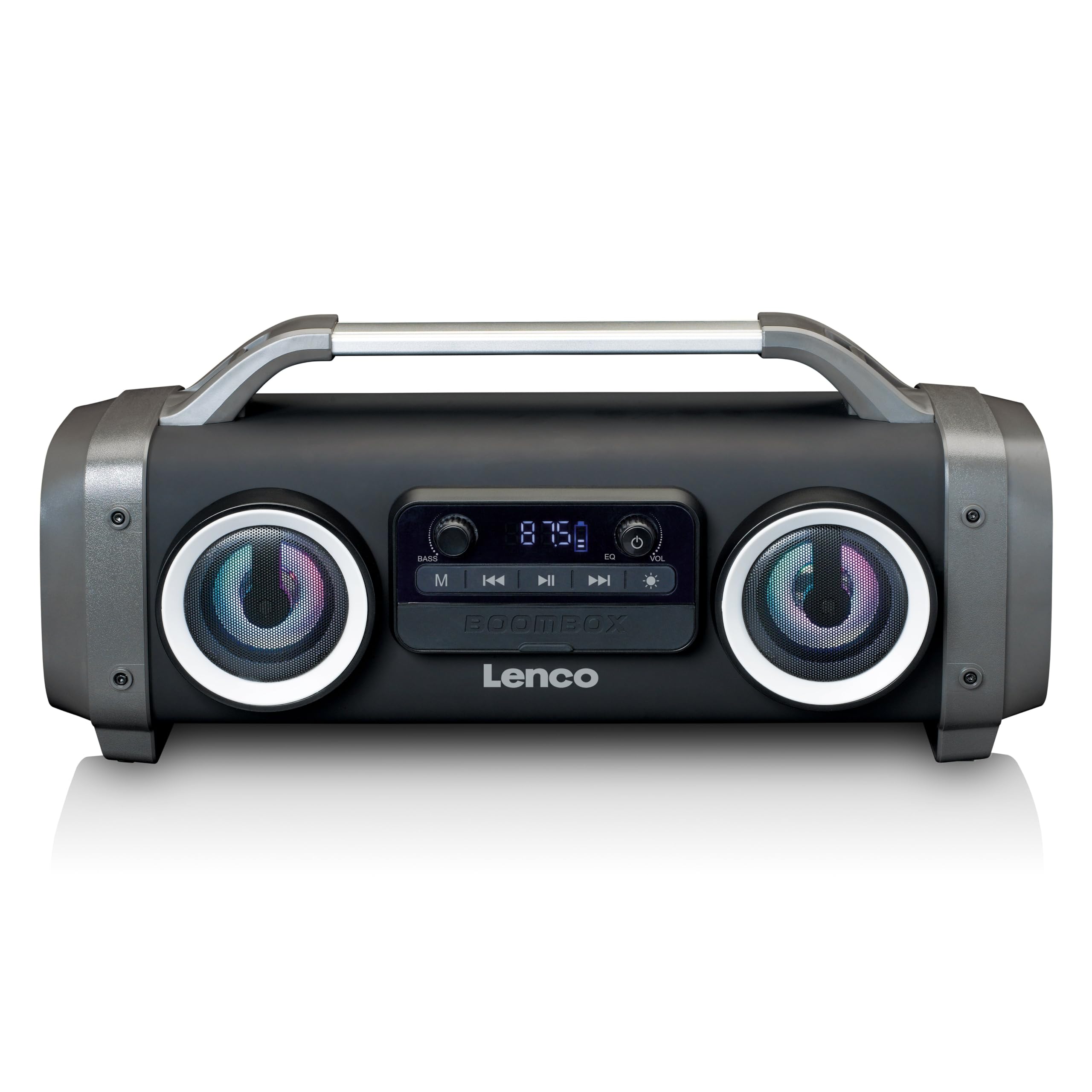
1. irudia: Aurrealdea view of the Lenco SPR-100BK speaker, showing the main speaker grille, control panel, and integrated light effects.
3.1 Kontrolak eta atakak
- Pizteko botoia: Bozgorailua pizten edo itzaltzen du.
- Modu botoia: Switches between Bluetooth, FM Radio, USB, SD, and AUX modes.
- Erreproduzitu/Pausatu botoia: Audioa erreproduzitzen edo pausatzen du.
- Bolumena kontrolatzeko botoia: Master bolumena doitzen du.
- Bass Boost Knob: Baxu-maila doitzen du.
- Argi efektuaren botoia: Cycles through or turns off light effects.
- USB ataka: USB flash unitatean erreproduzitzeko.
- SD txartelaren zirrikitua: SD txartela erreproduzitzeko.
- AUX sarrera (3.5 mm): Kanpoko audio gailuak konektatzeko.
- Charging Port (Mini USB): Barneko bateria kargatzeko.
4. Konfigurazioa
4.1 Paketatzea
Carefully remove the speaker and all accessories from the packaging. Ensure the following items are present:
- Lenco SPR-100BK Bluetooth Speaker
- USB kargatzeko kablea
- 3.5mm Audio Cable (AUX cable)
- Erabiltzailearen eskuliburua
4.2 Bateria kargatzea
- Locate the Mini USB charging port on the speaker.
- Connect the supplied USB charging cable to the speaker's charging port.
- Connect the other end of the USB cable to a compatible USB power adapter (5V/1A, not included) or a computer's USB port.
- Kargatzeko adierazlearen argia piztuko da, normalean gorriz, kargatzen ari den bitartean. Itzali edo kolorea aldatuko du (adibidez, urdina) guztiz kargatzen denean.
- A full charge takes approximately 4-5 hours and provides up to 15 hours of playback (without light effects).
4.3 Hasierako piztea
Eduki sakatuta Pizteko botoia for a few seconds until the speaker powers on and you hear an audible prompt or see the display light up.
5. Funtzionamendua
5.1 Piztu/Itzali
- Pizteko: Sakatu eta eutsi botoiari Pizteko botoia.
- Itzaltzeko: Sakatu eta eutsi botoiari Pizteko botoia berriz.
5.2 Bluetooth konexioa
- Piztu bozgorailua. Automatikoki Bluetooth parekatze moduan sartuko da, LED keinukari batek adierazita.
- Gaitu Bluetooth-a zure gailu mugikorrean (smartphone-a, tableta, etab.).
- Bilatu available Bluetooth devices and select "SPR-100BK"zerrendatik.
- Once paired, the speaker will emit a confirmation sound, and the LED will stop flashing.
- True Wireless Stereo (TWS) modua: If you have two SPR-100BK speakers, you can pair them for stereo sound.
- Ziurtatu bi bozgorailuak piztuta eta Bluetooth moduan daudela.
- On one speaker (the master), press and hold the Modu botoia until you hear a TWS pairing prompt.
- The two speakers will automatically connect. Once connected, pair your device to the master speaker as described above.
5.3 FM Irratia
- Sakatu Modu botoia repeatedly until you select FM Radio mode.
- To auto-scan and save stations: Press and hold the Erreproduzitu/Pausatu botoia. The speaker will scan for available FM stations and save them automatically.
- To switch between saved stations: Use the Aurreko/Hurrengo Pistaren Botoiak (if available, otherwise it will cycle through automatically).
- Oharra: For better FM reception, ensure the included 3.5mm audio cable is plugged into the AUX input, as it acts as an external antenna.
5.4 USB/SD txartelaren erreprodukzioa
- Insert a USB flash drive or an SD card (with supported audio files) dagokion portuan/zirrikituan.
- The speaker will automatically switch to USB or SD mode and begin playback. If not, press the Modu botoia iturri egokia hautatzeko.
- Erabili Erreproduzitu/Pausatu botoia eta Aurreko/Hurrengo Pistaren Botoiak erreprodukzioa kontrolatzeko.
5.5 AUX sarrera
- Connect one end of the supplied 3.5mm audio cable to the AUX input on the speaker.
- Konektatu beste muturra kanpoko gailuaren entzungailuen konektorera edo audio irteerara.
- Sakatu Modu botoia AUX modua hautatzeko.
- Kontrolatu erreprodukzioa eta bolumena kanpoko gailutik.
5.6 Argi-efektuak
Sakatu Argi-efektuaren botoia to cycle through different light modes or to turn the lights off. The speaker features 12 color light effects.
5.7 Soinuaren doikuntza
- Bolumena: Biratu Bolumena kontrolatzeko eskutokia to increase or decrease the overall sound level.
- Baxua: Biratu Bass Boost Knob to adjust the intensity of the bass.
6. Mantentzea
6.1 Garbiketa
Wipe the speaker with a soft, dry cloth. Do not use abrasive cleaners, waxes, or solvents. For stubborn dirt, a slightly damp cloth can be used, ensuring all port covers are sealed.
6.2 Bateria zaintzea
- To prolong battery life, fully charge the speaker before first use.
- Saihestu bateria maiz erabat deskargatzea.
- If storing the speaker for an extended period, charge it to about 50% every few months.
6.3 Biltegiratzea
Gorde bozgorailua leku fresko eta lehor batean, eguzki-argitik eta muturreko tenperaturetatik babestuta.
7. Arazoak
| Arazoa | Kausa posiblea | Irtenbidea |
|---|---|---|
| Bozgorailuak ez du pizten. | Bateria agortuta dago. | Charge the speaker using the supplied USB cable. |
| Soinurik ez. | Volume is too low; incorrect mode selected; device not connected. | Increase volume; press Mode button to select correct source; ensure Bluetooth device is paired or AUX cable is connected. |
| Bluetooth parekatzeak huts egiten du. | Bozgorailua ez dago parekatze moduan; gailua urrunegi dago; interferentziak. | Ensure speaker is in Bluetooth pairing mode (flashing LED); move device closer; turn off other Bluetooth devices. |
| FM irratiaren harrera eskasa. | No external antenna; weak signal. | Plug in the 3.5mm AUX cable to act as an antenna; try moving the speaker to a different location. |
| USB/SD erreprodukzioa ez dabil. | Onartu gabe file formatua; txartela/unitatea ez da behar bezala sartu; hondatuta files. | Ziurtatu files are in a supported format (e.g., MP3); reinsert the USB drive/SD card; try a different drive/card. |
8. Zehaztapenak
| Modelo zenbakia | SPR-100BK |
| Marka | Lenco |
| Potentzia Irteera | 25 watt RMS |
| Konektibitatea | Bluetooth, USB, SD Card, 3.5mm AUX Input |
| Bateria mota | Litio-ioi (4400 mAh) |
| Erreprodukzio-denbora | Up to 15 hours (reduced with light effects) |
| Kargatzeko sarrera | 5V/1A (Mini USB) |
| Ezaugarri bereziak | Splash-proof design, Integrated light effects, FM Radio, TWS function |
| Neurriak (L x W x H) | 60 x 60 x 85 cm |
| Pisua | 2 kilogramo |
Oharra: zehaztapenak aldez aurretik jakinarazi gabe alda daitezke.
9. Bermea eta Laguntza
9.1 Bermearen informazioa
This Lenco product is covered by a warranty for a period of 2 urte on parts from the date of purchase. This warranty covers manufacturing defects and workmanship under normal use. It does not cover damage caused by misuse, accidents, unauthorized modifications, or normal wear and tear.
9.2 Software eguneraketak
Software updates for this product are guaranteed until 13ko apirilaren 2030a.
9.3 Bezeroarentzako laguntza
For technical assistance, warranty claims, or product inquiries, please contact Lenco customer support through their official website or the retailer where the product was purchased. Please have your model number (SPR-100BK) and proof of purchase ready.
Lenco ofiziala Webgunea: www.lenco.com


