
1. Sarrera
Thank you for choosing the ROMOSS Large Capacity Portable Charger. This device is designed to provide reliable and efficient power to your mobile devices on the go. Please read this manual carefully before use to ensure proper operation and to maximize the lifespan of your product.
2. Segurtasun informazioa
Zure gailuari lesiorik edo kalterik ez egiteko, jarraitu segurtasun neurri hauek:
- Ez jarri bateria eramangarria muturreko tenperaturetan (60 °C/140 °F-tik gora edo 0 °C/32 °F-tik behera).
- Saihestu gailua erortzea, desmuntatzea edo zuk zeuk konpontzen saiatzea.
- Mantendu uretatik, hezetasunetik eta material sukoietatik urrun.
- Erabili ziurtatutako kargatzeko kableak eta egokigailuak soilik.
- Mantendu haurren eskura.
- Bota ezazu produktua arduraz tokiko araudiaren arabera.
3. Produktua amaitu daview
The ROMOSS Large Capacity Portable Charger features multiple ports for versatile charging and an LED indicator for battery status.
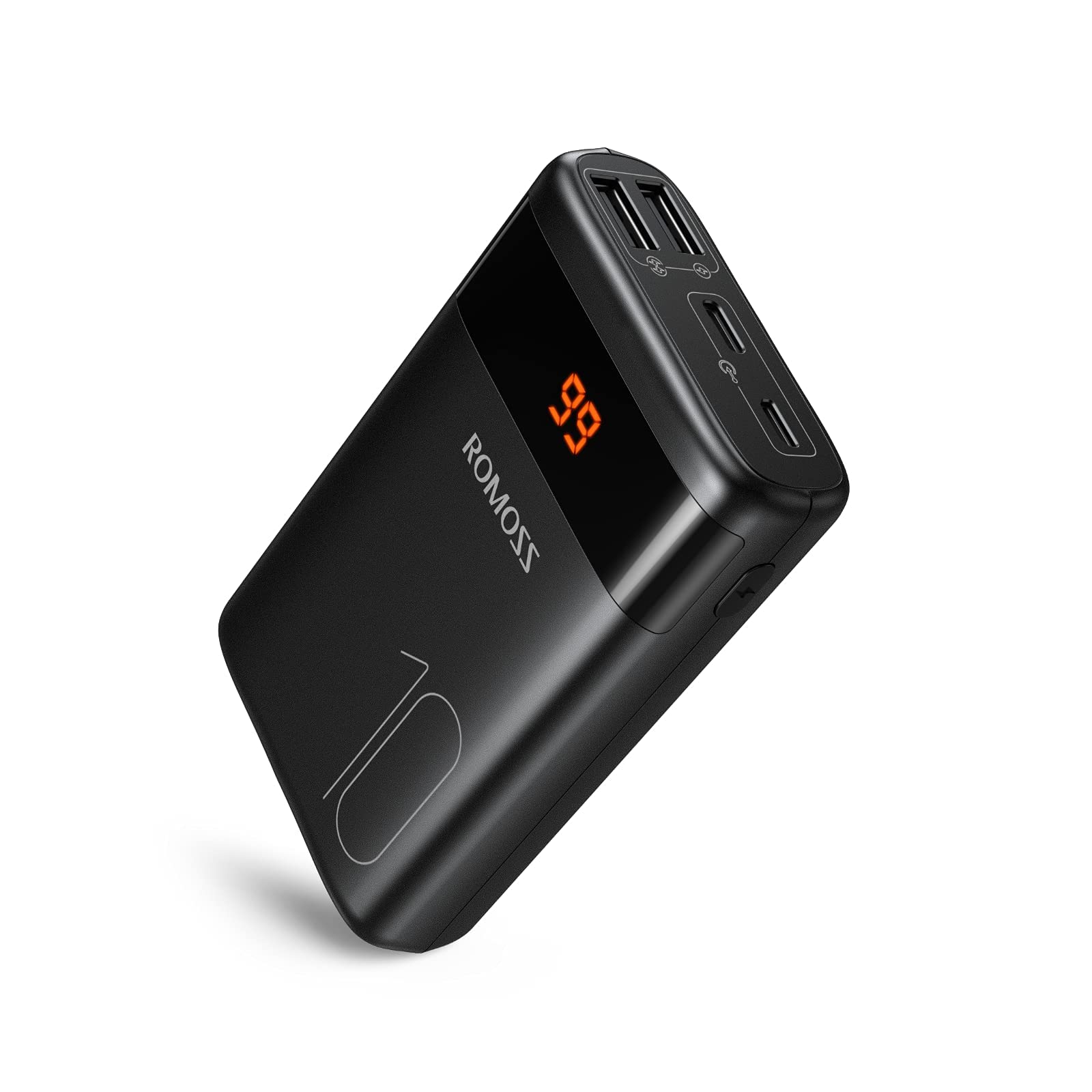
Irudia: Aurrealdea view of the ROMOSS Portable Charger, showing input/output ports and LED battery indicators.
Osagaiak:
- Pizteko botoia: Press once to check battery level, press and hold to activate/deactivate (if applicable).
- LED adierazleak: Display the remaining battery capacity.
- Sarrerako ataka: Used to charge the portable charger itself (e.g., Type-C, Micro USB, Lightning).
- Irteerako atakak: Used to charge other devices (e.g., USB-A, Type-C).
4. Konfigurazioa
4.1 Hasierako karga
Before first use, fully charge your ROMOSS portable charger. This ensures optimal battery performance and accuracy of the battery indicator.
- Connect the portable charger to a power source (e.g., wall adapter, computer USB port) using a compatible charging cable (e.g., Type-C cable).
- The LED indicators will illuminate to show the charging progress.
- Once all LED indicators are solid, the portable charger is fully charged. Disconnect it from the power source.
5. Funtzionamendu-argibideak
5.1 Zure gailuak kargatzea
Zure telefono mugikorra, tableta edo beste USB bidez elikatzen diren gailuak kargatzeko:
- Connect your device to an output port on the portable charger using its charging cable.
- The portable charger should automatically begin charging your device. If not, press the power button once.
- The LED indicators will show the remaining battery level of the portable charger during charging.
- Once your device is fully charged, disconnect it from the portable charger.
5.2 Bateriaren maila egiaztatzea
To check the remaining battery capacity of the portable charger:
- Sakatu pizteko botoia behin.
- The LED indicators will light up, showing the current battery level. For example, four solid LEDs typically indicate a full charge, while one blinking LED indicates a low battery.
6. Mantentzea
6.1 Garbiketa
Wipe the portable charger with a soft, dry cloth. Do not use harsh chemicals or abrasive materials.
6.2 Biltegiratzea
Store the portable charger in a cool, dry place away from direct sunlight and extreme temperatures. If storing for an extended period, charge the device to approximately 50-75% capacity every three months to maintain battery health.
6.3 Bateria zaintzea
To prolong battery life, avoid fully discharging the portable charger frequently. It is recommended to recharge it before it completely runs out of power.
7. Arazoak
| Arazoa | Kausa posiblea | Irtenbidea |
|---|---|---|
| Portable charger not charging | Cable issue, power source issue, or charger fault. | Try a different charging cable and wall adapter. Ensure the power source is active. |
| Device not charging from portable charger | Portable charger is out of power, cable issue, or device compatibility. | Recharge the portable charger. Try a different charging cable. Ensure your device is compatible with USB charging. |
| Karga motela | Cable quality, device input limit, or portable charger output limit. | Use a high-quality charging cable. Check if your device supports faster charging. Ensure the portable charger's output port supports the desired speed. |
| LED adierazleak ez dira funtzionatzen | Gailuaren matxura. | If the device is still charging/discharging normally, this might be a minor fault. If not, contact customer support. |
If you encounter issues not listed here or if the problem persists, please contact ROMOSS customer support.
8. Zehaztapenak
| Ezaugarri | Xehetasuna |
|---|---|
| Marka | ROMOSS |
| Eredua | Large Capacity Portable Charger |
| ASIN | B085RSRFQS |
| Sarrera | Type-C (specific voltage/current not provided in source data) |
| Irteera | USB-A, Type-C (specific voltage/current not provided in source data) |
| Ziurtagiria | PSE Ziurtagiria |
| First Available Date (Amazon.co.jp) | 25ko uztailaren 2019a |
9. Bermea eta Laguntza
ROMOSS products come with a standard warranty. For detailed warranty information, please refer to the warranty card included with your product or visit the official ROMOSS website. For technical support, troubleshooting assistance, or warranty claims, please contact ROMOSS customer service through their official channels.
Informazio gehiago eta harremanetarako datuak aurki ditzakezu hemen: ROMOSS Brand Store on Amazon.


