1. Sarrera
Thank you for choosing the Xiaomi Mi 55-inch 4K UHD Smart Android TV. This manual provides essential information for the safe and efficient use of your television. Please read it thoroughly before operating the device and retain it for future reference.

1.1. irudia: Aurrealdea view of the Xiaomi Mi 55-inch 4K UHD Smart Android TV.
2. Segurtasun informazioa
Funtzionamendu segurua bermatzeko eta kalteak saihesteko, jarraitu neurri hauek:
- Ez jarri telebista euri edo hezetasunera.
- Ez blokeatu aireztapen baoak.
- Ziurtatu entxufearen lurreratze egokia dagoela.
- Saihestu telebista gainazal ezegonkorretan jartzea.
- Keep the TV away from direct sunlight, heat sources, and open flames.
- Deskonektatu telebista tximista-ekaitzetan edo denbora luzez erabili gabe dagoenean.
- Jarri zerbitzu-zerbitzu guztiak zerbitzu-pertsonal kualifikatuari.
3. Paketearen edukia
Egiaztatu elementu guztiak paketean daudela:
- 1 × Xiaomi Mi 55-inch TV
- 1 × Remote control with voice control
- 1 × Remote control batteries
- 1 × Elikatze kablea
- 1 × User manual (this document)
- 1 × Support legs
- 4 × Screws for support legs
4. Konfigurazioa
4.1. Instalazio fisikoa
Your TV can be installed on a stand or wall-mounted. The TV is VESA mounting standard compatible.
4.1.1. Standaren instalazioa
- Kontu handiz jarri telebista aurpegia behera gainazal bigun eta lau batean, pantaila kaltetu ez dadin.
- Attach the support legs to the designated slots at the bottom of the TV using the provided screws. Ensure they are securely fastened.
- Jarri telebista gainazal egonkor eta mailakatu batean.
4.1.2. Horman muntatzea (aukerakoa)
If you choose to wall-mount your TV, use a VESA-compatible wall mount kit (sold separately) and follow the instructions provided with the wall mount. Ensure the wall can support the weight of the TV.
4.2. Periferikoak konektatzea
Konektatu kanpoko gailuak telebistaren ataketara:
- HDMI: Connect Blu-ray players, game consoles, or set-top boxes to the HDMI ports (3 available). HDMI ARC is supported for audio return channel functionality.
- USBa: Connect USB storage devices for media playback (2 available).
- LAN: Kable bidezko internet konexioa lortzeko, konektatu Ethernet kable bat LAN atakara.
- Audio Irteera Digitala (Optikoa): Connect to an external audio system for high-quality digital sound.
4.3. Hasierako piztea
- Konektatu elikatze-kablea telebistara eta gero entxufe batera.
- Sakatu urrutiko agintean edo telebistan pizteko botoia.
- Jarraitu pantailan agertzen diren argibideei hasierako konfigurazioa osatzeko, hizkuntza hautatzea, sareko konexioa (Wi-Fi edo Ethernet) eta Google kontuan saioa hastea barne.
5. Funtzionamendu-argibideak
5.1. Urruneko kontrola
The included remote control allows you to navigate the TV's features. It supports voice control for convenient interaction with Google Assistant.
- Pizteko botoia: Telebista pizten edo itzaltzen du.
- Nabigazio-tekla (Gora/Behera/Ezkerra/Eskuina/Ados): Menuetan nabigatzen du eta aukerak hautatzen ditu.
- Bolumen-botoiak: Soinu maila doitzen du.
- Kanalaren botoiak: Telebistako kateak aldatzen ditu.
- Google Laguntzailearen botoia: Ahots-kontrola aktibatzen du.
- Hasierako botoia: Android TV-ren hasierako pantailara itzultzen da.
- Atzera botoia: Aurreko pantailara itzultzen da.
- Aplikazioaren botoiak: Dedicated buttons for popular apps like Netflix and YouTube.
5.2. Smart TV-ren ezaugarriak (Android TV)
Your TV runs on Android TV (version 9), providing access to a wide range of smart features:
- Google Laguntzailea: Erabili ahots-komandoak edukia bilatzeko, etxe adimenduneko gailuak kontrolatzeko eta informazioa lortzeko.
- Google Play Store: Download and install various apps, games, and streaming services.
- Chromecast integratua: Edukia zuzenean telebistara igorri zure telefonotik, tabletetik edo ordenagailutik.
- Aurrez instalatutako aplikazioak: Access Netflix, YouTube, and a web arakatzailea zuzenean.
- SmartThings App Support: Integrate with other compatible smart home devices.
5.3. Irudi eta soinu ezarpenak
Egokitu irudi eta soinu ezarpenak zure optimizazioa lortzeko viewesperientzia:
- Irudi moduak: Select from various presets (e.g., Standard, Vivid, Movie, Game) or customize brightness, contrast, color, and sharpness.
- HDR: The TV supports HDR for enhanced contrast and color with compatible content.
- Soinu moduak: Aukeratu aurrezarpenen artean, hala nola Estandarra, Musika, Filma, edo pertsonalizatu berdinketaren ezarpenak.
- DTS/Dolby Audio: The TV supports DTS and Dolby audio technologies for immersive sound.
6. Mantentzea
6.1. Garbiketa
To clean your TV:
- Deskonektatu beti telebista garbitu aurretik.
- Erabili zapi leun eta lehor bat pantaila eta kabinetea garbitzeko.
- Marka egoskorretarako, arinki garbituampGarbitu zapi bat urarekin edo pantaila-garbitzaile espezializatu batekin. Ez ihinztatu inoiz garbitzailea zuzenean pantailan.
- Saihestu garbitzaile edo disolbatzaile urratzaileak erabiltzea.
6.2. Software eguneraketak
Periodically check for software updates to ensure your TV has the latest features and performance improvements. Updates can usually be found in the TV's settings menu under 'About' or 'System Update'.
7. Arazoak
Arazoak badituzu, jo ezazu honako arazo eta irtenbide ohikoenei:
| Arazoa | Irtenbide posiblea |
|---|---|
| Botererik ez | Check if the power cable is securely connected and the power outlet is working. Try a different outlet. |
| Ez dago irudirik, baina soinua badago | Ziurtatu sarrera-iturri zuzena hautatuta dagoela. Egiaztatu kanpoko gailuetarako kable-konexioak. |
| Soinurik ez, baina irudia badago | Check volume level and mute settings. Verify audio cable connections. If using external audio, ensure it's powered on and correctly configured. |
| Urruneko kontrola ez dabil | Replace batteries. Ensure there are no obstructions between the remote and the TV. Re-pair the remote if it's a Bluetooth remote. |
| Ezin da wifira konektatu | Check if the Wi-Fi router is on and working. Re-enter the Wi-Fi password. Try restarting the TV and router. |
| Aplikazioak motel doaz edo huts egiten dute | Close unused apps. Clear app cache. Restart the TV. Ensure sufficient internet speed. |
Arazoak jarraitzen badu, jarri harremanetan bezeroarentzako laguntzarekin.
8. Zehaztapenak
| Ezaugarri | Xehetasuna |
|---|---|
| Modelo zenbakia | L55M5-5ASP |
| Pantailaren tamaina | 55 hazbetekoa |
| Bistaratzeko Teknologia | LED |
| Ebazpena | 3840 x 2160 (4K UHD) |
| Freskatze tasa | 60Hz |
| Viewangelua | 178 gradu |
| Bideo Ezaugarriak | HDR euskarria |
| Sistema eragilea | Android TV (Android 9) |
| RAM | 2 GB |
| Biltegiratze Ahalmena | 8 GB |
| Audio Irteera | 2 x 10W-ko bozgorailuak |
| Audio Teknologiak | DTS/Dolby Audio |
| Ezaugarri adimendunak | Google Assistant, Google Play, Web Browser, SmartThings app support, YouTube, Netflix (subscription not included), Chromecast built-in, DVB-T2 + DVB-C tuner |
| Konektibitatea | 3 x HDMI (with ARC), 2 x USB, 1 x LAN (Ethernet 100Mbps), 1 x Digital Optical Audio Out, Built-in Wi-Fi (2.4G/5G), Bluetooth 4.2 |
| Aspektu-erlazioa | 16:9 |
| Muntaketa estandarra | VESA bateragarria |
| Produktuaren neurriak (W x P x H) | 124.2 x 24.5 x 78 cm (euskarriarekin) |
| Produktuaren pisua | 13 kg |
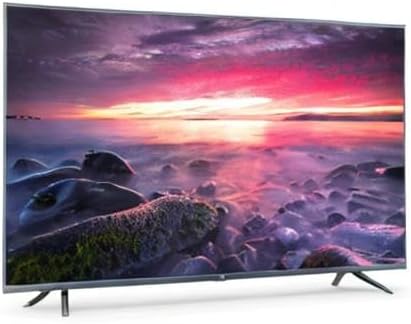
Image 8.1: Energy efficiency label for the Xiaomi Mi 55-inch TV.
9. Bermea eta Laguntza
Bermeari buruzko informazioa lortzeko, kontsultatu zure produktuarekin batera datorren berme-txartela edo bisitatu Xiaomi-ren webgune ofiziala. webzure eskualdeko gunea. Gorde erosketa-agiria erosketaren frogagiri gisa.
For technical support, troubleshooting assistance beyond this manual, or service inquiries, please contact Xiaomi customer service through their official channels.