1. Sarrera
This manual provides detailed instructions for the memzuoix 2.4G Portable Wireless Mouse, Model WM-697. Please read this manual carefully before using the product to ensure proper operation and to maximize its lifespan.
Paketearen edukia
- 1 x memzuoix 2.4G Portable Wireless Mouse (Model WM-697)
- 1 x USB Nano hargailua
- 1 x Erabiltzailearen eskuliburua (dokumentu hau)

Image 1.1: The memzuoix wireless mouse and its USB nano receiver.
2. Zehaztapenak
| Ezaugarri | Xehetasuna |
|---|---|
| Eredua | WM-697 |
| Konektibitatea | 2.4 GHz haririk gabekoa (USB hargailua) |
| DPI | 1400 DPI |
| Botoiak | 5 (Left, Right, Scroll Wheel, Forward, Backward) |
| Mugimenduen detekzioa | Optikoa |
| Eragiketa-eremua | Gehienez 43 oin (13 metro) |
| Energia iturria | 2 x AAA bateria (ez daude barne) |
| Lo modua | Automatikoa 7 minutuko inaktibitatearen ondoren |
| Neurriak (L x W x H) | 4.19 x 2.63 x 1.50 hazbete |
| Pisua | 2.22 ontza |
| Bateragarritasuna | Windows 7/8/10/XP, Vista 7/8, Mac OS, Linux |

Image 2.1: Physical dimensions of the mouse.
3. Konfigurazio gida
3.1 Bateriaren instalazioa
- Bilatu bateriaren konpartimentuaren estalkia saguaren azpialdean.
- Gently slide the cover open.
- Sartu bi AAA pila (ez daude barne) konpartimentuan, polaritate zuzena (+/-) ziurtatuz.
- Itxi bateriaren konpartimentuaren estalkia ondo sartu arte klik egin arte.
3.2 USB hargailuaren konexioa
- Locate the USB nano receiver, which is typically stored in a slot within the battery compartment for safekeeping during transport.
- Kendu USB hartzailea bere biltegiratze-zirrikitutik.
- Plug the USB nano receiver into an available USB port on your computer (laptop, PC, desktop, MacBook, etc.).
- Piztu sagua beheko aldean dagoen ON/OFF etengailua erabiliz.
- Your computer should automatically detect and install the necessary drivers. No manual driver installation is required.

Image 3.1: Underside of the mouse, illustrating battery compartment, USB receiver slot, and power switch.

Image 3.2: Wireless connection setup with a laptop.
4. Funtzionamendu-argibideak
4.1 Oinarrizko funtzioak
- Ezkerreko klik: Lehen mailako hautaketa eta aktibazioa.
- Egin klik eskuineko botoiarekin: Testuinguru-menuetara sartzen da.
- Korritzeko gurpila: Scrolls content vertically. Can also be clicked for middle-click functionality (application dependent).
4.2 Advanced Functions (5-Button Mouse)
- Aurrera egiteko botoia: Aurrera nabigatzen du web nabigatzaileak edo file explorers. (Located on the side of the mouse)
- Atzera botoia: Atzeraka nabigatzen du web nabigatzaileak edo file explorers. (Located on the side of the mouse)
Oharra: The side buttons (Forward/Backward) are not available for Mac OS. Other functions operate normally.
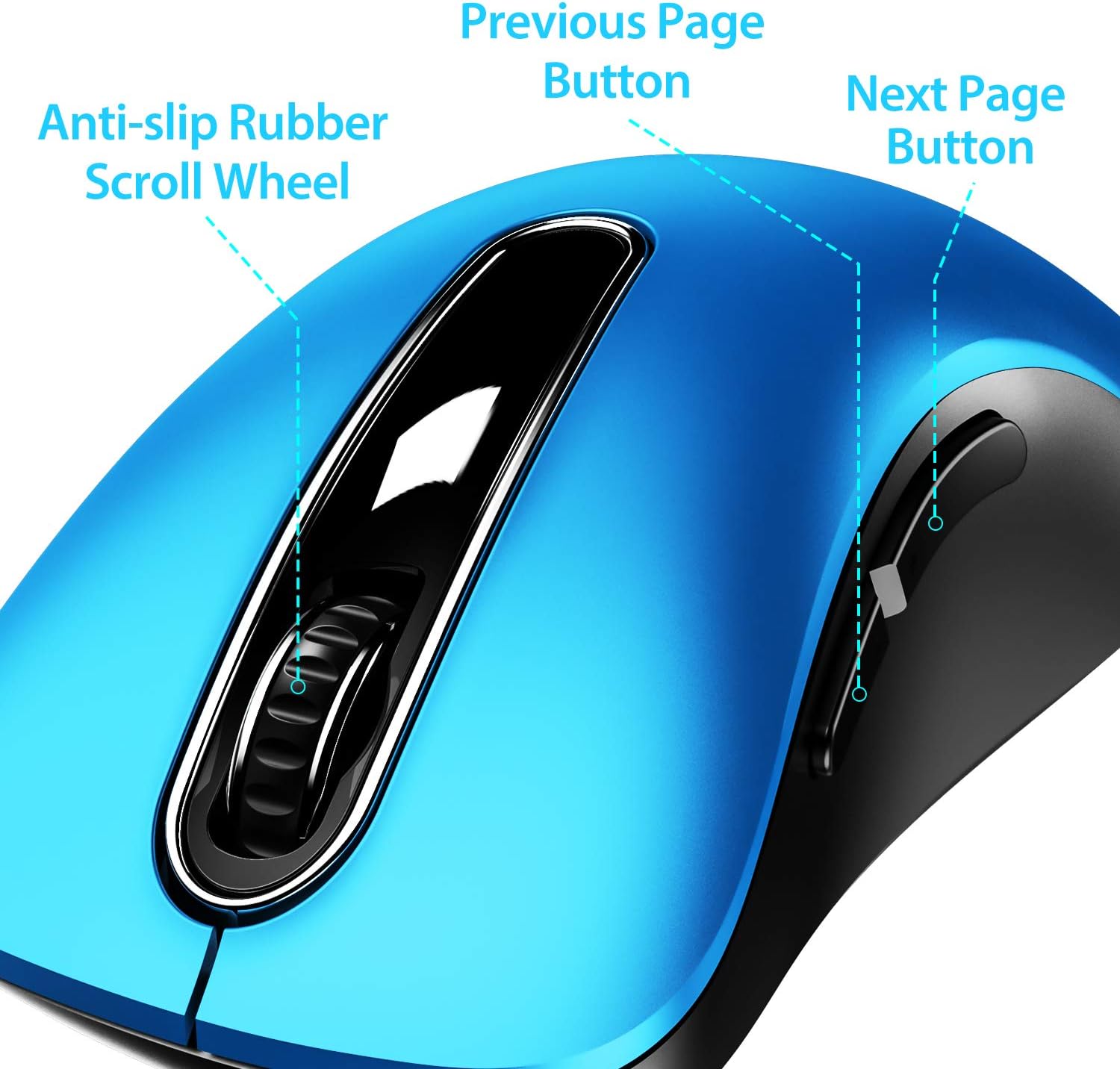
4.1. irudia: Amaituview of mouse buttons, including the scroll wheel and side navigation buttons.
4.3 Energia aurrezteko modua
The mouse features an automatic power-saving sleep mode. If inactive for 7 minutes, the mouse will enter sleep mode to conserve battery life. To reactivate the mouse, simply click any button.
5. Mantentzea eta Zainketa
- Garbiketa: Erabili zapi leun eta lehor bat sagua garbitzeko. Zikinkeria egoskorra bada, garbitu zapi pixka bat.amp oihal bat erabil daiteke, baina ziurtatu hezetasunik ez dela barneko osagaietan sartzen.
- Bateria ordezkatzea: Replace batteries when the mouse performance degrades or stops responding. Always use fresh AAA batteries.
- Biltegiratzea: When not in use for extended periods, turn off the mouse using the ON/OFF switch and store the USB receiver in its dedicated slot on the mouse's underside to prevent loss.
- Saihestu muturreko baldintzak: Ez jarri sagua tenperatura altuen, eguzki-argiaren eraginpean edo hezetasun gehiegizkoaren eraginpean.
6. Arazoak
| Arazoa | Irtenbide posiblea |
|---|---|
| Sagua ez du erantzuten |
|
| Kurtsorearen mugimendua irregularra edo motela da |
|
| Side buttons not working on Mac OS | This is a known compatibility limitation. The side buttons are not supported on Mac OS. Other mouse functions should work normally. |
| Sagua azkarregi sartzen da lo moduan | The mouse is designed to enter sleep mode after 7 minutes of inactivity to conserve power. This is normal operation. Click any button to wake it up. |
7. Bermea eta Laguntza
The memzuoix 2.4G Portable Wireless Mouse (Model WM-697) comes with a 365-day worry-free warranty from the date of purchase. This warranty covers manufacturing defects and malfunctions under normal use.
For warranty claims, technical support, or any inquiries, please contact memzuoix customer service through the retailer where the product was purchased or visit the official memzuoix webharremanetarako informazioa lortzeko gunea.
Gorde erosketaren egiaztagiria bermea balioztatzeko.


