1. Sarrera
Thank you for choosing the havit KB488L USB Wired Keyboard. This manual provides essential information for setting up, operating, and maintaining your keyboard. Please read it carefully to ensure optimal performance and longevity of your device.
The havit KB488L is designed for both office and gaming use, featuring a quiet typing experience, ergonomic wrist rest, and vibrant rainbow LED backlighting. It offers a 105-key UK layout for comfortable and efficient input.

Image 1.1: The havit KB488L keyboard, highlighting its quiet operation and integrated wrist rest.
2. Produktuaren ezaugarriak
- Funtzionamendu isila: Designed for smooth and silent typing, suitable for office and home environments.
- Diseinu ergonomikoa: Features a 15° tilt capability and an integrated wrist rest to reduce fatigue during extended use.
- Ortzadarraren LED atzeko argia: Enhances visibility in low-light conditions and provides an aesthetic appeal. The backlight can be toggled on/off.
- 12 multimedia lasterbide-teklak: Provides quick access to common functions for entertainment and productivity.
- Eraikuntza iraunkorra: Keys tested for 5 million clicks, ensuring long-term reliability.
- Kable bidezko konexioa: Reliable USB connection for consistent performance.
- Bateragarritasun zabala: Supports Windows 2000/XP/Vista/7/8/10, Mac, and Linux operating systems. (Note: Multimedia keys function only on Windows).

Image 2.1: The integrated wrist rest of the havit KB488L keyboard, designed for ergonomic comfort.
3. Paketearen edukia
- havit KB488L USB Wired Keyboard with integrated wrist rest
- Erabiltzailearen eskuliburua (dokumentu hau)
4. Konfiguratzeko argibideak
- Deskonprimitu teklatua: Kontu handiz atera teklatua bere paketetik.
- Konektatu ordenagailura: Plug the USB connector of the keyboard into an available USB port on your computer (desktop PC or laptop).
- Gidariaren instalazioa: The keyboard is plug-and-play. Your operating system will automatically detect and install the necessary drivers. No additional software installation is required.
- Inklinazioa doitzea (aukerakoa): Atera teklatuaren azpialdeko oin erregulagarriak nahi duzun idazteko angelua ezartzeko.

Image 4.1: The havit KB488L keyboard set up and connected to a computer.
5. Funtzionamendu-argibideak
5.1 Oinarrizko teklatuaren funtzioak
The havit KB488L functions as a standard 105-key UK layout keyboard. All standard alphanumeric keys, function keys (F1-F12), navigation keys, and numeric keypad operate as expected.
5.2 Multimedia lasterbide-teklak
The keyboard features 12 multimedia shortcut keys accessible by pressing the Fn key in combination with the corresponding F1-F12 keys. These shortcuts are designed to enhance productivity and entertainment. Note: Multimedia keys are ONLY functional on Windows operating systems.
| Tekla-konbinazioa | Funtzioa |
|---|---|
| Fn + F1 | Musika erreproduzitzailea |
| Fn + F2 | Bolumena jaitsi |
| Fn + F3 | Bolumena igo |
| Fn + F4 | Isildu |
| Fn + F5 | Aurreko Abestia |
| Fn + F6 | Hurrengo Abestia |
| Fn + F7 | Erreproduzitu/Pausatu |
| Fn + F8 | Gelditu |
| Fn + F9 | Web/ Etxea |
| Fn + F10 | Posta elektronikoa |
| Fn + F11 | Nire Ordenagailua |
| Fn + F12 | Gogokoak |
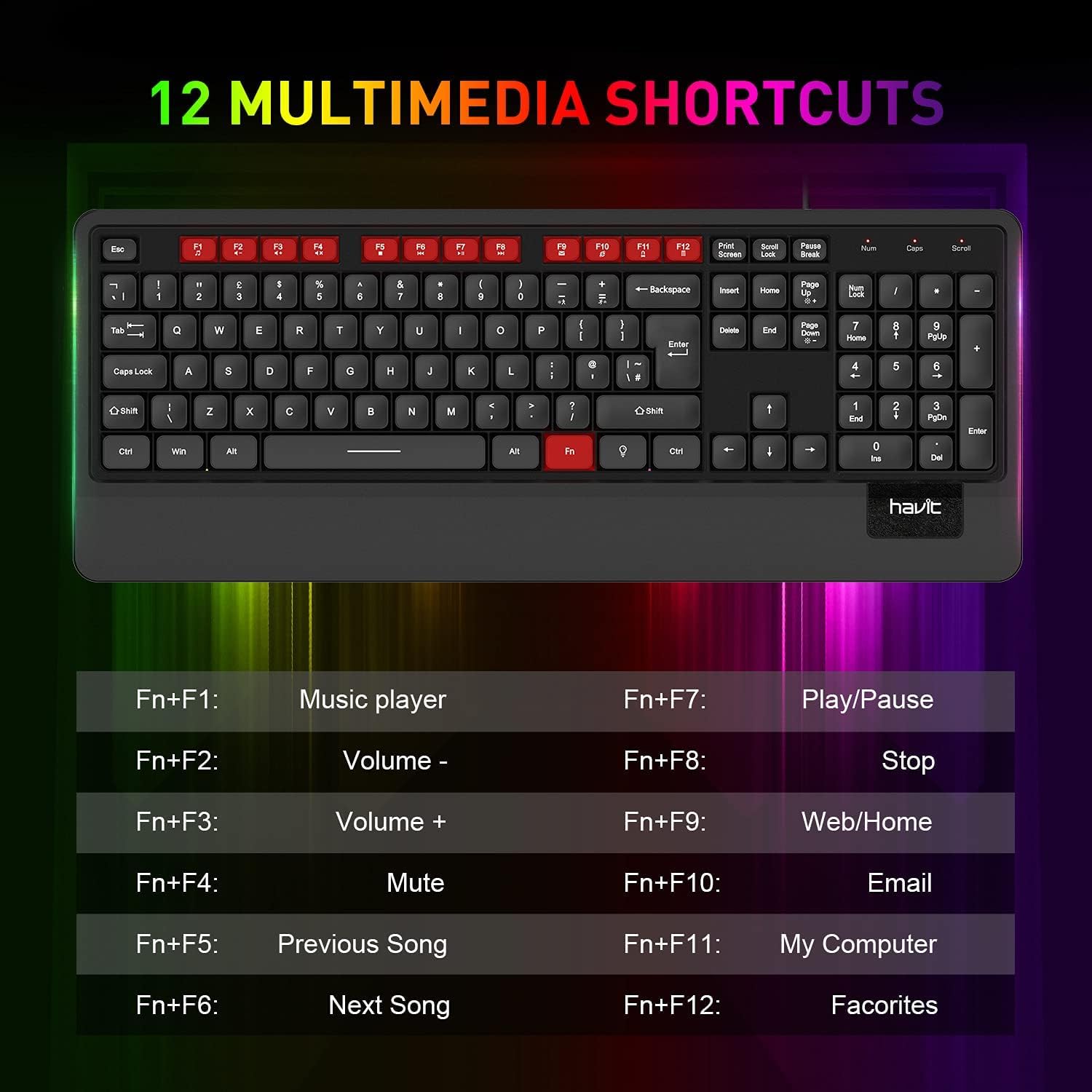
5.1. irudia: Amaituview of the 12 multimedia shortcut keys and their functions.
5.3 Atzeko argiaren kontrola
The keyboard features a rainbow LED backlight. To control the backlight:
- Piztu/Desaktibatu: Sakatu Korritzeko blokeoa key to toggle the backlight on or off.

Image 5.2: The havit KB488L keyboard with its rainbow LED backlight active, illustrating key visibility in low light.
6. Mantentzea
To ensure the longevity and proper functioning of your havit KB488L keyboard, follow these maintenance guidelines:
- Garbiketa: Erabili zapi leun eta lehor bat teklatuaren gainazala garbitzeko. Zikinkeria egoskorra bada, garbitu zapi pixka bat.amp cloth can be used, ensuring no liquid enters the keycaps or internal components. Avoid harsh chemicals or abrasive cleaners.
- Hautsa kentzea: Erabili aire konprimatua teklen arteko hautsa eta hondakinak kentzeko.
- Saihestu isurketak: Keep liquids away from the keyboard to prevent damage. In case of a spill, immediately disconnect the keyboard from your computer and allow it to dry completely before reconnecting.
- Biltegiratzea: Denbora luzez erabiltzen ez duzunean, gorde teklatua leku garbi eta lehor batean, eguzki-argitik eta muturreko tenperaturetatik urrun.
7. Arazoak
If you encounter issues with your havit KB488L keyboard, please refer to the following common solutions:
- Teklatuak ez du erantzuten:
- Ziurtatu USB kablea ondo konektatuta dagoela ordenagailuko USB ataka funtzional batean.
- Saiatu teklatua beste USB ataka batera konektatzen.
- Berrabiarazi ordenagailua.
- Probatu teklatua beste ordenagailu batean arazoa teklatuan edo ordenagailuan dagoen zehazteko.
- Atzeko argia ez dabil:
- Sakatu Korritzeko blokeoa key to ensure the backlight is toggled on.
- Ziurtatu teklatua behar bezala konektatuta dagoela eta energia jasotzen duela.
- Multimedia Keys Not Functioning:
- Remember that multimedia keys only work on Windows operating systems.
- Ziurtatu botoia sakatzen ari zarela Fn key simultaneously with the desired function key (F1-F12).
- Keys Sticking or Not Registering:
- Garbitu kaltetutako teklak aire konprimatua erabiliz hondakinak kentzeko.
- Saihestu gehiegizko indarra idazterakoan.
If these steps do not resolve your issue, please contact havit customer support for further assistance.
8. Zehaztapenak
| Ezaugarri | Xehetasuna |
|---|---|
| Modelo zenbakia | KB488L |
| Konektibitatea | USB kableduna |
| Gakoen diseinua | 105 Keys, UK Layout |
| Atzeko argia | Rainbow LED |
| Ezaugarri bereziak | Backlit, Ergonomic, Integrated Wrist Rest |
| Gailu bateragarriak | Ordenagailu eramangarria, ordenagailua |
| Sistema eragileen bateragarritasuna | Windows 2000/XP/Vista/7/8/10, Mac, Linux |
| Produktuaren neurriak | 1.08 x 17.52 x 6.89 hazbete (27.5 x 445 x 175 mm) |
| Elementuaren pisua | 1.63 libra (0.74 kg) |
| Fabrikatzailea | izan |

Image 8.1: Detailed dimensions of the havit KB488L keyboard.
9. Bermea eta Laguntza
havit products come with a standard manufacturer's warranty. For specific warranty details, terms, and conditions, please refer to the warranty card included with your purchase or visit the official havit webgunea.
For technical support, troubleshooting assistance, or any inquiries regarding your havit KB488L keyboard, please contact havit customer service through their official webgunea edo zure produktuaren ontzian emandako harremanetarako informazioa.


