1. Sarrera
Thank you for choosing the HANMATEK S1 DM20 Digital Multimeter. This intelligent multimeter is designed for safe and accurate measurements of various electrical parameters. Please read this manual thoroughly before use to ensure proper operation and to prevent potential hazards.
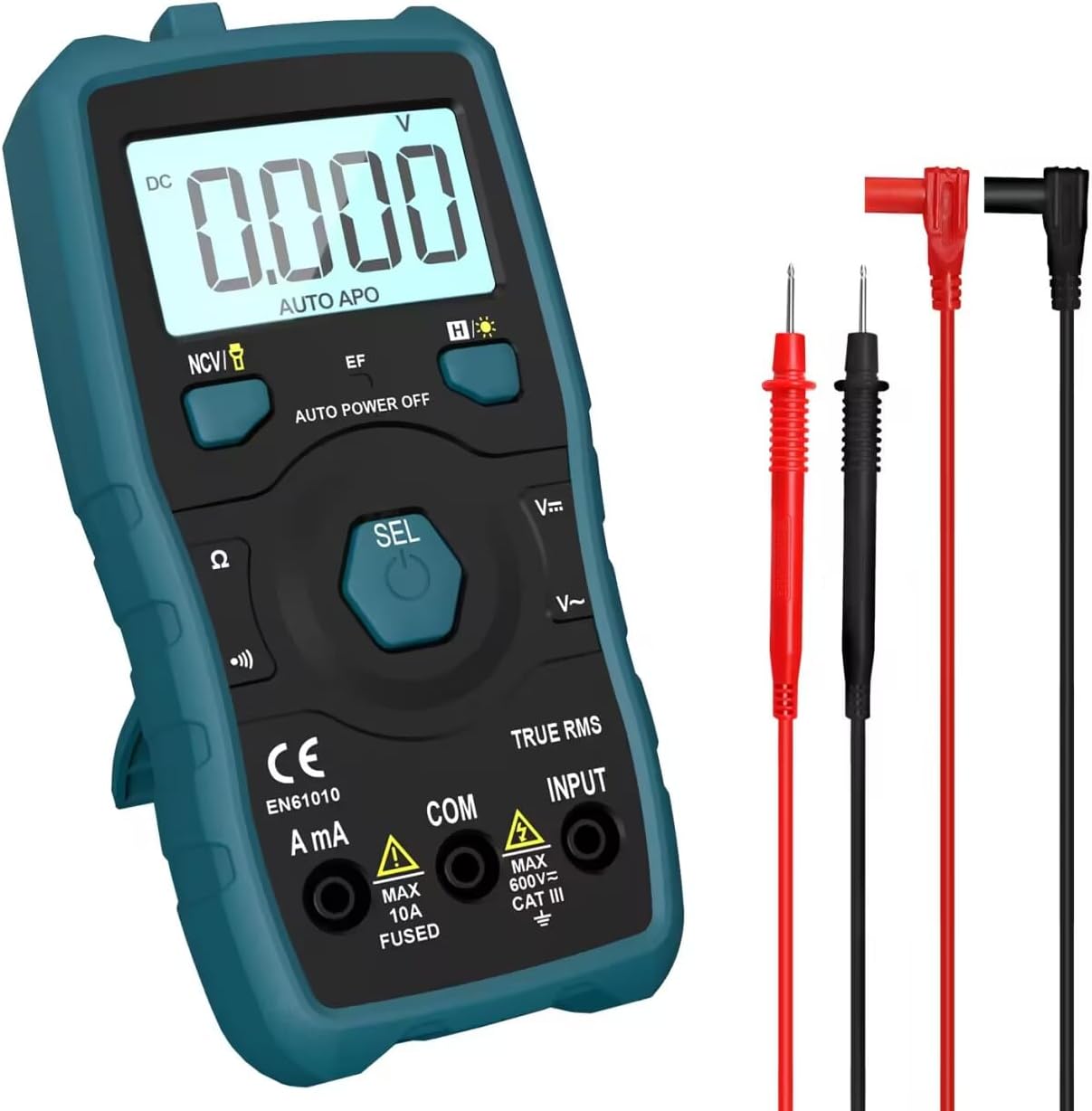
Image 1.1: HANMATEK S1 DM20 Digital Multimeter with included test leads.
2. Segurtasun informazioa
OHARRA: Segurtasun-jarraibide hauek ez betetzeak deskarga elektrikoak, suteak edo lesio pertsonalak eragin ditzake.
- To prevent erroneous readings and avoid electric shock or personal injury, replace the battery as soon as the low battery voltage symbol appears.
- To prevent electric shock or personal injury, turn off the device and ensure test leads are disconnected from the circuit under test before opening the battery cover to replace the battery.
- Do not measure any AC or DC voltage exceeding 600V to prevent electric shock or damage to the instrument.
- Erabili aurretik, egiaztatu beti multimetroa eta proba-kableak kalterik dagoen ikusteko. Ez erabili hondatuta badaude.
- Ensure your hands are dry when operating the multimeter.
- Ez erabili multimetroa gas, lurrun edo hautsez betetako ingurune lehergarrietan.
3. Produktuaren ezaugarriak eta osagaiak
The HANMATEK S1 DM20 Digital Multimeter is equipped with several features for versatile measurements. Familiarize yourself with the components shown below.
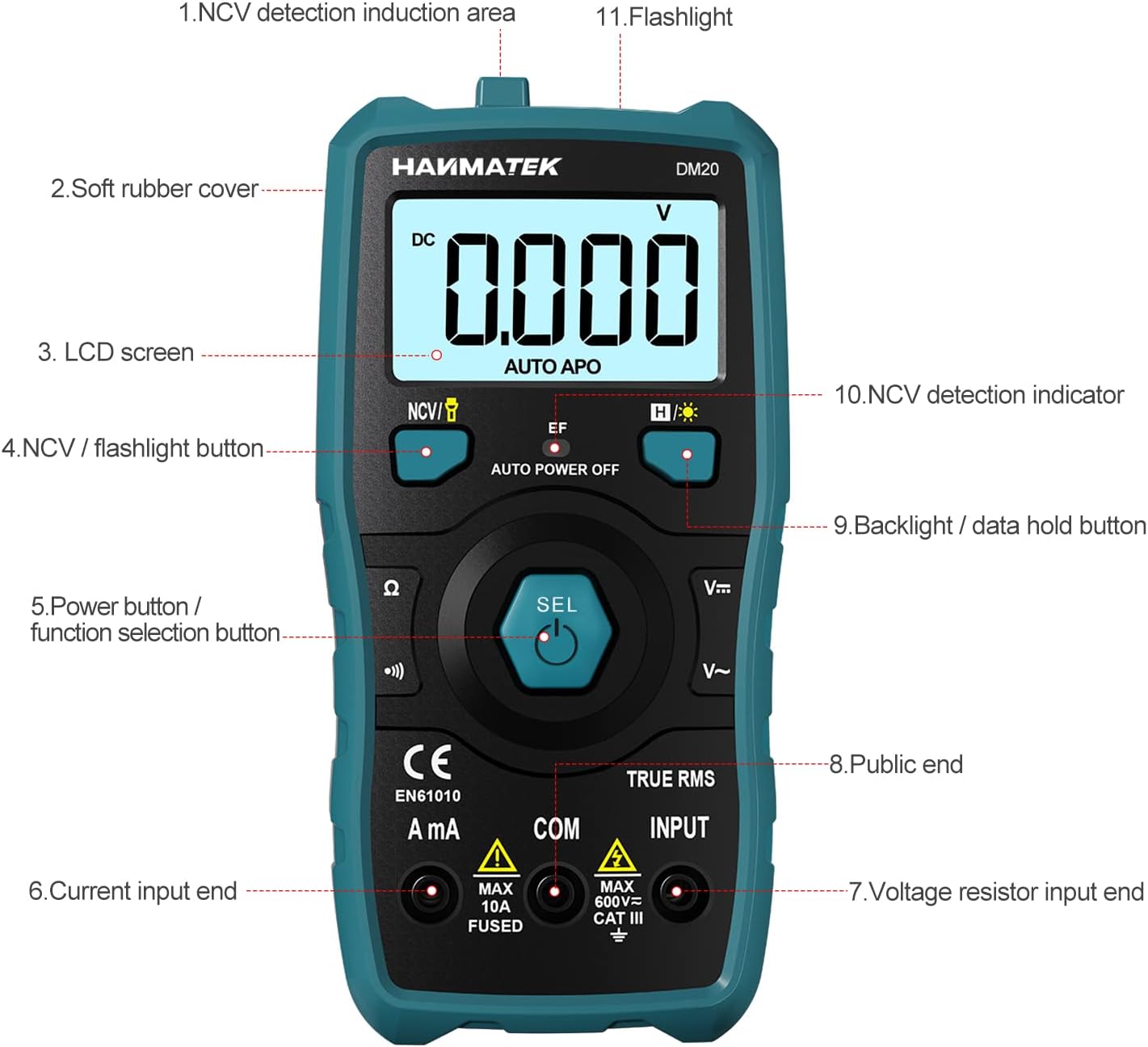
3.1. irudia: Aurrealdea view of the multimeter with labeled components.
- NCV Detection Induction Area
- Soft Rubber Cover
- LCD pantaila
- NCV / Flashlight Button
- Power Button / Function Selection Button (SEL)
- Current Input End (A mA)
- liburukiatage Resistor Input End (INPUT)
- Public End (COM)
- Backlight / Data Hold Button
- NCV Detection Indicator
- Linterna

3.2. irudia: Amaituview of multimeter functions including AC/DC Voltage, AC/DC Current, Resistance, Continuity, Backlight, Data Hold, NCV, Flashlight, and 6000 Count display.
4. Konfigurazioa
4.1 Paketearen edukia
Hasi aurretik, ziurtatu elementu guztiak paketean daudela:
- HANMATEK S1 DM20 Digital Multimeter
- 3 x 1.5V AAA bateria
- Proba-kableak (gorria eta beltza)
- Erabiltzailearen eskuliburua

Image 4.1: Package contents including the multimeter, batteries, test leads, and manual.
4.2 Bateriaren instalazioa
The multimeter requires 3 x 1.5V AAA batteries. Follow these steps to install them:
- Ziurtatu multimetroa itzalita dagoela eta proba-kableak deskonektatuta daudela.
- Kokatu bateriaren konpartimendua multimetroaren atzealdean.
- Erabili bihurkin bat bateriaren estalkia irekitzeko.
- Insert the 3 AAA batteries, observing the correct polarity (+/-).
- Jarri bateriaren estalkia eta lotu torlojuarekin.

4.2 irudia: Xehetasun zehatza view of the multimeter's rear, showing the battery bay and stable holder.
5. Funtzionamendu-argibideak
The HANMATEK S1 DM20 features auto-ranging for most measurements, simplifying operation.
5.1 Piztu/Itzali
- Sakatu SEL button to power on the multimeter.
- Multimetroa automatikoki itzaliko da denbora batez inaktibo egon ondoren, bateriaren iraupena aurrezteko.
- Eskuz itzaltzeko, sakatu eta eutsi botoiari SEL botoia.
5.2 Funtzio hautaketa
The multimeter automatically detects the measurement type (voltage, resistance, continuity) when test leads are connected. For specific functions or to switch between AC/DC, press the SEL botoia labur.
5.3 Oinarrizko neurketak
Konektatu proba beruna gorriarekin SARRERA terminalak eta proba beltzak COM terminal for most measurements.
- liburukiatage (AC/DC): Connect test leads in parallel to the circuit or component. The multimeter will automatically detect AC or DC voltage.
- Korrontea (AC/DC): Connect test leads in series with the circuit. Use the A mA terminal for current measurements. Ensure the circuit is de-energized before connecting.
- Erresistentzia: Connect test leads across the component. Ensure the component is isolated from power.
- Jarraitasuna: Connect test leads across the circuit. A buzzer will sound if continuity is detected.
- Diodoa: Connect test leads across the diode.
- Maiztasuna: Connect test leads to the signal source.

Image 5.1: Demonstrations of NCV testing, resistance test, current measuring, voltage measuring, and on-off test.
5.4 Harremanik gabeko Voltage (NCV) Detekzioa
NCV funtzioak AC bolumena detektatzeko aukera ematen du.tage kontaktu zuzenik gabe.
- Sakatu NCV / Flashlight botoia NCV modua aktibatzeko.
- Place the NCV detection area (top of the multimeter) near the conductor.
- AC boltage is detected, the NCV LED will flash, and the buzzer will sound. The LCD screen will display segments ('-' to '----') indicating signal strength.

Image 5.2: NCV function detecting voltage in a live line versus a null line.
5.5 Backlight and Data Hold
- Atzeko argia: sakatu Backlight / Data Hold button briefly to turn the LCD backlight on/off.
- Datuak gordetzea: Eduki sakatuta Backlight / Data Hold botoia pantailan uneko irakurketa izozteko. Sakatu berriro askatzeko.
5.6 Linterna
- Eduki sakatuta NCV / Flashlight button to turn the built-in flashlight on/off.
6. Mantentzea
- Garbiketa: Wipe the multimeter with a damp oihala eta detergente leuna. Ez erabili urratzaileak edo disolbatzaileak.
- Biltegiratzea: Store the multimeter in a dry, cool place away from direct sunlight. If storing for extended periods, remove the batteries to prevent leakage.
- Bateria ordezkatzea: Replace batteries promptly when the low battery indicator appears to ensure accurate readings. Refer to Section 4.2 for instructions.
7. Arazoak
- No Display/Power On: Check battery installation and ensure batteries are not depleted. Replace if necessary.
- Irakurketa okerrak: Ensure test leads are properly connected and not damaged. Verify the correct measurement function is selected (though auto-ranging handles most). Check battery level.
- No NCV Detection: Ensure NCV mode is activated. The detection area must be close to the AC voltage iturria.
- Auto Power Off Too Soon: This is a power-saving feature. The device will power off after a period of inactivity.
8. Zehaztapenak
| Ezaugarri | Zehaztapena |
|---|---|
| Modelo zenbakia | DM20 |
| Bistaratu zenbaketak | 4000 |
| Segurtasun Balorazioa | 600V CAT II, Pollution Degree 2, IEC61010 |
| Energia iturria | 3 x 1.5V AAA bateria |
| Neurriak | 147 mm x 71 mm x 45 mm (7.1 x 4.5 x 14.7 cm) |
| Pisua | 220 g |
| Ezaugarri bereziak | NCV, Auto-Ranging, Data Hold, Auto Power-Off, Backlight, Flashlight |
9. Bermea eta Laguntza
The HANMATEK S1 DM20 Digital Multimeter comes with a 24 hilabeteko bermea erosketa-datatik aurrera. Berme honek erabilera normalaren ondoriozko fabrikazio-akatsak estaltzen ditu.
For technical support, warranty claims, or any inquiries, please contact HANMATEK customer service through their official channels or the retailer where the product was purchased. You can find more information on the HANMATEK Brand Store.


