1. Sarrera
This instruction manual provides comprehensive information for the YOSUN Universal Replacement Remote Control, model RMT-TX100U. Designed for seamless compatibility with a wide range of Sony Bravia LCD LED HDTV Smart TVs, this remote offers a direct replacement solution without requiring complex programming. It aims to restore full control over your television with reliable performance and an intuitive layout.
2. Produktuaren ezaugarriak
- Bateragarritasun zabala: Fully compatible with all Sony Bravia LCD LED HDTV Smart TVs.
- Ez da programaziorik behar: Ready to use straight out of the box, eliminating the need for manual setup.
- Errendimendu egonkorra: Equipped with an upgraded smart chip for consistent and reliable operation.
- Barruti hedatua: Transmits signals effectively over long distances, up to 10 meters (33 feet).
- Erantzun denbora azkarra: Features a rapid transmission response time of approximately 0.2 seconds for immediate command execution.
- Eraikuntza iraunkorra: Made from high-quality ABS and silicone materials for a sturdy, non-slip shell and comfortable, sensitive buttons.
- Identical Layout: Designed to be visually and functionally identical to the original Sony remote control.
- Netflix Shortcut: Includes a dedicated Netflix button for quick access to the streaming service.
3. Konfigurazio gida
3.1 Bateriaren instalazioa
Urrutiko agintea bi (2) AAA bateria behar ditu funtzionatzeko (ez daude barne). Jarraitu urrats hauek bateriak instalatzeko:
- Kokatu bateriaren konpartimentuaren estalkia urrutiko agintearen atzealdean.
- Irristatu estalkia beherantz konpartimentua irekitzeko.
- Sartu bi AAA pila, ziurtatu terminal positiboak (+) eta negatiboak (-) konpartimentuaren barruko adierazleekin behar bezala lerrokatuta daudela.
- Lerratu bateriaren estalkia berriro lekuan klik egin arte.

Figure 3.1: Battery installation and remote dimensions. The remote is 7.8 inches long, 1.8 inches wide, and 0.7 inches thick. The diagram shows sliding the battery cover and inserting two AAA batteries.
3.2 Hasierako erabilera (ez da programaziorik behar)
This YOSUN replacement remote control is designed to work immediately with compatible Sony TVs without any programming or pairing. Once batteries are installed, point the remote towards your TV and begin using it.
Video 3.2: Demonstration of the remote control's simple operation, highlighting that no pairing is required for use with Sony TVs.
4. Funtzionamendu-argibideak
The remote control features a standard layout with clearly labeled buttons for easy navigation and control of your Sony TV. Refer to the diagram below for button identification and their primary functions.
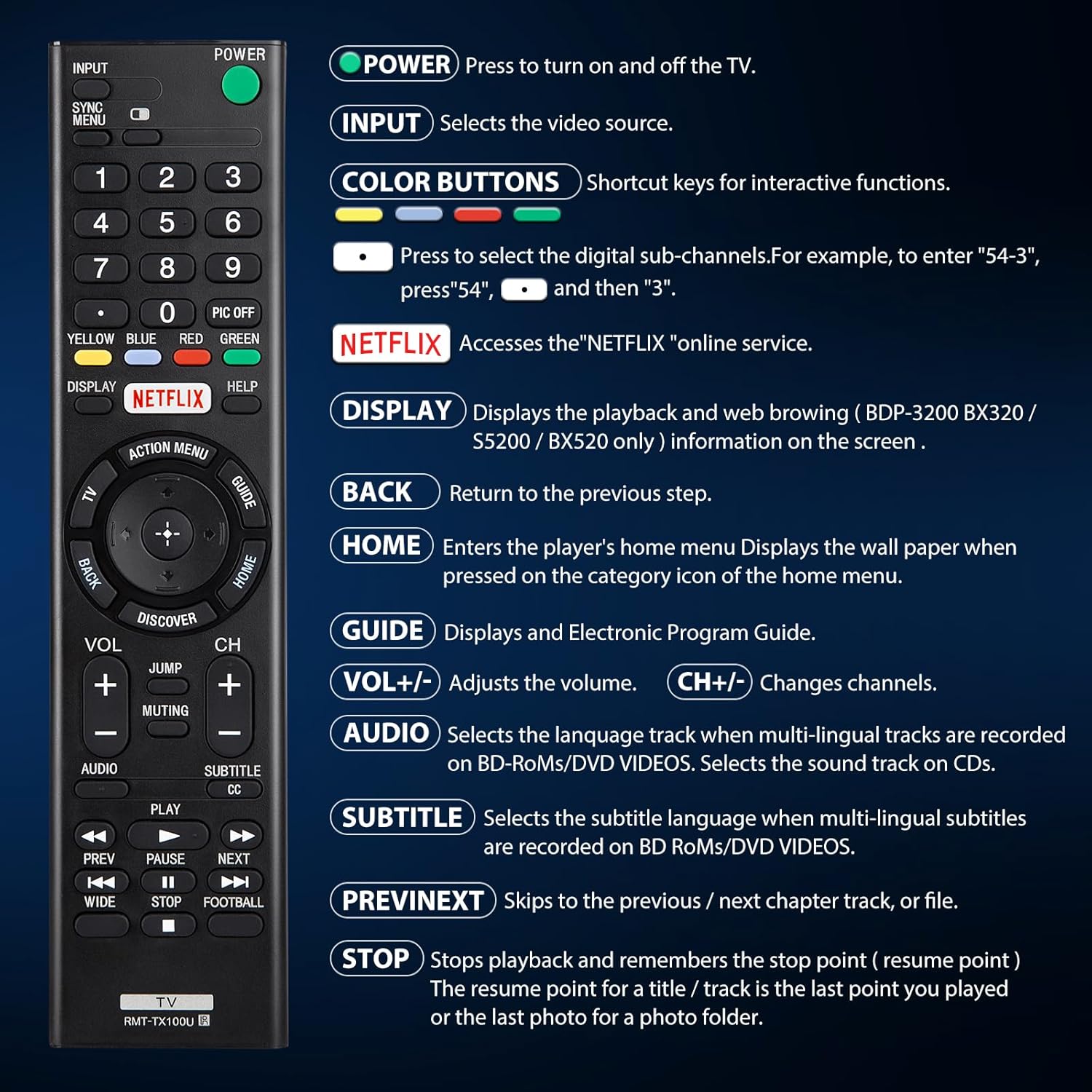
4.1 Irudia: Gainetikview of remote control buttons and their functions.
| Botoia | Funtzioa |
|---|---|
| BOTEREA | Press to turn the TV on and off. |
| SARRERA | Selects the video source (e.g., HDMI 1, AV). |
| COLOR BUTTONS (Yellow, Blue, Red, Green) | Shortcut keys for interactive functions or digital sub-channels (e.g., to enter "5-4", press "5", then "4"). |
| NETFLIX | Directly accesses the Netflix online streaming service. |
| BANTAILUA | Displays playback and web browsing information on the screen (for compatible models like BDP-3200 BX320 / S5200 / BX520 only). |
| ATZERA | Aurreko urratsera edo menura itzultzen da. |
| ETXERA | Enters the player's home menu or displays the wallpaper when pressed on the category icon of the home menu. |
| GIDA | Displays the Electronic Program Guide (EPG). |
| VOL +/- | Bolumen-maila doitzen du. |
| CH +/- | Telebistako kateak aldatzen ditu. |
| AUDIOA | Selects the language track when multi-lingual tracks are recorded on BD-ROMs/DVD VIDEOS. Selects the sound track on CDs. |
| SUBTITLE CC | Selects the subtitle language when multi-lingual subtitles are recorded on BD ROMs/DVD VIDEOS. |
| AURREAN / HURRENEAN | Skips to the previous or next chapter, track, or file multimedia erreproduzitzerakoan. |
| GELDITU | Stops playback and remembers the stop point (resume point) for a title/track, or the last photo for a photo folder. |
5. Bateragarritasuna
5.1 Gailu bateragarriak
This remote control is specifically designed for and compatible with the following:
- All Sony Bravia LCD LED HDTV Smart TVs.

Figure 5.1: The remote is compatible with Sony Smart TVs, Sony Bravia TVs, and Sony Google TVs.
5.2 Non-Compatible Devices
Urrutiko aginte hau da EZ gailu hauekin bateragarria:
- Blu-ray Disc Players
- DVD erreproduzitzaileak
- AV hargailuak
- Subwooferak
- Soinu Barrak
- Etxeko Antzerki Sistemak

Figure 5.2: The remote is not compatible with Blu-ray players, DVD players, AV receivers, subwoofers, sound bars, or home theater systems.
6. Arazoak
If you experience issues with your remote control, please consider the following common troubleshooting steps:
- Egiaztatu bateriak: Ensure that the batteries are correctly installed with the proper polarity and are not depleted. Replace with fresh AAA batteries if necessary.
- Ikusmen lerroa: Make sure there are no obstructions between the remote control and the TV's infrared receiver. The remote operates using an infrared signal, which requires a clear line of sight.
- Urruneko bateragarritasuna: Verify that your TV model is a compatible Sony Bravia LCD LED HDTV Smart TV. Refer to Section 5 for detailed compatibility information.
- Urruneko berrezarri: Remove the batteries, press and hold any button on the remote for 5 seconds to discharge any residual power, then reinsert the batteries.
- TV Power Cycle: Unplug your TV from the power outlet for 60 seconds, then plug it back in. This can sometimes resolve minor communication issues.
7. Mantentzea
Zure urrutiko agintearen iraupena eta errendimendu optimoa bermatzeko, jarraitu mantentze-jarraibide hauek:
- Garbiketa: Garbitu urrutiko agintea aldizka zapi leun eta lehor batekin. Zikinkeria egoskorra bada, garbitu pixka bat.ampGarbitu oihalak urarekin edo garbitzaile leun eta ez-urratzaile batekin. Saihestu produktu kimiko gogorrak edo material urratzaileak erabiltzea.
- Bateria ordezkatzea: Replace batteries promptly when the remote's performance degrades or it stops responding. Remove batteries if the remote will not be used for an extended period to prevent leakage.
- Biltegiratzea: Gorde urrutiko agintea leku fresko eta lehor batean, eguzki-argitik, muturreko tenperaturetatik eta hezetasun handitik babestuta.
- Saihestu tantoak: Iraunkorra izan arren, erorketa errepikatuek barneko osagaiak kaltetu ditzakete. Kontuz ibili urrutiko agintea erabiliz.
8. Zehaztapenak
| Atributua | Xehetasuna |
|---|---|
| Produktuaren neurriak | 7.87 x 1.89 x 0.78 hazbete |
| Elementuaren pisua | 3.17 ontza |
| Modelo zenbakia | RMT-TX100U |
| Beharrezko bateriak | 2 AAA bateria (ez daude barne) |
| Ezaugarri Berezia | Ez da programaziorik behar |
| Kolorea | Beltza |
| Onartutako gailuen gehienezko kopurua | 18 (Refers to the range of Sony TV models it can control) |
| Gailu bateragarriak | Television (Sony Bravia LCD LED HDTV Smart TVs) |
| Fabrikatzailea | YOSUN |
9. Bermea eta Laguntza
YOSUN offers an unlimited return and refund service for this remote control within 30 days of purchase. If you have any questions, concerns, or require assistance with your order or the product, please do not hesitate to contact YOSUN customer service directly. Our team is committed to providing support and will respond to your inquiries within 12 hours during the work week.
For further assistance, please refer to the contact information provided with your purchase or visit the official YOSUN webgunea.


