Sarrera
This manual provides detailed instructions for the HyperGear Sport True Wireless Earbuds, designed for an active lifestyle. Learn how to set up, operate, and maintain your earbuds for optimal performance and longevity.
Produktua amaituview
The HyperGear Sport True Wireless Earbuds offer immersive HD stereo sound, quick-pair technology, and a noise-cancelling microphone for clear calls. Their ergonomic secure-fit ear hooks ensure stability during intense workouts, and the sweatproof design provides durability for active use.

Image: HyperGear Sport True Wireless Earbuds shown with their retail packaging, highlighting the secure-fit design.

Image: Close-up of a HyperGear earbud with callouts for HD Stereo Sound, Quick-Pair Technology, Crystal Clear Conversations, Control at Your Fingertips, and Superior Battery Life.
Kutxan dagoena
Your HyperGear Sport True Wireless Earbuds package includes:
- HyperGear Sport True Wireless Earbuds
- Kargatzeko kaxa
- Kargatzeko kablea
- Erabiltzailearen eskuliburua
- S | M | L Ear Gels
- Travel Pouch & Carabiner

Image: The earbuds connected to a charging cable, alongside a travel pouch, carabiner, and different sized ear gels, illustrating the included accessories.
Konfigurazioa
Entzungailuak kargatzen
Before first use, fully charge your earbuds. Connect the charging cable to the earbuds and a power source. A full charge takes approximately 2 hours. A quick 10-minute charge provides an extra hour of playtime.
Image: The HyperGear Sport True Wireless Earbuds connected via their charging cable, indicating the charging process.
Zure gailuarekin parekatzea
- Ziurtatu entzungailuak kargatuta eta piztuta daudela.
- Aktibatu Bluetooth-a zure gailuan (telefono adimenduna, tableta, etab.).
- Bilatu "HyperGear Sport X2" or similar in your device's Bluetooth settings.
- Select the earbuds to pair. A voice prompt will confirm successful connection.
The quick-pair technology ensures a stable connection up to 33 feet.

Image: A smartphone screen displaying Bluetooth settings, showing the HyperGear Sport X2 earbuds as connected, illustrating the pairing process.
Funtzionamendu-argibideak
Piztu/Itzali
Press and hold the On/Off button on the earbud for approximately 3 seconds to power on or off.
Musika erreproduzitzea
- Erreproduzitu/Pausatu: Sakatu behin funtzio anitzeko botoia.
- Hurrengo ibilbidea: Sakatu bi aldiz eskuineko entzungailuko funtzio anitzeko botoia.
- Aurreko pista: Sakatu bi aldiz ezkerreko entzungailuko funtzio anitzeko botoia.
- Bolumena igo: Sakatu '+' botoia.
- Bolumena jaitsi: Sakatu '-' botoia.
Deien Kudeaketa
- Deia erantzun/amaitu: Sakatu behin funtzio anitzeko botoia.
- Deia baztertu: Eduki sakatuta funtzio anitzeko botoia 2 segundoz.
The built-in noise-cancelling microphone ensures clear conversations.
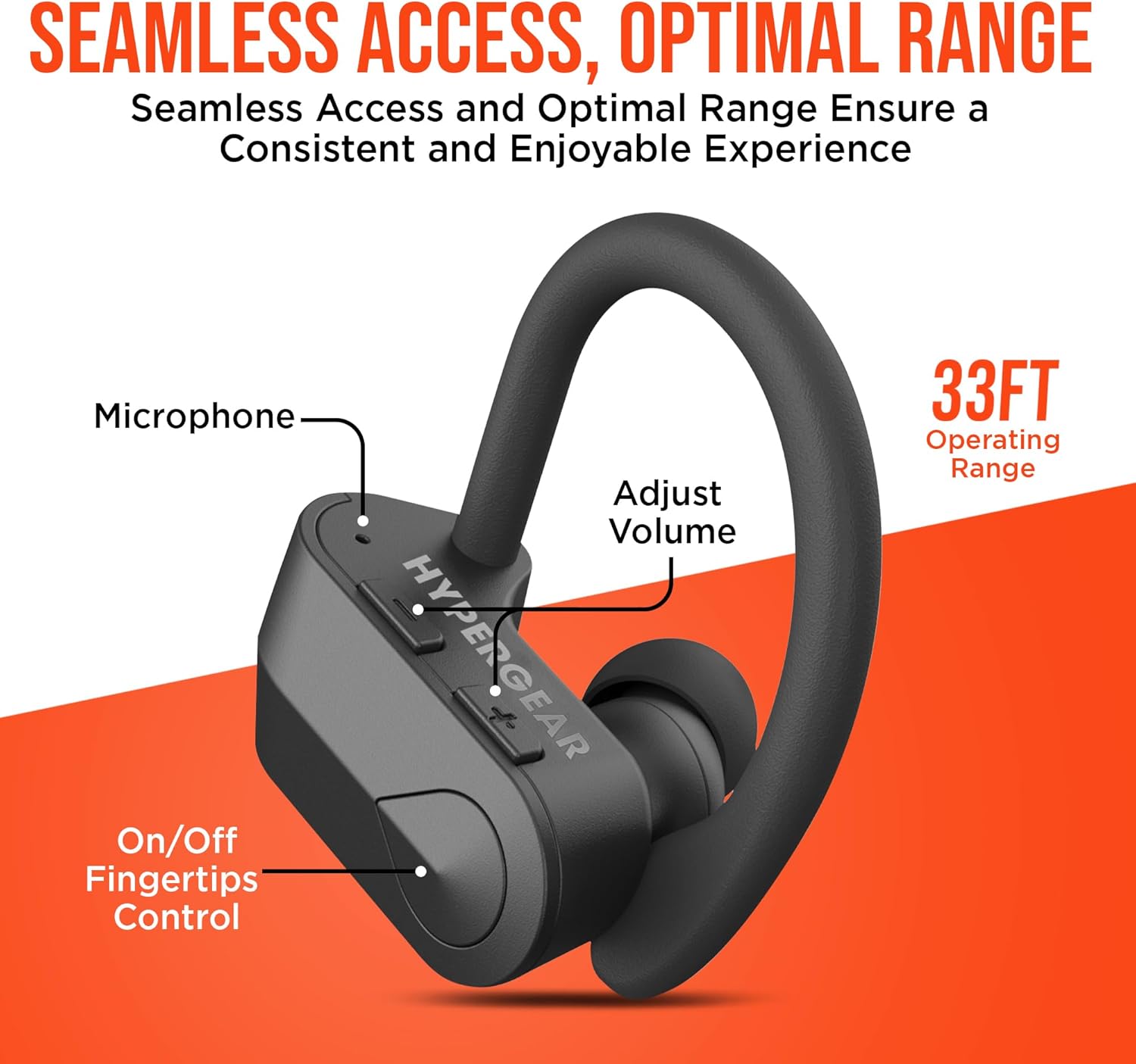
Irudia: Xehetasun zehatza view of the earbud showing the microphone, volume adjustment buttons, and on/off fingertip control, along with an operating range of 33 feet.
Mantentzea
- Garbitu entzungailuak aldizka zapi leun eta lehor batekin.
- Saihestu garbitzaile edo disolbatzaile urratzaileak erabiltzea.
- Gorde entzungailuak kargatzeko zorroan erabiltzen ez dituzunean babesteko eta kargatuta mantentzeko.
- Mantendu tenperatura altuetatik eta hezetasunetik urrun.
- The earbuds are sweatproof and water-resistant, but not fully waterproof. Do not submerge them in water.
Arazoak konpontzea
| Arazoa | Irtenbidea |
|---|---|
| Aurikularrak ez dira pizten. | Ensure earbuds are fully charged. Press and hold the power button for 3-5 seconds. |
| Ezin da gailuarekin parekatu. | Make sure Bluetooth is enabled on your device and the earbuds are in pairing mode. Move closer to the device (within 33 ft). Forget the device in Bluetooth settings and re-pair. |
| Soinua distortsionatu edo mozten da. | Check the distance between earbuds and device. Ensure no obstacles are blocking the signal. Recharge earbuds if battery is low. |
| Mikrofonoa ez dabil. | Ensure the earbuds are properly connected. Check device's audio input settings. |
Zehaztapenak
- Konektibitate Teknologia: Bluetootha
- Haririk gabeko komunikazio teknologia: Bluetootha
- Bluetooth bertsioa: 5.0
- Bluetooth barrutia: 33 Oin
- Bateriaren iraupena: Up to 4 Hours playtime
- Kargatzeko denbora: 2 Hours (10 min quick charge for 1 hour playtime)
- Kontrol mota: Media Control (Touch/Button)
- Zarata kontrola: Active Noise Cancellation (for mic)
- Uraren erresistentzia maila: Urarekiko erresistentea (izerdiarekiko erresistentea)
- Maiztasun-tartea: 20 Hz - 20,000 Hz
- Elementuaren pisua: 4.6 ontza
- Produktuaren neurriak: 2.36 x 1.18 x 1.18 hazbete
- Modelo zenbakia: 14294
Bermea eta Laguntza
HyperGear products are designed for quality and performance. For warranty information or technical support, please visit the official HyperGear website or contact their customer service. Details can typically be found on the product packaging or the brand's official online store.
Lineako laguntza: Bisitatu HyperGear denda Amazonen


