1. Sarrera
This manual provides detailed instructions for the setup, operation, and maintenance of your Pyle PMX466 Professional 6-Channel Bluetooth DJ Audio Mixer. Please read this manual thoroughly before using the device to ensure proper functionality and to prevent damage.
2. Ezaugarri nagusiak
- Rugged metal chassis and exquisite panel design.
- Preset 16 digital effects for enhanced audio.
- Built-in SUB output and EQ control for MP3 player.
- Selectable sound effects: Normal, Rock, POP, Classical, Jazz, Country.
- Flexible connectivity for various external devices.
- Zarata oso baxuko diseinua, zabalera handikoa.
- Integrated sound card for computer recording support.
- USB interface for Mac/PC connection.
- Smooth rotary-style faders for Mic/USB/Line/Master controls.
- Extremely musical 2-band EQ & Pan on each channel.
- Combo microphone jack connector (XLR and 6.35 Jack).
- 4 XLR + 6.35 JACK (L/R) stereo input and output connectors.
- Voice echo effect/delay features.
- Audio signal CLIP LED indicator lights.
- Input selection/control buttons.
- Independent channel + MASTER volume controls.
- Independent channel balance/high + low-frequency adjustment.
- Universal digital audio file bateragarritasuna.

1. irudia: Aurrealdea view of the Pyle PMX466 Mixer, showcasinbere diseinu trinkoa eta kontrol-diseinua esker.
3. Zer dago kutxan
- Mixer Interface (Pyle PMX466)
- USB kablea
- Wall Adapter (DC 5V/1A)

Figure 2: The Pyle PMX466 Mixer, USB cable, and wall adapter included in the package.
4. Konfigurazioa
4.1 Energia-konexioa
- Connect the provided USB cable to the 'POWER' port on the mixer.
- Connect the other end of the USB cable to the wall adapter.
- Plug the wall adapter into a standard power outlet. The mixer can also be powered via a USB port on a computer or a power bank.

Figure 3: Diagram illustrating diversified power supply modes via USB, including power bank, USB port, and power socket.
4.2 Audio-gailuak konektatzea
- Mikrofonoak/Linea sarrerak: Use XLR or 6.35mm (1/4 inch) jack cables to connect microphones or line-level instruments to channels 1-4.
- Linea estereoaren sarrerak: Use 6.35mm (1/4 inch) jack cables for stereo line inputs on channels 5/6.
- AUX sarrera: Connect external audio sources (e.g., smartphone, tablet) via the 3.5mm AUX IN jack.
- Irteera nagusia: Konektatu zure bozgorailu nagusiak edo amplifier to the MAIN OUT (XLR or 6.35mm jack) ports.
- Entzungailuak: Plug your headphones into the PHONES 6.35mm jack for monitoring.
5. Funtzionamendu-argibideak
5.1 Kontrolakview
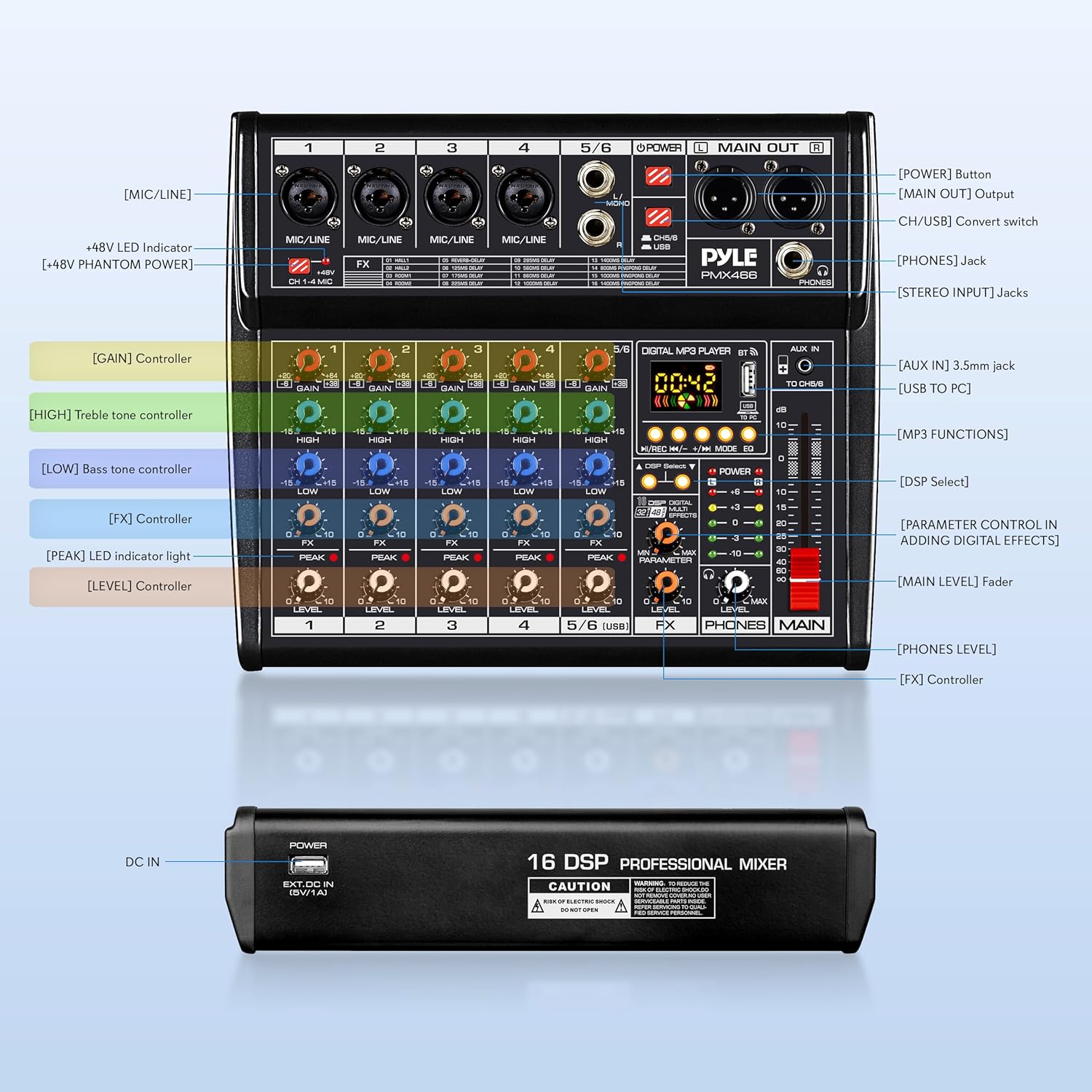
Figure 4: Detailed diagram of the Pyle PMX466 mixer's controls and input/output sections.
- [GAIN] Kontrolatzailea: Kanal bakoitzerako sarrera-sentsibilitatea doitzen du.
- [HIGH] Treble Tone Controller: Adjusts the high-frequency range.
- [LOW] Bass Tone Controller: Adjusts the low-frequency range.
- [FX] Kontrolatzailea: Kanalari aplikatzen zaion efektuaren kopurua kontrolatzen du.
- [PEAK] LED adierazle-argia: Sarrerako seinalea altuegia denean pizten da, mozketa posiblea adieraziz.
- [MAILA] Kontrolatzailea: Kanal bakoitzaren irteera-maila doitzen du.
- [MAILA NAGUSIA] Fader: Nahastailearen irteerako bolumen orokorra kontrolatzen du.
- [PHONES LEVEL]: Entzungailuen irteeraren bolumena doitzen du.
- [DSP hautatzea]: Button to cycle through the 16 digital effects.
- [PARAMETROEN KONTROLA EFEKTU DIGITALAK GEHITZEAN]: Adjusts specific parameters of the selected effect.
5.2 Digital MP3 Player & Bluetooth
The mixer features a built-in digital MP3 player with Bluetooth connectivity and a USB interface.
- USB erreprodukzioa: Sartu USB unitate bat MP3 batekin files into the USB port. Use the control buttons (Play/Pause, Next/Previous, Mode) to navigate and play tracks.
- Bluetooth konexioa: Activate Bluetooth on your external device and search for 'Pyle PMX466'. Pair the devices to stream audio wirelessly.
- Soinu efektuak: The digital MP3 player offers 6 sound effects (Normal, Rock, POP, Classical, Jazz, Country) selectable via the EQ button.
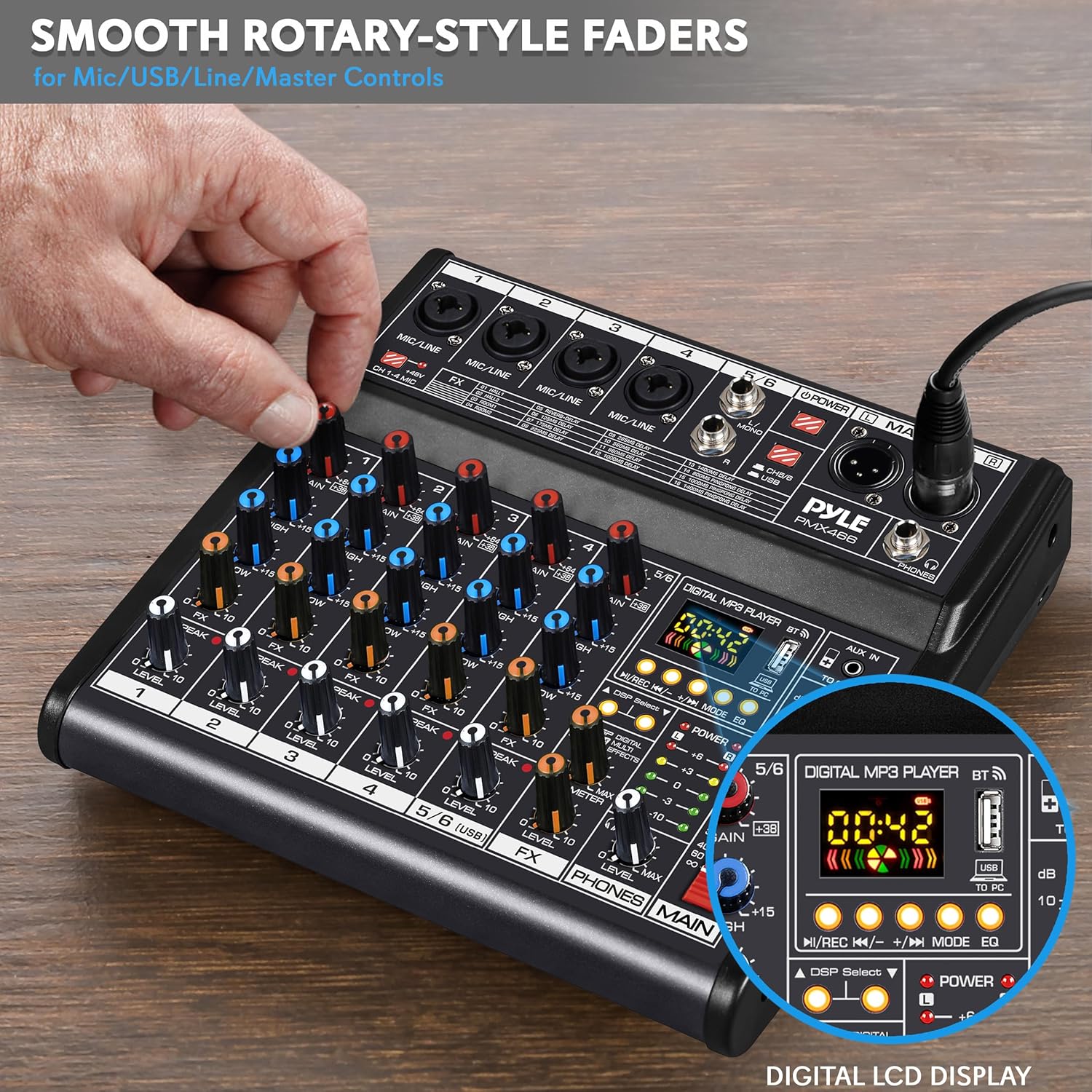
Figure 5: Smooth rotary-style faders for precise control over various inputs and the digital LCD display for MP3 player functions.
5.3 DSP Digital Effects
The mixer includes 16 preset digital effects to enhance your audio.
- Erabili DSP Aukeratu button to cycle through the available effects (e.g., Reverb, Delay, Flanger).
- Egokitu Parametroa knob to fine-tune the selected effect.
- Erabili FX Maila knob to control the overall wet/dry mix of the effects.
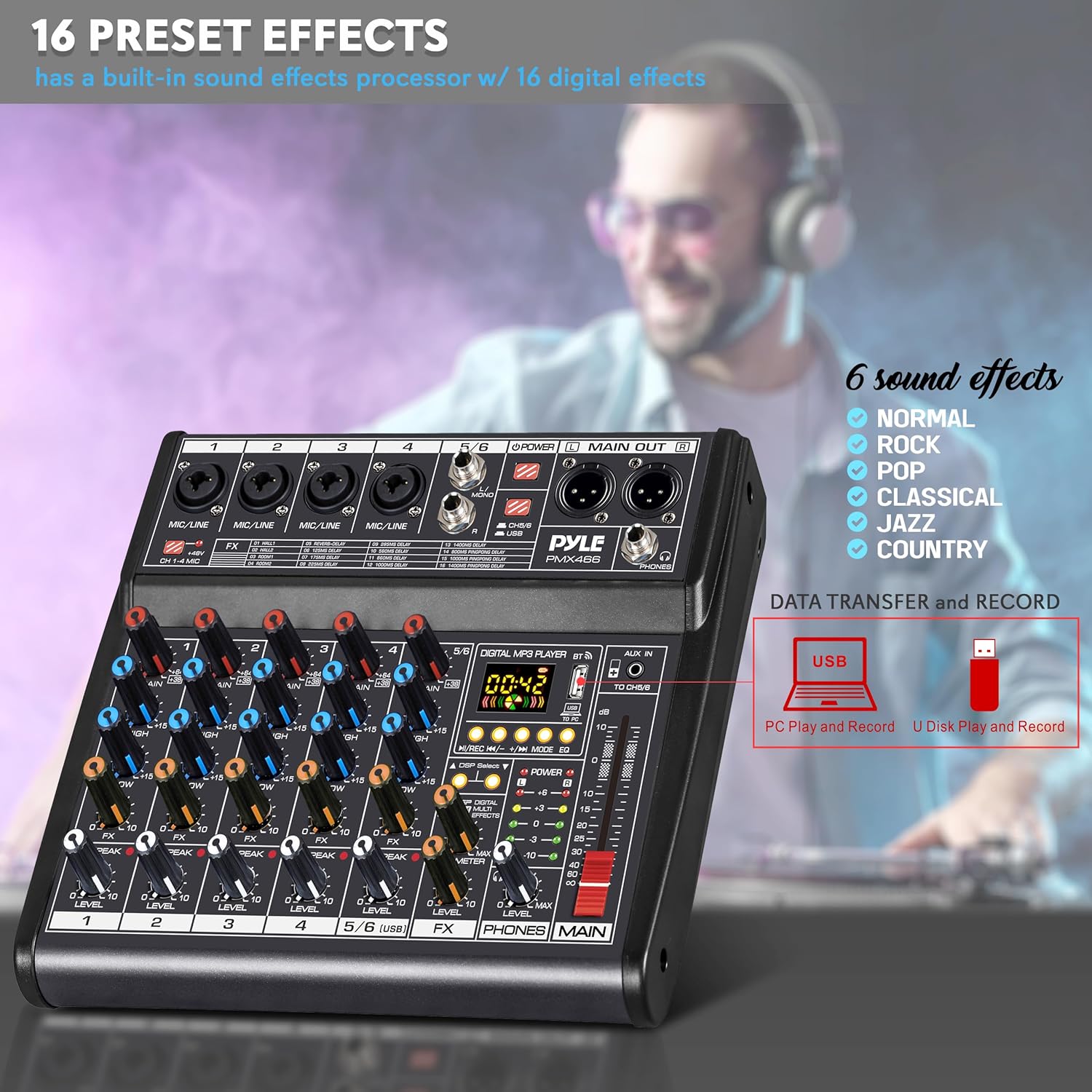
Figure 6: The 16 preset digital effects and 6 sound effects available on the Pyle PMX466 mixer.
5.4 Computer Recording
The integrated sound card allows for direct recording to a computer.
- Connect the mixer to your computer using the USB cable.
- The mixer will be recognized as an audio input/output device.
- Use your preferred digital audio workstation (DAW) or recording software to capture audio from the mixer.

Figure 7: The Pyle PMX466 mixer connected to a laptop, demonstrating its integrated sound card for computer recording.
5.5 Produktuaren bideo ofiziala
1 bideoa: Produktu ofizial baten bideo-erakustaldiaasing the Pyle PMX466 Professional DJ Audio Mixer Controller and its features.
6. Mantentzea
- Garbiketa: Use a soft, dry cloth to clean the mixer's surface. Avoid abrasive cleaners or solvents.
- Biltegiratzea: Gorde nahasgailua leku fresko eta lehor batean, eguzki-argitik eta muturreko tenperaturetatik babestuta.
- Manipulazioa: Kontu handiz maneiatu nahasgailua botoiak, faderrak eta atakak kaltetu ez daitezen.
7. Arazoak
| Arazoa | Irtenbide posiblea |
|---|---|
| Botererik ez | Ensure the USB cable and wall adapter are securely connected and plugged into a working power outlet. Check if the power button on the mixer is pressed. |
| Ez dago soinu irteerarik | Verify all volume levels (channel, master, headphone) are turned up. Check cable connections to speakers/headphones. Ensure correct input selection. |
| Audio distortsionatua | Reduce input GAIN levels to prevent clipping (check PEAK LEDs). Lower channel and master volume. Check for faulty cables. |
| Bluetootha ez da konektatzen | Ensure Bluetooth is enabled on both the mixer and your device. Make sure the mixer is in Bluetooth mode. Try unpairing and re-pairing the devices. |
| USB recording issues | Ensure the mixer is correctly recognized by your computer's operating system and recording software. Check USB cable connection. Verify recording settings in your software. |
8. Zehaztapenak
| Zehaztapena | Balioa |
|---|---|
| Elikatze Hornidura | DC 5V/1A |
| potentzia fantasma | +48V |
| THD | =0.5%@+4dBµ |
| USB Interfazea | SB 2.0, Windows 98SE+, macOS |
| Neurriak (L x W x H) | 11.22'' x 9.06'' x 2.17'' hazbete |
| Elementuaren pisua | 3.87 kilo |
| Kanal kopurua | 6 |
| Konektibitate Teknologia | USBa |
9. Bermea eta Laguntza
Pyle products typically come with a manufacturer's warranty. Please refer to the warranty card included in your product packaging or visit the official Pyle website for detailed warranty information and support options. For technical assistance or service inquiries, contact Pyle customer support.


