1. Produktua amaitu daview
The Philips SRP5016/10 is a modern and elegant 6-in-1 universal remote control designed to simplify your home entertainment experience. It allows you to control up to six different devices, such as televisions, DTVs, DVRs, home theater systems, soundbars, and streaming devices. This remote features a learning function, enabling it to receive and store infrared codes from your original remote controls, providing comprehensive control over various brands and models.
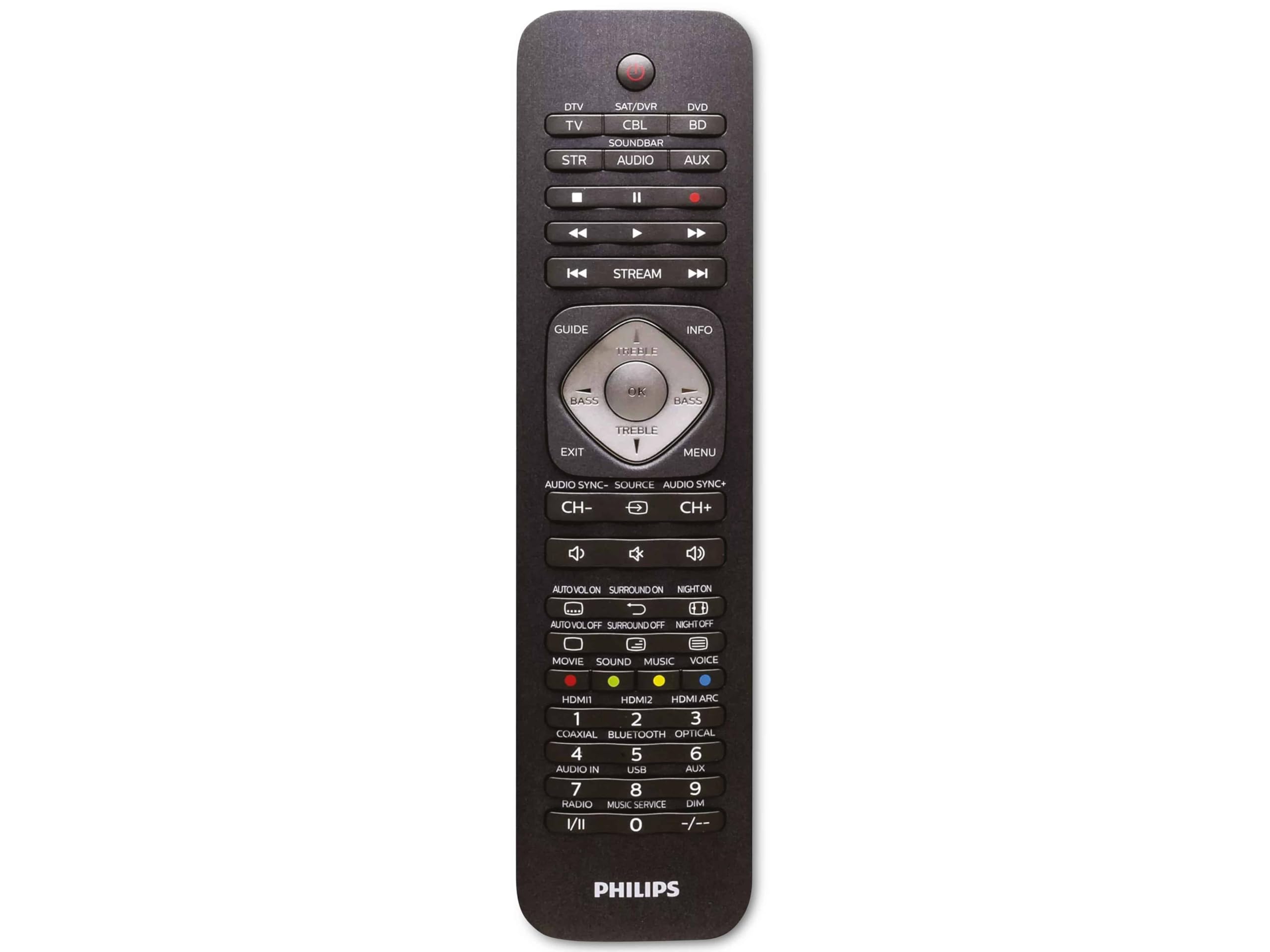
Image 1.1: Philips SRP5016/10 6-in-1 Universal Remote Control. This image displays the front view of the black universal remote control, highlighting its ergonomic design and button layout.
2. Konfigurazioa
2.1. Bateriaren instalazioa
- Ireki urrutiko agintearen atzealdean dagoen bateriaren konpartimentuaren estalkia.
- Sartu bi AAA pila, konpartimentuaren barruan adierazten den polaritate zuzena (+ eta -) ziurtatuz.
- Itxi bateriaren konpartimenduaren estalkia ondo.
Oharra: Pilak ez daude sartuta eta bereiz erosi behar dira.
2.2. Programming Devices
The Philips SRP5016/10 can be programmed using either direct code entry or the learning function.
2.2.1. Direct Code Entry (Recommended for common brands)
- Turn on the device you wish to control (e.g., TV, DVD player).
- Press and hold the desired device button on the universal remote (e.g., TV, DVDa) for approximately 3 seconds until the device button lights up.
- Enter the 4-digit code for your device's brand (refer to the code list provided with your remote, if available, or search online for Philips universal remote codes).
- If the device turns off or responds, the code is correct. Press the device button again to save the code. If not, try the next code for your brand.
2.2.2. Learning Function (For devices not in the code list or advanced functions)
- Place the universal remote and your original remote control head-to-head, approximately 1-3 cm apart.
- Press and hold the desired device button on the universal remote (e.g., TV) for approximately 3 seconds until the device button lights up.
- Eduki sakatuta IKASI button on the universal remote until the device button starts blinking.
- On your original remote, press the button you wish to teach (e.g., BOTEREA). The device button on the universal remote will blink rapidly and then stay solid, indicating successful learning.
- Repeat step 4 for all other buttons you wish to learn.
- Sakatu IKASI button again to exit learning mode.
3. Funtzionamendu-argibideak
3.1. Selecting a Device
To control a specific device, press the corresponding device button (e.g., TV, DVDa, SAT, AUX, SOINU-BARRA, ERREKA) once. The selected device button will light up briefly to confirm your selection. You can then use the remote's buttons to control that device.
3.2. Oinarrizko funtzioak
- POTENTZIA: Hautatutako gailua piztu edo itzaltzen du.
- BOLUMENA +/-: Adjusts the volume of the selected audio device.
- CHANNEL +/-: Changes channels on the selected TV or DTV device.
- MUTU: Audioa isilarazten du.
- ZENBAKI BOTOIAK (0-9): Kanalak zuzenean sartzeko edo bestelako sarrera numerikoetarako.
- NAVIGATION (Arrow buttons, OK): Menuetan nabigatzeko eta hautatzeko.
4. Mantentzea
4.1. Bateria ordezkatzea
When the remote control's range decreases or buttons become unresponsive, it is time to replace the batteries. Follow the battery installation steps in Section 2.1. Always replace both AAA batteries simultaneously with new ones.
4.2. Garbiketa
Urrutiko agintea garbitzeko, erabili zapi leun eta lehor bat. Zikinkeria egoskorra bada, garbitu apur bat.ampen the cloth with water or a mild cleaning solution. Avoid using abrasive cleaners, solvents, or alcohol, as these can damage the remote's surface or internal components.
5. Arazoak
- Urrunekoa ez dabil:
- Egiaztatu bateriak behar bezala sartuta dauden eta ez daudela agortuta. Beharrezkoa bada, ordezkatu itzazu.
- Ziurtatu ez dagoela oztoporik urruneko gailuaren eta gailuaren artean.
- Verify that the correct device button (e.g., TV, DVD) is selected.
- Gailuak ez die komandoei erantzuten:
- The device code may be incorrect. Try reprogramming the device using a different code from the code list or use the learning function.
- Ensure the remote's infrared emitter is pointed directly at the device's infrared receiver.
- Learning function not working:
- Ziurtatu jatorrizko urrutiko agintearen bateriak berriak direla eta behar bezala funtzionatzen duela.
- Make sure the remotes are positioned correctly (head-to-head, 1-3 cm apart) during the learning process.
- Try learning the button again. Some original remotes have weaker IR signals that require multiple attempts.
6. Zehaztapenak
| Ezaugarri | Zehaztapena |
|---|---|
| Marka | Philips |
| Ereduaren izena | 6-en-1 |
| Modelo zenbakia | SRP5016/10 |
| Gailu bateragarriak | Home Theater, DVD/Blu-ray Player, SoundBar, Television, Streaming Device |
| Ezaugarri Berezia | Universal, Learning Function |
| Konektibitate Teknologia | Infragorriak |
| Onartutako gailuen gehienezko kopurua | 6 |
| Kontrolagailu mota | Botoien Kontrola |
| Botoi kopurua | Not specified (typical universal remote layout) |
| Gehienezko irismena | 10 metro |
| Energia iturria | 2 x AAA bateria (ez daude barne) |
| Material Mota | Plastikoa |
| Produktuaren neurriak | 21.4 x 5.3 x 2.2 cm |
| Produktuaren pisua | 130 g |
7. Bermea eta Laguntza
For warranty information, please refer to the documentation provided at the time of purchase or contact your retailer. Philips offers customer support for their products. If you encounter issues that cannot be resolved using this manual, please visit the official Philips support webwebgunean edo jarri harremanetan bere bezeroarentzako arreta-zerbitzua laguntza lortzeko.
Mesedez, gorde zure erosketa-froga berme-erreklamazioetarako.


