1. Sarrera
This manual provides instructions for the Powerextra D-Tap Charger, designed for V Mount, V Lock, and Gold Mount batteries. It ensures efficient and safe charging for compatible camera batteries and other devices that utilize a D-Tap port for charging.

Image 1.1: Powerextra D-Tap Charger with its integrated D-Tap cable.
2. Paketearen edukia
Egiaztatu elementu guztiak zure paketean daudela:
- 1 x Powerextra D-Tap Charger
- 1 x 100cm AC Charging Cable
- 1 x Mikrozuntz garbitzeko zapi

Image 2.1: The D-Tap charger, AC power cable, and microfiber cloth included in the package.
3. Zehaztapenak
| Ezaugarri | Zehaztapena |
|---|---|
| AC Sarrera | 100-240V / 0.8A |
| DC irteera | 16.8V-2.0A |
| Irteera boltage | 16.8 Volt |
| Elementuaren pisua | 8.1 ontza (gutxi gorabehera 230 g) |
| Paketearen neurriak | 6.14 x 3.58 x 1.46 hazbete |
| Ziurtagiriak | CE |
4. Konfigurazioa
Follow these steps to set up your D-Tap Charger:
- Connect the AC Power Cable: Insert the included 100cm AC charging cable into the power input port on the charger unit.
- Entxufatu korronte-hartunean: Plug the other end of the AC charging cable into a standard wall power outlet (100-240V).
- Bateriara konektatu: Insert the D-Tap connector from the charger into the D-Tap port on your compatible V Mount, V Lock, or Gold Mount battery. Ensure a secure connection.

Image 4.1: The D-Tap connector for battery connection.


4.2 irudia: Adibideaamples of compatible V-Mount, Gold Mount, and other D-Tap port batteries.
5. Funtzionamendu-argibideak
Once the charger is connected to a power source and a compatible battery, it will begin charging automatically.
- Kargatzeko adierazlea: The charger features an LED indicator light to show the charging status.
- Argi gorria: Bateria kargatzen ari dela adierazten du.
- Argi berdea: Bateria guztiz kargatuta dagoela adierazten du.
The charger utilizes automatic constant current control to optimize charging speed and prevent overcharging.
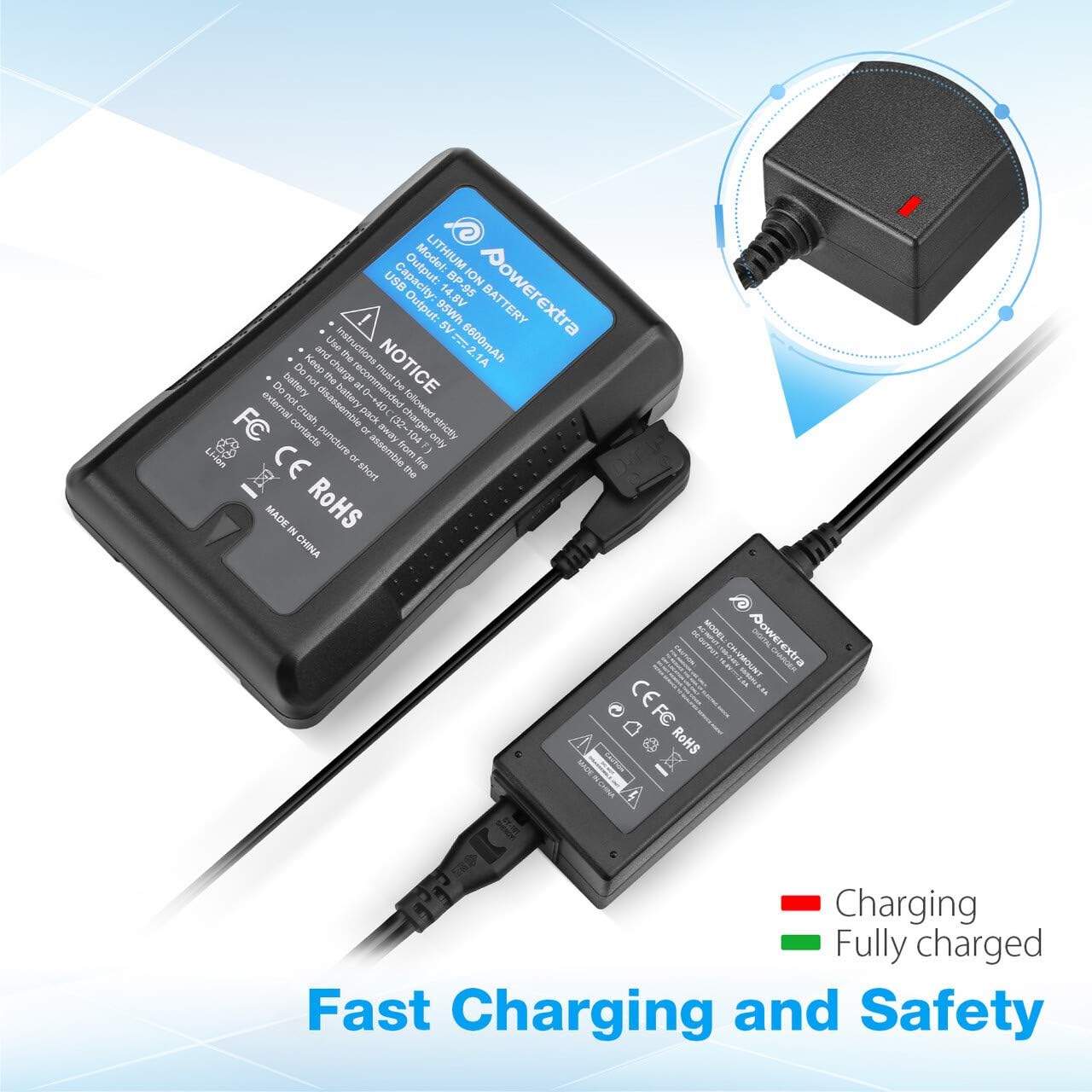
Image 5.1: Charger connected to a battery, with the red LED indicating active charging.
6. Segurtasun informazioa
To ensure safe operation and prolong the life of your charger and batteries, please observe the following safety precautions:
- Gainkarga Babesteko: The charger is designed to prevent batteries from overcharging.
- Zirkuitu laburren babesa: Zirkuitu laburren aurka babesten duten mekanismo integratuak.
- Uneko babesaren gainekoa: Gehiegizko korronte-fluxuaren aurkako babes-neurriak.
- Over Heating Protection: Prevents the charger from overheating during operation.
- Deskarga gaindiko babesa: (Note: This protection is typically a feature of the battery itself, but the charger is designed to work safely with such batteries.)
- Use the charger only with compatible V Mount, V Lock, or Gold Mount batteries.
- Ez jarri kargagailua hezetasunean, eurian edo muturreko tenperaturetan.
- Ez desmuntatu edo aldatu kargagailua. Mantendu konponketa guztiak langile kualifikatuen esku.
- Mantendu haurren eskura.

Image 6.1: Visual representation of the multi-protection features including short circuit, over discharge, over current, over charge, and over heating protection.
7. Mantentzea
Proper maintenance ensures optimal performance and longevity of your charger:
- Garbiketa: Use the provided microfiber cleaning cloth to gently wipe the charger and cables. Do not use liquid cleaners or solvents.
- Biltegiratzea: Kargagailua erabiltzen ez duzunean, gorde leku fresko eta lehor batean, eguzki-argitik eta muturreko tenperaturetatik babestuta.
- Kableen zainketa: Saihestu kableak gehiegi tolestea edo tolestea. Deskonektatzean, eutsi beti entxufeari, ez kableari.
8. Arazoak
If you encounter issues with your Powerextra D-Tap Charger, refer to the following common problems and solutions:
- Kargagailua ez da pizten:
- Ensure the AC power cable is securely connected to both the charger and the wall outlet.
- Egiaztatu hormako entxufea funtzionatzen duela beste gailu batekin probatuz.
- Bateria ez da kargatzen:
- Check that the D-Tap connector is fully and correctly inserted into the battery's D-Tap port.
- Confirm that the battery is compatible with the charger and is not fully charged already (green LED).
- Inspect the D-Tap cable and connector for any visible damage.
- Indicator Light Not Functioning:
- If the charger is connected and the battery is not fully charged, but the light is off, contact customer support.
If the problem persists after attempting these solutions, please contact Powerextra customer support for further assistance.
9. Bermea eta Laguntza
Powerextra provides the following for this D-Tap Charger:
- Bermea: 12-month hassle-free warranty from the date of purchase.
- Laguntza: Bizi osorako laguntza teknikoa.
For warranty claims, technical assistance, or any product-related inquiries, please contact Powerextra customer service through their official webproduktua erosi zen gunea edo dendaria.


