1. Sarrera
The YABER V3 Mini Bluetooth Projector is designed to provide a versatile and high-quality viewing experience for home entertainment and outdoor use. Featuring native 1280x720p resolution with 1080P support, a 6000:1 contrast ratio, and an advanced German LED light source, it delivers clear and accurate images. This projector also includes Bluetooth 5.0 for wireless audio connectivity and supports wireless screen mirroring via Anycast or Chromecast (adapters sold separately).
2. Zer dago kutxan
- YABER V3 Mini Bluetooth Projector
- HDMI kablea
- Elikatze kablea
- Erabiltzailearen eskuliburua
- AV Kable
- Lenteak garbitzeko zapia
- Urruneko kontrola (pilak ez barne)
3. Produktuaren ezaugarriak
- Native 720P & 1080P Supported: Offers a native resolution of 1280x720 pixels, supporting up to 1080P input for clear images.
- Kontraste-erlazio handia: Features a 6000:1 contrast ratio for enhanced image depth and detail.
- Bluetooth 5.0 konexioa: Allows wireless connection to Bluetooth headsets, speakers, and Airpods for enhanced audio.
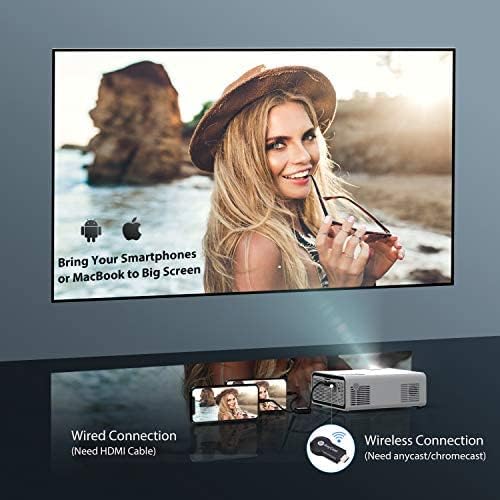
- Haririk gabeko pantaila islatzea: Supports Anycast and Chromecast for mirroring content from smartphones and other devices (adapters required).
- Zoom funtzioa: Adjusts image size from 100% to 50% using the remote control without moving the projector.
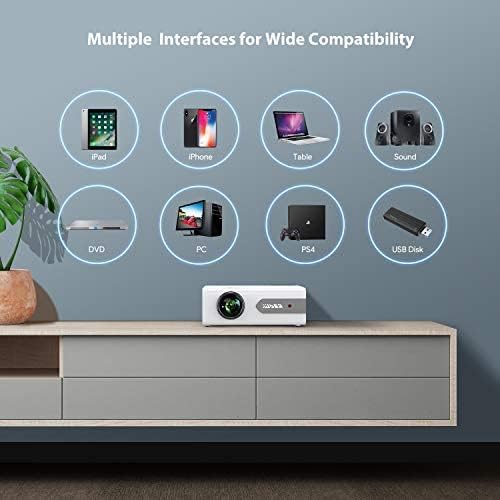
- Hainbat interfaze: Equipped with HDMI, USB, VGA, AV, and Audio ports for wide compatibility with various devices.
- HIFI soinu estereoa: Built-in dual stereo speakers with an SRS sound system provide a good auditory experience.
- Hozte sistema aurreratua: Designed to minimize lamp power consumption and extend lamp bizitza 100,000 ordu arte.


4. Konfigurazioa
4.1 Hasierako kokapena
Place the projector on a stable, flat surface or mount it to the ceiling. Ensure there is adequate ventilation around the projector to prevent overheating. The projection distance and screen size can be adjusted based on your viewingurunea.

4.2 Energia-konexioa
Connect the power cord to the projector's power input and then plug it into a power outlet.
4.3 Piztu/Itzali
Sakatu proiektorearen edo urrutiko agintearen pizteko botoia unitatea pizteko edo itzaltzeko.
5. Funtzionamendu-argibideak
5.1 Fokua eta Keystone zuzenketa
Adjust the focus ring on the projector lens until the image is clear. Use the keystone correction feature (manual or digital, if available) to correct any trapezoidal distortion of the image.
5.2 Sarrera iturriaren hautaketa
Use the 'Source' button on the remote or projector to select the desired input source (HDMI, USB, VGA, AV).
5.3 Bluetooth konexioa
To connect to a Bluetooth audio device:
- Ensure your Bluetooth speaker or headset is in pairing mode.
- Nabigatu proiektorearen Bluetooth ezarpenetara.
- Hautatu zure gailua parekatzeko eskuragarri dauden gailuen zerrendatik.
- Once connected, audio will play through the Bluetooth device.
Oharra: The V3 mini projector supports Bluetooth output devices (speakers, headphones) but does not connect to phones/pads via Bluetooth for mirroring. Turn off Bluetooth when not in use to avoid potential issues.
5.4 Haririk gabeko pantailaren islatzea
The YABER V3 supports wireless screen mirroring from iOS and Android devices using an external Anycast or Chromecast dongle (purchased separately). Connect the dongle to an HDMI port and follow the dongle's instructions for mirroring.
5.5 Zoom Funtzioa
To adjust the image size without moving the projector, use the zoom function via the remote control. This allows you to shrink the image from 100% down to 50%.
5.6 Erabilera-eszenatokiak
The YABER V3 projector is suitable for various applications:
- Etxeko Antzerkia: Enjoy movies and shows on a large screen.
- Jokoa: Connect gaming consoles for an immersive experience.
- Outdoor Movies: Perfect for backyard movie nights in dark environments.

6. Mantentzea
6.1 Lenteen garbiketa
Regularly clean the projector lens using the provided lens cleaning cloth or a soft, lint-free cloth. Avoid using abrasive cleaners or harsh chemicals.
6.2 Aire-iragazkiaren garbiketa
Check and clean the air filter periodically to ensure proper airflow and prevent dust buildup, which can affect performance and lamp bizitza.
6.3 lamp Bizitza
Proiektagailuaren LED lamp has a lifespan of up to 100,000 hours. Proper maintenance, including adequate ventilation and cleaning, helps maximize its longevity.
7. Arazoak
- Irudirik ez:
- Check if the power cable is securely connected.
- Ziurtatu sarrera-iturri zuzena hautatuta dagoela.
- Verify that the connected device (e.g., TV Stick, PC) is powered on and outputting a signal.
- Adjust focus and keystone.
- Soinurik ez:
- Egiaztatu bolumen-ezarpenak bai proiektorean bai konektatutako gailuan.
- If using Bluetooth, ensure the device is properly paired and connected.
- If using an external speaker via AUX, ensure the cable is fully inserted.
- Some content (e.g., certain streaming services) may have audio format incompatibilities; try a different source or content.
- Irudi lausoa:
- Doitu lentearen fokatze-eraztuna.
- Ziurtatu proiekzio-gainazala laua dela eta proiektorea egonkorra dela.
- Garbitu proiektorearen lentea.
- Urruneko kontrola ez dabil:
- Ordeztu bateriak urrutiko agintean.
- Ziurtatu ez dagoela oztoporik urrutiko agintearen eta proiektorearen IR hargailuaren artean.
- Gehiegizko berotzea:
- Ensure adequate ventilation around the projector.
- Clean the air filter and vents to remove dust.
- Avoid operating in excessively hot environments.
8. Zehaztapenak
| Modelo zenbakia | V3 |
| Bistaratzeko ebazpena | Native 1280 x 720 (Supports 1080P) |
| Kontraste-erlazioa | 6000:1 |
| Aspektu-erlazioa | 16:9 / 4:3 |
| Argi iturria | LED |
| Lamp Bizitza | Gehienez 100,000 ordu |
| Konektibitate Teknologia | 3.5mm Jack, Bluetooth, HDMI, USB, VGA, AV |
| Bluetooth bertsioa | 5.0 |
| Produktuaren neurriak | 8.19 x 6.61 x 3.07 hazbete |
| Elementuaren pisua | 2.2 kilo |
| Gomendatutako Erabilerak | Home Cinema, Gaming, Business (not recommended for professional presentations) |
9. Bermea eta Laguntza
YABER provides a 6-month return policy and 3-year repair service for the V3 Mini Bluetooth Projector. Lifetime professional technical support is also available. For any issues or inquiries, please contact YABER customer service.


