1. Produktua amaitu daview
The Satisfyer Double Joy Connect App is a U-shaped partner vibrator designed for simultaneous internal and external stimulation. It features two powerful motors and is controlled via the Satisfyer Connect App or directly on the device. Made from skin-friendly silicone, it is waterproof (IPX7) and rechargeable.

Image 1.1: The Satisfyer Double Joy Connect App, emphasizing its app connectivity and powerful vibration capabilities. Designed for couples, it stimulates both partners.
This device offers 10 distinct vibration programs, providing a range of sensations from gentle to intense. Its ergonomic and flexible design ensures comfortable use. The Satisfyer Connect App enhances the experience with features like Remote Play, Vibration Creator, and Playlist Vibration.

Image 1.2: The Satisfyer Double Joy Connect App, showcasing its waterproof (IPX7) design, skin-friendly silicone material, and ease of cleaning.
2. Konfigurazioa
2.1 Gailua kargatzea
Before first use, fully charge your Satisfyer Double Joy. Use the included magnetic USB charging cable. Connect the magnetic pins to the charging contacts on the device. A full charge typically takes approximately 2 hours.
2.2 Downloading the Satisfyer Connect App
To unlock the full range of features, download the free Satisfyer Connect App. It is available on the Apple App Store for iOS devices and Google Play Store for Android devices.
- Bilatu "Satisfyer Connect" in your device's app store.
- Deskargatu eta instalatu aplikazioa.
2.3 Bluetooth parekatzea
To pair your device with the Satisfyer Connect App:
- Ziurtatu gailua kargatuta dagoela.
- Press and hold the power button on the device for 5 seconds until you feel a double pulse. The LED light will start flashing, indicating it is ready for pairing.
- Open the Satisfyer Connect App on your smartphone and follow the on-screen instructions to connect.
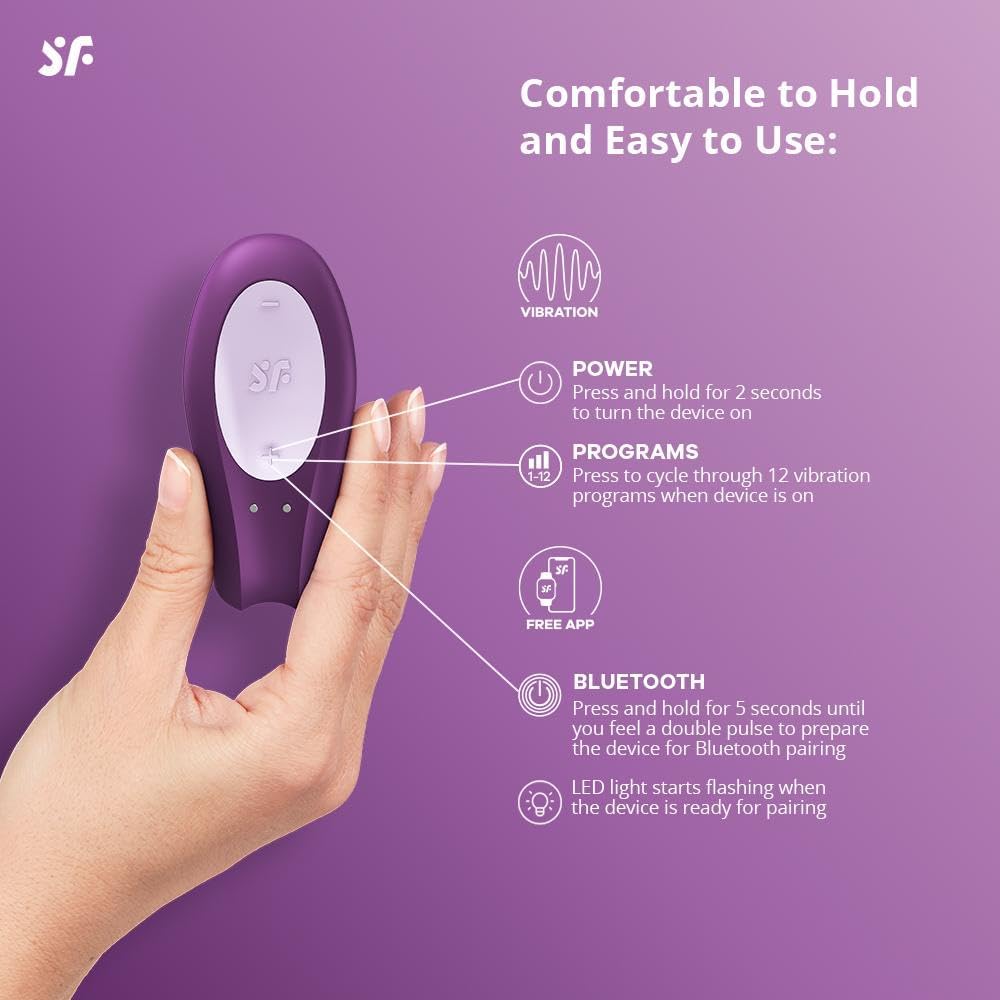
Image 2.1: Controls on the Satisfyer Double Joy Connect App, illustrating the power button, program selection, and Bluetooth pairing function.
3. Funtzionamendu-argibideak
3.1 Piztu/Itzali
- To turn the device on, press and hold the power button for 2 seconds.
- Gailua itzaltzeko, eduki sakatuta pizteko botoia 2 segundoz.
3.2 Changing Vibration Programs
While the device is on, press the program button to cycle through the 10 available vibration programs. Each press will switch to the next program.
3.3 Using the Satisfyer Connect App
Once paired, the app provides advanced control and customization:
- Urruneko kontrola: Control the device from your smartphone.
- Vibration Creator: Design and save custom vibration patterns.
- Playlist Vibration: Sync vibrations to your favorite music.
- Chat Function: Connect with partners for shared experiences.
- Datuen segurtasuna: The app is designed with 100% data security.

Image 3.1: The Satisfyer Connect App interface, demonstrating features like chat, remote control, vibration creation, and playlist vibration.
Video 3.1: Official product video for the Satisfyer Double Joy (Purple), demonstrating its features, app connectivity, and design. This video highlights the device's functionality and ease of use.
4. Mantentzea
4.1 Garbiketa
The Satisfyer Double Joy is waterproof (IPX7) and made of medical-grade silicone, making it easy to clean. After each use, clean the device with warm water and a mild, toy-friendly soap or a specialized toy cleaner. Rinse thoroughly and allow it to air dry.
4.2 Biltegiratzea
Store the device in a clean, dry place away from direct sunlight and extreme temperatures. Avoid storing it with other silicone products to prevent material degradation.
5. Arazoak
- Gailua ez da pizten: Ensure the device is fully charged. If it still doesn't turn on, try a different USB power source for charging.
- Aplikazioaren konexio arazoak:
- Ziurtatu Bluetootha gaituta dagoela zure telefonoan.
- Make sure the device is in pairing mode (LED flashing).
- Berrabiarazi gailua eta aplikazioa biak.
- Egiaztatu aplikazioa azken bertsiora eguneratuta dagoen.
- If issues persist, try unpairing and re-pairing the device in your phone's Bluetooth settings.
- Kargatzeko arazoak: If the device is not charging, verify that the magnetic charging cable is properly connected to both the device and a working USB power source. Inspect the cable for any damage.
- Buttons changing settings accidentally: When using the device, ensure your grip does not inadvertently press the control buttons. The Satisfyer Connect App allows you to lock the buttons to prevent accidental changes during use.
6. Zehaztapenak
| Ezaugarri | Xehetasuna |
|---|---|
| Ereduaren izena | Satisfyer Double Joy with app |
| Elementuaren eredu-zenbakia | SATDJL |
| Kolorea | Violeta |
| Materiala | Silikona |
| Iragazgaitzaren balorazioa | IPX7 |
| Energia iturria | Litio-ioizko bateria kargagarria (barne) |
| Produktuaren neurriak | 4.72 x 3.15 x 7.87 hazbete |
| Pisua | 5.3 ontza |
| Aplikazioen bateragarritasuna | Satisfyer Connect App (iOS & Android) |
7. Bermea
The Satisfyer Double Joy Connect App comes with a 15-year guarantee, ensuring long-lasting satisfaction and product quality. Please retain your proof of purchase for warranty claims.
8. Laguntza
For further assistance, technical support, or warranty inquiries, please visit the official Satisfyer website or contact their customer service department. Refer to the packaging for specific contact details.


