1. Sarrera
Eskerrik asko erosketagatik.asing the YESIDO YSP03 Sports Bluetooth In-Ear Earphones. This manual provides essential information for the safe and efficient use of your new earphones. Please read it thoroughly before use and retain it for future reference.
2. Segurtasun informazioa
- Do not expose the earphones to extreme temperatures, humidity, or corrosive environments.
- Avoid dropping, impacting, or bending the earphones.
- Ez desmuntatu edo aldatu entzungailuak. Honek bermea baliogabetu eta kalteak eragin ditzake.
- Keep the earphones away from children and pets.
- Erabili emandako kargatzeko kablea edo baliokide ziurtatu bat soilik.
- Entzun bolumen moderatuan entzumen-kalteak saihesteko.
- Ez erabili entzungailuak gidatzen ari zaren bitartean edo ingurua kontuan hartu behar duzun egoeretan.
3. Paketearen edukia
Mesedez, egiaztatu paketea elementu hauek dituen:
- YESIDO YSP03 Sports Bluetooth In-Ear Earphones
- USB kargatzeko kablea
- Erabiltzailearen eskuliburua
- Ear tips (various sizes, typically)
4. Produktua amaitu daview
The YESIDO YSP03 earphones feature an in-ear design with a control unit for easy operation. They support Bluetooth wireless connectivity and also offer direct music playback via an SD card.
Control Unit and Ports
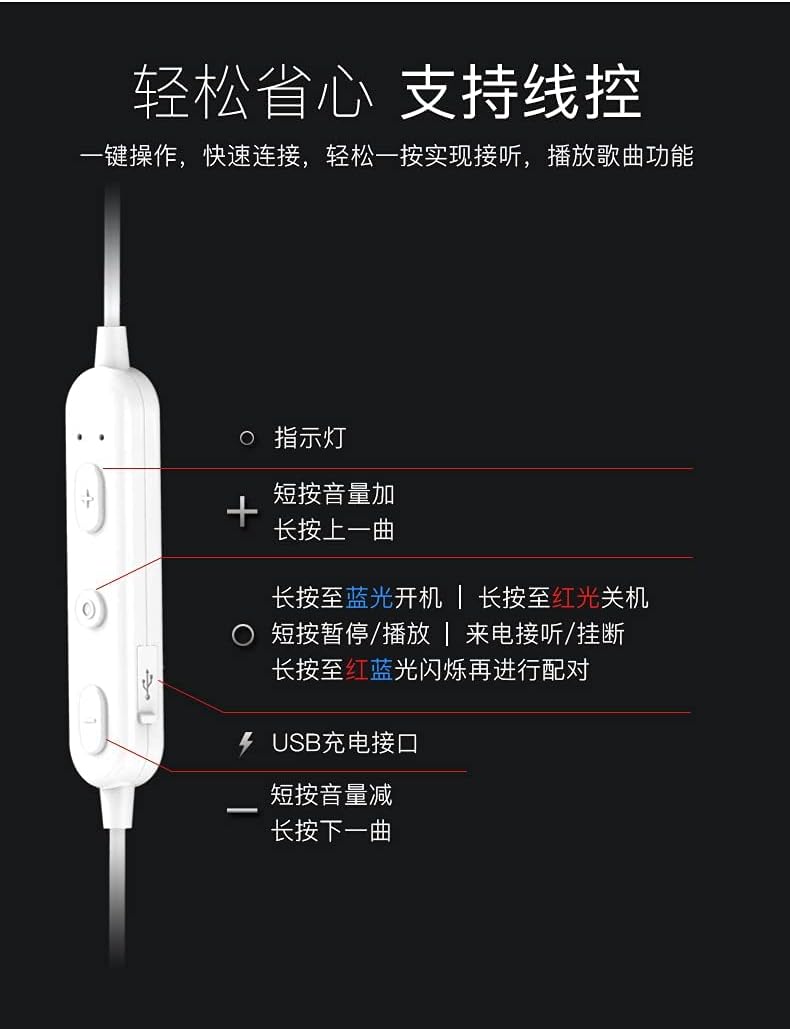
Irudia: Xehetasuna view of the earphone control unit, showing the indicator light, volume/track buttons, multi-function button, and USB charging port.
- Argi adierazlea: Displays status (power, pairing, charging).
- '+' botoia: Short press for Volume Up; Long press for Previous Track.
- Funtzio anitzeko botoia (erdikoa): Long press for Power On (blue light) / Power Off (red light); Short press for Play/Pause or Answer/Hang up calls; Long press until red and blue lights flash for Pairing Mode.
- '-' botoia: Short press for Volume Down; Long press for Next Track.
- USB kargatzeko ataka: Kargatzeko kablea konektatzeko.
SD txartelaren zirrikitua
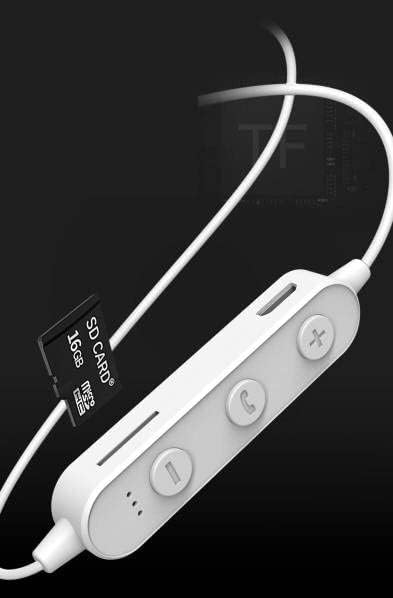
Irudia: Close-up of the control unit showing the SD card slot, indicating direct music playback without a phone. A 64GB card can store approximately 15,000 songs.
The earphones feature an integrated SD card slot, allowing you to play music directly from a memory card without needing a connected device. This is ideal for sports or activities where carrying a phone is inconvenient.
5. Konfigurazioa
5.1 Entzungailuak kargatzea
- Connect the USB charging cable to the USB charging port on the earphone control unit.
- Konektatu USB kablearen beste muturra USB elikatze-egokitzaile batera (ez dago barne) edo ordenagailuaren USB ataka batera.
- The indicator light will typically show a red light during charging and turn off or change color when fully charged.
- Itxaron gutxi gorabehera 1-2 ordu karga osoa egiteko.
5.2 Bluetooth parekatzea
- Ziurtatu entzungailuak itzalita daudela.
- Press and hold the Multi-function Button (center button) for approximately 5-7 seconds until the indicator light flashes red and blue alternately. This indicates pairing mode.
- On your mobile phone or Bluetooth-enabled device, go to the Bluetooth settings and turn on Bluetooth.
- Bilatu available devices. You should see "YESIDO YSP03" or a similar name in the list.
- Select "YESIDO YSP03" to connect. Once successfully paired, the indicator light will typically flash blue slowly or turn off.
- Pasahitza eskatzen badizute, idatzi "0000".
5.3 SD txartel bat sartzea
- Locate the SD card slot on the control unit.
- Gently insert a formatted Micro SD card (TF card) with the metal contacts facing down until it clicks into place.
- The earphones will automatically detect the card and switch to SD card playback mode if no Bluetooth device is connected or if Bluetooth is disconnected.
6. Funtzionamendu-argibideak
6.1 Piztu/Itzali
- Piztu: Press and hold the Multi-function Button until the blue indicator light appears.
- Itzali: Press and hold the Multi-function Button until the red indicator light appears.
6.2 Musika Erreprodukzioa (Bluetooth Modua)
- Erreproduzitu/Pausatu: Sakatu labur funtzio anitzeko botoia.
- Bolumena igo: Short press the '+' Button.
- Bolumena jaitsi: Short press the '-' Button.
- Hurrengo ibilbidea: Long press the '-' Button.
- Aurreko pista: Long press the '+' Button.
6.3 Deien kudeaketa
- Deia erantzun/amaitu: Short press the Multi-function Button when an incoming call is received.
- Deia baztertu: Long press the Multi-function Button when an incoming call is received.
- Berriz markatu azken zenbakia: Sakatu bi aldiz funtzio anitzeko botoia.
6.4 SD txartelaren erreprodukzioa
- Once an SD card is inserted and detected, the earphones will automatically begin playing music from the card.
- The same controls for Play/Pause, Volume, Next/Previous Track apply as in Bluetooth mode.
7. Mantentzea
- Garbiketa: Erabili zapi leun eta lehor bat entzungailuak garbitzeko. Ez erabili produktu kimiko gogorrik edo material urratzailerik.
- Biltegiratzea: Gorde entzungailuak leku fresko eta lehor batean, eguzki-argitik eta muturreko tenperaturetatik babestuta.
- Bateria zaintzea: To prolong battery life, charge the earphones regularly, even if not in frequent use. Avoid fully discharging the battery for extended periods.
8. Arazoak
| Arazoa | Irtenbidea |
|---|---|
| Earphones won't power on. | Ensure the earphones are fully charged. Press and hold the Multi-function Button for a longer duration. |
| Ezin da gailuarekin parekatu. | Ensure earphones are in pairing mode (red and blue flashing light). Turn off and on Bluetooth on your device. Move closer to the earphones. Forget the device in your phone's Bluetooth settings and try pairing again. |
| Soinurik ez. | Check volume levels on both earphones and your connected device. Ensure earphones are properly connected via Bluetooth or that the SD card is inserted correctly and contains playable files. |
| SD txartela ez da erreproduzitzen. | Ensure the SD card is inserted correctly and contains compatible audio files (e.g., MP3). Try re-inserting the card. Ensure no Bluetooth device is actively connected, as SD card playback might be prioritized when Bluetooth is disconnected. |
| Soinu kalitate txarra. | Ensure there are no obstructions between the earphones and your device. Move closer to your device. Try a different audio source or file. |
9. Zehaztapenak
| Ezaugarri | Xehetasuna |
|---|---|
| Marka | YESIDO |
| Modelo zenbakia | YSP03 |
| Kolorea | Zuria |
| Belarrien Kokatzea | Belarri barnean |
| Konektibitate Teknologia | Haririk gabeko (Bluetooth) |
| Zarata Kontrola | Bat ere ez |
| Gailu bateragarriak | Telefono mugikorrak |
| Produkturako erabilera espezifikoak | Kirolak |
| Kable Ezaugarri | Kablerik gabe |
| Uraren Erresistentzia Maila | Ez Urarekiko Erresistentea |
| Kontrol mota | Ahots kontrola |
| Kontrol-metodoa | App (Voice Control implies app integration for some functions) |
Bateriaren errendimendua

Irudia: Visual representation of battery performance metrics for the YESIDO YSP03 earphones.
- Musika erreproduzitzeko denbora: 9 ordu gutxi gorabehera
- Headphone Standby Time: 120 ordu gutxi gorabehera
- Deiaren iraupena: 7.5 ordu gutxi gorabehera
*Note: These data are obtained from YESIDO laboratory tests, and slight deviations may occur due to changes in objective environment and usage patterns.
10. Bermea eta Laguntza
10.1 Bermearen informazioa
This product is provided without an explicit warranty. Please refer to your retailer's return policy for any issues within the applicable return period.
10.2 Bezeroarentzako laguntza
For further assistance or inquiries, please contact the retailer where you purchased the product. You may also visit the official YESIDO website for general product information and potential support resources.


