1. Sarrera
Thank you for choosing the Sunbuck AS-35BU Stereo Ampbizigarria. Trinko baina indartsu hau amplifier is designed to enhance your home audio experience, offering versatile connectivity options including Bluetooth 5.0, RCA, USB, SD card, FM radio, and AUX input. With a maximum output of 400W x 2 (RMS 60W x 2), it delivers high-fidelity sound with low distortion, suitable for various environments such as offices, small apartments, basements, and garages. This manual provides detailed instructions for setup, operation, maintenance, and troubleshooting to ensure optimal performance and longevity of your device.
2. Segurtasun-argibide garrantzitsuak
- Energia iturria: Ziurtatu ampLikidatzailea bolumenarekin bat datorren elikatze-iturri batera konektatuta dagotage indicated on the unit. Use only the provided AC power plug.
- Aireztapena: Ez blokeatu aireztapen-irekidurarik. Instalatu fabrikatzailearen argibideen arabera. Aire-fluxu egokia ezinbestekoa da gehiegi berotzea saihesteko.
- Ura eta hezetasuna: Do not expose this apparatus to rain or moisture. Do not use near water (e.g., bathtubs, sinks, swimming pools).
- Beroa: Ez instalatu bero-iturri inongo ondoan, esate baterako, erradiadoreak, bero-erregistroak, sukaldeak edo beste aparatu batzuk (barne ampberoa sortzen duten argitzaileak).
- Garbiketa: Oihal lehor batekin bakarrik garbitu. Saihestu garbitzaile likidoak edo aerosolak erabiltzea.
- Zerbitzua: Ez saiatu produktu hau zeuk konpontzen. Konponketa guztiak zerbitzu-langile kualifikatuen esku utzi. Konponketa beharrezkoa da aparatua edozein modutan kaltetuta dagoenean, hala nola, elikatze-kablea edo entxufea kaltetuta dagoenean, likidoa isuri edo objektuak aparatuan erori direnean, aparatua euripean edo hezetasunean egon denean, normal funtzionatzen ez duenean edo erori denean.
- Gainkarga: Ez ezazu gainkargatu hormako entxufeak edo luzapen-kableak, sute edo deskarga elektrikoa gerta daitekeelako.
3. Paketearen edukia
Egiaztatu behean zerrendatutako elementu guztiak zure paketean sartuta daudela:
- 1 x Sunbuck AS-35BU Stereo AmpGarraioa (110V)
- 1 x Urruneko kontrola
- 1 x FM antena
- 1 x AC Power Plug

Image: Contents of the Sunbuck AS-35BU ampbizigarri paketea, barne amplifier unit, remote control, FM antenna, and AC power plug.
4. Produktua amaitu daview
4.1 Aurreko panela
The front panel provides access to primary controls and inputs for convenient operation.
- Switch potentziala: Txandakatzen ditu ampargitzailea piztu/desaktibatu.
- Sarrera hautatzailea: Rotary knob to select between Media Player (USB/SD/Bluetooth/FM), AUX, CD, and Line inputs.
- Tonu kontrolak: Separate knobs for Treble and Bass adjustment to fine-tune audio output.
- Oihartzunaren kontrola: Adjusts the echo effect for microphone inputs.
- Mic 1/2 Volume: Controls the overall volume for both microphone inputs.
- Musikaren bolumena: Main rotary knob for adjusting the overall music volume.
- USB/SD/MMC/BT Player: Digital display and control buttons for media playback (Play/Pause, Scan, Mode, Next/Previous Track, Volume +/-).
- Mikrofonoaren sarrerak: Two 1/4" (6.35mm) jacks for connecting microphones.

Irudia: Aurrealdea view of the Sunbuck AS-35BU amplifier, showing all controls and inputs including power switch, input selector, tone controls, media player interface, and microphone inputs.
4.2 Atzeko panela
The rear panel houses all the necessary connections for your audio sources and speakers.
- RCA Audio Inputs: Two pairs of RCA inputs labeled 'CD' and 'LINE' for connecting external audio devices.
- Bozgorailuaren irteerak: Spring clip terminals for connecting left and right passive speakers.
- DC potentzia sarrera: For alternative DC power supply (DC12V 5A-10A).
- CA potentzia sarrera: Standard AC power cord connection.
- liburukiatage Conversion Switch: Allows selection between 230V and 115V AC power.
- FM antena sarrera: Coaxial connector for the FM antenna.

Irudia: Atzealdea view of the Sunbuck AS-35BU amplifier, displaying RCA audio inputs, speaker terminals, power input, voltage selector, and FM antenna connection.
4.3 Neurriak
The compact design of the AS-35BU allows for flexible placement in various settings.
- Produktuaren neurriak: 6.1 x 5.31 x 2.17 hazbete (15.5 x 13.5 x 5.5 cm)
- Elementuaren pisua: 2.2 libra (1 kg)
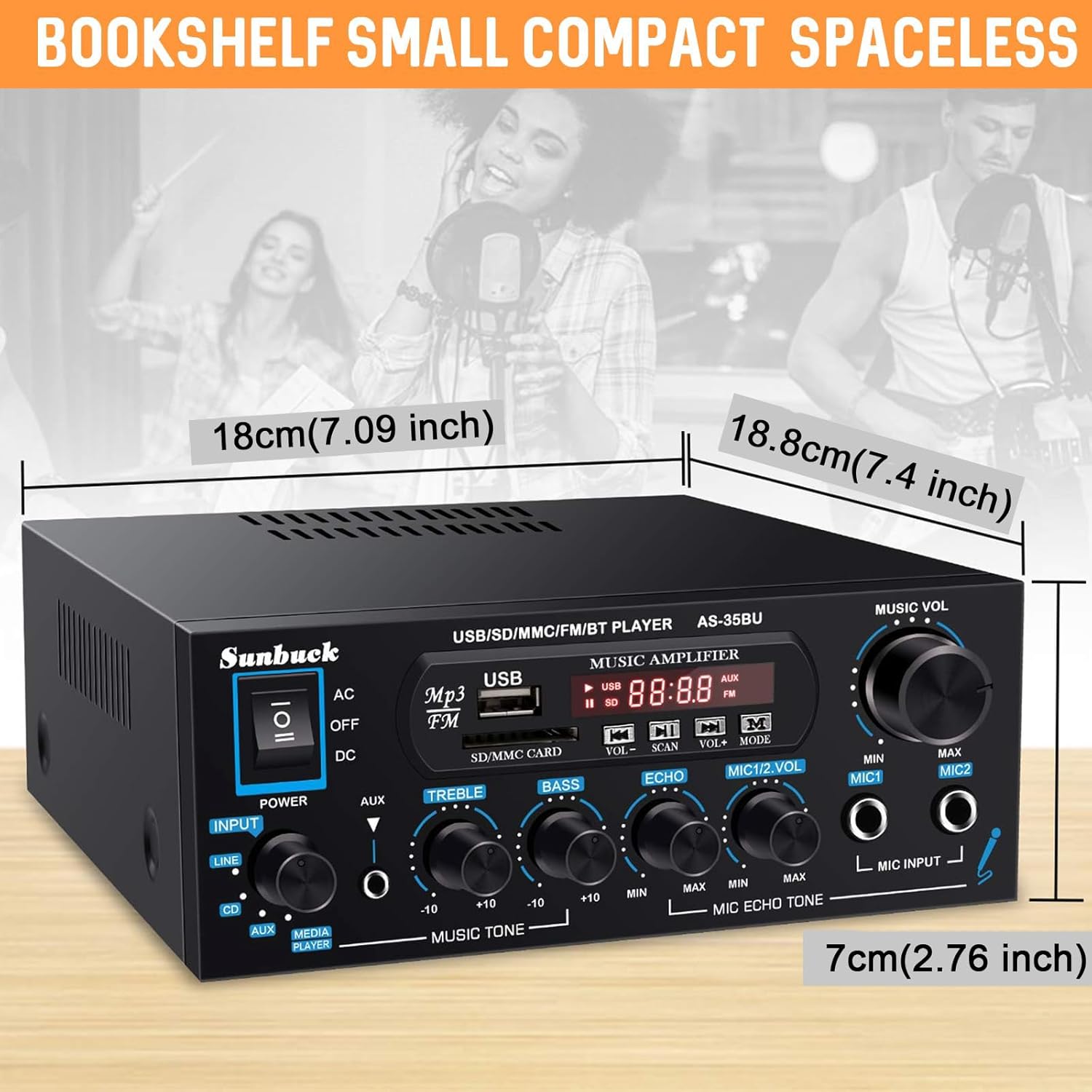
Image: Diagram showing the compact dimensions of the Sunbuck AS-35BU amplifier, highlighting its small footprint.
5. Konfigurazioa
5.1 Bozgorailuen konexioa
Connect your passive speakers to the speaker output terminals on the rear panel. Ensure correct polarity (positive to positive, negative to negative) for optimal sound quality.
- Strip approximately 1/2 inch (1.2 cm) of insulation from the ends of your speaker wires.
- Press down on the spring clip terminal to open the connection point.
- Insert the bare wire into the opening.
- Release the spring clip to secure the wire.
- Repeat for all four connections (Left +, Left -, Right +, Right -).
5.2 Audio Sarrerako Konexioa
Connect your audio sources to the appropriate RCA inputs on the rear panel.
- CD sarrera: Use RCA cables to connect a CD player or other audio device.
- LINE sarrera: Use RCA cables to connect devices like laptops, TVs, or projectors with AV audio output.
- AUX Input (Front Panel): Use a 3.5mm to 3.5mm audio cable to connect portable devices like smartphones or tablets to the front panel AUX jack.

Image: Diagram illustrating various input and output connections for the Sunbuck AS-35BU amplifier, including RCA, speaker terminals, and compatible devices.
5.3 Energia-konexioa
Korrontera konektatu aurretik, ziurtatu bolumenatage conversion switch on the rear panel is set correctly for your region (230V or 115V). Then, connect the provided AC power plug to the amplifikatzailea eta hormako hartune bat.
5.4 FM antenaren konexioa
Connect the included FM antenna to the FM ANT coaxial input on the rear panel for radio reception.
6. Funtzionamendu-argibideak
6.1 Piztu/Itzali
Flip the power switch on the front panel to the 'ON' position to power on the amplifier. The digital display will illuminate. Flip to 'OFF' to power down.
6.2 Sarrera hautatzea
Rotate the 'INPUT' knob on the front panel to select your desired audio source: 'MEDIA PLAYER' (for USB/SD/Bluetooth/FM), 'AUX', 'CD', or 'LINE'.
6.3 Bolumen eta tonuaren kontrola
Adjust the 'MUSIC VOL' knob to control the overall output volume. Use the 'TREBLE' and 'BASS' knobs to fine-tune the high and low frequencies of your music.
6.4 USB/SD/MMC Playback
Insert a USB drive or SD/MMC card containing MP3 audio files into the respective slots on the front panel. The amplifier will automatically switch to 'MEDIA PLAYER' mode and begin playback. Use the control buttons (VOL+/-, SCAN, MODE, Next/Previous) to navigate and control playback.
6.5 Bluetooth konexioa
Bluetooth gailu bat konektatzeko:
- Switch the input selector to 'MEDIA PLAYER'. The display will show 'BLUE' indicating Bluetooth mode.
- Zure gailu mugikorrean (smartphone-a, tableta, ordenagailu eramangarria), gaitu Bluetooth-a eta bilatu eskuragarri dauden gailuak.
- Select 'AS-35BU' from the list of devices to pair. Once connected, you will hear a confirmation tone.
- Orain audioa haririk gabe erreproduzitu dezakezu zure gailutik amplifier. The wireless range is approximately 40 feet (12 meters). Note that signal and volume may be intermittent if there are physical obstructions like walls between the devices.

Image: Visual representation of the Sunbuck AS-35BU amplifier connecting wirelessly to various devices via Bluetooth, including smartphones, tablets, and laptops.
6.6 FM irratiaren funtzionamendua
FM irratiaren funtzioa erabiltzeko:
- Switch the input selector to 'MEDIA PLAYER' and then press the 'MODE' button until 'FM' is displayed.
- Press the 'SCAN' button to automatically scan and save available FM stations as presets.
- Use the 'Next/Previous Track' buttons on the front panel or the remote control to cycle through the saved presets. For direct frequency input, use the number pad on the remote control.
6.7 Mikrofono eta Karaoke funtzioa
The amplifier supports two microphone inputs for karaoke or public address.
- Plug your 1/4" (6.35mm) microphones into the 'MIC INPUT' jacks on the front panel.
- Adjust the 'MIC 1/2 VOL' knob to control the microphone volume.
- Use the 'ECHO' knob to add or remove echo effect to the microphone sound.
6.8 Urruneko kontrolaren erabilera
The included remote control provides convenient access to various functions from a distance. It allows for direct input of FM frequencies, track navigation, volume control, and mode selection.

Image: Step-by-step guide for installing the battery in the remote control, ensuring proper functionality.
7. Arazoak
If you encounter any issues with your Sunbuck AS-35BU amplifier, please refer to the table below for common problems and their solutions.
| Arazoa | Kausa posiblea | Irtenbidea |
|---|---|---|
| Botererik ez | Kable elektrikoa ez dago konektatuta; Etengailua itzalita; Bolumen okerratage aukeraketa. | Ziurtatu kablea ondo konektatuta dagoela. Piztu etengailua. Egiaztatu bolumenatage switch (230V/115V) is set correctly. |
| Ez dago soinu irteerarik | Incorrect input selected; Volume too low; Speaker wires loose or incorrect polarity. | Select the correct input source. Increase 'MUSIC VOL' knob. Check speaker wire connections and polarity. |
| Bluetooth konexio arazoak | Gailua ez dago parekatze moduan; Amplifier too far from device; Obstructions. | Ziurtatu amplifier is in 'BLUE' mode. Move device closer to amplifier. Remove obstructions. Try re-pairing. |
| FM irratiaren harrera eskasa | Antenna not connected or positioned poorly; Weak signal. | Connect FM antenna securely. Adjust antenna position for better reception. Perform a new auto-scan for stations. |
| Soinu distortsionatua | Volume too high; Tone controls set incorrectly; Poor audio source quality. | Reduce 'MUSIC VOL'. Adjust 'TREBLE' and 'BASS' knobs. Test with a different audio source. |
8. Zehaztapenak
- Eredua: AS-35BU
- Potentzia irteera: Max 400W x 2 (RMS 60W x 2)
- Bluetooth bertsioa: 5.0 (Wireless range: 40 feet / 12 meters)
- Sarrerak: 2 x RCA Audio (CD, Line), 2 x Microphone (1/4"), USB2.0, SD Card, Bluetooth 5.0, FM Radio, AUX (3.5mm front)
- Irteerak: 2-Channel Speaker Output
- Neurriak (L x W x H): 6.1 x 5.31 x 2.17 hazbete (15.5 x 13.5 x 5.5 cm)
- Pisua: 2.2 libra (1 kg)
- Fabrikatzailea: JS Electronics Limited
9. Mantentzea eta Zainketa
Zure iraupena eta errendimendu optimoa ziurtatzeko amplifizer-a, jarraitu mantentze-jarraibide hauek:
- Garbiketa: Aldian-aldian garbitu kanpoaldea amplifier with a soft, dry cloth. Do not use abrasive cleaners, waxes, or solvents.
- Aireztapena: Keep the ventilation openings clear of dust and debris. Ensure adequate space around the unit for proper airflow.
- Biltegiratzea: gordez gero amplifier for an extended period, disconnect it from the power source and store it in a cool, dry place away from direct sunlight and extreme temperatures.
- Manipulazioa: Kontu handiz maneiatu unitatea. Saihestu erortzea edo kolpe bortitzak jasotzea.
10. Bermea eta Laguntza
Sunbuck products are manufactured with high-quality standards. For specific warranty information, please refer to the documentation included with your purchase or contact the retailer. If you require technical support or have questions not covered in this manual, please contact Sunbuck customer service or the authorized dealer from whom you purchased the product. Provide your model number (AS-35BU) and a detailed description of the issue for faster assistance.


