1. Sarrera
The Celly FLIP1 True Wireless Bluetooth Earbuds provide a wireless audio experience with Bluetooth 5.0 connectivity. Designed for portability and convenience, these earbuds feature a compact charging case with a lanyard and support both stereo and mono audio modes. They are suitable for various activities, including sports, and offer integrated controls for music and call management.
This manual provides instructions for setting up, operating, and maintaining your Celly FLIP1 earbuds.
2. Paketearen edukia
Egiaztatu elementu guztiak paketean daudela:
- Celly FLIP1 True Wireless Earbuds (Left and Right)
- Portable Charging Case with Lanyard
- MikroUSB kargatzeko kablea
- Erabiltzailearen eskuliburua (dokumentu hau)
3. Produktua amaitu daview
The Celly FLIP1 earbuds and charging case are designed for ease of use and portability. The earbuds fit securely in the ear, and the charging case protects them while providing additional battery life.

Image 3.1: Celly FLIP1 earbuds removed from the open charging case. The earbuds are white with a small blue indicator light on one, and the charging case is white and silver with battery indicator icons.
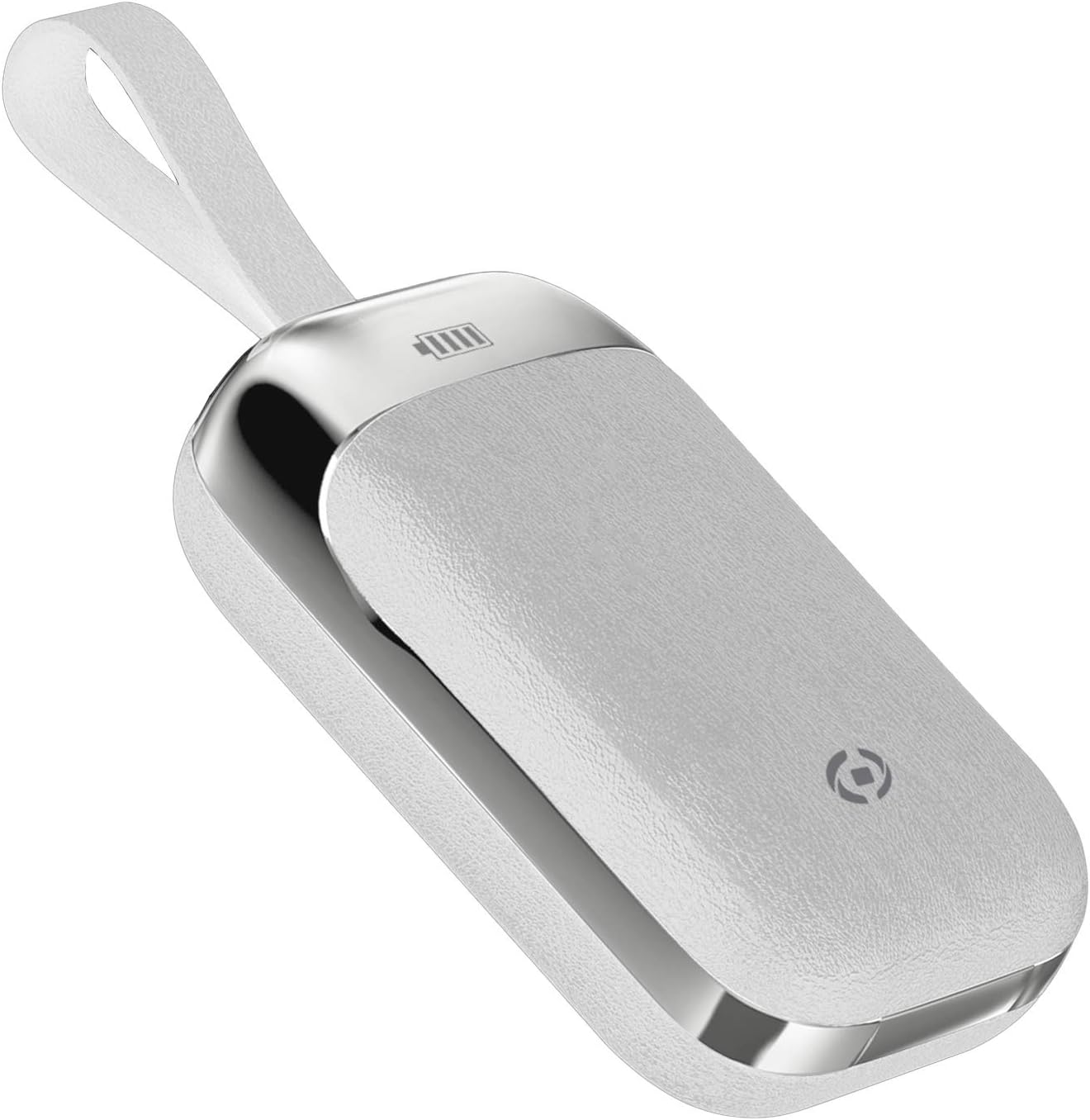
Image 3.2: The Celly FLIP1 charging case in a closed position, showing its compact design and integrated lanyard for easy carrying.

3.3 irudia: Leherketa bat view illustrating the internal components of a Celly FLIP1 earbud, including the Bluetooth 5.0 chip, battery, and speaker driver.
4. Konfigurazioa
4.1 Entzungailuak eta zorroa kargatzea
Lehenengo aldiz erabili aurretik, kargatu guztiz entzungailuak eta kargatzeko zorroa.
- Jarri entzungailuak kargatzeko zorroan. Ziurtatu behar bezala sartuta daudela dagokien zirrikituetan.
- Connect the MicroUSB charging cable to the charging port on the case and the other end to a USB power source (e.g., computer USB port, wall adapter).
- The indicator lights on the case and/or earbuds will show the charging status. Refer to the case for battery level indicators.
- A full charge typically takes approximately 1.5 hours. The charging case has a 400mAh capacity, and each earbud has a 50mAh battery.
Once fully charged, the earbuds provide approximately 4 hours of continuous music playback or talk time.
4.2 Bluetooth gailu batekin parekatzea
To connect your Celly FLIP1 earbuds to your smartphone or other Bluetooth-enabled device:
- Ziurtatu entzungailuak kargatuta daudela.
- Open the charging case and remove both earbuds. They will automatically power on and enter pairing mode. You may hear an audio prompt indicating they are ready to pair.
- Zure gailuan, joan Bluetooth ezarpenetara.
- Bilatu new devices. Select "Celly FLIP1" (or similar name) from the list of available devices.
- Once connected, you will hear a confirmation tone, and the earbuds' indicator lights may change.
- Parekatzeak huts egiten badu, jarri entzungailuak berriro zorroan, itxi eta errepikatu urratsak.
The earbuds have a wireless range of up to 10 meters (33 feet) from your connected device.
5. Funtzionamendu-argibideak
The Celly FLIP1 earbuds feature multifunction keys for controlling audio playback and calls.
5.1 Piztu/Itzali
- Piztu: Remove earbuds from the charging case. They will power on automatically. Alternatively, press and hold the multifunction button on each earbud for a few seconds.
- Itzali: Place earbuds back into the charging case. They will power off automatically. Alternatively, press and hold the multifunction button on each earbud for several seconds until the indicator light turns off.
5.2 Musika erreproduzitzea
- Erreproduzitu/Pausatu: Press the multifunction button once on either earbud.
- Hurrengo ibilbidea: Double-press the multifunction button on the right earbud.
- Aurreko pista: Double-press the multifunction button on the left earbud.
- Bolumen kontrola: Bolumena normalean konektatutako gailuaren bidez kontrolatzen da.
5.3 Deien kudeaketa
- Deia erantzun/amaitu: Press the multifunction button once on either earbud.
- Deia baztertu: Press and hold the multifunction button on either earbud for approximately 2 seconds.
- Ahots laguntzailea: Triple-press the multifunction button on either earbud to activate your device's voice assistant (e.g., Siri, Google Assistant).
5.4 Mono/Estereo modua
The Celly FLIP1 earbuds support both stereo (using both earbuds) and mono (using a single earbud) modes. Each earbud has an integrated microphone.
- To use in mono mode, simply remove one earbud from the case and leave the other in the case. The single earbud will connect to your device.
- To switch back to stereo, remove the second earbud from the case. It will automatically connect to the first earbud and your device.

Image 5.1: A user wearing Celly FLIP1 earbuds while interacting with a smartphone, demonstrating typical use.
6. Mantentzea
Mantentze egokiak zure entzungailuen iraupena eta errendimendu optimoa bermatzen ditu.
- Garbiketa: Erabili zapi leun, lehor eta lihorik gabeko bat entzungailuak eta kargatzeko zorroa garbitzeko. Ez erabili garbitzaile urratzailerik, alkoholik edo disolbatzaile kimikorik.
- Biltegiratzea: When not in use, always store the earbuds in their charging case to protect them from dust, scratches, and damage.
- Saihestu hezetasuna: Do not expose the earbuds or charging case to water, rain, or excessive humidity.
- Tenperatura: Avoid storing or using the device in extreme temperatures (hot or cold).
7. Arazoak
If you encounter issues with your Celly FLIP1 earbuds, refer to the following common solutions:
| Arazoa | Irtenbidea |
|---|---|
| Aurikularrak ez dira pizten. | Ensure earbuds are charged. Place them in the charging case and connect the case to a power source. |
| Aurikularrak ez dira gailuarekin parekatzen. | 1. Ensure Bluetooth is enabled on your device. 2. Place earbuds back in the case, close, then reopen and remove to re-enter pairing mode. 3. Forget/remove "Celly FLIP1" from your device's Bluetooth list and try pairing again. 4. Ensure earbuds are within 10 meters of your device. |
| Entzungailu bakarra dabil. | 1. Ensure both earbuds are charged. 2. Place both earbuds back in the charging case, close the lid, wait a few seconds, then open and remove both simultaneously. 3. Re-pair the earbuds with your device. |
| Bolumen baxua edo soinu-kalitate eskasa. | 1. Adjust the volume on your connected device. 2. Ensure earbuds are clean and free of debris. 3. Check the fit of the earbuds in your ears. |
| Kargatzeko kaxa ez da kargatzen ari. | 1. Ensure the MicroUSB cable is securely connected to both the case and the power source. 2. Try a different MicroUSB cable or power adapter. |
8. Zehaztapenak
| Ezaugarri | Xehetasuna |
|---|---|
| Ereduaren izena | FIP1 |
| Elementuaren eredu-zenbakia | FLIP1WH |
| Konektibitate Teknologia | Haririk gabekoa (Bluetooth 5.0) |
| Wireless Range | Gehienez 10 metro (33 oin) |
| Earbud bateriaren edukiera | 50 mAh (bakoitza) |
| Kargatzeko kasua bateriaren edukiera | 400 mAh |
| Kargatzeko Denbora | Approx. 1.5 hours (earbuds and case) |
| Music Playback / Talk Time | Gutxi gorabehera. 4 ordu |
| Materiala | Plastikoa |
| Kolorea | Zuria |
| Elementuaren pisua | 50 g |
| Produktuaren neurriak (kaxa) | 10 x 17 x 3.5 cm |
| Dakarten osagaiak | Charging box, Headphones, MicroUSB Cable |
9. Segurtasun informazioa
Mesedez, irakurri eta jarraitu segurtasun-jarraibide hauek zure gailuari kalterik edo zeure buruari kalterik ez egiteko:
- Ez desmuntatu, konpondu edo aldatu produktua.
- Mantendu gailua muturreko tenperaturetatik, eguzki-argitik zuzenean eta sugar irekietatik urrun.
- Saihestu gailua ura edo beste likido batzuen eraginpean jartzea.
- Do not use the device at high volume for extended periods to prevent hearing damage.
- Mantendu haurren eta maskoten eskura.
- Tokiko araudien arabera bota produktua eta bateriak arduraz.
10. Bermea eta Laguntza
Celly products are designed and manufactured to the highest quality standards. For information regarding warranty coverage, technical support, or service, please refer to the warranty card included with your purchase or visit the official Celly webgunea.
Gorde erosketaren egiaztagiria bermearen erreklamazioetarako.


