1. Sarrera
This manual provides essential information for the safe and efficient operation of your Cecotec Ready Warm 800 Thermal Connected 600W Digital Heater. Please read these instructions carefully before using the appliance and retain them for future reference. This heater is designed to provide supplementary heating for indoor spaces and features Wi-Fi connectivity for remote control.
2. Segurtasun-argibideak
OHARRA: Segurtasun-jarraibide hauek ez betetzeak sutea, deskarga elektrikoa edo lesioak eragin ditzake.
- Ziurtatu liburukiatagE-tiketan adierazitako e-ak zure sare nagusiaren bolumenarekin bat egiten dutage aparatua konektatu aurretik.
- Do not cover the heater. Overheating can occur if the heater is covered or obstructed.
- Keep flammable materials such as furniture, curtains, and bedding at least 1 meter (3 feet) away from the heater.
- Do not operate the heater with a damaged cord or plug, or after the appliance malfunctions or has been dropped or damaged in any manner.
- Tresna hau ez da gaitasun fisiko, sentsorial edo mental murriztua duten edo esperientzia eta ezagutza falta duten pertsonek (haurrak barne) erabiltzeko, baldin eta haien segurtasunaz arduratzen den pertsona batek gailuaren erabilerari buruz gainbegiratu edo jarraibiderik eman ez badu.
- Haurrak gainbegiratu behar dira aparatuarekin jolasten ez dutela ziurtatzeko.
- Ez erabili berogailua bainu, dutxa edo igerileku baten inguruan.
- Deskonektatu beti berogailua erabiltzen ez duzunean edo garbitu aurretik.
- Do not insert any objects into the ventilation or exhaust openings as this may cause electric shock, fire, or damage to the heater.
3. Produktua amaitu daview
Familiarize yourself with the components of your Cecotec Ready Warm 800 Digital Heater.

This image shows the Cecotec Ready Warm 800 Digital Heater from a side angle, highlighting its slim profile and the integrated control panel on the right side. The heater is white with black vents at the top and stands on two white feet.

The heater is shown in a home environment, positioned on a wooden floor next to a person seated on a black armchair, illustrating its compact size and how it fits into a living space.
Kontrol-panela eta pantaila
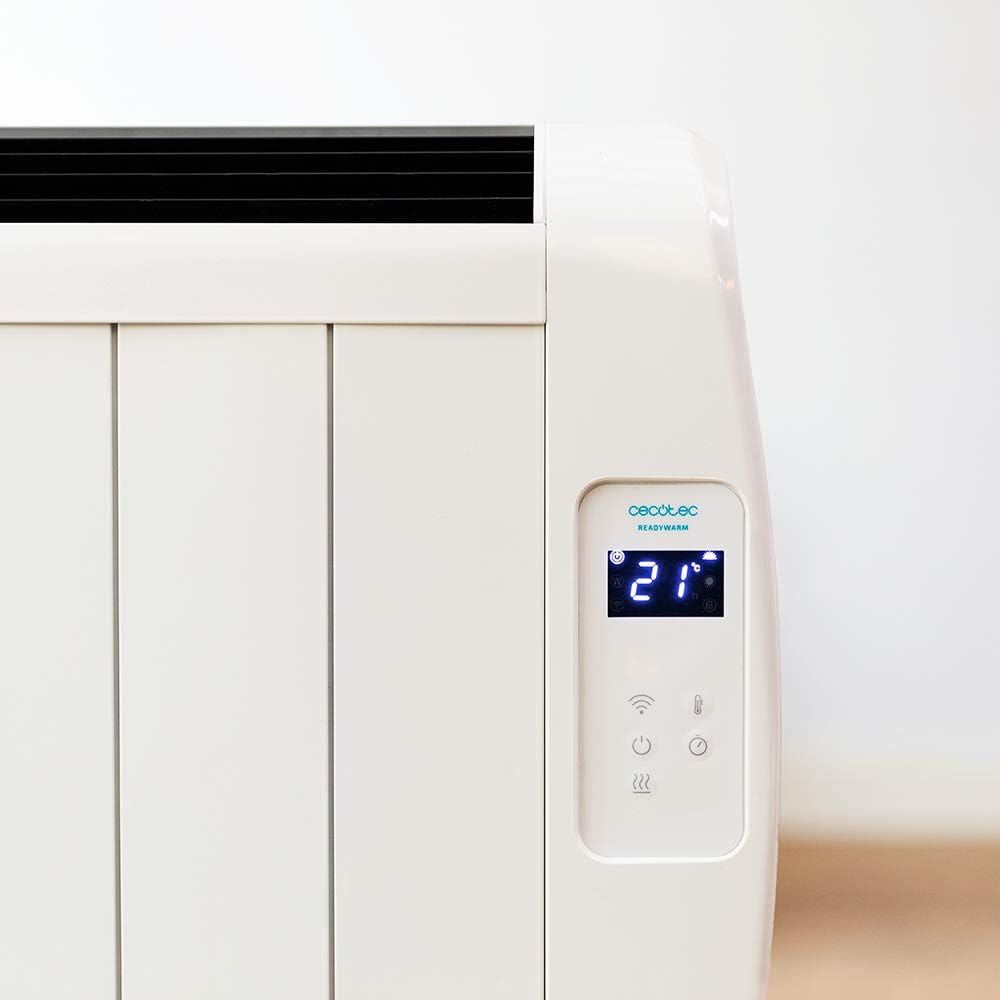
Xehetasun bat view of the heater's digital control panel, featuring a clear LCD screen showing '21' degrees Celsius, indicating the current temperature setting. Below the screen are touch-sensitive buttons for power, Wi-Fi, mode selection, and temperature adjustment.

This image focuses on the digital control panel, showing the LCD screen set to a timer function, displaying '04' hours. This indicates the heater is programmed to operate for a specific duration.
The digital display shows the current temperature, timer settings, and Wi-Fi status. The touch-sensitive buttons allow for easy control of the heater's functions.
Pizteko etengailua

A close-up shot of the heater's base, revealing the physical on/off power switch. This switch provides a direct way to cut power to the unit.
A physical power switch is located at the base of the unit for complete power disconnection.
4. Konfigurazioa
- Despaketatzea: Kontu handiz atera berogailua bere paketetik. Gorde ontzia biltegiratzeko edo garraiatzeko.
- Lekua: Place the heater on a firm, level surface. Ensure there is at least 1 meter (3 feet) of clear space around the heater from walls, furniture, and other objects. Do not place it directly under a power outlet.
- Potentzia-konexioa: Plug the power cord into a suitable 230V AC power outlet. Ensure the main power switch at the base of the unit is in the 'OFF' position before plugging in.
- Hasierako piztea: Flip the main power switch at the base of the unit to the 'ON' position. The digital display on the control panel should illuminate.
Dimensions for Placement

This image provides a clear diagram of the heater's physical dimensions: 63 cm in width, 10.5 cm in depth, and 53.5 cm in height, useful for planning placement.
5. Funtzionamendu-argibideak
Oinarrizko Funtzionamendua
- Piztu/Itzali: Sakatu pizteko botoia (U) kontrol-panelean berogailua piztu edo itzaltzeko.
- Tenperaturaren doikuntza: Erabili tenperatura gora (+) eta behera (-) buttons to set your desired room temperature. The display will show the set temperature.
- Modu aukeraketa: Press the mode button to cycle through available heating modes (e.g., Low, Medium, High, or Eco, depending on the model's specific programming).
- Tenporizadorearen funtzioa: Press the timer button to set an operating duration. Use the temperature adjustment buttons to set the desired hours (e.g., 0-24 hours). The heater will automatically turn off after the set time.
Wi-Fi konexioa eta aplikazioen kontrola
The Cecotec Ready Warm 800 features Wi-Fi connectivity, allowing you to control the heater remotely via a smartphone application.

A hand holding a smartphone with the Cecotec Ready Warm mobile application open. The app interface shows a large dial indicating '33°C' and various control options, demonstrating remote control capabilities.
- Deskargatu aplikazioa: Bilatu the 'Cecotec Ready Warm' app in your smartphone's app store (iOS or Android).
- Erregistratu/Hasi saioa: Sortu kontu bat edo hasi saioa dagoeneko baduzu.
- Gehitu gailua: Follow the in-app instructions to add your Ready Warm 800 heater. This typically involves putting the heater into pairing mode (often by pressing and holding the Wi-Fi button on the control panel) and connecting it to your home Wi-Fi network.
- Urruneko kontrola: Once connected, you can control the heater's power, temperature, modes, and timer functions from your smartphone.
6. Mantentzea
Mantentze-lan erregularrak berogailuaren errendimendu optimoa eta iraupen luzea bermatzen ditu.
- Garbiketa: Deskonektatu beti berogailua eta utzi guztiz hozten garbitu aurretik. Erabili oihal leun eta lehorra.amp kanpoko gainazalak garbitzeko zapi bat. Ez erabili garbitzaile edo disolbatzaile urratzailerik.
- Hautsa kentzea: Periodically use a vacuum cleaner with a brush attachment to remove dust from the air intake and exhaust vents.
- Biltegiratzea: Berogailua denbora luzez gordetzen baduzu, deskonektatu, garbitu ondo eta gorde leku fresko eta lehor batean, hobe jatorrizko ontzian.
- Erabiltzaileak ez du zerbitzurik gabeko piezarik: Ez saiatu berogailua zeuk irekitzen edo konpontzen. Mantendu konponketa guztiak langile kualifikatuen esku.
7. Arazoak
If you encounter issues with your heater, refer to the following table for common problems and solutions.
| Arazoa | Kausa posiblea | Irtenbidea |
|---|---|---|
| Berogailua ez da pizten. | No power supply. Main power switch off. | Check if the power cord is securely plugged in. Ensure the main power switch at the base is ON. Check the wall outlet. |
| Bero irteerarik ez. | Temperature setting too low. Overheat protection activated. | Increase the desired temperature setting. Unplug the heater, let it cool for 30 minutes, then plug it back in. Ensure vents are not blocked. |
| Wi-Fi konexioa huts egiten du. | Incorrect Wi-Fi password. Heater too far from router. App issues. | Verify Wi-Fi password. Move heater closer to the router. Restart the app and heater. Ensure your router is 2.4GHz compatible. |
| Berogailua ustekabean itzaltzen da. | Timer function activated. Overheat protection. | Check if the timer is set. If not, unplug the heater, let it cool, and check for obstructions. |
8. Zehaztapenak
| Ezaugarri | Xehetasuna |
|---|---|
| Marka | Cecotec |
| Modelo zenbakia | 05372 |
| Potentzia / Wattage | 600W |
| liburukiatage | 230 Volt |
| Produktuaren neurriak | 63 x 10.5 x 53.5 cm |
| Pisua | 3.4 kg |
| Ezaugarri bereziak | Portable, Wireless (Wi-Fi Control), LCD Screen |
| Berotze metodoa | Distiratsua |
| Barruko/Kanpoko erabilera | Barruan |
| Muntatze Mota | Wall Mount (optional, accessories not included) / Freestanding |
9. Bermea eta Laguntza
Your Cecotec Ready Warm 800 Digital Heater is covered by a manufacturer's warranty. Please refer to the warranty card included with your purchase for specific terms and conditions, including the warranty period and coverage details.
For technical support, troubleshooting assistance beyond this manual, or warranty claims, please contact Cecotec customer service. Contact information can typically be found on the Cecotec official webgunean edo zure produktuaren ontzian.
Laguntzarekin harremanetan jartzean, eduki eskura zure produktuaren modelo zenbakia (05372) eta erosketaren frogagiria.


