Sarrera
This manual provides detailed instructions for the setup, operation, and maintenance of your BUFFBEE Glow Alarm Clock HRS-BLACK. Please read this manual thoroughly before using the product to ensure proper function and longevity.
Produktua amaituview
The BUFFBEE Glow Alarm Clock is a versatile device combining a digital alarm clock, FM radio, and a 7-color night light. It is designed to enhance your sleep and wake-up experience with customizable features.
Ezaugarri nagusiak:
- 3-en-1 funtzionaltasuna: Digital alarm clock, FM radio, and night light.
- 7 koloreko gaueko argia: Adjustable with 5 brightness levels.
- Alarma bikoitzak: Set two independent alarms with choice of FM radio, built-in beep, or bird sounds.
- Adjustable Display Dimmer: 0-100% brightness control for the time display.
- Argizatutako botoiak: For easy operation in low light conditions.
- Siesta tenporizadorea: Quick nap setting from 10 to 120 minutes.
- Auto-Off Sleep Timer: Automatically turns off night light and FM radio after a set duration.
- USB kargatzeko ataka: Kanpoko gailu elektronikoak kargatzeko.
- Potentzia aukerak: AC powered with AAA battery backup (batteries not included).
Paketearen edukia:
- 1 x BUFFBEE Glow Alarm Clock
- 1 x korronte egokitzailea
- 1 x Erabiltzailearen eskuliburua
Osagaien identifikazioa:
Beheko irudia kontsultatu informazio gehiago lortzekoview of the alarm clock's buttons and display.

Irudia: Aurrealdea view of the BUFFBEE Glow Alarm Clock, showing the digital time display, alarm indicators, and control buttons on the top panel. The top edge features a light strip.
Konfigurazioa
1. Potentzia-konexioa:
- Connect the provided power adapter to the DC input port on the back of the alarm clock.
- Konektatu egokitzailea hormako hartune estandar batera.
2. Battery Backup (Optional):
Energia itzaltzean etenik gabeko funtzionamendurakotages, install 3 AAA batteries (not included) into the battery compartment on the bottom of the unit. The clock will maintain time and alarm settings, and the alarm will still function, but the display and night light may be limited to conserve power.

Irudia: Atzealdea view of the alarm clock showing the power input and battery compartment, alongside a power adapter and three AAA batteries (not included).
3. Hasierako orduaren ezarpena:
- When first powered on, the display will show a default time.
- Eduki sakatuta ORDUA button (usually located on the top panel) until the hour digits flash.
- Erabili +/- buttons (or similar navigation buttons) to adjust the hour.
- Sakatu ORDUA berriro ordua berresteko eta minutuen doikuntzara joateko.
- Erabili +/- minutuak doitzeko botoiak.
- Sakatu ORDUA behin gehiago berresteko eta ordua ezartzeko modutik irteteko.
- 12 orduko eta 24 orduko formatuaren artean aldatzeko, sakatu 12/24H button (if available, often combined with time set or a dedicated button).
Funtzionamendu-argibideak
1. Setting Alarms (Alarm 1 & Alarm 2):
Erlojuak bi alarma independente onartzen ditu.
- Sakatu 1. ALARMA botoia (edo 2. ALARMA) once to display the current alarm time.
- Eduki sakatuta 1. ALARMA (edo 2. ALARMA) button until the hour digits flash.
- Erabili +/- ordua doitzeko botoiak.
- Sakatu ALARMA botoia berriro sakatu ordua berresteko eta minutuen doikuntzara joateko.
- Erabili +/- minutuak doitzeko botoiak.
- Sakatu ALARMA button again to select the alarm sound: FM radio, built-in beep, or bird sounds. Use +/- aukeren artean ziklatzeko.
- Sakatu ALARMA button one more time to confirm and activate the alarm. An alarm icon will appear on the display.
- To turn off an active alarm, press the corresponding ALARMA button. The alarm icon will disappear.
2. Errepikapen funtzioa:
Alarma jotzen duenean, sakatu botoi handia SNOOZE / ARGIA button on top to temporarily silence the alarm for 9 minutes. The alarm will sound again after the snooze period.
3. Night Light Operation:
The alarm clock features a 7-color night light with adjustable brightness.

Image: The alarm clock shown with its top light strip illuminated in various colors, demonstrating the 7-color night light feature.
- Sakatu ARGIA button (often combined with SNOOZE or a dedicated button) to turn the night light on/off.
- When the night light is on, press the ARGIA button repeatedly to cycle through the 7 available colors.
- To adjust the brightness, use the +/- buttons while the night light is active. There are 5 brightness levels.
4. FM Irratia:
The built-in FM radio allows you to listen to your favorite stations.
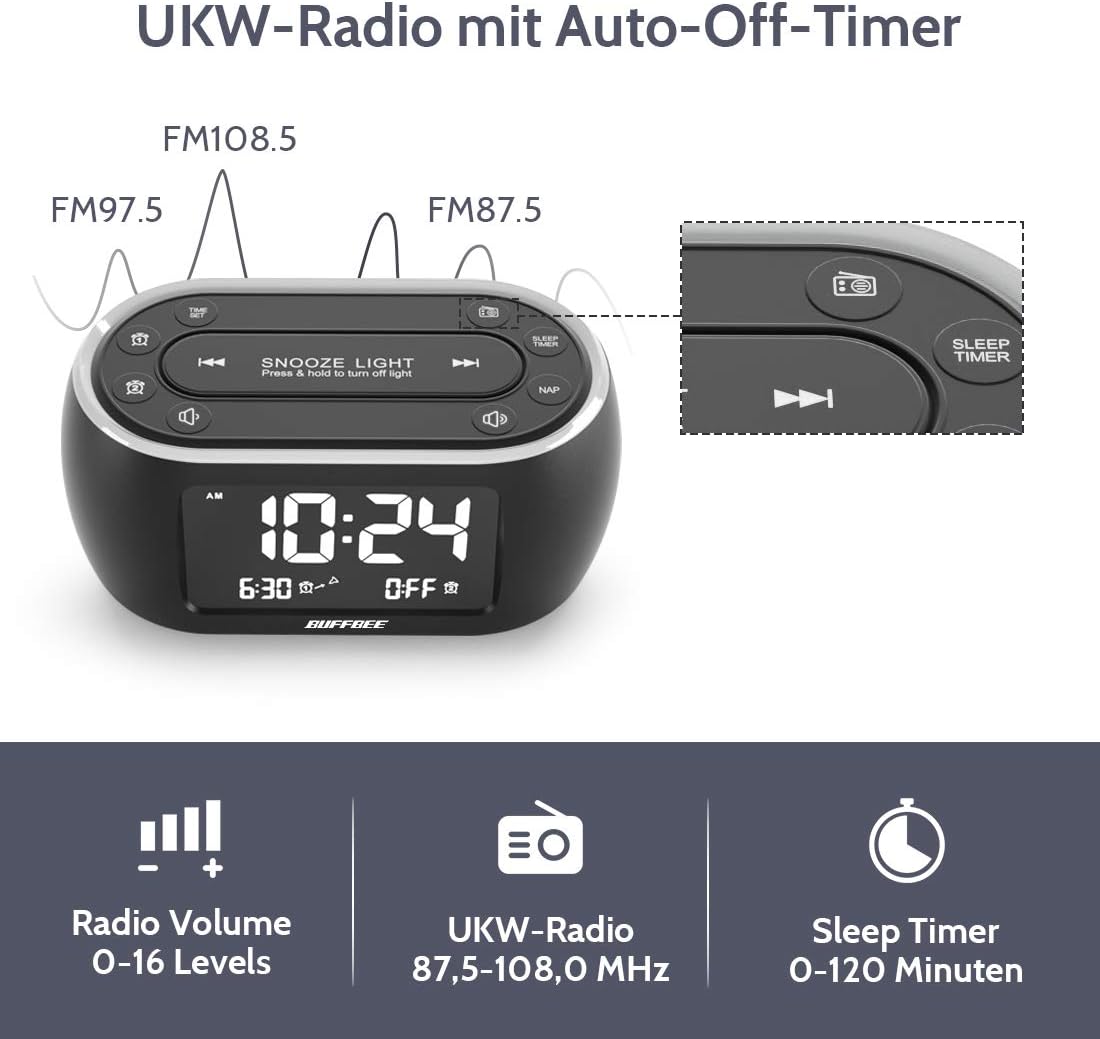
Image: The alarm clock display showing FM radio frequencies (FM108.5, FM97.5, FM87.5) and icons for radio volume and sleep timer.
- Sakatu IRRATIA button to turn the FM radio on/off.
- Sakatu ESKANETATU button (or similar) to automatically scan and save available FM stations.
- Erabili AURREAN / HURRENEAN buttons to navigate through saved stations or manually tune.
- Doitu bolumena BOLUMENA +/- buttons. The volume can be set from 0 to 16 levels.
5. Nap Timer:
The nap timer allows for quick, short sleep periods without affecting regular alarm settings.
- Sakatu NAP button. The display will show the default nap time (e.g., 10 minutes).
- Sakatu NAP button repeatedly to cycle through preset nap durations (e.g., 10, 20, 30, 60, 90, 120 minutes).
- The nap timer will start automatically after selection.
- To cancel the nap timer, press the NAP button until "OFF" is displayed.
6. Auto-Off Sleep Timer:
Set a timer for the night light and/or FM radio to automatically turn off after a specified duration.
- While the night light or FM radio is active, press the LO TEMPORIZADOREA botoia.
- Sakatu LO TEMPORIZADOREA button repeatedly to cycle through available durations (e.g., 15, 30, 60, 90, 120 minutes, or OFF).
- The selected duration will be displayed, and the timer will begin. The night light and/or FM radio will turn off automatically when the timer expires.
7. Display Dimmer:
Adjust the brightness of the main time display from 0% to 100%.

Image: Six different views of the alarm clock display, illustrating the range of brightness from very dim to fully bright, and also showing the night light dimmer.
Erabili dedikatua. DIMMER dial or DIMMER +/- buttons (if available) to adjust the display brightness to your preference. This allows for comfortable viewedozein argiztapen-egoeretan aritzea.
8. USB Charging Port:
A USB port is located on the back of the unit for charging small electronic devices.

Image: The alarm clock with a smartphone plugged into its side USB port, indicating the charging function.
Connect your device's USB charging cable to the port. The clock must be powered by the AC adapter for the USB charging function to work.
Mantentzea
To ensure the longevity and optimal performance of your BUFFBEE Glow Alarm Clock, follow these maintenance guidelines:
- Garbiketa: Wipe the unit with a soft, dry cloth. Do not use abrasive cleaners, waxes, or solvents as they may damage the surface.
- Potentzia: Always disconnect the power adapter from the wall outlet before cleaning or if the unit will be unused for an extended period.
- Ingurumena: Keep the alarm clock away from direct sunlight, heat sources, and excessive moisture.
- Bateria ordezkatzea: If using battery backup, replace AAA batteries annually or when the battery indicator suggests low power. Ensure correct polarity when inserting new batteries.
Arazoak konpontzea
If you encounter issues with your BUFFBEE Glow Alarm Clock, refer to the following common problems and solutions:
| Arazoa | Kausa posiblea | Irtenbidea |
|---|---|---|
| Clock display is blank or flickering. | No power or loose connection. Low battery backup. | Ensure the power adapter is securely plugged into the clock and the wall outlet. Check if AAA batteries are installed correctly and have sufficient charge. |
| Alarmak ez du jotzen. | Alarm not activated. Alarm volume too low. | Verify that the alarm icon is displayed. Check the alarm volume setting. Ensure the correct alarm time is set. |
| FM irratiaren harrera eskasa da. | Weak signal. Antenna not extended. Interference. | Extend the FM antenna fully. Try repositioning the clock. Perform an auto-scan for stations again. |
| Gaueko argia ez dabil. | Light function turned off. | Press the LIGHT button to turn it on. Check if the brightness is set to 0%. |
| USB kargatzeak ez du funtzionatzen. | Clock not connected to AC power. Device not compatible. | Ensure the clock is powered by the AC adapter. Check if your device is compatible with standard USB charging. |
Zehaztapenak
| Ezaugarri | Xehetasuna |
|---|---|
| Marka | BUFFBEE |
| Modelo zenbakia | HRS-BLACK |
| Neurriak (L x W x H) | 12 x 3.81 x 6 cm (4.72 x 1.5 x 2.36 hazbete) |
| Pisua | 330 gramo (0.73 lb) |
| Potentzia Sarrera | AC 100-240V, 50/60Hz |
| Bateria babeskopia | 3 x AAA bateria (ez daude barne) |
| Bistaratzeko mota | Digitala |
| Pantailaren distira | % 0-100 erregulagarria |
| Gaueko argi koloreak | 7 kolore |
| Gaueko argiaren distira | 5 maila erregulagarriak |
| FM Irrati Maiztasuna | 87.5-108.0 MHz |
| Alarmaren bolumena | 0-16 maila erregulagarriak |
| Ezaugarri bereziak | Ambient light, Dual Alarm, Nap Timer, Sleep Timer, USB Charging Port |
Bermea eta Laguntza
BUFFBEE products are designed for reliability and performance. For specific warranty information, please refer to the documentation included with your purchase or contact BUFFBEE customer support.
If you require technical assistance or have questions regarding your BUFFBEE Glow Alarm Clock, please visit the official BUFFBEE webwebgunean edo jarri harremanetan bezeroarentzako arreta-zerbitzuarekin. Harremanetarako datuak normalean produktuaren ontzian edo fabrikatzailearen eskuliburuan aurkitzen dira. webgunea.


