Sarrera
The iTouch Air 3 Smartwatch is designed to help you track your health and fitness, stay connected, and manage your daily activities. This manual provides essential information for setting up, operating, and maintaining your device.

Image: iTouch Air 3 Smartwatch with rose gold case and mesh band, displaying time and fitness metrics.

Image: Promotional image introducing the iTouch Air 3 Smartwatch.
Kutxan dagoena
- 1 iTOUCH Air 3 Smartwatch
- 1 USB-Powered Charging Cable
- Warranty/Quick Start Guide
Konfigurazioa
1. Zure erloju adimenduna kargatzea
Before first use, fully charge your iTouch Air 3 Smartwatch. Connect the magnetic charging cable to the charging pins on the back of the watch and plug the USB end into a power source.

Image: The iTouch Air 3 Smartwatch connected to its magnetic charging cable.
2. Downloading the iTouch Wearables App
The iTouch Air 3 Smartwatch requires the iTouch Wearables app for full functionality. Download the app from the App Store (for iOS devices) or Google Play Store (for Android devices).

Image: A smartphone showing the iTouch Wearables app interface alongside the smartwatch.
3. Pairing with Your Phone
Open the iTouch Wearables app on your smartphone. Follow the on-screen instructions to pair your smartwatch via Bluetooth. Ensure Bluetooth is enabled on your phone. The app requires iOS 13 or higher for iPhones and Android 9 or higher for Android devices.
Bideoa: Amaiera batview of the iTouch Air 3 Smartwatch features, including connectivity and app integration.
Zure erloju adimenduna erabiltzea
Oinarrizko Nabigazioa
The iTouch Air 3 features a vibrant LCD display. Swipe left, right, up, or down to navigate through menus and access different features. Tap to select options.
Erlojuaren aurpegiak pertsonalizatzea
Personalize your smartwatch by choosing from a variety of built-in watch faces or accessing a larger library through the iTouch Wearables app. You can also create your own custom watch faces.

Image: A collage showing various digital watch faces available for the iTouch Air 3 Smartwatch.
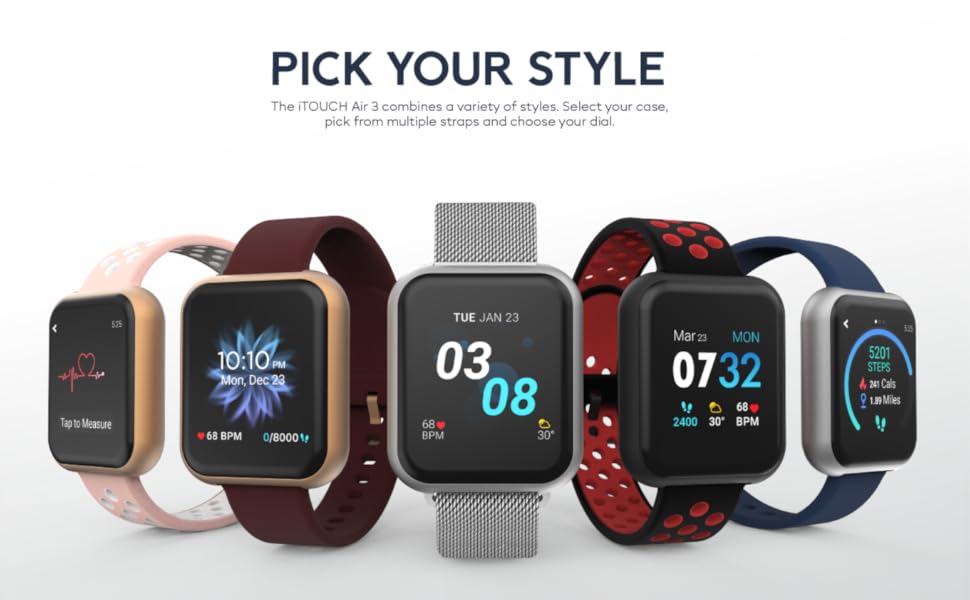
Irudia: Ilustrazio batek erakusten duasing different styles and customizable options for the iTouch Air 3 Smartwatch.
Jakinarazpenak
Receive notifications for calls, text messages, and social media alerts directly on your wrist. Configure notification settings within the iTouch Wearables app.

Image: Two iTouch Air 3 smartwatches showing incoming notifications from social media and messages.

Image: An illustration highlighting notifications and extended battery life features of the iTouch Air 3 Smartwatch.
Hygiene Reminders
Set reminders to wash your hands or move around if you've been sedentary for too long, promoting better health habits.
Konektatutako GPSa
Utilize the connected GPS feature to track your routes and distance during outdoor activities by syncing with your phone's GPS.
Sports and Workout Modes
The iTouch Air 3 offers various sports and workout modes to accurately track your activity. Select the appropriate mode for your exercise to monitor calories burned, heart rate, and duration.
- Kirol moduak: Basketball, Baseball, Football, Soccer
- Entrenamendu moduak: Running, Elliptical, Cycling, Hiking
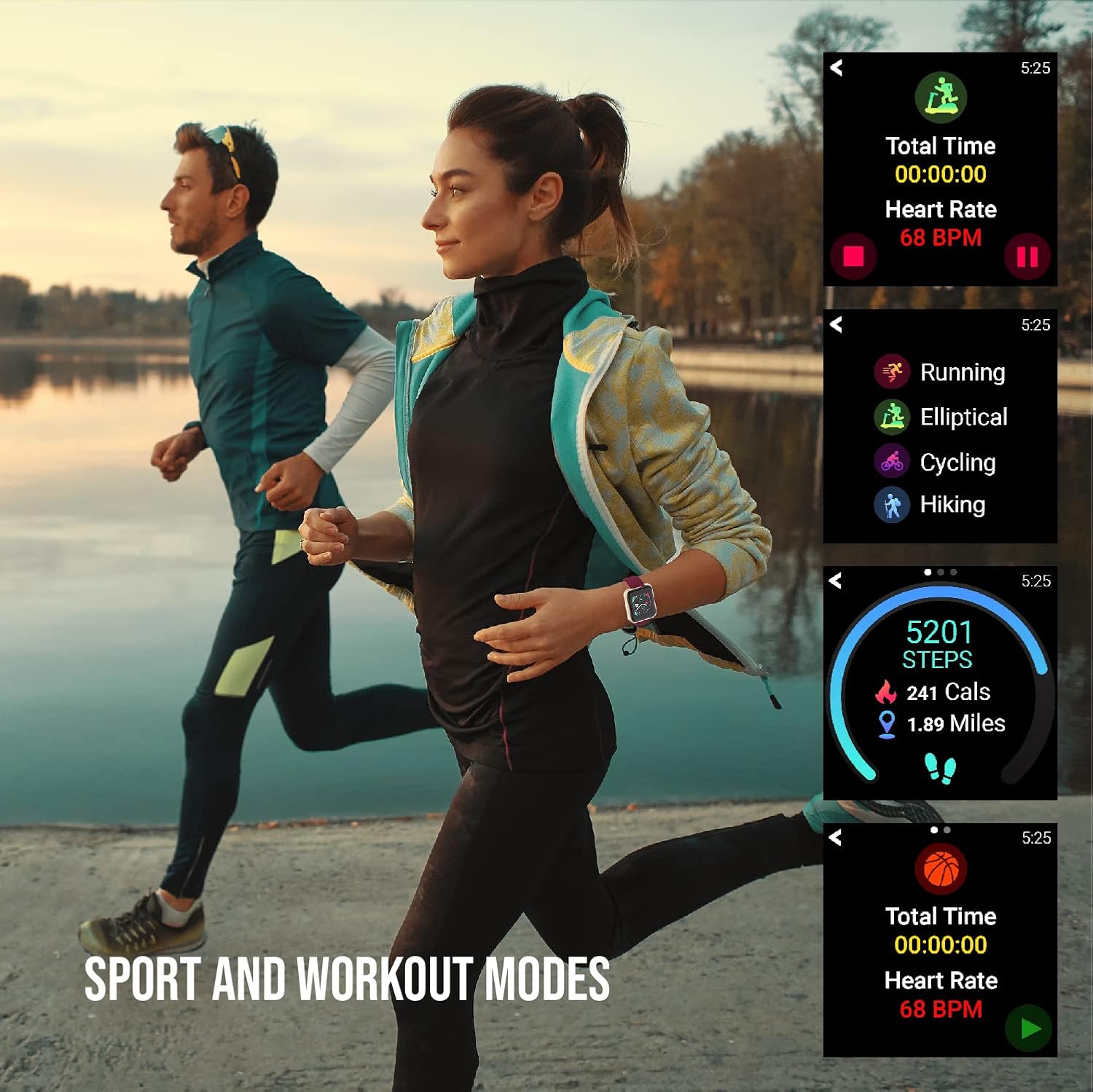
Image: Individuals engaged in physical activity, with the smartwatch interface showing various sport and workout tracking options.

Image: An illustration demonstrating the activity tracking features of the iTouch Air 3 Smartwatch, including steps, calories, and workout modes.
Bihotz Maiztasunaren Monitorizazioa
The iTouch Air 3 features a 24/7 optical heart rate monitor. It automatically tracks your heart rate throughout the day. You can also manually measure your heart rate from the watch interface.

Image: The iTouch Air 3 Smartwatch showing continuous heart rate tracking and historical data.
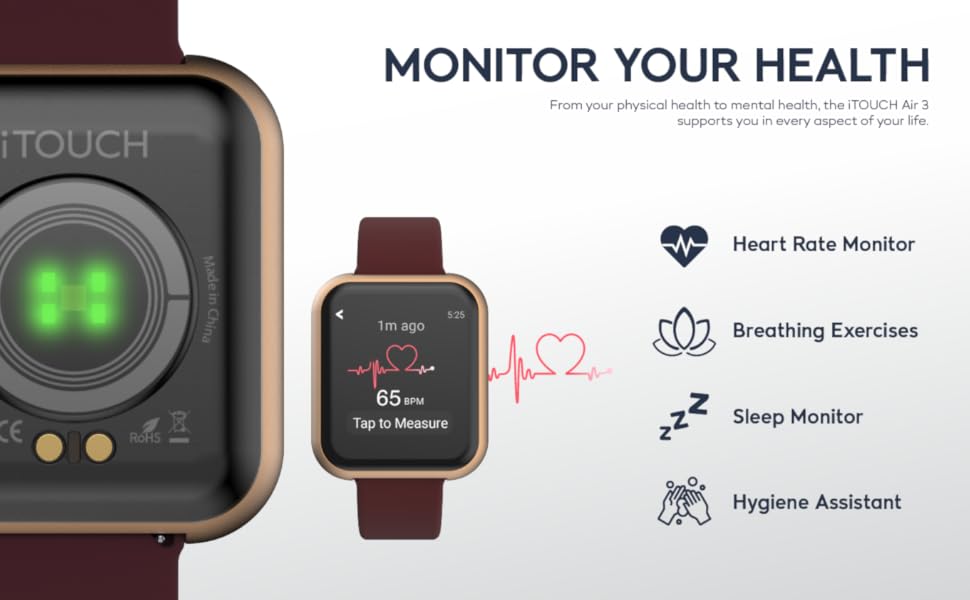
Image: An illustration detailing the health monitoring features of the iTouch Air 3 Smartwatch, including heart rate, breathing exercises, sleep, and hygiene assistance.
Loaren jarraipena
The smartwatch automatically tracks your sleep patterns, providing insights into your light, deep, and awake sleep stages. View detailed sleep data in the iTouch Wearables app.
Musika Kontrola
Control your phone's music playback directly from your smartwatch, allowing you to play, pause, skip tracks, and adjust volume without taking your phone out of your pocket.
Kamera Urrunekoa
Use your iTouch Air 3 as a remote shutter button for your smartphone camera, making it easier to take photos from a distance.
Mantentzea
Uraren Erresistentzia
The iTouch Air 3 is IP68-rated water resistant, meaning it can withstand immersion in water up to 1.5 meters for up to 30 minutes. It is suitable for daily use and light water exposure, but not recommended for swimming or diving.
Garbiketa
Zure erloju adimenduna garbitzeko, garbitu zapi leun batekinamp cloth. Avoid using harsh chemicals or abrasive materials. Ensure the charging pins are clean and dry before charging.
Bateriaren iraupena
The iTouch Air 3 offers up to 7 days of battery life on a single charge, depending on usage. To maximize battery life, reduce screen brightness and limit frequent notifications.

Image: A close-up of the iTouch Air 3 Smartwatch emphasizing its scratch-resistant glass, water resistance, and long battery life.
Arazoak konpontzea
If you encounter issues with your iTouch Air 3 Smartwatch, try the following steps:
- Gailua ez da pizten: Ziurtatu gailua guztiz kargatuta dagoela. Konektatu kargatzeko kableari eta energia-iturri bati gutxienez 30 minutuz.
- Not Pairing with Phone:
- Ziurtatu Bluetootha gaituta dagoela telefonoan.
- Make sure the iTouch Wearables app is open and running.
- Berrabiarazi telefonoa eta erloju adimenduna.
- Check if your phone's operating system meets the minimum requirements (iOS 13+ or Android 9+).
- Inaccurate Readings (Steps, Heart Rate):
- Ziurtatu erlojua eskumuturrean ondo eramaten duzula, eskumuturreko hezurraren gainetik hatz baten zabaleran gutxi gorabehera.
- Garbitu erlojuaren atzealdeko sentsore optikoa.
- Sync the watch with the app regularly to ensure data transfer.
- Ez dira agertzen jakinarazpenak:
- Check notification settings within the iTouch Wearables app.
- Ensure your phone's notification settings allow the iTouch Wearables app to send alerts.
- Egiaztatu erlojua zure telefonora Bluetooth bidez konektatuta dagoela.
Zehaztapenak
| Ezaugarri | Xehetasuna |
|---|---|
| Produktuaren neurriak | 4.8 x 2 x 3.23 hazbete |
| Elementuaren pisua | 6.4 ontza |
| Elementuaren eredu-zenbakia | Airea 3 |
| Pilak | 1 litio ioi bateriak behar dira (barne) |
| Pantaila zutik bistaratzeko tamaina | 40 milimetro |
| Sistema eragilea | Android (Compatible with iOS 13+ and Android 9+) |
| Ezaugarri bereziak | Calorie Tracker, GPS, Heart Rate Monitor, Pedometer, Sleep Monitor, Time Display |
| Konektibitate Teknologia | Bluetootha |
| Forma | Plaza |
| Fabrikatzailea | iTouch |
| Eskuragarri dagoen lehen data | 5ko azaroaren 2020a |
Bermea eta Laguntza
For warranty information and customer support, please refer to the documentation included in your product packaging or visit the official iTouch Wearables webgunea. Gorde erosketaren egiaztagiria berme-erreklamazioetarako.
Era berean, bisitatu dezakezu iTouch Store on Amazon informazio gehiago eta produktuen eguneratzeetarako.


