1. Sarrera
This manual provides essential information for the safe and efficient operation of your iFFALCON 40F2A 40-inch Full HD Android Smart LED TV. Please read these instructions thoroughly before using the television and retain them for future reference.
The iFFALCON 40F2A is a 40-inch Full High Definition (1920x1080) Smart LED TV powered by Android, offering a rich entertainment experience with built-in Google Assistant, HDR10 support, and integrated streaming services.

Irudia: Aurrealdea view of the iFFALCON 40F2A 40-inch Full HD Android Smart LED TV.
2. Konfigurazioa
2.1 Kutxa irekitzea eta paketearen edukia
Kontu handiz atera telebista bere paketetik. Ziurtatu osagai guztiak bertan daudela:
- 1 x iFFALCON 40F2A LED TV
- 1 x Mahai gaineko euskarria
- 1 x Erabiltzailearen eskuliburua (dokumentu hau)
- 1 x Berme Txartela
- 1 x Urruneko kontrola
- 2 x AAA bateria
2.2 Standaren instalazioa
If using the table-top stand:
- Jarri telebistaren pantaila beherantz gainazal bigun eta lau batean, kalteak saihesteko.
- Lerrokatu euskarri-euskarriak telebistaren behealdeko torloju-zuloekin.
- Lotu euskarria emandako torlojuak erabiliz.
- Kontu handiz altxatu telebista gainazal egonkor eta mailakatu batean zutik jarri.
2.3 Horman muntatzea (aukerakoa)
For wall mounting, consult a professional installer and refer to the wall mount kit's instructions. Ensure the wall mount is compatible with the TV's VESA mounting pattern.
2.4 Kanpoko gailuak konektatzea
Connect your external devices (e.g., set-top box, gaming console, Blu-ray player) to the TV's ports. The TV features HDMI, USB, VGA, and Headphone ports.
- HDMI: For high-definition audio and video.
- USBa: USB biltegiratze gailuak konektatzeko.
- Ethernet: Kable bidezko internet konexiorako.
- Entzungailuak: Audio irteera entzungailuetara bidaltzeko.
2.5 Energia konexioa eta hasierako konfigurazioa
- Sartu emandako AAA bateriak urrutiko agintean.
- Konektatu elikatze-kablea telebistara eta gero entxufe batera.
- Sakatu urrutiko aginteko pizteko botoia telebista pizteko.
- Jarraitu pantailan agertzen diren argibideei hasierako konfigurazioa osatzeko, hizkuntza hautatzea, sareko konexioa (Wi-Fi edo Ethernet) eta Google kontuan saioa hastea barne.
3. Telebistaren funtzionamendua
3.1 Urruneko kontrolaren funtzioak
The remote control provides access to all TV functions. It includes dedicated buttons for popular streaming services like Netflix, Amazon Prime Video, and Zee5, as well as a Google Assistant button for voice commands.

Image: The iFFALCON 40F2A Smart Remote Control, highlighting the Google Assistant and Netflix hotkey buttons.
3.2 Android TV interfazea
Navigate the Android TV interface using the remote's directional pad and OK button. The home screen displays recommended content, installed applications, and settings.

Image: The Android TV home screen on the iFFALCON 40F2A, showing various apps and features.
3.3 Google Laguntzailea
Sakatu urrutiko agintearen Google Assistant botoia eta hitz egin mikrofonotik telebista kontrolatzeko, edukia bilatzeko, erantzunak lortzeko eta etxe adimenduneko gailuak kudeatzeko.
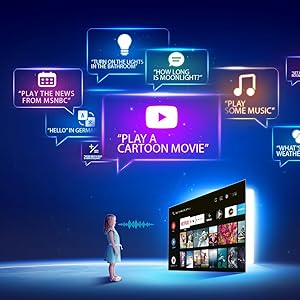
Image: Illustration of using Google Assistant voice commands with the TV.
3.4 Streaming aplikazioak
Access a wide range of pre-installed streaming applications such as Netflix, Amazon Prime Video, YouTube, Disney+Hotstar, Zee5, and more. Additional apps can be downloaded from the Google Play Store.

Image: The iFFALCON 40F2A displaying various streaming application logos.
3.5 Chromecast integratua
Use the built-in Chromecast feature to cast content from your compatible smartphone, tablet, or computer directly to your TV screen.

Image: A smartphone casting content to the iFFALCON 40F2A TV via Chromecast.
4. Ezaugarriak
4.1 Full HD Display with HDR10
Experience clear and vibrant visuals with Full HD (1920x1080) resolution. HDR10 support enhances contrast and color accuracy, providing a more dynamic picture.

Image: A side-by-side comparison of a scene without HDR10 and with HDR10, showing enhanced detail and color.
4.2 Micro Dimming
Micro Dimming analyzes video content in hundreds of separate zones to adjust brightness and darkness independently, improving contrast and picture quality.

Image: A comparison showing a city skyline without Micro Dimming and with Micro Dimming, highlighting improved contrast.
4.3 iPQ Engine
The iPQ Engine intelligently processes image quality, optimizing brightness, color range, and other visual parameters for a superior viewesperientzia.

Image: Visual representation of the iPQ Engine's high brightness precision and intelligent color range control technologies.
4.4 Dolby Audio
Enjoy immersive sound with Dolby Audio. The TV features 20 Watts speakers (10W + 10W) for clear and powerful audio output.

Image: Graphic illustrating the 10W + 10W Dolby Audio speakers for enhanced sound.
4.5 Slim Design
The iFFALCON 40F2A features a sleek and slim design, allowing it to blend seamlessly into any living space.

Image: A hand demonstrating the slim profile of the iFFALCON TV.
5. Mantentzea
5.1 Pantaila garbitzea
Garbitu pantaila astiro-astiro zapi leun eta pelusik gabeko batekin. Orba egoskorrak izanez gero, garbitu apur batampGarbitu zapi bat urarekin edo pantaila-garbitzaile espezializatu batekin. Saihestu produktu kimiko gogorrak edo material urratzaileak erabiltzea.
5.2 Telebistaren gorputza garbitzea
Wipe the TV's frame and stand with a soft, dry cloth. Do not use liquid cleaners directly on the TV.
5.3 Arreta orokorra
- Saihestu telebista eguzki-argiaren edo tenperatura altuen eraginpean jartzea.
- Ziurtatu telebistaren inguruan behar bezalako aireztapena dagoela gehiegi berotzea saihesteko.
- Deskonektatu telebista tximista-ekaitzetan edo denbora luzez erabili gabe egongo denean.
6. Arazoak
Telebistarekin arazoak badituzu, jo ezazu honako arazo eta irtenbide ohikoenei:
| Arazoa | Kausa posiblea | Irtenbidea |
|---|---|---|
| Botererik ez | Kable elektrikoa deskonektatuta; Entxufearen arazoa | Check power cord connection; Try a different outlet; Press power button on TV/remote |
| Ez dago irudirik, baina soinua badago | Sarrera-iturri okerra; HDMI/AV kablea soltea | Hautatu sarrera-iturri zuzena; Konektatu berriro kableak ondo |
| Soinurik ez, baina irudia badago | Volume muted or too low; Audio cable issue | Unmute or increase volume; Check audio settings; Reconnect audio cables |
| Urruneko kontrola ez dabil | Pilak agortuta; Oztopoa; Urrutiko agintea ez dago parekatuta | Replace batteries; Remove obstructions; Re-pair remote if necessary |
| Ezin da wifira konektatu | Pasahitz okerra; Routerraren arazoa; Telebista routerretik urrunegi dago | Verify password; Restart router; Move TV closer or use Ethernet |
| Aplikazioak motel doaz edo izozten dira | Insufficient memory; Network issue; App malfunction | Close unused apps; Check internet connection; Clear app cache/data or reinstall app |
Irtenbide hauek probatu ondoren arazoa konpontzen ez bada, jarri harremanetan bezeroarentzako arreta-zerbitzuarekin.
7. Zehaztapenak
Detailed technical specifications for the iFFALCON 40F2A Smart LED TV:

Image: Diagram showing the dimensions of the iFFALCON 40F2A TV.
| Ezaugarri | Zehaztapena |
|---|---|
| Marka | iFFALCON |
| Eredua | 40F2A |
| Pantailaren tamaina | 40 hazbete (102 cm) |
| Bistaratzeko Teknologia | LED, A+ mailako panela |
| Ebazpena | Full HD (1920 x 1080 pixel) |
| Freskatze tasa | 60 Hz |
| Erantzun Denbora | 8.5 milisegundo |
| Viewangelua | 178 gradu |
| Irudiaren aspektu-erlazioa | 16:09 |
| Irudien kontraste-ratioa | 5000:1 |
| Sistema eragilea | Android |
| RAM memoria instalatuaren tamaina | 1 GB |
| Biltegiratze Digitalaren Ahalmena | 8 GB |
| Koprozesadore grafikoa | Mali470x2 |
| Audio Irteera | 20 Watts (Dolby Audio) |
| Konektibitate Teknologia | Ethernet, HDMI, USB, Wi-Fi, Bluetooth |
| Hardware interfazea | HDMI, Headphone, USB, VGA |
| USB portuak guztira | 1 |
| Energia iturria | AC |
| Wattage | 75 watt (piztuta dagoen energia-kontsumoa) |
| Produktuaren neurriak (LxWxH) | 90.5 x 18.5 x 57.7 cm (euskarriarekin) |
| Elementuaren pisua | 6.1 kg |
| Pilak | 2 AAA bateria (urrutiko agintearentzat barne) |
8. Bermea eta Laguntza
8.1 Bermearen informazioa
Your iFFALCON 40F2A TV comes with a 1 Urteko Bermea from the date of purchase. Please refer to the included Warranty Card for detailed terms and conditions. Retain your purchase receipt as proof of purchase for warranty claims.
8.2 Bezeroarentzako laguntza
For technical assistance, service requests, or any inquiries regarding your iFFALCON TV, please contact the manufacturer's customer support. Contact details can typically be found on the warranty card or the official iFFALCON webgunea.


