1. Sarrera
Thank you for choosing the R-MUSIC Booster S High Power Wireless Bluetooth Speaker. This manual provides important information regarding the setup, operation, and maintenance of your new speaker. Please read this manual thoroughly before using the product to ensure proper function and to prevent damage.
2. Paketearen edukia
Mesedez, egiaztatu paketearen edukia kutxa irekitzean. Elementuren bat falta bada edo hondatuta badago, jarri harremanetan zure saltzailearekin.
- R-MUSIC Booster S Speaker Unit
- Energia-egokigailua/kargatzeko kablea
- Wired Microphone (if included with your model)
- Erabiltzailearen eskuliburua

Image: Wired Microphone. This microphone is typically included for karaoke or public address functions.
3. Produktuaren ezaugarriak
The R-MUSIC Booster S speaker is designed for powerful and versatile audio playback. Key features include:
- High Power Audio Output (40 Watts Max)
- Haririk gabeko Bluetooth konexioa
- USB ataka MP3 erreprodukziorako
- MicroSD Card Reader for MP3 Playback
- 3.5mm AUX Input for Wired Connections
- Microphone Input with Echo Control
- Integrated LED Display
- LED argien ikuskizun dinamikoa
- Portable Design with Integrated Handle

Irudia: Aurrealdea view of the R-MUSIC Booster S speaker, highlighting the speaker grille and LED lighting.

Irudia: Angelua view hizlariaren, erakustaldiaasing its compact yet powerful design.
4. Kontrolak eta konexioak
Familiarize yourself with the control panel located on the rear of the speaker.
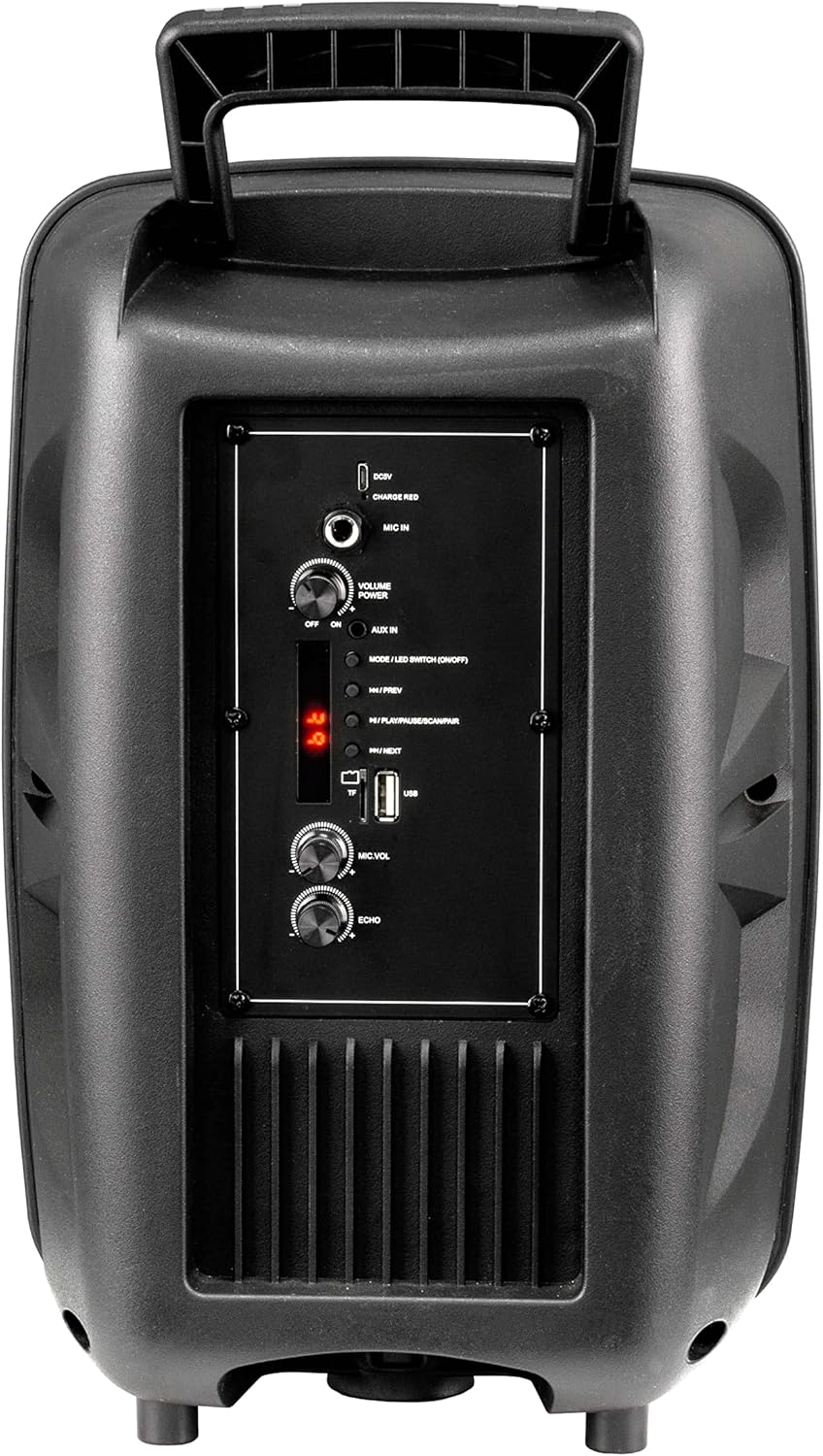
Image: Rear Control Panel Overview.
- DC 5V sarrera: Bozgorailua kargatzeko sarrera.
- CHARGE RED Indicator: Lights up red when charging.
- Mikrofonoa: 6.35 mm-ko jack-a mikrofono kableatu bat konektatzeko.
- VOLUME POWER (OFF/ON): Rotary knob to turn the speaker ON/OFF and adjust the master volume.
- AUX IN: 3.5mm audio input for connecting external audio devices.
- MODE / LED SWITCH (ON/OFF): Press to switch between input modes (Bluetooth, USB, MicroSD, AUX). Press and hold to turn the LED light show ON/OFF.
- |<< / PREV: Sakatu aurreko pistara joateko.
- >>| / NEXT: Sakatu hurrengo pistara joateko.
- >|| / PLAY/PAUSE / SCAN/PAIR: Press to play or pause audio. In FM mode, press and hold to scan for stations. In Bluetooth mode, press and hold to initiate pairing.
- TF (MicroSD) txartelaren zirrikitua: Insert a MicroSD card for MP3 playback.
- USB ataka: Insert a USB flash drive for MP3 playback.
- MIC.VOL: Rotary knob to adjust the microphone volume.
- OHARRA: Rotary knob to adjust the microphone echo effect.
5. Konfigurazioa
5.1. Bozgorailua kargatzea
Before first use, fully charge the speaker. Connect the provided charging cable to the DC 5V input on the rear panel and plug the other end into a suitable USB power source (e.g., USB wall adapter, computer USB port). The "CHARGE RED" indicator will light up during charging and turn off when fully charged.
5.2. Piztu/Itzaltzea
Rotate the "VOLUME POWER" knob clockwise to turn the speaker ON. Rotate it counter-clockwise until it clicks to turn the speaker OFF.
6. Funtzionamendu-argibideak
6.1. Bluetooth modua
- Turn on the speaker. It will automatically enter Bluetooth pairing mode, indicated by a flashing "BLUE" on the LED display.
- Gaitu Bluetooth-a zure gailu mugikorrean (telefonoa, tableta, ordenagailua).
- Bilatu "R-MUSIC BOOSTER S" (or similar name) in your device's Bluetooth list and select it to pair.
- Once successfully paired, the speaker will emit a confirmation tone, and the "BLUE" indicator will stop flashing.
- You can now play audio from your device through the speaker. Use the speaker's control buttons or your device to control playback.
6.2. USB / MicroSD Card Playback
- Insert a USB flash drive or MicroSD card (pre-loaded with MP3 audio files) dagokion portuan.
- The speaker will automatically switch to USB or TF (MicroSD) mode and begin playing the first compatible audio file.
- Use the "|<<" and ">>|" buttons to navigate between tracks. Use the ">||" button to play or pause.
6.3. AUX sarrera modua
- Konektatu 3.5 mm-ko audio-kable baten mutur bat (ez dago barne) bozgorailuaren AUX IN atakara.
- Konektatu beste muturra kanpoko gailuaren (adibidez, MP3 erreproduzitzailea, ordenagailu eramangarria) entzungailuen konektorera edo audio irteerara.
- Press the "MODE" button until "AUX" is displayed on the LED screen.
- Play audio from your external device. Volume can be controlled via the speaker's master volume knob or your external device.
6.4. Mikrofonoaren erabilera
- Connect a wired microphone to the "MIC IN" jack.
- Adjust the microphone volume using the "MIC.VOL" knob.
- Adjust the echo effect using the "ECHO" knob.
6.5. LED Light Show
Press and hold the "MODE / LED SWITCH" button to toggle the dynamic LED light show ON or OFF.
7. Mantentzea
- Garbitu bozgorailua zapi leun eta lehor batekin. Ez erabili garbitzaile edo disolbatzaile urratzailerik.
- Mantendu bozgorailua uretatik, hezetasunetik eta muturreko tenperaturetatik urrun.
- Ez blokeatu aireztapen-zuloak.
- Gorde bozgorailua leku fresko eta lehor batean denbora luzez erabiltzen ez duzunean.
8. Arazoak
| Arazoa | Kausa posiblea | Irtenbidea |
|---|---|---|
| Botererik ez | Battery is depleted; Power knob is off. | Charge the speaker; Rotate the VOLUME POWER knob clockwise to turn on. |
| Soinurik ez | Volume too low; Incorrect mode selected; Device not paired (Bluetooth); Cable not connected (AUX). | Increase volume; Press MODE button to select correct input; Re-pair Bluetooth device; Check AUX cable connection. |
| Ezin izan da Bluetooth parekatzea | Bozgorailua ez dago parekatze moduan; Gailua urrunegi dago; Interferentzia. | Ensure speaker is in Bluetooth mode (flashing BLUE); Move device closer; Turn off other Bluetooth devices. |
| USB/MicroSD ez da erreproduzitzen | Onartu gabe file formatua; hondatuta files; Txartela/unitatea ez dago behar bezala sartuta. | Ziurtatu files are MP3 format; Try another USB/MicroSD; Re-insert card/drive. |
9. Zehaztapenak
- Eredua: RM301891 (Booster S)
- Marka: R-MUSIKA
- Konektibitatea: Bluetooth, USB, MicroSD, 3.5mm AUX
- Irteera potentzia maximoa: 40 Watt
- Hizlari mota: Subwoofer (as per product data, likely refers to bass capability)
- Muntatze mota: Zutikako eserlekua
- Neurriak (Ontziratzea): 44.4 x 30.1 x 22.6 cm (gutxi gorabehera 17.5 x 11.8 x 8.9 hazbete)
- Pisua (ontziratzea): 1.9 kilogramo (gutxi gorabehera 4.2 lb)
- Potentzia sarrera: DC 5V
10. Segurtasun informazioa
- Do not disassemble or modify the speaker. This may cause electric shock, fire, or product damage.
- Ez jarri bozgorailua euripean, hezetasunean edo muturreko tenperaturetan.
- Saihestu bozgorailua kolpe gogorrak erortzea edo jasaten.
- Mantendu haurren eskura.
- Erabili zehaztutako kargatzeko kablea eta korronte egokitzailea soilik.
- Bolumen maila altuetan luze entzuteak entzumena kaltetu dezake.
11. Bermea eta Laguntza
R-MUSIC products are designed and manufactured to the highest quality standards. For warranty information and technical support, please refer to the warranty card included with your product or contact your local retailer. Keep your purchase receipt as proof of purchase.
For further assistance, you may visit the official R-MUSIC webwebgunean edo jarri harremanetan bere bezeroarentzako arreta zerbitzuarekin.


