1. Sarrera
The Vgate VR800 OBD2 Scanner is a powerful and user-friendly diagnostic tool designed for automotive enthusiasts and professional mechanics alike. It provides comprehensive diagnostic functions for OBD-II/EOBD compliant vehicles, enabling users to quickly identify and resolve issues related to the Check Engine Light (CEL). This manual provides detailed instructions on how to set up, operate, and maintain your VR800 scanner to ensure optimal performance and accurate vehicle diagnostics.
2. Produktua amaitu daview
The Vgate VR800 is a handheld diagnostic device featuring a color LCD display, intuitive button layout, and a durable OBD-II connector cable. Its compact design allows for easy portability and use in various automotive environments.
2.1 Funtsezko osagaiak
- LCD koloreko pantaila: Provides clear and detailed diagnostic information.
- Nabigazio botoiak: Gora, Behera, Ezkerra, Eskuina geziak menuan nabigatzeko.
- Ados botoia: Hautaketak berresten ditu.
- I/M botoia: Shortcut for I/M Readiness status.
- Question Mark (?) Button: Provides help and DTC lookup information.
- Itzultzeko botoia: Aurreko pantailara itzultzen da.
- OBD-II Connector: Connects the scanner to the vehicle's diagnostic port.
- USB ataka: For software updates and data printing.

3. Ezaugarriak
The Vgate VR800 OBD2 Scanner offers a comprehensive set of features for vehicle diagnostics:
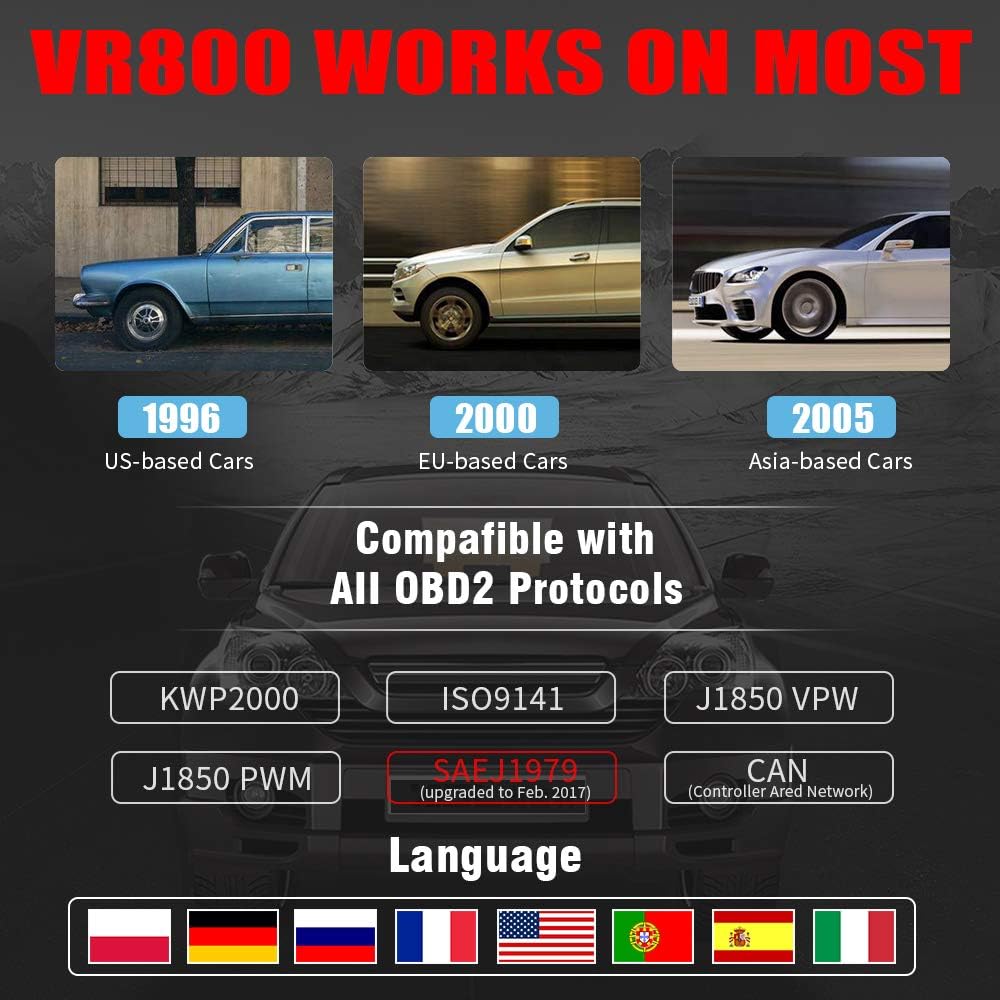
- All OBD2 Protocols Support: Compatible with ISO9141, KWP2000, J1850 PWM, J1850 VPW, and CAN protocols. Compliance with SAEJ1979 has been upgraded to the latest standards (February 2017).
- Ibilgailuen bateragarritasun zabala: Works with most American vehicles manufactured after 1996, European vehicles after 2000, and Asian vehicles after 2005. Applicable to OBD-II/CAN/EOBD-compliant vehicles, including light-duty trucks (6.5T or less), SUVs, and minivans.
- Smog Check Helper (I/M Readiness): Features Red-Yellow-Green LEDs and a built-in speaker to indicate readiness status for emissions testing. Dedicated I/M and '?' shortcut keys provide quick access to readiness checks.
- Full OBD Service Modes: Quickly reads and checks Diagnostic Trouble Codes (DTCs), views freeze frame data, reads live PCM data stream, performs On-Board Monitor tests, and displays live O2 sensor test data.
- Built-in DTC Lookup Library: Allows accurate determination of the causes of the Check Engine Light.
- Accurate Battery Status Check: Reads real-time battery and voltage informazioa.
- Hizkuntza anitzeko euskarria: Available in English, French, German, Italian, Spanish, Russian, Polish, and Portuguese.
- Data Logging and Printing: Supports data logging and connection to a PC for printing diagnostic data files.



4. Konfigurazioa
Follow these steps to set up your Vgate VR800 OBD2 Scanner:
- Kokatu OBD-II ataka: The OBD-II port is typically located under the dashboard on the driver's side of the vehicle. Refer to your vehicle's owner's manual if you cannot find it.
- Konektatu eskanerra: Plug the VR800's OBD-II connector cable firmly into the vehicle's OBD-II port.
- Piztu: The scanner will automatically power on once connected to the vehicle's OBD-II port. No external power source or batteries are required as it draws power directly from the vehicle.
- Hasierako konfigurazioa (eskatzen bada): If this is your first time using the scanner or after a factory reset, you may be prompted to select a language. Use the navigation buttons to select your preferred language and press OK.

5. Funtzionamendu-argibideak
Once the scanner is connected and powered on, you can begin diagnosing your vehicle.
5.1 Menuan nabigatzea
Erabili UP eta BEHERA arrow buttons to scroll through menu options. Press the OK button to select an option. Press the Itzuli botoia aurreko pantailara itzultzeko.
5.2 Reading Diagnostic Trouble Codes (DTCs)
- Menu nagusitik, hautatu Irakurri DTCak.
- The scanner will display any active or pending DTCs. Each code will have a brief description.
5.3 Clearing DTCs
Warning: Clearing DTCs will erase all diagnostic trouble codes from the vehicle's computer and may reset readiness monitors. Ensure you have addressed the underlying issue before clearing codes.
- Menu nagusitik, hautatu Garbitu DTCak.
- Confirm your selection when prompted. The scanner will attempt to clear the codes.
5.4 I/M Readiness Function
The I/M Readiness function checks if the various emissions-related systems on the vehicle are operating correctly and if they have completed their self-tests.
- Sakatu dedikatua. I/M button on the scanner.
- The display will show the status of various monitors (e.g., O2 Sensor, EVAP, Catalyst). A green light indicates ready, yellow indicates pending, and red indicates not ready or a fault.
5.5 ViewZuzeneko datuak iragartzen
Live Data allows you to view real-time sensor data from the vehicle's engine control unit (ECU).
- Menu nagusitik, hautatu Zuzeneko datuak.
- Choose the specific data parameters you wish to view (e.g., engine RPM, vehicle speed, O2 sensor voltageta).
5.6 DTC bilaketa
If you have a DTC and need more information, use the built-in DTC lookup library.
- Menu nagusitik, hautatu DTC bilaketa edo sakatu ? button when a DTC is displayed.
- Enter the DTC code (if not already displayed) to get a detailed description and possible causes.
5.7 Bateriaren egoeraren egiaztapena
To check your vehicle's battery voltage and status:
- Menu nagusitik, hautatu Bateria.
- Eskanerrak bateriaren uneko bolumena erakutsiko dutage and an estimated charge percentage.
6. Mantentzea
Proper maintenance ensures the longevity and accuracy of your Vgate VR800 scanner.
- Garbiketa: Erabili zapi leun eta lehor bat eskanerraren kanpoaldea garbitzeko. Ez erabili garbitzaile edo disolbatzaile urratzailerik.
- Biltegiratzea: Store the scanner in a clean, dry environment away from extreme temperatures and direct sunlight.
- Software eguneraketak: Regularly check for software updates to ensure compatibility with the latest vehicle models and diagnostic protocols. Updates can typically be performed by connecting the scanner to a PC via the USB port and using the provided update software.
7. Arazoak
If you encounter issues while using your Vgate VR800 scanner, refer to the following common problems and solutions:
- Scanner Does Not Power On:
- Ensure the OBD-II connector is securely plugged into the vehicle's port.
- Verify the vehicle's ignition is in the ON position (engine can be off).
- Check the vehicle's fuse for the OBD-II port (consult your vehicle's manual).
-
Erlazionatutako dokumentuak - VR800

Vgate vLinker BM+ Quick Start Guide: Connect BMW/Mini with BimmerCode & BimmerLink
Comprehensive quick start guide for the Vgate vLinker BM+ OBD2 Bluetooth scanner. Learn how to connect your BMW or Mini vehicle to BimmerCode and BimmerLink apps on iOS and Android for diagnostics and customization.
Vgate iCar Pro BLE 4.0 iOS eta Androiderako hasiera azkarreko gida
Get started quickly with your Vgate iCar Pro BLE 4.0 OBD-II scanner. This guide covers vehicle compliance, app installation, Bluetooth pairing for iOS and Android, supported OBD parameters, and troubleshooting for your automotive diagnostic tool.
Vgate vLinker BM+ Bluetooth OBD2 eskanerra hasteko gida azkarra
Vgate vLinker BM+ Bluetooth OBD2 eskanerra zure ibilgailura konektatzeko urratsez urratseko gida, diagnostikoetarako eta aplikazioen integraziorako. Android eta iOS gailuak onartzen ditu.
Vgate Automotive Diagnostic Scanner - OBD2 Tool User Guide
Osoa baino gehiagoview of the Vgate Automotive Diagnostic Scanner, a universal OBD2 tool for vehicle diagnostics. Features include reading DTCs, live data stream, I/M readiness checks, and VIN retrieval. Compatible with most vehicles and mobile devices via third-party apps.
Vgate iCar Pro BT3.0 Androiderako hasiera azkarreko gida
Hasi zaitez azkar zure Vgate iCar Pro BT3.0 OBD-II eskanerra erabiltzen Android-erako. Gida honek ibilgailuen betetzea, onartutako protokoloak, aplikazioen konfigurazioa, parekatzea, arazoak konpontzea eta diagnostiko kodeak ulertzea jorratzen ditu.
Vgate iCar2 BT3.0 Hasiera Azkarreko Gida eta OBDII Informazioa
Vgate iCar2 BT3.0 Bluetooth OBDII eskanerraren gida osoa, ibilgailuen bateragarritasuna, aplikazioen laguntza, konexio urratsak, arazoak konpontzea eta OBDII kodearen azalpenak biltzen dituena.