1. Produktua amaitu daview
The Gladen ATM4 is an active terminal module designed to integrate an amplifier directly into a subwoofer enclosure, effectively converting any passive subwoofer into an active one. This module provides 200W RMS power output and features both high-level and low-level inputs, remote detection, and an adjustable low-pass filter. It is engineered for a 4 Ohm connection, offering a compact and efficient solution for enhancing your audio system.
2. Zer dago kutxan
Upon unpacking your Gladen ATM4, please ensure all components are present and undamaged.
- 1 x Gladen ATM4 Active Terminal Module
3. Ezaugarriak
The Gladen ATM4 Active Terminal Module incorporates several key features for optimal performance and integration:
- 200 W RMS potentzia irteera: Provides robust amplification for subwoofers.
- High and Low-Level Inputs: Offers versatile connection options for various audio sources.
- Remote Detection: Automatically turns the module on/off with the audio signal.
- Behe-iragazkia: Adjustable filter to optimize subwoofer frequency response.
- Connection for RTC.2 Pot: Allows for an optional remote level control.
- Molex Connector: Ensures secure and short-circuit protected power connections.
- 4 Ohm Compatibility: Designed for use with 4 Ohm subwoofers.
4. Zehaztapenak
| Zehaztapena | Balioa |
|---|---|
| Modelo zenbakia | ATM4 |
| Potentzia Irteera | 200W RMS |
| Inpedantzia | 4 Ohm |
| Sarrera mota | High-Level, Low-Level |
| Elementuaren pisua | 2 kilo |
| Paketearen neurriak | 8.5 x 5.5 x 5.5 hazbete |
| ASIN | B08NSPHP62 |
| Eskuragarri dagoen lehen data | 6ko urtarrilaren 2022a |
5. Segurtasun informazioa
Please read and understand all safety instructions before installing or operating the Gladen ATM4 module. Failure to follow these guidelines may result in injury or damage to the product or other equipment.
- Instalazio profesionala gomendatzen da: Autoko audio osagaien instalazioa konplexua izan daiteke. Instalazio prozesuaren edozein atalen inguruan ziur ez bazaude, eskatu laguntza profesional kualifikatu bati.
- Deskonektatu energia: Always disconnect the vehicle's battery negative terminal before making any electrical connections to prevent short circuits and electrical shock.
- Kableatu egokia: Ensure all wiring is correctly routed and secured to prevent damage from pinching, abrasion, or heat. Use appropriate gauge wires for power and speaker connections.
- Aireztapena: Ensure the module is installed in a location with adequate ventilation to prevent overheating. Do not cover the module or restrict airflow.
- Saihestu hezetasuna: Do not expose the module to water, moisture, or excessive humidity.
- Inpedantzia zuzena: Ensure your subwoofer's impedance matches the module's specified 4 Ohm output to prevent damage.
6. Konfigurazioa eta instalazioa
The Gladen ATM4 is designed to replace a standard passive terminal cup on a subwoofer enclosure. Follow these steps for installation:
- Prestaketa: Disconnect the vehicle's battery. Carefully remove the existing terminal cup from your subwoofer enclosure.
- Muntaketa: Insert the Gladen ATM4 module into the opening. Secure it using the provided screws, ensuring a tight seal to prevent air leaks.
- Subwoofer konexioa: Connect the internal speaker wires from your subwoofer driver to the appropriate terminals on the ATM4 module. Ensure correct polarity (+ to + and - to -).
- Potentzia-konexioa: Connect the main power (MAINS) and ground wires to the Molex connector. The ATM4 features remote detection, so a separate remote turn-on wire is typically not required if using high-level inputs or a compatible low-level source.
- Input Signal Connection:
- Goi-mailako sarrera: If your head unit does not have RCA outputs, connect the speaker-level outputs from your head unit or amplifier to the HIGH-level inputs on the ATM4.
- Maila baxuko sarrera: Zure unitate nagusia edo amplifier has RCA outputs, connect them to the LOW-level (RCA) inputs on the ATM4.
- Optional RTC.2 Connection: If using the optional Gladen RTC.2 remote level control, connect it to the RTC port on the module.
- Azken egiaztapenak: Double-check all connections for security and correct polarity. Reconnect the vehicle's battery.
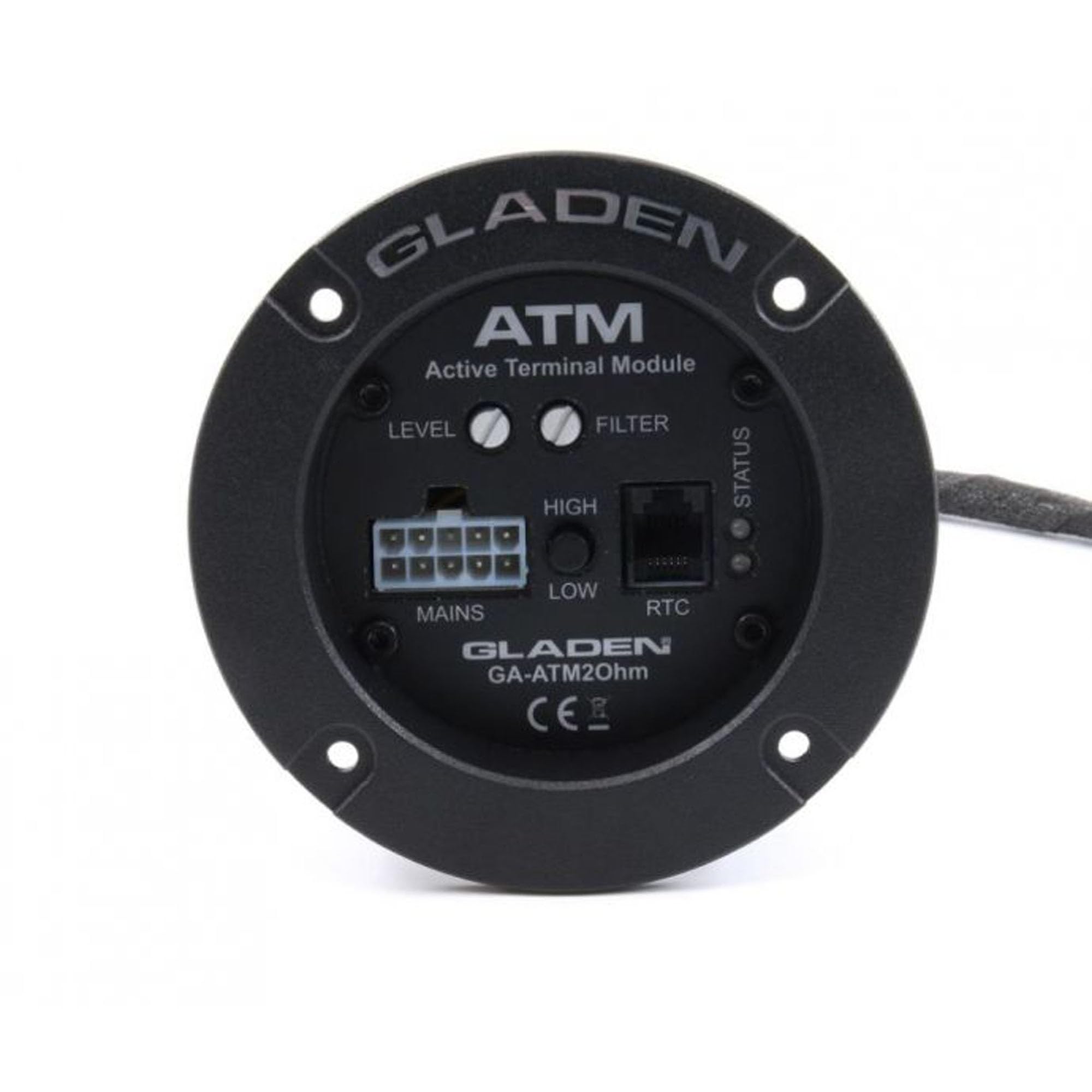
Image showing the Gladen ATM4 Active Terminal Module installed in a subwoofer enclosure, illustrating the external terminal plate and the internal module.

Front panel of the Gladen ATM4 Active Terminal Module, showing the LEVEL and FILTER controls, HIGH and LOW inputs, MAINS, and RTC connections.

Gertutik view of the Gladen ATM4 module, highlighting the various input and output connections, including the Molex connector and RCA inputs.
7. Funtzionamendu-argibideak
Once installed, the Gladen ATM4 module requires minimal operation. Adjustments are typically made during the initial setup phase.
- MAILA Kontrola: This knob adjusts the overall output level (volume) of the subwoofer. Start with the level set low and gradually increase it until the subwoofer blends seamlessly with your main speakers without overpowering them.
- FILTER Control: This knob adjusts the low-pass filter frequency. The low-pass filter allows only frequencies below the set point to pass through to the subwoofer, preventing it from playing higher frequencies that should be handled by your main speakers. Adjust this to achieve a smooth transition between your subwoofer and main speakers.
- Remote Detection: The ATM4 features automatic remote detection. When an audio signal is present on the high-level or low-level inputs, the module will power on. When the signal is absent, it will power off after a short delay.
- RTC.2 (Optional): If you have connected the optional RTC.2 remote level control, you can use it to conveniently adjust the subwoofer's output level from your listening position.
8. Mantentzea
The Gladen ATM4 module is designed for reliable operation with minimal maintenance.
- Garbiketa: Periodically wipe the exterior of the module with a soft, dry cloth to remove dust. Do not use harsh chemicals or abrasive cleaners.
- Aireztapena: Ensure that the area around the module remains clear to allow for proper airflow and prevent overheating.
- Konexioak: Noizean behin egiaztatu kableatu-konexio guztiak ondo finkatuta daudela eta korrosiorik gabe daudela ziurtatzeko.
9. Arazoak
If you encounter issues with your Gladen ATM4 module, refer to the following troubleshooting guide:
| Arazoa | Kausa posiblea | Irtenbidea |
|---|---|---|
| No Power / No Indicator Light | No power supply; Blown fuse; Loose power connection. | Check vehicle battery connection. Verify power and ground wires are securely connected to the Molex connector. Check for a blown fuse in the power line (if applicable). |
| Subwooferretik soinurik ez | No input signal; Incorrect input connection; Subwoofer wires disconnected; Level control too low. | Ensure audio source is active. Verify high-level or low-level input connections are secure and correct. Check subwoofer wiring to the module. Increase the LEVEL control. |
| Soinu distortsionatua | Input signal too high; Level control too high; Incorrect filter setting. | Reduce the input signal level from your head unit or amplifier. Decrease the LEVEL control on the ATM4. Adjust the FILTER control to a suitable frequency. |
| Module Overheating | Insufficient ventilation; Prolonged high-power operation. | Ensure the module has adequate airflow. Reduce the operating level or allow the module to cool down. |
10. Bermearen informazioa
The Gladen ATM4 Active Terminal Module is covered by a 1 urteko fabrikatzailearen bermea erosketa-datatik aurrera. Berme honek ohiko erabileran materialen eta eskulanen akatsak estaltzen ditu.
The warranty does not cover damage resulting from improper installation, accident, misuse, abuse, neglect, unauthorized modification, or normal wear and tear. For warranty claims, please retain your proof of purchase and contact your authorized Gladen retailer or the manufacturer's customer support.
11. Laguntza
For further assistance, technical support, or inquiries regarding your Gladen ATM4 Active Terminal Module, please refer to the following resources:
- Gladen Official Webgunea: Visit the official Gladen website for product information, FAQs, and support contact details.
- Authorized Retailer: Contact the retailer from whom you purchased the product for local support and service.