1. Sarrera
The weBoost Home Studio Cell Phone Signal Booster is designed to eliminate cellular dead zones within your home, providing a stronger, more reliable signal for 4G LTE and 5G networks. This system is FCC and carrier approved, ensuring compatibility with all major U.S. and Canadian networks, including Verizon, T-Mobile, AT&T, Dish, and US Cellular.
This booster kit is ideal for improving cellular coverage in a single room, covering an area of up to 3000 square feet. It is engineered for easy, do-it-yourself installation, allowing you to enhance your mobile experience with fewer dropped calls, faster data speeds, and improved streaming performance.

Irudia: The weBoost Home Studio Cell Phone Signal Booster, its packaging, and main components.
2. Zer dago kutxan
Zure weBoost Home Studio kit includes all necessary components for installation and operation:
- Home Studio booster
- Outside directional antenna
- Inside booster antenna
- Elikatze-hornidura
- (2) 30’ low-loss cables
- Outside antenna mounting bracket
- Barrika-lokailua

Irudia: Osagai guztiak barne weBoost Home Studio kit, with some dimensions indicated.
3. Konfigurazioa eta instalazioa
The weBoost Home Studio is designed for straightforward installation. For the best results, it is recommended to use the weBoost App, which provides step-by-step video guides, an antenna positioning guide, and allows you to take before and after cell signal readings.
3.1. Test Your Signal
Before installation, step outside and ensure you have at least one bar of signal on your phone. The effectiveness of any booster depends on the strength of the outside cell signal. A booster amplifies existing signal; it does not create it.

Irudia: The weBoost app displaying signal strength information, guiding the user to test their signal.
3.2. Outside Antenna Placement
The outside directional antenna communicates with nearby cell towers. It should be mounted in a location where it can receive the strongest possible signal, typically on the roof or an exterior wall, facing the nearest cell tower.
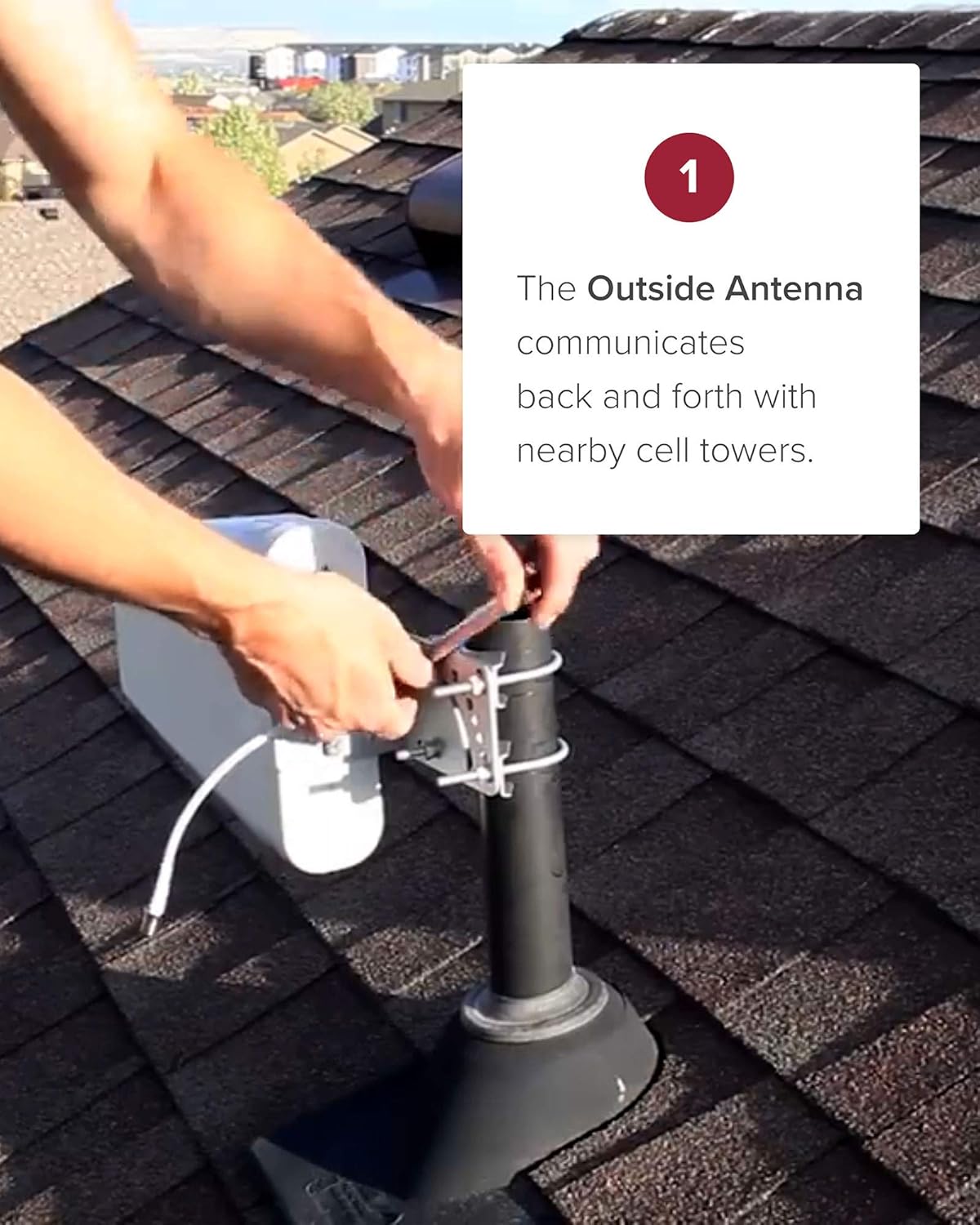
Image: A person installing the outside directional antenna on a roof, securing it with mounting hardware.
3.3. Booster and Inside Antenna Placement
Booster amplifies the signals received by the outside antenna and broadcasts them throughout your designated room. The inside booster antenna should be placed within the room where you need improved signal, ensuring it is not too close to the outside antenna to prevent oscillation.

Irudia: The weBoost Home Studio booster unit with its whip antenna, placed on a surface indoors.
3.4. Cable Connection and Power
Connect the low-loss cables from the outside antenna to the booster, and from the booster to the inside antenna. Finally, connect the power supply to the booster and plug it into a standard electrical outlet. The booster will power on and begin to ampseinalea piztu.

Image: A diagram illustrating the signal flow from the cell tower to the outside antenna, through the booster, and to the inside antenna within a home.
4. Funtzionamendua
Once properly installed and powered on, the weBoost Home Studio operates automatically. It continuously monitors and amplifies the cellular signals from nearby towers, rebroadcasting them within the coverage area. Your mobile devices will automatically connect to the stronger signal provided by the booster.
The system is designed to work with all U.S. and Canadian networks and devices, ensuring broad compatibility.

Image: Logos of various cellular carriers, emphasizing the booster's compatibility across different networks.
5. Arazoak
Zurearekin arazoak badituzu weBoost Home Studio, consider the following common troubleshooting steps:
- Seinalearen hobekuntzarik ez: Ensure the outside antenna is pointed towards the strongest signal source (nearest cell tower). Check all cable connections to ensure they are secure. Increase the separation distance between the outside and inside antennas.
- Flickering Lights on Booster: This may indicate oscillation (feedback loop). Increase the distance between the inside and outside antennas, or adjust their orientation.
- Energia-arazoa: Verify the power supply is securely connected to the booster and the wall outlet. Try a different outlet.
- Estaldura mugatua: Ensure the inside antenna is centrally located within the desired coverage area. The booster is designed for single-room coverage; larger areas may require a different model.
For more detailed troubleshooting or persistent issues, please refer to the support section or the full installation manual.
6. Zehaztapenak
| Ezaugarri | Xehetasuna |
|---|---|
| Produktuaren neurriak | 13 x 7.25 x 8.5 hazbete |
| Elementuaren pisua | 5.89 kilo |
| Modelo zenbakia | 470166 |
| Konektibitate Teknologiak | 2. belaunaldia |
| Haririk gabeko komunikazio estandarra | Irrati maiztasuna |
| Kolorea | Whip Antena |
| Fabrikatzailea | Wilson Elektronika |
| Eskuragarri dagoen lehen data | 9ko abenduaren 2020a |
7. Bermea eta Laguntza
weBoost products are backed by a bi urteko bermea, ensuring reliability and performance. We also offer a 30-day money-back guarantee.
Expert U.S. customer support is available to assist you with any questions or installation guidance. You can reach support through the weBoost App, chat, phone, or email.

Image: Information on weBoost's U.S.-based customer support, 30-day money-back guarantee, and 2-year warranty.
Baliabide osagarriak
For a complete guide, download the official Installation Manual (PDF): weBoost Home Studio Installation Manual
Get help with installation using the weBoost App:

Irudia: The weBoost app interface, highlighting features like step-by-step videos and customer support access.
8. FCC informazioa
The weBoost Home Studio Cell Phone Signal Booster is FCC approved, ensuring it meets all regulatory standards for safe and effective operation within the United States. This device complies with Part 15 of the FCC Rules.
The FCC ID for this product is PWO460066. You can locate the certification label on the underside of the booster unit.

Irudia: Gertutik view of the product label on the weBoost Home Studio, indicating the model number and FCC ID.
9. Segurtasun informazio garrantzitsua
- Use only the power supply provided with the kit.
- Do not operate the booster without all antennas properly connected.
- Keep the booster and antennas away from water and excessive heat.
- Ensure proper grounding for outdoor antenna installations as per local electrical codes.
- Espresuki onartzen ez dituen aldaketak edo aldaketak weBoost could void the user's authority to operate this equipment.


