1. Sarrera
Thank you for choosing the THOMSON Coffee Maker with Integrated Grinder, Model THCOG6. This appliance is designed to provide you with a rich and authentic coffee experience, whether you prefer freshly ground beans or pre-ground coffee. Its compact design and user-friendly features make it an ideal addition to any kitchen. Please read this manual carefully before using the appliance to ensure safe and optimal operation.
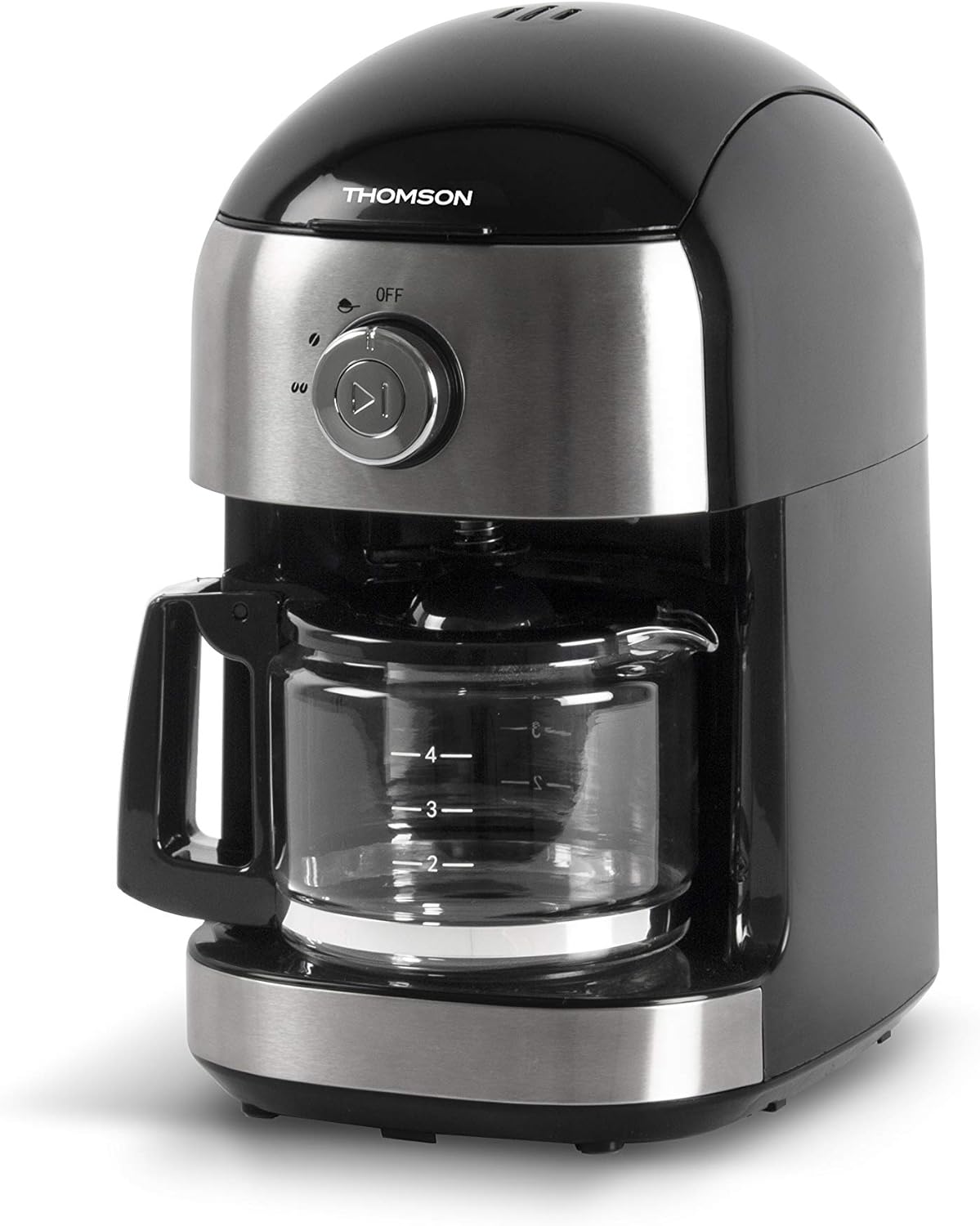
1.1. irudia: Aurrealdea view of the THOMSON Coffee Maker, showcasing its sleek black and stainless steel design with the glass carafe in place.
2. Segurtasun-argibideak
To prevent personal injury or damage to the appliance, always observe basic safety precautions when using electrical appliances. Keep this manual for future reference.
- Irakurri argibide guztiak erabili aurretik.
- Ez sartu aparatua, kablea edo entxufea uretan edo beste likido batzuetan.
- Gainbegiratzea beharrezkoa da aparaturen bat umeek edo umeen ondoan erabiltzen dutenean.
- Deskonektatu entxufetik erabiltzen ez duzunean eta garbitu aurretik. Utzi hozten piezak jarri edo kendu aurretik, eta aparatua garbitu aurretik.
- Ez erabili aparaturik kablea edo entxufea hondatuta dagoenean, edo aparatuak gaizki funtzionatzen duenean edo nolabait hondatu ondoren.
- Gailuaren fabrikatzaileak gomendatzen ez dituen osagarri osagarriak erabiltzeak sua, deskarga elektrikoa edo pertsonetan zauriak eragin ditzake.
- Ez erabili kanpoan.
- Ez utzi kablea mahai edo mostrador baten ertzetik zintzilik, ezta gainazal beroak ukitu ere.
- Ez jarri gas edo erregailu elektriko bero baten gainean edo inguruan, edo berotutako labe batean.
- Beti konektatu entxufea lehenik etxetresna elektrikora, eta gero konektatu kablea hormako entxufean. Deskonektatzeko, jarri edozein kontrol "itzali" posizioan, eta gero atera entxufea hormako entxufetik.
- Ez erabili aparatua aurreikusitako erabilera ez den beste baterako.
- Kontu handiz ibili lurrun beroa botatzean.
- Karafa aparatu honekin bakarrik erabiltzeko diseinatuta dago. Ez da sekula erabili behar gailurretan.
- Ez jarri garrafa beroa gainazal hotz edo heze batean.
- Ez erabili pitzatuta dagoen garrafarik edo heldulekua askatuta edo ahulduta duen garrafarik.
- Ez garbitu garraiatzaileekin, altzairuzko artilezko kuxinekin edo bestelako material urratzailearekin.
3. Piezak eta Osagaiak
Familiarize yourself with the different parts of your THOMSON Coffee Maker.
- Estalkia
- Ur depositua
- Bean Hopper (with lid)
- Artezteko muntaia
- Iragazki Saskia (kengarria)
- Control Dial (OFF / Grind / Brew)
- Hasi/Gelditu botoia
- Kristalezko pitxerra heldulekuarekin
- Berotzeko Plaka
- Elikatze kablea

Image 3.1: The coffee maker with its main removable components, including the water tank and filter basket, displayed separately for clarity.
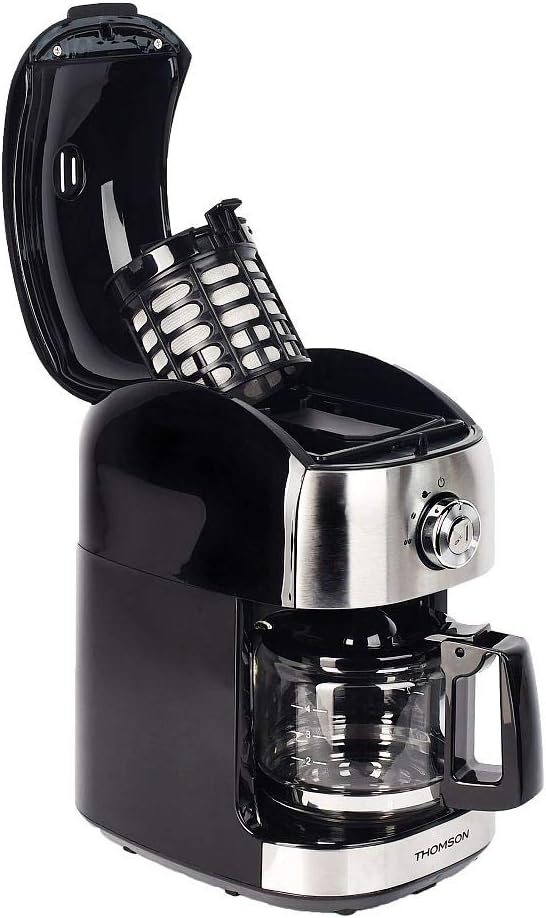
3.2. irudia: Goian view of the coffee maker with the lid open, showing the internal filter basket and bean hopper area.
4. Konfigurazioa
Before first use, and for optimal performance, follow these setup steps:
- Despaketatzea: Carefully remove the coffee maker and all its components from the packaging. Retain packaging for future storage or transport.
- Garbiketa: Wash the glass carafe, filter basket, and water tank with warm, soapy water. Rinse thoroughly and dry. Wipe the exterior of the appliance with a damp oihal.
- First Use Cycle (Cleaning Cycle):
- Fill the water tank with clean water up to the MAX level (500 ml).
- Jarri iragazki-saski hutsa bere tokian.
- Jarri beirazko txarroa berogailuan.
- Plug the appliance into a suitable power outlet (240V).
- Turn the control dial to the "Brew" position.
- Press the Start/Stop button to begin the brewing cycle without coffee.
- Utzi ziklo osoa osatzeko. Bota ur beroa.
- Repeat this process 2-3 times to ensure the appliance is thoroughly cleaned and free of any manufacturing residues.
- Lekua: Place the coffee maker on a stable, flat, heat-resistant surface, away from the edge of the counter and out of reach of children. Ensure adequate ventilation around the unit.
5. Funtzionamendu-argibideak
Your THOMSON Coffee Maker offers two brewing options: using whole coffee beans with the integrated grinder, or using pre-ground coffee.
5.1. Brewing with Whole Coffee Beans (Grind & Brew)
- Ur depositua bete: Open the lid and fill the water tank with fresh, cold water. The capacity is 500 ml, suitable for 4 to 6 cups. Do not exceed the MAX fill line.
- Gehitu kafe aleak: Open the bean hopper lid and add up to 32g of whole coffee beans. Close the bean hopper lid securely.
- Txertatu iragazki-saskia: Ensure the filter basket is correctly placed in its compartment.
- Jarri Karafea: Place the empty glass carafe onto the warming plate.
- Select Grind & Brew: Turn the control dial to the "Grind" position. This setting activates both the grinder and the brewing function.
- Hasi garagardoa egiten: Press the Start/Stop button. The grinder will activate first, grinding the beans, followed by the brewing process.
- Gozatu: Once the brewing cycle is complete, the appliance will automatically switch to the keep-warm function for up to 30 minutes. Carefully remove the carafe to pour and serve.

Image 5.1: The THOMSON Coffee Maker positioned on a kitchen counter, accompanied by a freshly brewed cup of coffee, illustrating its use in a home environment.
5.2. Aurrez ehotako kafearekin prestatzea
- Ur depositua bete: Open the lid and fill the water tank with fresh, cold water up to the desired level (max 500 ml).
- Gehitu kafe xehatua: Place the desired amount of pre-ground coffee into the filter basket. Do not overfill.
- Txertatu iragazki-saskia: Ensure the filter basket is correctly placed in its compartment.
- Jarri Karafea: Place the empty glass carafe onto the warming plate.
- Aukeratu garagardoa: Turn the control dial to the "Brew" position.
- Hasi garagardoa egiten: Press the Start/Stop button. The brewing process will begin immediately.
- Gozatu: Once the brewing cycle is complete, the appliance will automatically switch to the keep-warm function for up to 30 minutes.
5.3. Anti-Drip System
The appliance features an anti-drip system, allowing you to temporarily remove the carafe during the brewing cycle to pour a cup of coffee. The flow of coffee will pause. Return the carafe to the warming plate within 20 seconds to prevent overflow from the filter basket.
5.4. Bero mantentzeko funtzioa
After brewing, the warming plate will keep your coffee warm for up to 30 minutes. After 30 minutes, the appliance will automatically shut off for safety and energy saving.
6. Mantentzea eta Garbiketa
Regular cleaning ensures optimal performance and extends the lifespan of your coffee maker. Always unplug the appliance and allow it to cool completely before cleaning.
- Karafa eta iragazki-saskia: Wash the glass carafe and filter basket with warm, soapy water after each use. Rinse thoroughly and dry. These parts are not dishwasher safe.
- Kanpoaldea: Garbitu kafe-makinaren kanpoko gainazalak oihal leun eta lehor batekinamp oihalik. Ez erabili garbitzaile urratzailerik edo urratzailerik, gainazala urra baitezakete.
- Grinder Assembly: Periodically clean the grinder assembly. Use a small brush to remove any residual coffee grounds from the bean hopper and grinder blades. Do not use water directly on the grinder.
- Deskalifikazioa: Uretan dauden mineral-gordailuak denborarekin pilatu eta errendimenduan eragina izan dezakete. Deskaltzifikatu kafe-makina 2-3 hilabetero, edo maizago ur gogorra baduzu.
- Prepare a descaling solution by mixing white vinegar and water in a 1:2 ratio (e.g., 1 part vinegar to 2 parts water).
- Bota soluzioa ur deposituan.
- Jarri garrafa hutsa berogailuan.
- Egin kafe-ziklo bat kaferik gabe.
- After the cycle, let the solution sit in the carafe for 15 minutes.
- Discard the solution and rinse the carafe and water tank thoroughly.
- Run 2-3 cycles with fresh, clean water to remove any residual vinegar taste.
- Biltegiratzea: When not in use, store the coffee maker in a clean, dry place.
7. Arazoak
Kafe-makinarekin arazoak badituzu, jo ezazu beheko taulara arazo ohikoenak eta irtenbideak ikusteko.
| Arazoa | Kausa posiblea | Irtenbidea |
|---|---|---|
| Kafe-makina ez da pizten. | Ez dago konektatuta; itzalita dagotage; entxufe akastuna. | Ziurtatu kablea ondo konektatuta dagoela funtzionatzen duen entxufe batera. Egiaztatu etxeko etengailua. |
| Kafea ez da prestatzen. | No water in tank; carafe not correctly placed; control dial not set to "Brew" or "Grind". | Fill water tank. Ensure carafe is properly seated on the warming plate. Set control dial to the correct position and press Start/Stop. |
| Errotagailua ez dabil. | No beans in hopper; bean hopper lid not closed; grinder clogged. | Add coffee beans. Ensure bean hopper lid is securely closed. Clean the grinder assembly to remove any blockages. |
| Kafeak zapore ahula edo urtsua du. | Insufficient coffee grounds/beans; too much water; appliance needs descaling; grind setting too coarse. | Increase amount of coffee. Use less water. Descale the appliance. If using beans, ensure the grinder is set to a finer grind (if adjustable, though this model has a fixed grind). |
| Kafea iragazki-saskitik gainezka egiten du. | Too much coffee grounds; carafe removed for too long; filter clogged. | Reduce amount of coffee. Return carafe quickly if removed. Clean filter basket thoroughly. |
| Funtzionamenduan zarata handia. | Normal grinding noise; foreign object in grinder; appliance needs descaling. | Grinding is naturally noisy. Check bean hopper for foreign objects. Descale the appliance if noise persists during brewing. |
Irtenbide hauek probatu ondoren arazoa konpontzen ez bada, jarri harremanetan bezeroarentzako arreta-zerbitzuarekin.
8. Zehaztapenak
Key technical specifications for the THOMSON Coffee Maker (Model THCOG6):
| Ezaugarri | Xehetasuna |
|---|---|
| Modelo zenbakia | THCOG6 |
| Marka | Thomson |
| Mota | Filter Coffee Maker with Integrated Grinder |
| Edukiera | 500 ml (approx. 4-6 cups) |
| Bean Hopper edukiera | 32 g |
| Boterea | 680 Watt |
| liburukiatage | 240V |
| Neurriak (L x W x H) | 24 x 17 x 27 cm |
| Pisua | 2.1 kg |
| Materiala | Plastikoa |
| Ezaugarri bereziak | Keep Warm Function (up to 30 min), Anti-drip System, Mechanical Control |

Image 8.1: Diagram showing the dimensions of the coffee maker (24cm x 17cm x 27cm) and icons indicating its compatibility with coffee beans and ground coffee, along with the 30-minute keep-warm function.
9. Bermea eta Laguntza
THOMSON products are manufactured to high-quality standards. This product is covered by a manufacturer's warranty against defects in materials and workmanship. The specific terms and duration of the warranty may vary by region. Please retain your proof of purchase for warranty claims.
For technical support, warranty inquiries, or spare parts, please contact your local THOMSON customer service or the retailer from whom you purchased the product. You may also visit the official THOMSON webwebgunean informazio gehiago eta harremanetarako datuak.
Bezeroarentzako Arretarako Harremana: Refer to your regional THOMSON website or product packaging for specific contact information.


