Sarrera
This manual provides detailed instructions for the installation, operation, and maintenance of your Laxihub P2 Indoor Home Security Camera. The P2 camera offers 1080P Full HD video, two-way audio, night vision, and advanced AI motion detection, making it an ideal solution for monitoring your home, children, or pets.

The Laxihub P2 camera, shown alongside a smartphone displaying a live feed of a dog, highlights its primary use for indoor monitoring.
Ezaugarri nagusiak
- 1080P Full HD bereizmena: Bideo argi eta zehatza eskaintzen dutage jarraipen hobetua lortzeko.

Comparison of 2K/3MP UHD resolution from the P2 camera versus standard resolution, demonstrating superior clarity.
- Panoramika eta inklinazio funtzionalitatea: Offers a 355° horizontal pan and 60° vertical tilt for comprehensive room coverage.

The P2 camera's pan and tilt capabilities are illustrated, showing its wide field of view.
- Bi norabideko audioa: Communicate with family members or pets directly through the camera using the built-in microphone and speaker.

A visual representation of the two-way audio feature, showing interaction with a pet.
- AI Motion & Sound Detection: Receive instant alerts on your smartphone when motion or unusual sounds are detected.

The camera's motion tracking and instant alert features are depicted, showing detection of pets.
- Gaueko ikuspegi hobetua: Provides clear visibility up to 32 feet (10 meters) in low-light conditions.

The camera's enhanced night vision capability is shown, providing clear images in darkness.
- Pribatutasun modua: The camera lens can be physically hidden for complete privacy when needed.
The privacy mode feature, where the camera lens retracts for user privacy.
- Hodeiko eta SD txartelaren biltegiratzea: Supports both cloud storage (AWS) and local storage via a microSD card (up to 128GB, not included).
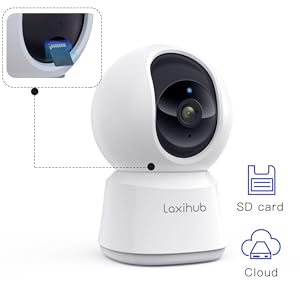
Illustration of the camera's support for both SD card and cloud storage options.
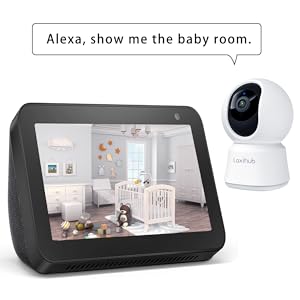
- Etxe adimendunaren integrazioa: Compatible with Amazon Alexa and Google Assistant for voice control and live viewpantaila adimendunetan ari da.
The camera's compatibility with Amazon Alexa and Google Assistant, showing integration with smart displays.
Konfigurazio Gida
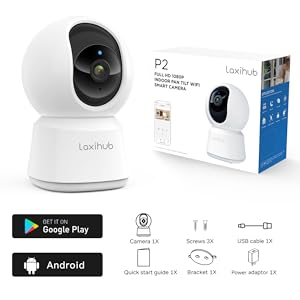
1. Kutxa irekitzea eta paketearen edukia
Hasi aurretik, ziurtatu osagai guztiak paketean daudela:
- Laxihub P2 Camera
- Elikatze-moldagailua
- USB kablea
- Mounting Kit (screws, bracket)
- Hasierako gida azkarra
2. Gailua piztea
Connect the USB cable to the camera's power port and plug the power adapter into a wall outlet. The camera will power on and the indicator light will begin to flash red, indicating it's ready for setup.
This video demonstrates how to power on the Laxihub P2 camera and initiate the setup process by connecting it to power.
3. Aplikazioaren instalazioa eta kontuaren sorrera
Download the "Arenti" app from your smartphone's app store (Google Play Store for Android or Apple App Store for iOS). Follow the on-screen prompts to create a new account or log in if you already have one.
4. Gailuen parekatzea eta Wi-Fi konexioa
- In the Arenti app, tap "Add Device" and select the P2 camera model.
- Follow the app's instructions to reset the device if prompted. Hold the reset button for 5 seconds until the indicator light flashes red.
- Select your 2.4GHz Wi-Fi network and enter the password. (Note: The P2 camera only supports 2.4GHz Wi-Fi networks).
- The app will generate a QR code. Hold your phone with the QR code 5-8 inches in front of the camera lens. The camera will emit a tone when the QR code is successfully scanned.
- The camera will then attempt to connect to your Wi-Fi network. Once connected, the indicator light will turn blue.
This video illustrates the process of connecting the Laxihub P2 camera to the Arenti app, including Wi-Fi setup and QR code scanning.
5. MicroSD txartelaren instalazioa (aukerakoa)
To enable local recording, gently tilt the camera lens upwards to reveal the microSD card slot. Insert a microSD card (up to 128GB, not included) into the slot. You may need to format the card via the app settings for optimal performance.
6. Muntatzeko aukerak
The Laxihub P2 camera can be placed on a flat surface or mounted to a wall or ceiling using the provided mounting kit. Ensure the camera is positioned to cover your desired monitoring area.

The image displays flexible installation options for the P2 camera, including standing on a surface or ceiling mounting.
Funtzionamendu-argibideak
1. Bizi View eta urruneko kontrola
Open the Arenti app and select your P2 camera to access the live video feed. Use the on-screen controls to remotely pan (355°) and tilt (60°) the camera lens to view different areas of your room. Digital zoom is also available.
2. Bi norabideko audio komunikazioa
Zuzenetik view, tap the microphone icon to activate two-way audio. Hold the button to speak, and release to listen. This allows for real-time communication with anyone near the camera.
3. Grabaketa eta Erreprodukzioa
Sartu grabatutako footage through the "History" or "Album" section in the app. You can review continuous recordings (if full-day recording is enabled) or event-triggered clips. Recordings are stored on the microSD card or in the cloud (subscription may apply after free trial).

The app interface for reviewing recorded video and sharing clips.
4. Alertak eta jakinarazpenak
Configure alert settings in the app to receive push notifications for motion or sound detection. You can adjust sensitivity levels to minimize false alarms.
5. Pribatutasun modua
Activate privacy mode via the app settings. In this mode, the camera lens will physically retract, ensuring no video or audio is captured. You can also set up geofencing for automatic privacy activation when your phone is on the same Wi-Fi network as the camera.
Mantentzea
1. Garbiketa orokorra
Wipe the camera lens and body with a soft, dry cloth. Avoid using harsh chemicals or abrasive materials that could damage the device.
2. Firmware eguneraketak
Periodically check the Arenti app for available firmware updates. Keeping your camera's firmware up-to-date ensures optimal performance, security, and access to new features.
3. SD txartelaren kudeaketa
If using a microSD card, regularly check its storage capacity via the app. Format the card periodically to maintain recording efficiency and prevent data corruption. Back up any important recordings before formatting.
Arazoak konpontzea
- Kamera lineaz kanpo: Ensure the camera is powered on and connected to a 2.4GHz Wi-Fi network. Check your Wi-Fi signal strength in the app. Try restarting the camera and your router.
- Bideoaren kalitate eskasa: Verify your internet connection speed. Ensure the camera lens is clean and free from obstructions. Adjust video resolution settings in the app if necessary.
- Bi norabideko audio-arazoak: Check microphone and speaker settings in the app. Ensure there are no physical obstructions blocking the microphone or speaker on the camera.
- Mugimendu/Soinu Alertek Ez Dabiltza: Confirm alert notifications are enabled in the app settings. Adjust detection sensitivity. Ensure the camera has a clear view kontrolatu nahi duzun eremuarena.
- Gaueko ikusmen arazoak: Night vision automatically activates in low light. Ensure the camera's infrared LEDs are not obstructed.
Zehaztapenak
| Ezaugarri | Xehetasuna |
|---|---|
| Bideo Ebazpen eraginkorra | 3 MP (1080P FHD) |
| Konektibitate Teknologia | Haririk gabekoa (Wi-Fi 2.4 GHz) |
| Eremua View | 360 gradu (355°-ko panoramika, 60°-ko inklinazioa) |
| Gaueko Ikusmenaren barrutia | 32 Oin |
| Bi norabideko audioa | Bai |
| AI mugimendua hautematea | Bai |
| Soinuaren detekzioa | Bai |
| Biltegiratze-aukerak | Cloud (AWS), MicroSD Card (up to 128GB) |
| Gailu bateragarriak | Amazon Alexa, Google Laguntzailea |
| Energia iturria | Battery Powered (DC 5V) |
| Barruko/Kanpoko erabilera | Barruan |
| Elementuaren pisua | 12 ontza |
| Paketearen neurriak | 6.73 x 3.39 x 3.31 hazbete |
Bermea eta Laguntza
For detailed warranty information and further support, please refer to the official Laxihub website or contact customer service. A comprehensive User Guide (PDF) is also available for download.
For additional assistance, you can refer to the Erabiltzailearen gida (PDF).


