Sarrera
Eskerrik asko erosketagatik.asing the Bytech True Wireless Bluetooth Boost Link True Speaker. This manual provides essential information for setting up, operating, and maintaining your new speakers. Please read this manual thoroughly before use to ensure proper operation and to maximize your listening experience. These speakers feature True Wireless Stereo (TWS) functionality, Bluetooth connectivity, FM Radio, and Bass Boost for rich audio.
Segurtasun Informazioa
- Ez jarri bozgorailuak tenperatura altuen, hezetasunaren edo eguzki-argiaren eraginpean.
- Saihestu bozgorailuak erortzea edo kolpe gogorren eraginpean jartzea.
- Do not disassemble, repair, or modify the speakers yourself. Refer all servicing to qualified personnel.
- Keep the speakers away from water and other liquids.
- Erabili zehaztutako kargatzeko kablea eta korronte egokitzailea soilik.
- Garbitu bozgorailuak zapi leun eta lehor batekin. Ez erabili garbitzaile edo disolbatzaile urratzailerik.
- Listen at moderate volume levels to avoid hearing damage.
Paketearen edukia

Image: The Bytech Boost Link True Wireless Speakers shown in their retail packaging, highlighting the two speakers and the Bluetooth connectivity feature.
Mesedez, egiaztatu elementu guztiak bertan daudela eta egoera onean daudela:
- 2 x Bytech Boost Link True Wireless Speakers
- 1 x Kargatzeko kablea (USB)
- 1 x Erabiltzailearen eskuliburua (dokumentu hau)
Produktua amaituview

Irudia: Aurrealdea gertutik view of the two Bytech Boost Link True Wireless Speakers, showing the speaker grilles and control buttons at the bottom.
Ezagutu bozgorailuen osagaiak eta kontrolak:
- Bozgorailuaren parrilla: Protects the speaker driver.
- Kontrol-botoiak:
- Pizteko botoia: Power On/Off, Play/Pause.
- Modu botoia: Switch between Bluetooth, FM Radio, etc.
- Aurreko pista/bolumena jaisteko botoia: Sakatu labur aurreko abestirako, sakatu luze bolumena jaisteko.
- Hurrengo pista/bolumena igotzeko botoia: Sakatu labur hurrengo abestia ikusteko, sakatu luze bolumena igotzeko.
- Kargatzeko ataka: USB kargatzeko kablea konektatzeko.
- LED adierazlea: Shows power status, charging status, and pairing status.
Konfigurazioa
Bozgorailuak kargatzea
Before first use, fully charge both speakers. Connect the supplied USB charging cable to the charging port on each speaker and plug the other end into a USB power adapter (not included) or a computer's USB port. The LED indicator will show charging status and turn off or change color when fully charged.
Piztu/Itzaltzea
- Pizteko: Press and hold the Power button on each speaker until the LED indicator lights up and you hear a power-on prompt.
- Itzaltzeko: Press and hold the Power button on each speaker until the LED indicator turns off and you hear a power-off prompt.
Funtzionamendu-argibideak
Bluetooth Pairing (Single Speaker Mode)
- Ziurtatu bozgorailua piztuta dagoela eta Bluetooth parekatze moduan dagoela (LED adierazlea keinuka hasiko da).
- Zure gailuan (smartphone-a, tableta, ordenagailu eramangarria), gaitu Bluetooth-a eta bilatu eskuragarri dauden gailuak.
- Select "BYTECH BOOST LINK" (or similar name) from the list.
- Behin parekatuta, LED adierazlea keinuka utziko du eta finko mantenduko da, eta baieztapen soinu bat entzungo duzu.
True Wireless Stereo (TWS) Pairing (Two Speakers)
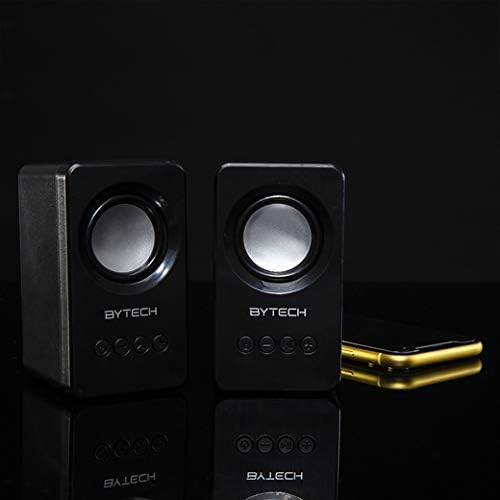
Image: The two Bytech Boost Link True Wireless Speakers positioned next to a smartphone, symbolizing their ability to connect wirelessly to each other and a device for stereo sound.
For a true stereo sound experience, you can pair both speakers together:
- Power on both Bytech Boost Link speakers. Do not connect them to your Bluetooth device yet.
- The speakers will automatically attempt to pair with each other. You will hear a confirmation sound when they are successfully linked for TWS. One speaker will become the master (left channel) and the other the slave (right channel).
- Once TWS paired, the master speaker will enter Bluetooth pairing mode (LED flashing).
- On your device, enable Bluetooth and search for "BYTECH BOOST LINK". Connect to this single entry.
- Both speakers will now play audio in stereo.
- Oharra: If the speakers do not automatically pair, try double-pressing the Mode button on one of the speakers to initiate TWS pairing.
FM Irratiaren funtzionamendua
- Power on the speaker(s).
- Sakatu Modua button repeatedly until you hear the FM radio prompt.
- To auto-scan and save stations, press and hold the Erreproduzitu/Pausatu button. The speaker will scan and store available FM stations.
- Erabili Aurreko Pista eta Hurrengo Pista gordetako irratien artean nabigatzeko botoiak.
Audio Playback and Volume Control
- Erreproduzitu/Pausatu: Sakatu labur pizteko botoia.
- Hurrengo ibilbidea: Short press the Next Track/Volume Up button.
- Aurreko pista: Short press the Previous Track/Volume Down button.
- Bolumena igo: Long press the Next Track/Volume Up button.
- Bolumena jaitsi: Long press the Previous Track/Volume Down button.
Mantentzea
- Garbiketa: Use a soft, dry, lint-free cloth to clean the surface of the speakers. Do not use liquid cleaners, aerosols, or solvents.
- Biltegiratzea: Denbora luzez erabiltzen ez dituzunean, gorde bozgorailuak leku fresko eta lehor batean, eguzki-argitik eta muturreko tenperaturetatik babestuta.
- Bateria zaintzea: To prolong battery life, avoid fully discharging the battery frequently. Charge the speakers regularly, even if not in use.
Arazoak konpontzea
| Arazoa | Kausa posiblea | Irtenbidea |
|---|---|---|
| Bozgorailuak ez du pizten. | Bateria baxua. | Kargatu bozgorailua guztiz. |
| Ezin da Bluetooth bidez parekatu. | Bozgorailua ez dago parekatze moduan; Gailuaren Bluetooth itzalita; Gailutik urrunegi. | Ensure speaker LED is flashing; Turn on Bluetooth on your device; Move speaker closer to device (within 10 meters). |
| Soinurik ez. | Volume too low; Speaker not connected; Incorrect mode. | Increase volume on speaker and device; Re-pair Bluetooth; Ensure correct mode (Bluetooth/FM). |
| TWS parekatzeak huts egin du. | Speakers already connected to a device; Speakers too far apart. | Disconnect speakers from any device; Power off and on both speakers, then try TWS pairing again; Ensure speakers are close to each other. |
| FM irratiaren harrera eskasa. | Seinale ahula; interferentzia. | Relocate the speaker to an area with better reception; Extend the charging cable (can act as an antenna). |
Zehaztapenak
- Eredua: BY-AU-BS-152-BK
- Marka: Bytech
- Konektibitate Teknologia: Haririk gabeko (Bluetooth)
- Audio irteera modua: Inguratu
- Hizlari mota: Inguruko Soinua
- Ezaugarri bereziak: Wireless Bluetooth, Bass Boost, FM Radio, True Wireless Stereo (TWS)
- Gomendatutako erabilerak: Musika erreproduzitzaileentzat
- Gailu bateragarriak: Ordenagailu eramangarria, Tableta, Smartphone
- Kontroladore mota: On-device buttons
- Paketearen neurriak: 20.7 x 16 x 9 cm
- Pisua: 560 g
Bermea eta Laguntza
Bytech products are designed and manufactured to the highest quality standards. For information regarding warranty coverage, technical support, or service inquiries, please refer to the warranty card included with your purchase or visit the official Bytech webgunea. Gorde erosketaren egiaztagiria bermearen erreklamazioetarako.
For further assistance, please contact Bytech customer support.


