Sarrera
The Garmin Striker Vivid 9sv is a 9-inch color fishfinder designed to provide clear and detailed views of fish and underwater structures. This device features high-contrast color palettes for enhanced visibility, supporting Garmin CHIRP traditional sonar, CHIRP ClearVü, and CHIRP SideVü scanning sonars. Equipped with high-sensitivity GPS, it allows users to mark waypoints, create routes, and monitor boat speed. The built-in Quickdraw Contours software enables the creation and saving of custom maps with 1-foot contours. Wi-Fi connectivity facilitates integration with the ActiveCaptain app for waypoint transfer, smart notifications, and access to the Garmin Quickdraw Community.
Konfigurazioa
Kutxan dagoena
- Garmin STRIKER Vivid 9sv Unit
- GT52HW-TM Transducer
- Babes-estalkia
- Potentzia/Datu Kablea
- Okertu/birikatutako muntaia
- Hardwarea
- Dokumentazioa
Gailua muntatzea
The Striker Vivid 9sv can be mounted using the included tilt/swivel mount or flush-mounted. Ensure the mounting location provides clear visibility and access to controls, away from heat sources or excessive vibration.

Image: The Garmin Striker Vivid 9sv unit mounted, displaying sonar information.
Transduktorearen instalazioa
The included GT52HW-TM transducer is crucial for sonar functionality. It can be mounted on the transom of your boat or through the hull, depending on your vessel type and preference. Follow the detailed instructions provided in the transducer's specific manual for optimal performance. Ensure the transducer is positioned to avoid obstructions and turbulence for clear sonar returns.

Image: The Striker Vivid 9sv highlighting its compatibility with the GT52 transducer for various sonar types.
Potentzia-konexioa
Connect the power/data cable to the corresponding port on the back of the Striker Vivid 9sv unit. Ensure the power cable is connected to a 12V DC power source on your boat. Proper wiring is essential to prevent damage to the unit and ensure reliable operation.

Irudia: Atzealdea view of the Striker Vivid 9sv, showing the transducer, SideVü, and power connection ports.
Funtzionamendu-argibideak
Piztu/Itzaltzea
To power on the device, press and hold the power button located on the front panel until the Garmin logo appears. To power off, press and hold the power button again until the shutdown prompt appears, then select 'Power Off'.
Oinarrizko Nabigazioa
Use the directional pad and 'OK' button on the right side of the unit to navigate through menus and select options. The 'Back' button allows you to return to the previous screen or menu. The '+' and '-' buttons control zoom levels on maps and sonar screens.
Sonar moduak
Striker Vivid 9sv-k sonar anitz eskaintzen ditu views:
- Sonar tradizionala: Klasiko bat eskaintzen du. view of fish arches and bottom structure.
- ClearVü Sonarra: Argazki bat eskaintzen du view of fish and structure directly below your boat.
- SideVü Sonarra: Scans areas to the left and right of your boat, revealing structures and fish targets over a wide area.
You can switch between these modes using the menu options. Experiment with the vivid color palettes to optimize your view for different conditions and target identification.

Image: The Striker Vivid 9sv screen showing a detailed SideVü sonar view urpeko egituraren.

Image: A split-screen view on the Striker Vivid 9sv, showing both traditional and SideVü sonar data.
GPS Ezaugarriak
The high-sensitivity GPS allows you to:
- Markatu bide-puntuak: Save locations of interest, such as fishing spots or hazards.
- Create Routes: Plan navigation paths between multiple waypoints.
- View Boat Speed: Monitor your current speed over ground.

Image: The Striker Vivid 9sv displaying a GPS map with navigation data.
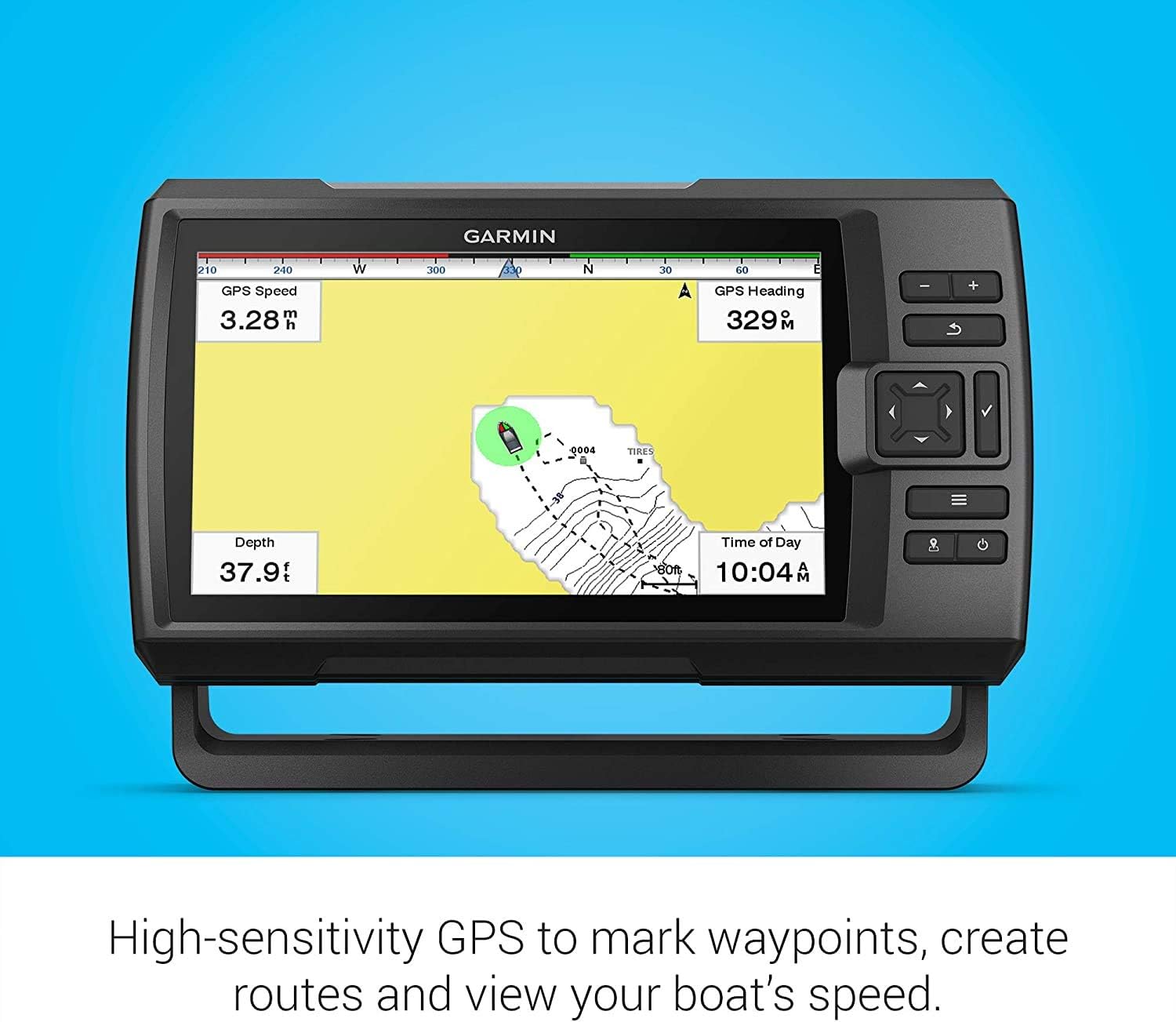
Image: The Striker Vivid 9sv highlighting its GPS capabilities for navigation and waypoint management.
Quickdraw Ingerada
This feature allows you to create personalized fishing maps with 1-foot contours as you navigate. The data is saved directly to your device. To activate, navigate to the Quickdraw Contours menu and start recording. You can also share and download maps from the Garmin Quickdraw Community via the ActiveCaptain app.
Wi-Fi and ActiveCaptain App
Connect your Striker Vivid 9sv to the ActiveCaptain app on your compatible smartphone via Wi-Fi. This enables:
- Transferring waypoints and routes.
- Receiving smart notifications on your fishfinder screen.
- Accessing the Quickdraw Community for map sharing.
- Software-eguneratzeak deskargatzea.
Mantentzea
Unitatea garbitzea
Garbitu aldizka pantaila eta casing bigun batekin, damp, lint-free cloth. Avoid using abrasive cleaners, solvents, or chemical-based products, as these can damage the display and plastic components. For stubborn dirt, a mild soap solution can be used, followed by rinsing with fresh water and drying thoroughly.
Transduktorearen zaintza
Inspect the transducer periodically for marine growth or damage. Clean the transducer face with a soft cloth and mild soap. Ensure the cable connections are secure and free from corrosion. If the boat is stored in water, clean the transducer more frequently to prevent buildup that can affect sonar performance.
Software eguneraketak
Garmin periodically releases software updates to improve performance and add new features. You can update your device via the ActiveCaptain app or by downloading the update file to a microSD card from the Garmin website and inserting it into the device.
Arazoak konpontzea
Device Will Not Power On
- Check the power cable connection to the unit and the boat's power source.
- Verify the boat's battery is charged and providing sufficient voltage (10V-tik 20V-ra).
- Inspect the fuse in the power cable for continuity. Replace if blown.
No Sonar Display
- Ziurtatu transduktorea unitateari behar bezala konektatuta dagoela.
- Verify the transducer is submerged in water.
- Egiaztatu transduktorearen aurpegian oztoporik edo itsas hazkuntzarik dagoen.
- Confirm that the correct transducer type is selected in the system settings.
Inaccurate GPS Position or No Satellite Lock
- Ziurtatu gailuak argia duela view zeruaren gainetik, goiko oztopoetatik libre.
- Move away from large metal objects or other electronic devices that may cause interference.
- Allow sufficient time for the device to acquire satellites, especially after being moved a long distance.
Screen Freezes or Becomes Unresponsive
- Perform a soft reset by pressing and holding the power button until the unit powers off, then restart.
- If the issue persists, consider performing a factory reset (refer to the full owner's manual for instructions, as this will erase user data).
- Ziurtatu gailuaren softwarea eguneratuta dagoela.
Zehaztapenak
| Ezaugarri | Zehaztapena |
|---|---|
| Marka | Garmin |
| Ereduaren izena | Garmin Striker Vivid 9sv |
| Zati zenbakia | 010-02554-00 |
| Pantailaren tamaina | 9 hazbete |
| Bistaratzeko mota | LCDa |
| Energia iturria | DC Power Supply (10-20V) |
| Muntatze Mota | Flush Mount, Tilt/Swivel Mount |
| Sonar Support | CHIRP Traditional, ClearVü, SideVü |
| GPSa | GPS sentikortasun handikoa |
| Kartografia | Quickdraw Ingerada |
| Konektibitatea | Wi-Fi (ActiveCaptain aplikaziorako) |
| Elementuaren neurriak (LxWxH) | 8 x 11.5 x 6 hazbete |
| UPC | 099654999471 |
Bermea eta Laguntza
Bermearen informazioa
The Garmin Striker Vivid 9sv comes with a 1 urteko berme mugatua from the date of purchase. This warranty covers defects in materials and workmanship under normal use. For specific terms and conditions, please refer to the warranty documentation included with your product or visit the official Garmin webgunea.
Bezeroarentzako Arreta
For technical assistance, troubleshooting beyond this manual, or warranty claims, please contact Garmin Customer Support. You can find contact information, FAQs, and additional resources on the official Garmin webgunea (www.garmin.com). Have your product model and serial number ready when contacting support.


