Sarrera
This user manual provides comprehensive instructions for the Tera HW0002 Wireless Barcode Scanner. It covers setup, operation, maintenance, and troubleshooting to ensure optimal performance and longevity of your device. The Tera HW0002 is a versatile 1D/2D QR barcode reader featuring a patented battery level indicator, 3-in-1 connectivity (Bluetooth, 2.4G Wireless, USB Wired), and a durable, shockproof design.
Paketearen edukia
- Barra-kodeen eskanerra x1
- Barra-kode eskaner euskarria x1
- USB kablea x1
- Dongle x1
- Erabiltzailearen eskuliburua x1

Image: The Tera HW0002 Barcode Scanner, its stand, USB cable, and 2.4G wireless dongle, illustrating the complete package contents.
Konfigurazioa
3-in-1 konexio moduak
The Tera HW0002 offers flexible connectivity options to suit various environments and devices. You can connect the scanner via Bluetooth, 2.4G Wireless, or a wired USB connection.

Image: Visual representation of the three connection modes: Bluetooth (BT), 2.4G Wireless via dongle, and USB Wired connection, compatible with various operating systems like Windows, Mac OS, iOS, Android, and Linux.
1. 2.4G Haririk gabeko Modua
- Insert the 2.4G USB dongle into an available USB port on your computer or device.
- The scanner will automatically pair with the dongle. A successful connection is indicated by a specific sound or LED light pattern (refer to the full PDF manual for details).
- The transmission distance can reach 328ft in barrier-free environments and 114ft in environments with obstacles.
2. Bluetooth modua
- Ziurtatu zure gailuaren Bluetooth-a gaituta dagoela.
- Scan the "Bluetooth Mode" barcode from the user manual (physical or PDF).
- On your device, search for "Barcode Scanner HW0002" in the Bluetooth settings and pair.
- This mode is compatible with smartphones, tablets, and computers running iOS, Android, Mac OS, and Windows.
3. USB kable bidezko modua
- Konektatu eskanerra zuzenean ordenagailura emandako USB kablea erabiliz.
- The scanner will function as a standard keyboard input device, requiring no additional drivers for most operating systems.
- This mode also charges the scanner's internal battery.
Video: An official product video demonstrating the Tera HW0002 Barcode Scanner's features, including its battery indicator, scanning capabilities, and various connection modes (2.4GHz, Bluetooth, Wired).
Funtzionamendu-argibideak
Bateriaren mailaren adierazlea
The Tera HW0002 features a patented battery level indicator located on the top of the scanner. This allows for real-time monitoring of the remaining charge, helping to prevent unexpected power interruptions.

Image: A visual guide to the battery level indicator, displaying working time (>12H), charging time (3.5H), standby time (>720H), and battery percentage levels (25%, 50%, 75%, 100%) via LED dots.
Barra-kodeak eskaneatzea
The scanner utilizes Superior Global CMOS Imaging Scanning technology, enabling fast and accurate reading of both ordinary and high-density 1D and 2D barcodes. It can read barcodes from various surfaces, including paper, reflective materials, and digital screens.

Image: The barcode scanner actively scanning various types of 1D and 2D barcodes, including QR codes, Code 39, EAN-13, and Data Matrix, demonstrating its versatile scanning capabilities.
Supported Symbologies include: 1D (Codabar, Code 11, Code93, MSI, Code 128, UCC/EAN-128, Code 39, EAN-8, EAN-13, UPC-A, ISBN, Industrial 25, Interleaved 25, Standard25, Matrix) and 2D (QR, DataMatrix, PDF417, Aztec, Hanxin, Micro PDF417).

Image: A Tera barcode scanner being used to scan both 1D and 2D barcodes displayed on computer monitors, highlighting its ability to read from digital screens.
Hands-Free Automatic Scanning
When placed on its stand, the scanner can operate in hands-free automatic scanning mode. This is ideal for high-volume scanning tasks, allowing users to simply present items to the scanner for automatic data capture.

Image: The barcode scanner positioned on its stand, ready for hands-free automatic scanning, with a person preparing to scan a document next to a laptop.
Customizing Scan Output (Prefix/Suffix)
The Tera HW0002 allows for advanced data editing, such as adding custom prefixes or suffixes to scanned data. This feature is configured by scanning specific barcodes found in the full user manual.
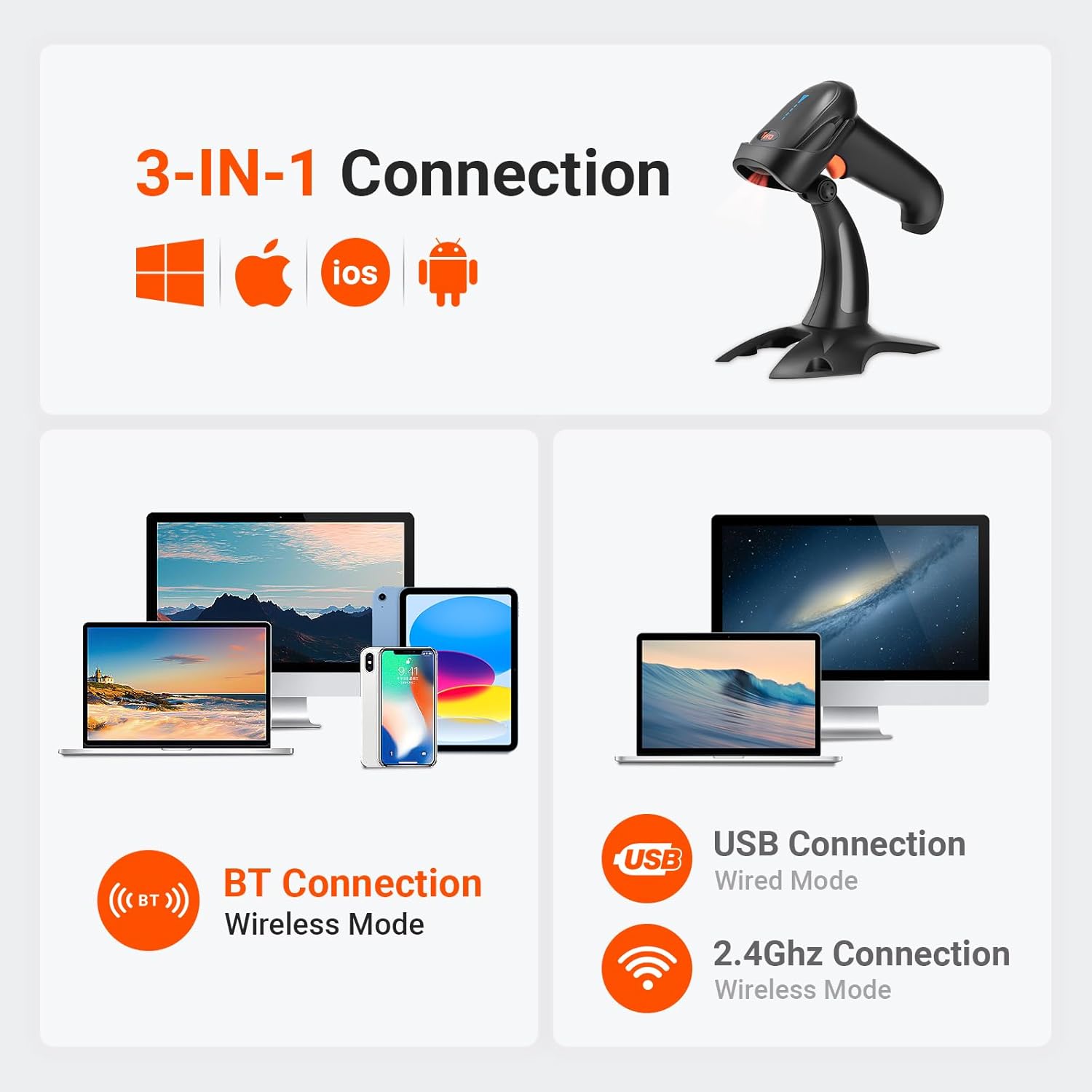
Image: Illustrations showing how date and time can be added as either a prefix or a suffix to scanned barcode data, demonstrating the customization feature.
Adibidezample, you can configure the scanner to delete the first 2 characters and add 2 TAB-characters when scanning Code39, while leaving other barcode types unedited. Refer to the full user manual for detailed programming barcodes.
Vibration Alert and Sound Settings
In addition to sound and LED illumination, the scanner provides a tactile vibration alert upon successful scans. The buzzer can be muted for quiet operation, which is useful in noise-sensitive environments.

Image: A graphic illustrating the volume settings (Off, Low, Medium, High) and vibration settings (Vibration On, Vibration Off) for the scanner, configurable via scanning specific barcodes.
Mantentzea
To ensure the longevity and optimal performance of your Tera HW0002 barcode scanner, follow these general maintenance guidelines:
- Garbiketa: Erabili zapi leun eta lehor bat eskanerraren kanpoaldea garbitzeko. Eskaneatze-leihoarentzat, erabili zapi leun eta lehor bat.ampGarbigarri leun eta ez-urratzaile batekin garbitu. Saihestu lentea urra dezaketen produktu kimiko gogorrak edo material urratzaileak.
- Biltegiratzea: Store the scanner in a cool, dry place away from direct sunlight and extreme temperatures. When not in use, place it on its stand or in a protective case to prevent accidental drops or damage.
- Bateria zaintzea: While the scanner has a large 2000mAh battery, avoid completely draining the battery frequently. For long-term storage, charge the battery to about 50% to prolong its lifespan.
- Babes fisikoa: The scanner features a shockproof silicone protective cover. While designed to withstand drops, avoid unnecessary impacts to maintain its integrity.
Arazoak konpontzea
If you encounter issues with your Tera HW0002 barcode scanner, please refer to the following common troubleshooting steps:
- Eskanerra ez da konektatzen:
- 2.4G Haririk gabekoa: Ensure the USB dongle is securely plugged in and the scanner is in 2.4G mode. Try a different USB port.
- Bluetootha: Confirm Bluetooth is enabled on your host device and the scanner is in Bluetooth pairing mode. Forget the device on your host and re-pair.
- USB kable bidez: Check the USB cable connection at both ends. Try a different USB cable or port.
- Ezin dira barra-kodeak eskaneatu:
- Ziurtatu barra-kodea garbi dagoela eta ez dagoela gehiegi hondatuta.
- Egiaztatu eskanerraren eta barra-kodearen arteko distantzia eta angelua.
- Verify the scanner's light is active when attempting to scan.
- Confirm the barcode symbology is supported by the scanner (refer to "Supported Symbologies" in the Operating Instructions).
- If scanning from a screen, ensure screen brightness is adequate.
- Datuen irteera okerra:
- If data appears garbled or incorrect, ensure the keyboard language settings on your computer match the scanner's configuration (e.g., US English keyboard layout).
- If custom prefixes/suffixes are causing issues, reset the scanner to factory defaults by scanning the appropriate barcode in the full user manual.
- No Vibration/Sound:
- Check the volume and vibration settings by scanning the configuration barcodes in the manual. The buzzer might be set to mute.
For more detailed troubleshooting or advanced configurations, please refer to the comprehensive PDF User Manual available online.
Zehaztapenak
| Ezaugarri | Xehetasuna |
|---|---|
| Produktuaren neurriak | 3.3 x 4.8 x 8.8 hazbete |
| Elementuaren pisua | 1.12 kilo |
| Elementuaren eredu-zenbakia | HW0002_BK_US |
| Pilak | 1 litio ioi bateria behar da (barne) |
| Energia iturria | Bateriaren bidez |
| Konektibitate Teknologia | 2.4G Haririk gabekoa, Bluetootha, USB kablea |
| Gailu bateragarriak | Mahaigaina, ordenagailu eramangarria, telefono adimenduna, tableta |
| Fabrikatzailea | Tera |
| Eskuragarri dagoen lehen data | 20ko otsailaren 2021a |
Bermea eta laguntza
Tera products are designed for reliability and performance. For specific warranty details, please refer to the documentation included with your purchase or contact Tera customer support.
For further assistance, technical support, or to access the full user manual with detailed configuration barcodes, please visit the official Tera store or refer to the PDF user manual:
Erlazionatutako dokumentuak - HW0002_BK_US
 |
Tera D5100 haririk gabeko 2D barra-kode eskanerra erabiltzailearen eskuliburua Tera D5100 haririk gabeko 2D barra-kode eskanerraren erabiltzailearen eskuliburu osoa, konfigurazioa, funtzionamendu moduak, konfigurazioa eta laguntza baliabideak zehaztuz. |
 |
Tera D5100Y Haridun 2D Barra-kode Eskanerra Erabiltzailearen Eskuliburua Tera D5100Y kable bidezko 2D barra-kode eskanerraren erabiltzailearen eskuliburua, konfigurazio aukerak eta erabilera argibideak zehazten dituena txikizkako merkataritzan, biltegietan eta POS inguruneetan errendimendu optimoa lortzeko. |
 |
Tera 5200C haririk gabeko barra-kode eskanerra erabiltzailearen eskuliburua Tera 5200C haririk gabeko barra-kode eskanerraren erabiltzailearen eskuliburua, konfigurazioa, ezaugarriak, zehaztapenak, konexio aukerak (2.4 Ghz, Bluetooth, USB) eta Tera barra-kode eskanerrentzako laguntza-informazioa zehazten dituena. |
 |
Tera Barcode Scanner User Manual User manual for the Tera Barcode Scanner, covering setup, configuration, and operation for models 8100, HW0002, HW0008, and D5100. Learn how to customize settings, connect via Bluetooth or 2.4GHz, and manage scanning modes. |
 |
Tera HW0009 2D barra-kode eskanerra erabiltzailearen eskuliburua Tera HW0009 2D Eremu-irudiak dituen barra-kode eskanerraren erabiltzailearen eskuliburu ofiziala. Gida honek pantaila digitala eta kargatzeko euskarria dituen eskuzko barra-kode irakurgailu honen konfigurazioa, haririk gabeko konexioa (2.4G, Bluetooth) eta USB konexioa, funtzionamendu moduak eta eskaner ezarpenak zehazten ditu. |
 |
Tera 5100E Haririk gabeko/Kabledun 1D Laser Barra-kode Eskanerra Erabiltzailearen Eskuliburua Erabiltzailearen eskuliburu honek Tera 5100E haririk gabeko/kabledun 1D laser barra-kode eskanerraren argibide eta zehaztapen osoak eskaintzen ditu, konfigurazioa, konfigurazioa eta funtzionamendua barne. |