1. Sarrera
This manual provides instructions for the Sharp Digital Alarm Clock, Model SPC547AJAMZ. This device features an easy-to-read LED display, a high-speed USB charging port, and essential alarm functions. Please read this manual thoroughly before use to ensure proper operation and to maximize the product's lifespan.

Figure 1: Sharp Digital Alarm Clock (Model SPC547AJAMZ) front view.
2. Produktuaren ezaugarriak
The Sharp Digital Alarm Clock offers the following key features:
- Erraz irakurtzeko pantaila: Large, clear green LED digits for visibility from a distance.
- High-Speed USB Charging Port: A 2 AMP USB port for rapid charging of compatible devices such as smartphones and tablets.
- Alarmaren bolumena doigarria: Select between high and low alarm volume settings.
- Eragiketa sinplea: Intuitive button controls for setting time and alarm.
- Bateria babeskopia: Maintains time and alarm settings during power outages (requires 2 AAA batteries, not included). The display will be blank during battery backup mode, but the internal clock will continue to run, and the alarm will sound at the set time.

Figure 2: Alarm clock with a smartphone connected to the USB charging port.
3. Paketearen edukia
Egiaztatu elementu guztiak paketean daudela:
- Sharp Digital Alarm Clock (Model SPC547AJAMZ)
- AC Potentzia Egokitzailea
- Erabiltzailearen eskuliburua (dokumentu hau)
Note: 2 AAA batteries for backup are not included and must be purchased separately.
4. Segurtasun informazioa
Mesedez, kontuan hartu segurtasun neurri hauek:
- Ez jarri unitatea uraren edo gehiegizko hezetasunaren eraginpean.
- Saihestu unitatea bero-iturrien ondoan edo eguzki-argiaren eraginpean jartzea.
- Erabili emandako korronte-egokitzailea soilik.
- Ez saiatu unitatea desmuntatzen edo aldatzen.
- Mantendu haurren eskura.
- Ziurtatu aireztapen egokia unitatearen inguruan.
5. Konfigurazioa
5.1 Energia-konexioa
- Plug the AC power adapter into the DC IN jack located on the back of the alarm clock.
- Entxufatu korronte-egokitzailearen beste muturra hormako entxufe estandar batera (120V AC, 60Hz).
- The display will illuminate, and the clock will be ready for time setting.
5.2 Bateriaren babeskopiaren instalazioa
Argindarra itzaltzean ordua eta alarma ezarpenak mantentzen direla ziurtatzekotage:
- Aurkitu bateriaren konpartimentua unitatearen behealdean.
- Ireki bateriaren konpartimenduaren estalkia.
- Insert two (2) new AAA batteries, observing the correct polarity (+ and -) as indicated inside the compartment.
- Itxi bateriaren konpartimenduaren estalkia ondo.
Note: Batteries are for backup only. The clock display will not be lit during a power outage when operating on battery backup, but the internal clock will continue to run, and the alarm will sound at the set time.
6. Funtzionamendu-argibideak
Familiarize yourself with the control buttons located on the top of the unit:
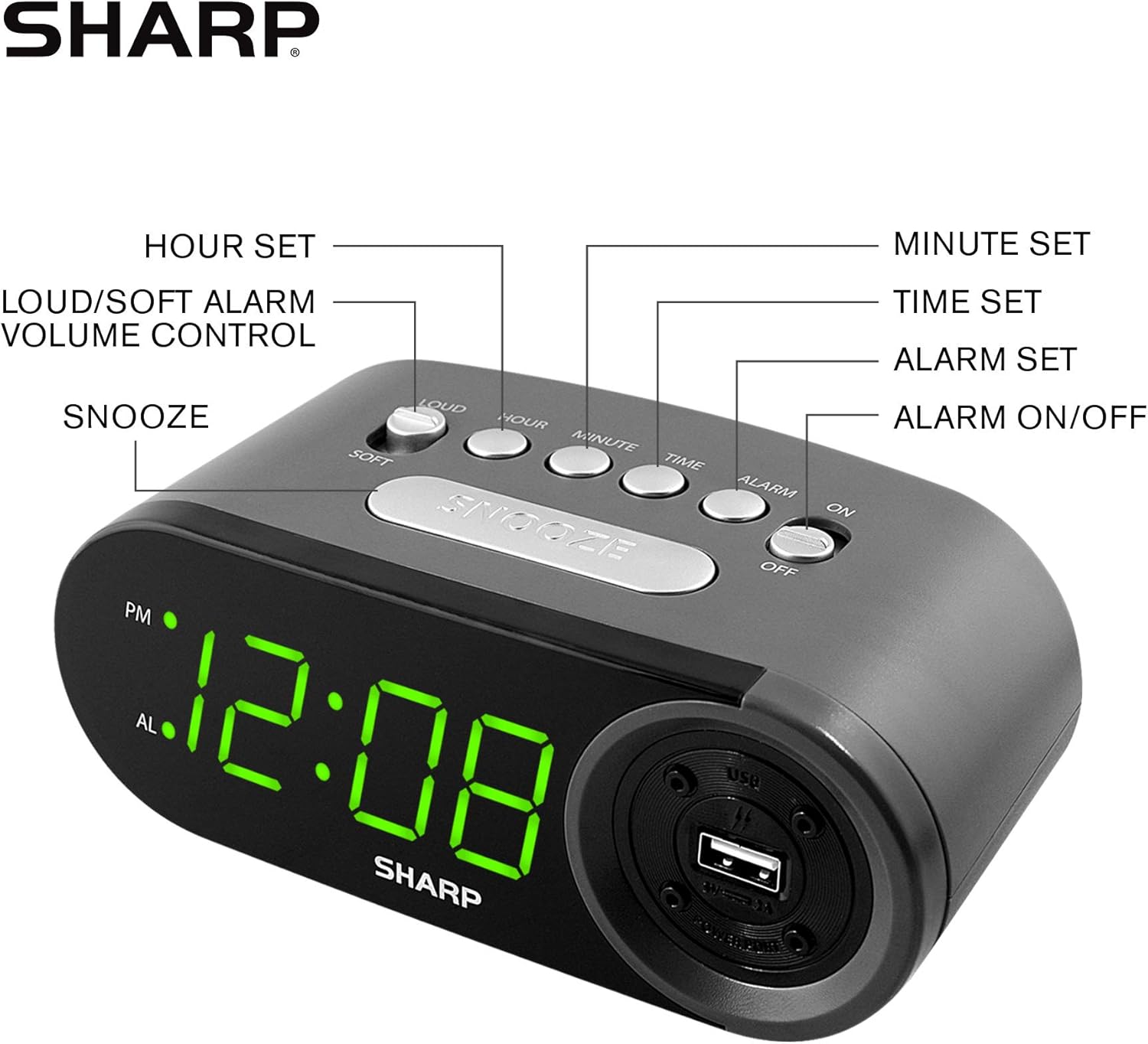
Figure 3: Top panel controls and their functions.
6.1 Uneko ordua ezartzea
- Eduki sakatuta DENBORA button until the display begins to flash.
- Sakatu ORDUA button repeatedly to set the hour. Observe the PM indicator for afternoon hours.
- Sakatu MINUTUA button repeatedly to set the minutes.
- Nahi den ordua ezarri ondoren, sakatu botoia DENBORA botoia berriro sakatu berresteko eta ordua ezartzeko modutik irteteko.
6.2 Setting the Alarm Time
- Eduki sakatuta ALARMA button until the alarm time display begins to flash. The "AL" indicator will also flash.
- Sakatu ORDUA button repeatedly to set the alarm hour. Observe the PM indicator.
- Sakatu MINUTUA button repeatedly to set the alarm minutes.
- Nahi duzun alarma ordua ezarri ondoren, sakatu ALARMA button again to confirm and exit alarm setting mode.
6.3 Alarma aktibatzea/desaktibatzea
- To turn the alarm ON, irristatu ALARMA ON / OFF switch to the "ON" position. The "AL" indicator will appear on the display.
- To turn the alarm OFF, irristatu ALARMA ON / OFF switch to the "OFF" position. The "AL" indicator will disappear.
6.4 Snooze funtzioa
Alarma jotzen duenean, sakatu botoi handia SNOOZE button. The alarm will temporarily stop and sound again after approximately 9 minutes.
6.5 Stopping the Alarm
To stop the alarm completely after it sounds (without using snooze), slide the ALARMA ON / OFF switch to the "OFF" position. The alarm will reset for the next day if the switch is moved back to "ON".
6.6 Alarmaren bolumena doitzea
Sakatu LOUD/SOFT button to toggle between high and low alarm volume settings.
6.7 Using the USB Charging Port
2 AMP USB charging port is located on the right side of the unit.
- Connect your device's USB charging cable (not included) to the USB port on the alarm clock.
- Connect the other end of the cable to your smartphone, tablet, or other compatible USB-powered device.
- Ensure the alarm clock is connected to AC power for the USB port to function.
Note: Charging speed may vary depending on your device and cable.
7. Mantentzea
To keep your alarm clock in optimal condition:
- Garbiketa: Garbitu unitatea zapi leun eta lehor batekin. Ez erabili garbitzaile edo disolbatzaile urratzailerik.
- Bateria ordezkatzea: Replace AAA backup batteries annually or when the battery low indicator (if present) appears, to ensure reliable backup functionality.
- Biltegiratzea: If storing the unit for an extended period, remove the backup batteries to prevent leakage.
8. Arazoak
| Arazoa | Kausa posiblea | Irtenbidea |
|---|---|---|
| Erlojuaren pantaila hutsik dago. | No AC power; power outage; unit unplugged. | Ensure AC adapter is securely plugged into the unit and a working wall outlet. Check for power outages. |
| Alarmak ez du jotzen. | Alarm is not activated; alarm time is incorrect; volume is too low. | Slide ALARM ON/OFF switch to "ON". Verify alarm time is set correctly. Adjust alarm volume using the LOUD/SOFT button. |
| USB kargatzeko ataka ez dabil. | Clock not connected to AC power; device not compatible; faulty cable. | Ensure the clock is plugged into AC power. Try a different USB cable or device to confirm compatibility. |
| Ordu/Alarma ezarpenak galdu dira argindarra itzaltzeantage. | Erreserbako bateriak agortuta daude edo ez daude instalatuta. | Install two fresh AAA batteries in the battery compartment, ensuring correct polarity. |
9. Zehaztapenak
- Marka: Zorrotza
- Eredua: SPC547AJAMZ
- Bistaratzeko mota: LED digitala (berdea)
- Energia iturria: Corded Electric (AC 120V, 60Hz)
- Bateria babeskopia: 2 x AAA bateria (ez daude barne)
- USB kargatzeko ataka: 2 AMP (5V)
- Produktuaren neurriak: Approximately 6.2" W x 2.3" H x 3.25" D
- Elementuaren pisua: 9.6 ontza gutxi gorabehera
- Materiala: Plastikoa
- UPC: 049353006000

4. irudia: Produktuaren neurriak.
10. Bermea eta laguntza
10.1 Bermearen informazioa
This Sharp product is covered by a limited manufacturer's warranty. For specific warranty terms and conditions, please refer to the warranty card included with your purchase or visit the official Sharp webgunea. Gorde erosketa-agiria erosketaren frogagiri gisa.
10.2 Bezeroarentzako laguntza
If you have any questions, require assistance, or need to report an issue with your Sharp Digital Alarm Clock, please contact Sharp customer support. Contact details can typically be found on the official Sharp webgunean edo produktuaren ontzian.
Informazio gehiagorako, bisitatu Sharp Store on Amazon.


