1. Sarrera
This user manual provides essential information for the safe and effective operation of your ITECH IT6952A Programmable DC Power Supply. Please read this manual thoroughly before using the device to ensure proper functionality and to prevent damage or injury. The IT6952A is a high-performance, programmable DC power supply designed for laboratory and industrial applications, offering precise control over voltage eta korronte irteera.
2. Segurtasun informazioa
Always observe the following safety precautions to prevent electric shock, injury, or damage to the instrument:
- Ziurtatu elikatze-iturria lurrera konektatutako korronte alternoko entxufe batera konektatuta dagoela.
- Ez erabili gailua hezeetan edo damp baldintzak.
- Ez ireki c-a.asing; ez dago erabiltzaileak konpondu beharreko piezarik barruan. Konponketa guztiak langile kualifikatuen esku utzi.
- Egiaztatu sarrerako boltage matches the power supply's rating before connecting to the mains.
- Avoid short-circuiting the output terminals, especially at high power settings.
- Ziurtatu aireztapen egokia unitatearen inguruan, gehiegi berotzea saihesteko.
3. Produktua amaitu daview
The ITECH IT6952A features a clear VFD display and intuitive controls for easy operation.
3.1 Aurreko panelaren diseinua

Figure 3.1: Front Panel of IT6952A
The front panel includes the VFD display for voltage and current readings, a rotary knob for precise adjustments, number keys (0-9) and ESC for direct input, function keys (V-SET, I-SET, Save, Recall, Meter, Trigger, Enter, On/Off) for various operations, navigation keys (UP/DOWN/LEFT/RIGHT) for cursor movement, and output terminals for connecting loads. The 'Shift' and 'Local' keys provide additional control options, and the main power switch is integrated.
3.2 Atzeko panelaren diseinua
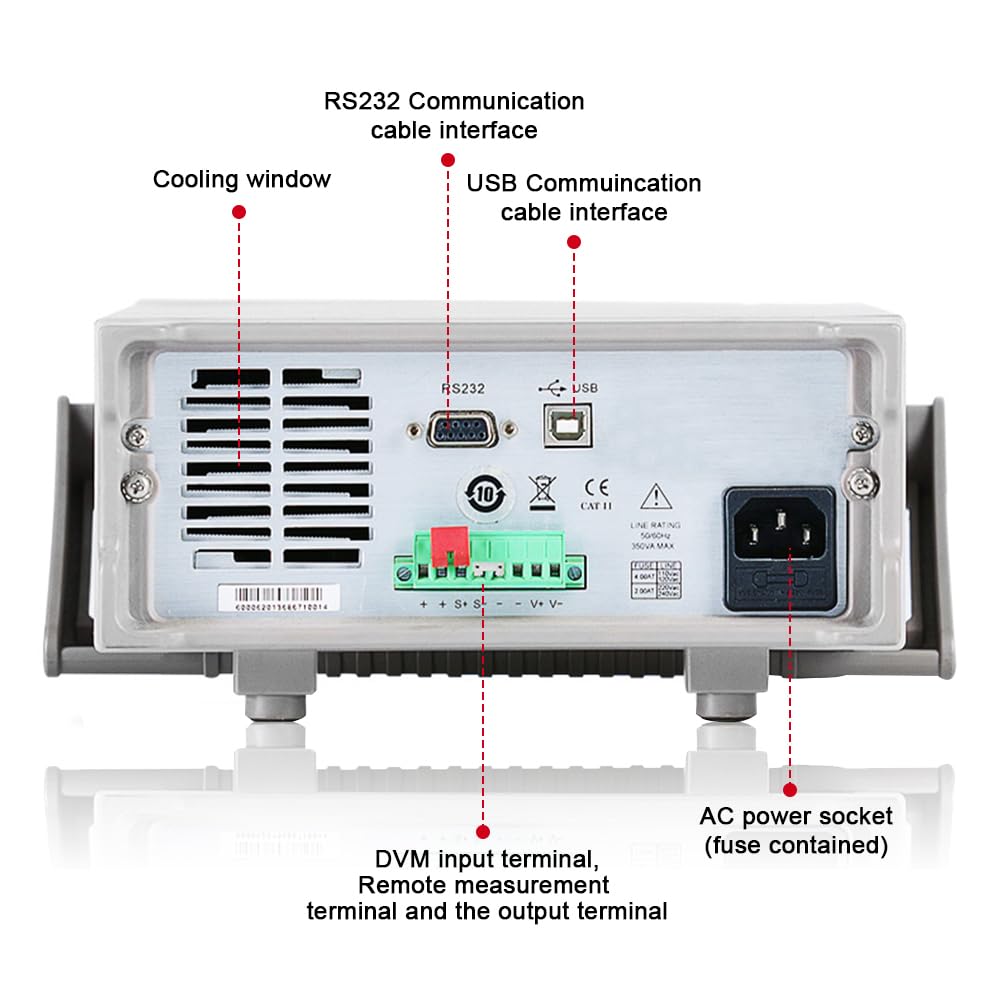
Figure 3.2: Rear Panel of IT6952A
The rear panel features the AC power socket (with integrated fuse), cooling windows for heat dissipation, an RS232 communication cable interface, a USB communication cable interface, and DVM input terminals along with remote measurement terminals and additional output terminals for specific applications.
4. Konfigurazioa
Jarraitu urrats hauek hasierako konfiguraziorako:
- Despaketatzea: Kontu handiz atera elikatze-iturria bere paketetik. Begiratu garraioan zehar kalterik dagoen.
- Lekua: Place the unit on a stable, level surface with adequate ventilation around all sides. Do not block the cooling vents on the sides and rear.
- Potentzia-konexioa: Connect the provided AC power cord to the AC power socket on the rear panel of the IT6952A. Plug the other end into a grounded electrical outlet.
- Piztu: Press the main power switch on the front panel to turn on the unit. The VFD display should illuminate.
- Irteerako konexioa: Connect your load to the output terminals on the front panel using appropriate test leads. Ensure correct polarity (positive to positive, negative to negative).
5. Funtzionamendu-argibideak
This section covers basic operation of the IT6952A.
5.1 Ezarpena Voltage eta Korrontea
- Set Voltage: Sakatu V-MULTZOA botoia. Bolumenatage display will become active. Use the rotary knob to adjust the voltage, or use the number keys for direct input followed by Sartu.
- Ezarri unekoa: Sakatu I-SET button. The current display will become active. Use the rotary knob to adjust the current limit, or use the number keys for direct input followed by Sartu.
- Gaitu irteera: Nahi den bolumena ezarri ondorentage eta unekoa, sakatu Piztu/Desaktibatu button to enable the output. The output indicator will illuminate.
- Desgaitu irteera: Irteera desgaitzeko, sakatu tekla Piztu/Desaktibatu botoia berriro.
5.2 Using Memory Functions (Save/Recall)
The IT6952A allows you to save and recall frequently used voltage eta egungo ezarpenak.
- Gorde ezarpena: Ezarri nahi duzun bolumenatage and current. Press the Gorde button. Use the navigation keys or number keys to select a memory location (e.g., 0-9) and press Sartu to store the settings.
- Recall Setting: Sakatu Gogoratu button. Use the navigation keys or number keys to select the desired memory location and press Sartu to load the stored settings.
6. Mantentzea
Proper maintenance ensures the longevity and reliability of your power supply.
- Garbiketa: Disconnect the power supply from the mains before cleaning. Use a soft, dry cloth to wipe the exterior. For stubborn dirt, a slightly damp cloth with mild detergent can be used, ensuring no liquid enters the unit.
- Aireztapena: Regularly check that the cooling vents are free from dust and obstructions. Use compressed air to clear dust if necessary.
- Biltegiratzea: When not in use for extended periods, store the power supply in a cool, dry, and dust-free environment.
7. Arazoak
If you encounter issues with your IT6952A, refer to the following common problems and solutions:
| Arazoa | Kausa posiblea | Irtenbidea |
|---|---|---|
| Piztuta dagoenean ez dago energiarik | Power cord not connected; Blown fuse; No power from outlet | Check power cord connection; Replace fuse (refer to specifications for type); Test outlet with another device |
| Ez dago irteera bolumeniktage/korronte | Output disabled; Overload protection activated; Incorrect settings | Sakatu Piztu/Desaktibatu to enable output; Reduce load or increase current limit; Verify voltage/uneko ezarpenak |
| Display shows 'Error' | Internal fault; Over-temperature | Turn off unit, wait 5 minutes, restart; Ensure proper ventilation, allow unit to cool down. If error persists, contact support. |
| Irakurketa okerrak | Poor connection; Calibration needed | Check all connections; Contact ITECH support for calibration information. |
8. Zehaztapenak
Key technical specifications for the ITECH IT6952A Programmable DC Power Supply:
| Zehaztapena | Balioa |
|---|---|
| Marka | ITECH |
| Eredua | IT6952A |
| Irteera boltage | 60 Volt |
| Amparoa | 25 Amps |
| Irteera Wattage | 600 Watt |
| Forma-faktorea | Bankua |
| Konektore mota | USBa |
| Materiala | Metala |
| Kolorea | Gorria, beltza |
9. Bermea eta Laguntza
ITECH products are designed for reliability and performance. For warranty information, technical support, or service inquiries, please refer to the warranty card included with your product or visit the official ITECH webgunea. Gorde erosketa-agiria erosketaren frogagiri gisa berme-erreklamazioetarako.
For further assistance, you may contact ITECH customer service through their official channels. Always provide your product model (IT6952A) and serial number when seeking support.


