Sarrera
This instruction manual provides comprehensive guidance for the SOAR NFL True Wireless Earbuds V.4. These earbuds feature Bluetooth 5.0 technology, a built-in microphone, and touch controls, offering 3-4 hours of playtime per charge. The included charging case ensures portability and extended use. Please read this manual thoroughly before using your earbuds to ensure proper operation and longevity.
Kutxan dagoena
Upon opening your SOAR NFL True Wireless Earbuds V.4 package, you should find the following items:
- One (1) Pair of True Wireless Earbuds
- Kargatzeko zorro bat (1)
- Mikro-USB kargatzeko kable bat (1)

The image above displays the SOAR NFL True Wireless Earbuds V.4 in their retail packaging. The package includes the earbuds, the charging case, and a micro-USB charging cable.
Produktua amaituview
The SOAR NFL True Wireless Earbuds V.4 consist of two individual earbuds and a portable charging case. Each earbud features a touch-sensitive area for controls and an LED indicator. The charging case has a lid, charging ports for the earbuds, and LED indicators to show its battery status.

This image shows the earbuds outside their charging case, which is open and connected to a charging cable. The charging case has designated slots for each earbud (Left and Right) and LED indicators for charging status.
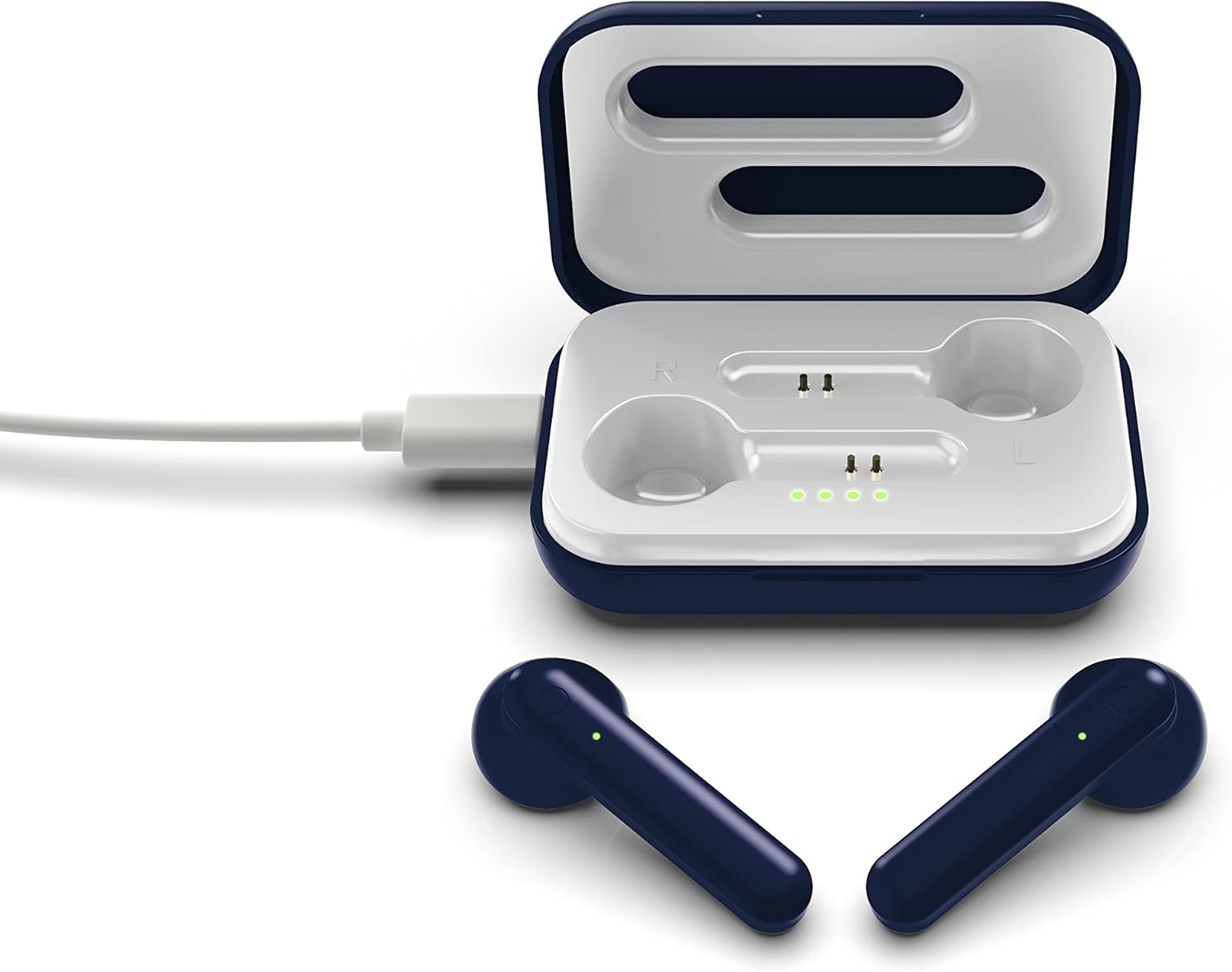
The image above illustrates the earbuds securely placed within their charging case. The illuminated LED lights on the case indicate the charging status of both the case and the earbuds.
Konfigurazioa
1. Entzungailuak eta zorroa kargatzea
Lehenengo aldiz erabili aurretik, kargatu guztiz entzungailuak eta kargatzeko zorroa.
- Kasua kargatzea: Connect the provided Micro-USB cable to the charging port on the case and the other end to a USB power source (e.g., computer, wall adapter). The LED indicators on the case will illuminate to show charging progress.
- Entzungailuak kargatzea: Place the earbuds into their respective slots in the charging case. Ensure they are correctly seated. The earbuds will begin charging automatically from the case's internal battery. The LED indicators on the earbuds will show their charging status.
- A full charge provides approximately 3-4 hours of playtime.
2. Bluetooth parekatzea
Aurikularrak gailu batera konektatzeko:
- Ziurtatu entzungailuak kargatuta daudela.
- Open the charging case. The earbuds will automatically power on and enter pairing mode. The LED indicator on one earbud will flash, indicating it is ready to pair.
- Zure gailuan (smartphone-an, tabletan, etab.), gaitu Bluetooth-a.
- Bilatu available Bluetooth devices and select "SOAR TWS4" from the list.
- Once connected, the earbud LED indicator will stop flashing. You will hear an audible confirmation.
- Entzungailuak automatikoki konektatuko dira azken parekatutako gailura zorrotik ateratzean, Bluetooth-a gaituta badago gailuan.
Funtzionamendu-argibideak
The SOAR NFL True Wireless Earbuds V.4 feature touch controls for easy management of audio and calls.
Piztu/Itzali
- Piztu: Ireki kargatzeko zorroa edo sakatu luze bi entzungailuetako ukipen-eremua 3 segundoz.
- Itzali: Jarri entzungailuak berriro kargatzeko zorroan eta itxi tapa, edo sakatu luze bi entzungailuetako ukipen-eremua 5 segundoz.
Musika erreproduzitzea
- Erreproduzitu/Pausatu: Sakatu bakar batean entzungailu batean.
- Hurrengo ibilbidea: Sakatu birritan eskuineko aurikularra.
- Aurreko pista: Sakatu birritan ezkerreko aurikularra.
Deien Kudeaketa
- Deia erantzun/amaitu: Sakatu behin entzungailuetako edozeinetan sarrerako dei batean edo dei aktibo batean zehar.
- Deia baztertu: Long-press on either earbud for 2 seconds during an incoming call.
Ahots Laguntzailea
- Aktibatu Ahots Laguntzailea: Sakatu hiru aldiz entzungailuetako edozeinetan.
Mantentzea
Behar bezala zaintzeak zure entzungailuen bizitza luzatuko du.
- Garbiketa: Erabili zapi leun eta lehor bat entzungailuak eta kargatzeko zorroa garbitzeko. Ez erabili produktu kimiko gogorrik edo material urratzailerik.
- Biltegiratzea: Erabiltzen ez dituzunean, gorde entzungailuak kargatzeko zorroan babesteko eta kargatuta mantentzeko.
- Uraren erresistentzia: Entzungailu hauek dira ez da urarekiko erresistentea. Avoid exposure to liquids, moisture, and extreme temperatures.
- Kargatzen: Use only the provided Micro-USB cable or a certified equivalent for charging.
Arazoak konpontzea
Entzungailuekin arazoak badituzu, jo ezazu honako ohiko irtenbide hauetara:
| Arazoa | Irtenbidea |
|---|---|
| One earbud is not connecting or producing sound. |
|
| Earbuds are not pairing with my device. |
|
| Aurikularrak ez dira kargatzen. |
|
Zehaztapenak
| Ezaugarri | Xehetasuna |
|---|---|
| Ereduaren izena | True Haririk gabeko entzungailuak V.4 |
| Elementuaren eredu-zenbakia | NFL-TWS4-SHKS |
| Konektibitate Teknologia | Bluetooth, Haririk gabekoa |
| Haririk gabeko Komunikazio Teknologia | Bluetooth 5.0 |
| Bluetooth barrutia | Gehienez 30 oin (9.14 metro) |
| Bateriaren iraupena (erreprodukzio-denbora) | 3-4 ordu karga bakoitzeko |
| Kontrol mota | Ukitu, Multimedia Kontrola |
| Ezaugarri Berezia | Mikrofonoa barne |
| Belarrien Kokatzea | Belarrian |
| Uraren Erresistentzia Maila | Ez Urarekiko Erresistentea |
| Materiala | Plastikoa |
| Produktuaren neurriak | 1.25 x 4.5 x 6.5 hazbete |
| Elementuaren pisua | 3.52 ontza |
| Fabrikatzailea | Prime Brands Group, Inc. |
| UPC | 192129070757 |
Produktuaren bideo ofiziala
Bideo honek ikuspegi orokorra eskaintzen duview of the SOAR TWS4 True Wireless Earbuds V.4, highlighting key features such as the wireless charging case, touch controls, and Bluetooth 5.0 technology. It demonstrates the product's design and functionality.
Bermea eta Laguntza
Your SOAR NFL True Wireless Earbuds V.4 are covered by a 1 urteko berme mugatua. This warranty covers manufacturing defects and issues arising from normal use. It does not cover damage caused by misuse, accidents, unauthorized modifications, or exposure to liquids.
For warranty claims, technical support, or further assistance, please contact the manufacturer, Prime Brands Group, Inc., or visit their official webgunea. Gorde erosketaren egiaztagiria bermea balioztatzeko.