1. Sarrera
The Blaupunkt BP 4.0 FHD Dash Cam is a compact and robust in-car video recorder designed to capture your journeys in Full HD. Featuring a 140-degree wide-angle lens, an integrated microphone, and an interior camera, it provides comprehensive coverage for your vehicle. This manual provides essential information for the proper installation, operation, and maintenance of your device.
2. Paketearen edukia
Mesedez, egiaztatu paketearen edukia elementu guztiak daudela ziurtatzeko:
- Blaupunkt BP 4.0 FHD Dash Cam (Video Recorder)
- Barneko lentea
- Mount (Suction Cup Type)
- Kable elektrikoa (auto kargagailua)
- Erabiltzailearen eskuliburua

Image 2.1: Contents of the Blaupunkt BP 4.0 FHD Dash Cam package.

Image 2.2: The retail packaging for the Blaupunkt BP 4.0 FHD Dash Cam.
3. Produktua amaitu daview
The BP 4.0 FHD Dash Cam features a main unit with a 2-inch display and a separate interior camera. It is designed for easy installation and discreet operation within your vehicle.
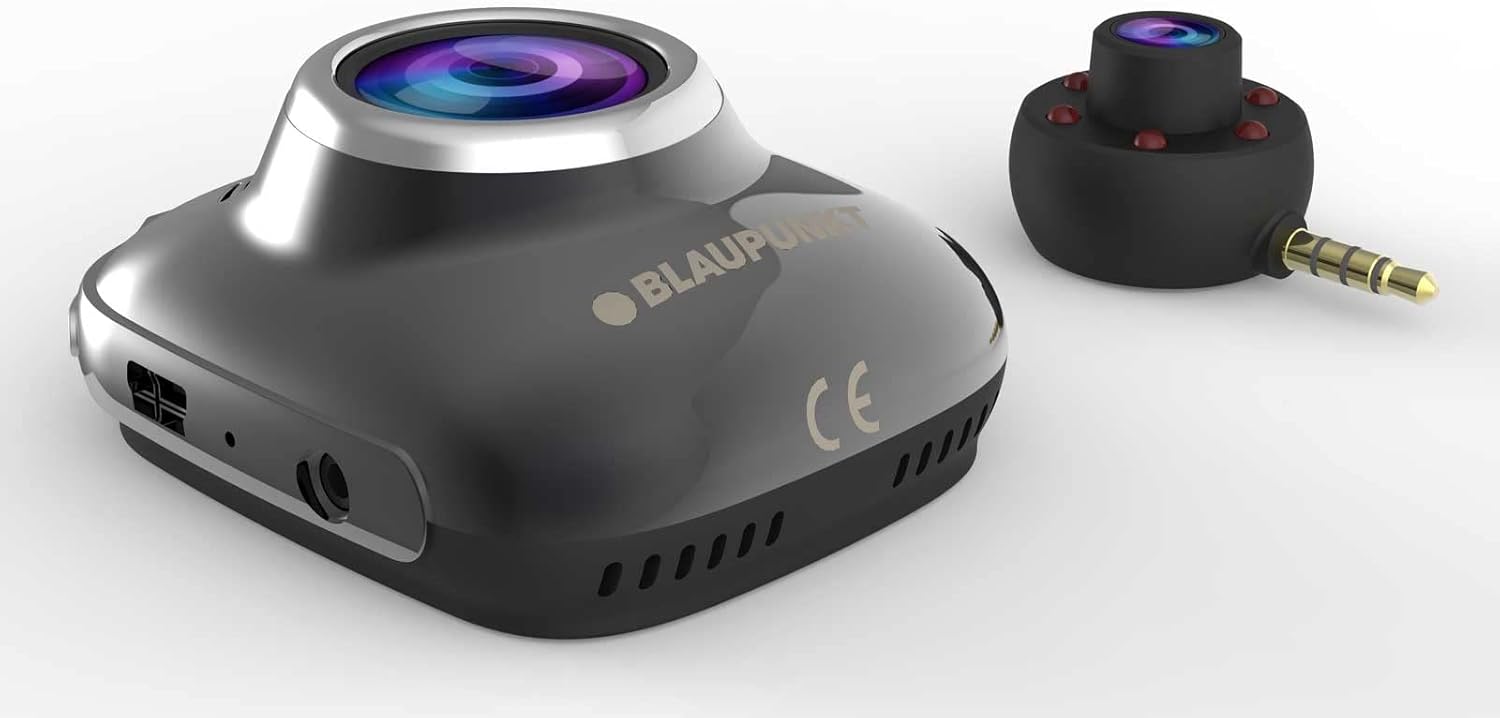
Image 3.1: Main unit and interior camera of the Blaupunkt BP 4.0 FHD Dash Cam.
Ezaugarri nagusiak:
- Lente bikoitza: Records both front and interior views aldi berean.
- Angelu Zabala View: 140 graduko eremu horizontala view errepideen estaldura osoa lortzeko.
- Mikrofono integratua: Captures in-cabin audio.
- 2 hazbeteko pantaila: Zuzenekoetarako view, erreprodukzioa eta menuen nabigazioa.
- G-sentsorea: Automatically locks video files upon impact.
- Loop grabaketa: Etengabe grabatzen du, zaharrena gainidatziz files memoria txartela beteta dagoenean.
- Diseinu iraunkorra: Constructed with zinc alloy for robustness.

Image 3.2: Dimensions of the Blaupunkt BP 4.0 FHD Dash Cam.
4. Instalazioa
Jarraitu urrats hauek zure autoko kamera behar bezala instalatzeko:
- Prestatu muntaketa kokalekua: Aukeratu haizetakoan ikusmena oztopatzen ez duen toki bat view of the road. Clean the area thoroughly to ensure good adhesion for the suction cup mount.
- Muntaia lotu: Secure the suction cup mount to the chosen spot on the windshield. Ensure it is firmly attached.
- Muntatu Dash Cam: Slide the main dash cam unit onto the mount until it clicks into place. Adjust the angle of the camera to ensure the front lens captures the road ahead clearly.
- Sartu MicroSD txartela: Insert a high-speed MicroSD card (not included) into the designated slot on the dash cam. Ensure it is inserted correctly until it locks.
- Konektatu barneko kamera: Plug the interior camera's 3.5mm jack into the auxiliary port on the main dash cam unit. Position the interior camera to capture the vehicle's cabin as desired.
- Konektatu energia: Plug the car charger cable into the dash cam's power input port and then into your vehicle's 12V power outlet (cigarette lighter socket). Route the cable neatly along the windshield and dashboard to avoid interference with driving.
- Piztu eta probatu: Start your vehicle. The dash cam should power on automatically and begin recording. Check the display to confirm both front and interior camera views are visible and recording correctly.
5. Oinarrizko Funtzionamendua
Understanding the basic functions of your dash cam will ensure optimal performance.
Piztu/Itzali:
- Automatikoa: The dash cam will automatically power on and begin recording when your vehicle's ignition is turned on (and power is supplied to the 12V outlet).
- eskuliburua: Press and hold the power button (usually marked with a power symbol) to manually turn the device on or off.
Grabaketa moduak:
- Loop grabaketa: Kamerak bideoa etengabeko begiztetan grabatzen du (adibidez, 1, 3 edo 5 minutuko segmentuak). Memoria txartela beteta dagoenean, desblokeatutako zaharrena files automatikoki gainidazten dira.
- G-Sentsorea (Larrialdiko Grabaketa): In the event of a sudden impact or collision, the built-in G-Sensor will detect the event and automatically lock the current video file, begizta-grabaketak gainidatzi ez dezan.
Menuen nabigazioa:
Use the buttons located around the 2-inch display to navigate through the menu options. Common settings include video resolution, loop recording duration, G-Sensor sensitivity, date/time stamp, and format MicroSD card.
6. Mantentzea
Regular maintenance ensures the longevity and optimal performance of your dash cam.
- Cleaning Lenses and Screen: Use a soft, lint-free cloth to gently wipe the camera lenses and the display screen. Avoid abrasive materials or chemical cleaners that could scratch or damage the surfaces.
- MicroSD txartelaren kudeaketa: Periodically format your MicroSD card (at least once a month) to prevent data corruption and ensure smooth recording. Back up any important video files formateatu aurretik.
- Tenperatura kontrola: Avoid exposing the dash cam to extreme temperatures for extended periods. If your car is parked in direct sunlight on a hot day, consider removing the dash cam to prevent overheating.
- Firmware eguneraketak: Check the official Blaupunkt website for any available firmware updates. Keeping your dash cam's firmware up-to-date can improve performance and add new features.
7. Arazoak
If you encounter issues with your Blaupunkt BP 4.0 FHD Dash Cam, refer to the following common problems and solutions:
| Arazoa | Kausa posiblea | Irtenbidea |
|---|---|---|
| Auto-kamerak ez du pizten. | Ez dago energia-iturririk; kable akastuna; bateria agortuta. | Check car charger connection and vehicle's 12V outlet. Try a different power source or cable. Ensure the internal battery is charged. |
| Grabaketa gelditu edo izoztu egiten da. | MicroSD txartel motela; MicroSD txartel beteta; txartelaren errorea. | Use a high-speed (Class 10 or U1/U3) MicroSD card. Format the MicroSD card. Replace the MicroSD card if errors persist. |
| Poor video quality (especially at night). | Dirty lens; low light conditions; windshield glare. | Clean the camera lenses and windshield. Ensure no obstructions. Adjust exposure settings if available. Note that night vision performance can be limited. |
| Interior camera not working. | Loose connection; faulty interior camera. | Ensure the interior camera is securely plugged into the main unit's auxiliary port. If the issue persists, contact support. |
| Botoiek ez dute erantzuten. | Device frozen; software glitch. | Perform a soft reset by pressing the reset button (if available) or by holding the power button for 10-15 seconds. |
8. Zehaztapenak
Detailed technical specifications for the Blaupunkt BP 4.0 FHD Dash Cam:
- Marka: BLAUPUNKT
- Ereduaren izena: BP 4.0 FHD
- Elementuaren eredu-zenbakia: BP 4.0 FHD
- Kolorea: Zinc Alloy / Black
- Pantailaren tamaina: 2 hazbetekoa
- ren eremua View: 140 gradu
- Bideo Grabaketa Ebazpena: 1080p, 720p
- Konektibitate Teknologia: Laguntzailea
- Muntatze mota: Suction Cup Mendia
- Gailu bateragarriak: Kotxea, Kamioia
- Dakarten osagaiak: Cable, Video Recorder, User Manual, Interior Lens, Mount
- Fabrikatzailea: BLAUPUNKT
- Amazon.com.be-n lehen aldiz eskuragarri dagoen data: 6ko ekainaren 2022a
- Ordezko piezen erabilgarritasuna: Informazioa ez dago eskuragarri
- Software eguneraketak bermatuta honako hau arte: Informazioa ez dago eskuragarri
9. Bermea eta Laguntza
For warranty information and customer support, please refer to the warranty card included in your product package or visit the official Blaupunkt webgunea. Bermearen baldintza espezifikoak eskualdearen eta saltzailearen arabera alda daitezke.


