1. Sarrera
Thank you for choosing the PROXTEND X502 Full HD Webcam. This manual provides detailed instructions to help you set up, operate, and maintain your webcam for optimal performance. The X502 is designed to deliver clear 1080p video at 30 frames per second, featuring an omni-directional microphone and automatic low light correction for various lighting conditions.
2. Paketearen edukia
Mesedez, egiaztatu elementu guztiak zure paketean daudela:
- PROXTEND X502 HD Osoa Webcam (PX-CAM007)
- Integrated Universal Mounting Clip
- Erabiltzailearen eskuliburua (dokumentu hau)
3. Konfigurazioa
Follow these steps to set up your PROXTEND X502 Webkamera:
- Muntatzea Webkamera:
The webcam features an integrated universal mounting clip. You can place the webcam on top of your computer monitor, laptop screen, or a flat surface. Adjust the clip to securely hold the webcam in position. The webcam also supports mini tripod mounting (tripod not included).
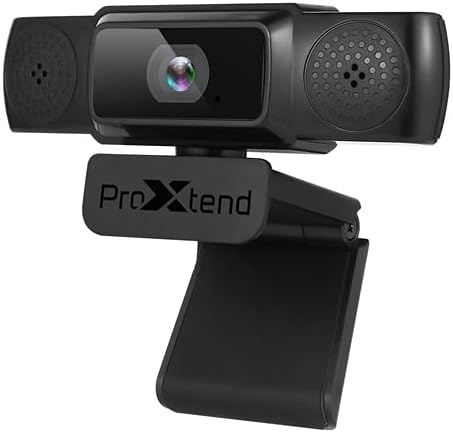
Image: The PROXTEND X502 Full HD Webcam shown with its universal mounting clip, suitable for monitors or flat surfaces.
- Zure ordenagailura konektatzen:
Konektatu USB kablea webzure ordenagailuko USB ataka libre batera sartu zen. webcam is plug-and-play, meaning your operating system should automatically detect and install the necessary drivers. No additional software installation is typically required.
- Driver Installation Verification:
After connecting, allow a few moments for your computer to recognize the device. You can verify successful installation in your operating system's Device Manager (Windows) or System Information (macOS) under 'Cameras' or 'Imaging Devices'.
4. Funtzionamendu-argibideak
Behin webcam is set up, you can begin using it with various applications:
- Aukeratuz Webkamera:
Open your preferred video conferencing, streaming, or recording application (e.g., Zoom, Microsoft Teams, Skype, OBS Studio). Navigate to the application's video and audio settings. Select "PROXTEND X502" as your camera and microphone input device.

Irudia: Aurrealdea view of the PROXTEND X502 Full HD Webcam, highlighting the lens and integrated microphones.
- Bideoaren kalitatea:
The webcam automatically adjusts for optimal image quality, including auto-focus and auto low light correction. Ensure adequate lighting for the best video performance. The 1920x1080p resolution at 30fps provides clear and smooth video.
- Audioaren kalitatea:
The integrated omni-directional microphone captures sound from all directions. Position yourself appropriately to ensure your voice is clearly picked up. Most applications allow you to adjust microphone input levels in their audio settings.
5. Ezaugarriak
Key features of the PROXTEND X502 Full HD Webcam include:
- 1 / 2.7 ”CMOS irudi sentsorea
- 2 megapixelekoa
- Resolution: 1920x1080 at 30 frames per second
- Norabide guztietako mikrofonoa
- Muntatzeko Klip Unibertsala
- Mini Tripod Support
- Argi baxuko zuzenketa automatikoa
6. Zehaztapenak
Detailed technical specifications for the PROXTEND X502 Full HD Webkamera:

Image: A visual representation of the PROXTEND X502 Full HD Webcam's key features and technical specifications.
| Ezaugarri | Zehaztapena |
|---|---|
| Irudi-sentsorea | 1/2.7" CMOS Image Sensor |
| Megapixelak | 2 MP |
| Max Ebazpena | 1920x1080 |
| Bideo Ebazpena | 1920x1080 |
| Gehienezko FPS | 30 fps |
| Bideoaren deskodetze formatua | H.264/MJPG |
| Esposizio modua | Autoa |
| Zurien Balantzea | Autoa |
| Irabazi | Autoa |
| Argi baxuko konpentsazioa | Autoa |
| Viewangelua | 77° |
| Distantzia Fokua | 10 cm infinituraino |
| Foku mota | Autoa |
| Mikrofonoa | Omni-noranzkoa |
| Audio Sampling Tarifa | 1 kanal 16bit 16K 32K 44.1K 48K |
| Audio formatua | PCM, UAC 1.0 bateragarria |
| Interfazea | USB 2.0 |
| Kablearen luzera | 1.5 m |
| OS bateragarria | Windows XP, Windows 7 (32bit/64bit), Windows 8, Windows 10, Android V5.0 or higher OS, MAC OS 10.6 or higher |
| Produktuaren neurriak | 12.7 x 7.62 x 5.08 cm |
| Produktuaren pisua | 453.59 g |
7. Arazoak
If you encounter issues with your PROXTEND X502 Webkamera, saiatu honako irtenbide hauek:
- Irudi/bideorik ez:
- Ziurtatu USB kablea bi gailuetara ondo konektatuta dagoela webkamera eta zure ordenagailua.
- Probatu beste USB ataka bat zure ordenagailuan.
- Berrabiarazi ordenagailua.
- Check your application's settings to ensure the PROXTEND X502 is selected as the video input.
- Verify that no other application is currently using the webkamara.
- Audiorik ez / Mikrofonoak ez du funtzionatzen:
- Ensure the PROXTEND X502 is selected as the microphone input in your application's audio settings.
- Egiaztatu ordenagailuaren soinu-ezarpenak mikrofonoa gaituta dagoela eta isilarazita ez dagoela ziurtatzeko.
- Adjust the microphone input level in your system or application settings.
- Bideoaren kalitate eskasa:
- Ziurtatu zure ingurunean argiztapen nahikoa dagoela.
- Garbitu webcam lens gently with a soft, lint-free cloth.
- Check your internet connection speed if streaming, as bandwidth can affect video quality.
8. Mantentzea
Zure iraupena eta errendimendu optimoa ziurtatzeko webkamera:
- Garbiketa: Garbitu astiro-astiro webcam lens with a soft, dry, lint-free cloth. Avoid using harsh chemicals or abrasive materials.
- Biltegiratzea: Erabiltzen ez duzunean, gorde webGorde leku garbi eta lehor batean, tenperatura altuetatik eta eguzki-argitik babestuta.
- Manipulazioa: Saihestu webcam or subjecting it to strong impacts.
9. Bermea eta Laguntza
The PROXTEND X502 Full HD Webkamera batekin dator 7 urteko bermea, ensuring peace of mind regarding your purchase. For warranty claims, technical support, or any inquiries not covered in this manual, please refer to the contact information provided with your product packaging or visit the official PROXTEND webgunea.
10. Betetze-informazioa
This device complies with relevant regulatory standards for electronic equipment. For detailed compliance information, please refer to the product packaging or the official PROXTEND webgunea.


