1. Sarrera
Eskerrik asko erosketagatik.asing the ORIA WA77 Indoor/Outdoor Wireless Digital Thermometer. This device is designed to provide accurate temperature readings for both your indoor environment and an outdoor location via a remote wireless sensor. Please read this manual carefully before use to ensure proper operation and to maximize the lifespan of your product.
2. Produktua amaitu daview
The ORIA WA77 thermometer system consists of a main display unit and a wireless remote sensor.
Bistaratzeko Unitate Nagusia
The main unit features a large LCD screen with an orange backlight for easy readability in various lighting conditions. It displays both indoor and outdoor temperatures, along with time and other indicators.
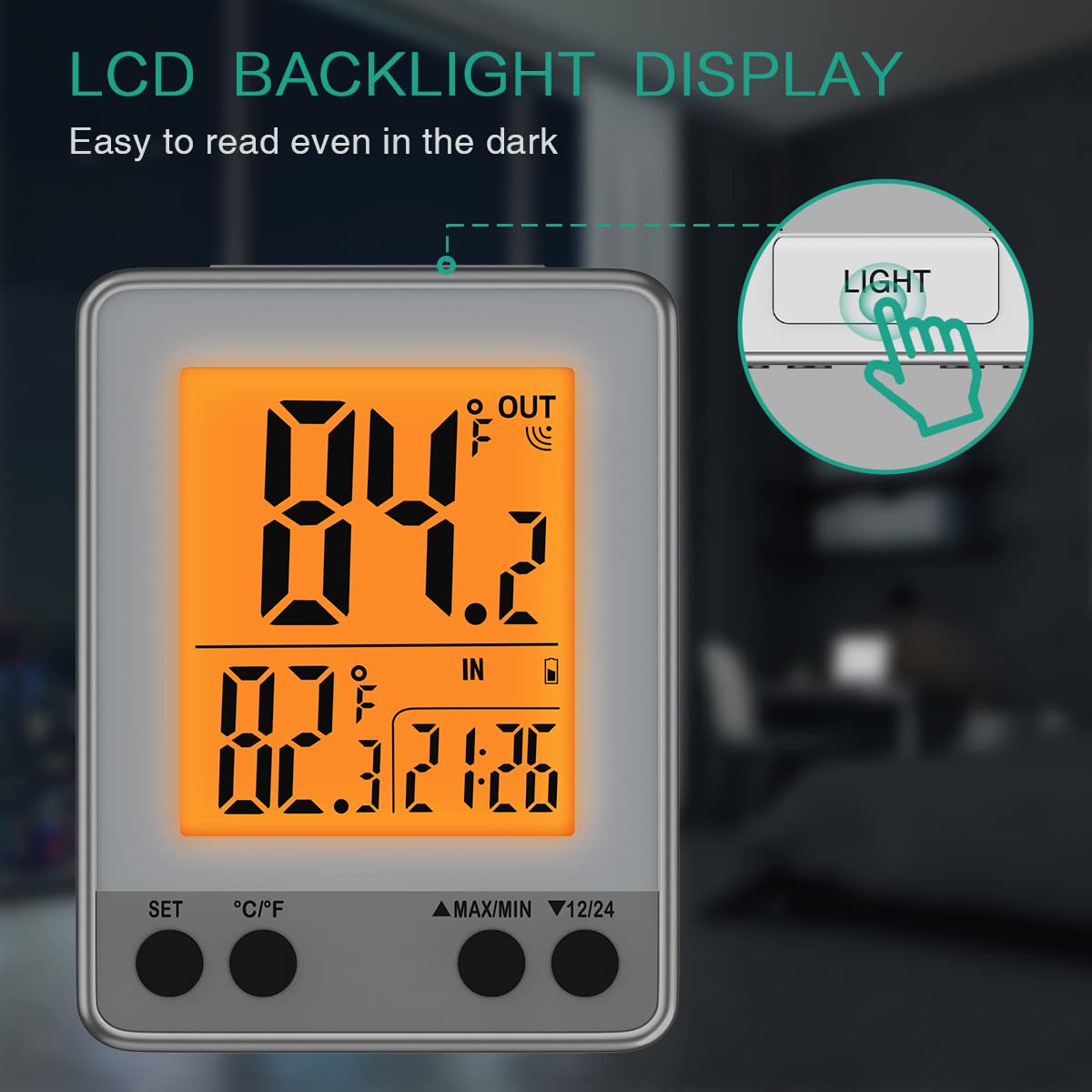
2.1. irudia: The main display unit showing the LCD screen with its orange backlight, making it easy to read temperature and time even in low light conditions.
Haririk gabeko urruneko sentsorea
The remote sensor transmits outdoor temperature data wirelessly to the main unit. It is designed for outdoor placement and has a maximum transmission range of 100 meters (328 feet) in open areas.

2.2. irudia: The wireless remote sensor (bottom) and the main display unit (top). The remote sensor is designed to be placed outdoors to measure external temperature and transmit it to the main unit.
Osagaiak eta Kontrolak
- Pantaila-unitate nagusia: LCD screen, 'SET' button, '°C/°F' button, 'MAX/MIN' button, '12/24' button, backlight button, battery compartment, stand, magnets, hang hole.
- Urruneko sentsorea: Temperature sensor, channel switch, battery compartment, stand, hang hole, sucker.

2.3. irudia: Atzekoa view of the main unit and remote sensor, highlighting features such as the stand, magnets, hang hole, channel switch, and battery compartments for 2xAAA batteries (not included).
3. Konfigurazioa
3.1 Bateriaren instalazioa
- Unitate nagusia: Open the battery compartment cover on the back of the main unit. Insert 2 AAA batteries (not included) according to the polarity markings (+/-). Close the cover.
- Urruneko sentsorea: Open the battery compartment cover on the back of the remote sensor. Insert 2 AAA batteries (not included) according to the polarity markings (+/-). Close the cover.
Oharra: Ensure batteries are inserted correctly. Replace batteries when the low battery indicator appears on the display.
3.2 Sentsoreen parekatzea
After installing batteries in both units, the main unit will automatically search for the remote sensor. The outdoor temperature should appear on the main unit's display within a few minutes. If the outdoor temperature does not display, press and hold the '12/24' button on the main unit for 3 seconds to manually re-establish the connection.
3.3 Sentsoreen kokapena
For accurate outdoor temperature readings and to prolong the sensor's life, place the remote sensor in a shaded area, away from direct sunlight and precipitation. The sensor should always be placed with its ventilation holes facing upwards to prevent rain from entering. Ensure it is within the 100-meter (328 feet) transmission range of the main unit, minimizing obstacles like thick walls or metal structures.
4. Funtzionamendu-argibideak
4.1 Tenperatura Unitatearen Hautaketa (°C/°F)
Press the '°C/°F' button on the main unit to switch between Celsius and Fahrenheit temperature displays.
4.2 Ordua ezartzea
Press and hold the 'SET' button for 3 seconds to enter time setting mode. Use the 'MAX/MIN' or '12/24' buttons to adjust the hour and minute values. Press 'SET' again to confirm each setting and move to the next. Press 'SET' once more to exit time setting mode.
4.3 12/24 orduko formatua
Press the '12/24' button to switch between 12-hour and 24-hour time formats.
4.4 Max/Min Temperature Records
Press the 'MAX/MIN' button to view the maximum and minimum recorded indoor and outdoor temperatures. Press it again to cycle through current, maximum, and minimum readings. The records are typically reset every 24 hours or upon battery replacement.

4.1. irudia: The display showing maximum and minimum temperature records, allowing users to review temperature fluctuations over time.
4.5 Atzeko argiaren aktibazioa
Press the 'LIGHT' button (usually located on the top edge of the main unit) to activate the orange backlight for a few seconds, improving visibility in dark environments.
5. Ezaugarriak
- Provides accurate indoor and outdoor temperature readings simultaneously.
- 3-inch LCD display with orange backlight for easy readability day or night.
- Switchable temperature units: Celsius (°C) or Fahrenheit (°F).
- Adjustable time display: 12-hour or 24-hour format.
- Low battery indicator for timely battery replacement.
- Records and displays maximum and minimum temperature values.
- Wireless transmission range of up to 100 meters (328 feet) in open areas.
- Multiple mounting options for the main unit: desktop stand, magnetic attachment, or wall mount.
- Multiple mounting options for the remote sensor: desktop stand, hang, or sucker.

5.1. irudia: Various mounting options for the main unit (stand, wall mount, magnet) and the remote sensor (stand, hang, sucker), offering flexibility for placement.

5.2. irudia: Examples of where the ORIA WA77 thermometer can be used, including refrigerators, baby rooms, bedrooms, warehouses, and greenhouses.
6. Mantentzea
6.1 Bateria ordezkatzea
When the low battery indicator appears on the display, replace the batteries in both the main unit and the remote sensor with new AAA batteries. Ensure correct polarity.
6.2 Garbiketa
Garbitu unitateak zapi leun batekin,amp oihal. Ez erabili garbitzaile edo disolbatzaile urratzailerik, pantaila edo... kaltetu baitezakete.asing.
6.3 Ingurumen-gogoetak
Avoid exposing the units to extremely high or low temperatures, as this can damage electronic components and plastics. Do not immerse the units in water.
7. Arazoak
- Blank LCD Display: If the LCD screen goes blank, replace the batteries in the main unit.
- No Outdoor Temperature Reading:
- Check if the remote sensor batteries are installed correctly and are not depleted.
- Ensure the remote sensor is within the transmission range (100m/328ft) of the main unit and there are no significant obstructions.
- Press and hold the '12/24' button on the main unit for 3 seconds to manually re-establish the connection with the remote sensor.
- Irakurketa okerrak: Ensure both units are placed away from direct heat sources, cold drafts, or direct sunlight. The remote sensor should be in a shaded, protected area outdoors.
8. Zehaztapenak
| Modelo zenbakia | WA77 |
| Energia (Unitate Nagusia) | 2 x AAA bateria (ez daude barne) |
| Power (Wireless Sensor) | 2 x AAA bateria (ez daude barne) |
| Transmisio-barrutia | 100 meters / 328 feet (open area) |
| Bistaratzeko mota | Digital LCD with orange backlight |
| Mounting Options (Main Unit) | Desktop stand, Magnetic, Wall mount |
| Mounting Options (Sensor) | Desktop stand, Hang, Sucker |
| Produktuaren pisua | 168 g |
| Paketearen neurriak | 11.5 x 9.1 x 6.4 cm |
9. Segurtasun informazioa
- Ez nahastu bateria zaharrak eta berriak.
- Ez nahastu bateria alkalinoak, estandarrak (karbonoa-zinka) edo kargagarriak (nikel-kadmioa).
- Remove batteries if the device is not used for an extended period.
- Mantendu haurren eskura.
- Ez saiatu unitatea zeuk desmuntatzen edo konpontzen. Jarri harremanetan bezeroarentzako arreta-zerbitzuarekin laguntza jasotzeko.
10. Bermea eta Laguntza
ORIA products are designed to provide reliable performance. For any questions, troubleshooting assistance, or warranty claims, please contact ORIA customer support through your purchase platform or the official ORIA website. Please have your model number (WA77) and purchase details available when contacting support.