1. Sarrera
Thank you for choosing the Cecotec TotalPure Connected 7500 Air Purifier. This manual provides essential information for the safe and efficient operation, maintenance, and troubleshooting of your device. Please read it thoroughly before use and retain it for future reference.
2. Segurtasun-argibideak
- Ziurtatu elikadura hornidura boltage etxetresna elektrikoaren balorazio-etiketarekin bat dator.
- Do not operate the appliance with a damaged cord or plug. Contact customer service for repairs.
- Mantendu gailua uretatik edo beste likido batzuetatik urrun. Ez murgildu.
- Do not block air inlets or outlets. Maintain at least 20 cm clearance from walls and furniture.
- Deskonektatu tresna garbitu edo mantentze-lanak egin aurretik.
- Etxetresna hau barrualdean erabiltzeko soilik da.
- Ez utzi haurrei aparatuarekin jolasten.
- Only use original Cecotec replacement filters.
3. Produktua amaitu daview
The Cecotec TotalPure Connected 7500 is designed to purify indoor air effectively. It features a DC motor for quiet operation and a 4-stage iragazketa sistema.
Ezaugarri nagusiak:
 CADR altua: Filters up to 130 m³/h of air.
 4-Stage Iragazkia: Pre-filter, activated carbon, high-efficiency, and antibacterial filters.
 PM 2.5 Sensor: Real-time air quality monitoring with color indicator.
 Wi-Fi kontrola: Manage settings via smartphone app.
 3 Abiadura Ezarpenak: Low, High, and Auto modes.
 Gaueko modua: Quiet operation for undisturbed rest.
 Tenporizadorearen funtzioa: Auto-off after 2, 4, or 8 hours.
 Iragazkia berrezartzeko adierazlea: Iragazkia aldatu behar denean abisatzen du.
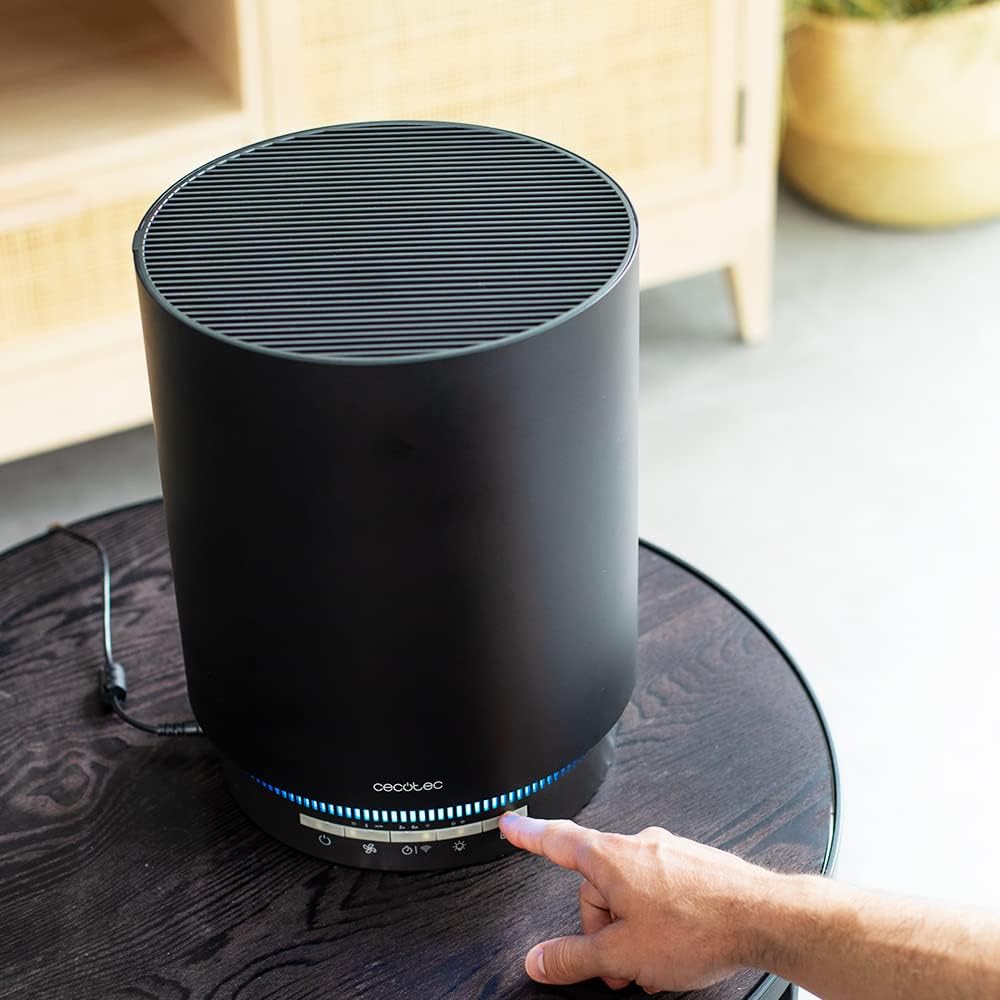
Figure 3.1: Air Purifier with illuminated control panel.

3.2. irudia: Xehetasuna view kontrol panelarena.
4. Konfigurazioa
4.1 Paketatzea
- Kontu handiz atera aire-arazgailua bere paketetik.
- Remove all packaging materials, including any protective films or tapes.
4.2 Iragazkien instalazioa
The filter may come pre-installed or require installation before first use. If not installed, follow these steps:
- Unscrew and remove the bottom cover of the air purifier.
- Kendu iragazkia plastikozko poltsa babesgarritik.
- Insert the filter into the air purifier, ensuring it is seated correctly.
- Replace and screw the bottom cover back on securely.

Figure 4.1: Filter installation/replacement.
4.3 Jartzea
- Jarri aire-arazgailua gainazal lau eta egonkor batean.
- Ensure there is adequate space around the unit (at least 20 cm) for proper air circulation.
- Avoid placing it near heat sources, direct sunlight, or in excessively humid environments.

Figure 4.2: Air purifier placed in a room.
5. Funtzionamendu-argibideak
5.1 Piztu/Itzali
- Entxufatu korronte-kablea entxufe elektriko egoki batean.
- Sakatu Pizteko botoia (
 ) kontrol-panelean unitatea pizteko edo itzaltzeko.
5.2 Abiadura ezarpenak
Sakatu Fan Speed botoia () to cycle through the following modes:
- Baxua: For quiet, continuous purification.
- Altua: For rapid air purification.
- Auto: The purifier adjusts fan speed automatically based on detected air quality.
5.3 Gaueko modua
Sakatu Gaueko modua botoia () to activate a low-speed, quiet operation suitable for sleeping environments. The display lights will dim.
5.4 Tenporizadorearen funtzioa
Sakatu Tenporizadorearen botoia () to set the automatic shut-off time. Options include 2, 4, or 8 hours. The unit will turn off automatically after the selected duration.
5.5 Wi-Fi Control
The air purifier can be controlled via a smartphone application. Follow the instructions provided in the app to connect your device to your home Wi-Fi network and manage its functions remotely.

Figure 5.1: Interacting with the control panel.
6. Mantentzea
6.1 Iragazkia ordezkatzea
The air purifier's filter has a limited lifespan. When the "Reset Filter" icon () illuminates on the control panel, it indicates that the filter needs to be replaced.
- Deskonektatu aire-arazgailua korronte-hartunetik.
- Askatu eta kendu beheko estalkia.
- Kendu iragazki zaharra eta bota ezazu behar bezala.
- Insert a new, genuine Cecotec replacement filter (refer to Section 4.2 for installation steps).
- Replace and secure the bottom cover.
- Konektatu aire-arazgailua eta sakatu eta eutsi botoiari Iragazkia Berrezarri botoia (often combined with the Power or Timer button, refer to your specific model's control panel layout) for 3-5 seconds until the indicator light turns off. This resets the filter timer.
6.2 Kanpoaldea garbitzea
- Deskonektatu beti gailua garbitu aurretik.
- Garbitu kanpoko gainazalak leun batekin, damp oihal.
- Ez erabili garbitzaile urratzailerik, disolbatzailerik edo produktu kimiko gogorrik.
- Ensure no water enters the air inlets or outlets.
7. Arazoak
| Arazoa | Kausa posiblea | Irtenbidea |
|---|---|---|
| Unitatea ez da pizten. | Ez dago elikadura hornidurarik. | Check if the power cord is securely plugged in. Verify the power outlet is functional. |
| Air quality indicator always shows poor. | Iragazkia zikin edo buxatuta dago. | Replace the filter. Ensure the PM 2.5 sensor is clean (refer to maintenance). |
| Weak airflow or unusual noise. | Filter is clogged or improperly installed. | Check and replace the filter if necessary. Ensure the filter is correctly seated. |
| Wi-Fi konexio arazoak. | Incorrect network settings or signal interference. | Ensure your Wi-Fi network is 2.4 GHz. Restart the air purifier and your router. Follow in-app instructions carefully. |
| "Reset Filter" icon remains on after replacement. | Iragazkiaren tenporizadorea ez da berrezarri. | Press and hold the Filter Reset button for 3-5 seconds to reset the timer. |
8. Zehaztapenak
| Ezaugarri | Zehaztapena |
|---|---|
| Modelo zenbakia | 05658 |
| Marka | Cecotec |
| Neurriak (L x W x H) | 42 x 27.5 x 27.8 cm |
| Pisua | 2.84 kilogramo |
| Boterea | 45 Watt |
| CADR (Aire Garbia Emateko Tarifa) | 130 m³/h arte |
| Iragazte mota | HEPA (4-s)tage iragazketa) |
| Kontrol-metodoa | Application (Wi-Fi) |
| Estalitako eremua | 25 m² arte (269.1 oin karratu) |
| Itzaltze automatikoaren funtzioa | Bai |
9. Bermea eta Laguntza
This product comes with a standard manufacturer's warranty. For detailed warranty terms and conditions, please refer to the warranty card included with your purchase or visit the official Cecotec webgunea.
For technical support, spare parts, or any inquiries regarding your Cecotec TotalPure Connected 7500 Air Purifier, please contact Cecotec customer service through their official channels. Contact information can typically be found on the product packaging, warranty card, or the Cecotec webgunea.