1. Sarrera
This manual provides detailed instructions for the installation, operation, and maintenance of the Vivotek ND9425P 16-Channel 4K UHD Network Video Recorder (NVR). This NVR is designed to manage and record video streams from up to 16 IP cameras, offering 4K UHD resolution support for high-quality surveillance. It is an integral component of a comprehensive security system, suitable for various applications requiring reliable video monitoring and recording.
Key features of the Vivotek ND9425P NVR include:
- Multimedia SoC CPU for efficient processing.
- Support for H.265, H.264, and MJPEG video codecs for flexible compression.
- Seamless recording capabilities.
- Smart Stream III optimization for bandwidth efficiency.
- Integrated PoE technology for simplified camera connectivity (when used with compatible PoE cameras).
2. Segurtasun informazioa
Please read all safety instructions carefully before operating the device. Failure to follow these instructions may result in injury or damage to the product.
- Energia iturria: Use only the power adapter supplied with the NVR. Ensure the power outlet provides the correct voltage.
- Aireztapena: Do not block any ventilation openings. Install the NVR in a well-ventilated area to prevent overheating.
- Ingurumena: Saihestu NVRa uretan, hezetasunean, tenperatura altuetan edo eguzki-argiaren eraginpean jartzea.
- Garbiketa: Deskonektatu korrontea garbitu aurretik. Erabili zapi lehor eta leun bat. Ez erabili garbitzaile likido edo aerosolik.
- Zerbitzua: Ez saiatu produktu hau zuk zeuk ematen. Bidali zerbitzu guztiak zerbitzu kualifikatuko langileengana.
- Kableak: Ensure all cables are properly connected and secured to prevent tripping hazards or accidental disconnections.
3. Paketearen edukia
Instalazioarekin jarraitu aurretik, egiaztatu elementu guztiak paketean daudela:
- Vivotek ND9425P 16-Channel 4K UHD NVR Unit
- Elikatze-moldagailua
- USB sagua
- Instalazio azkarraren gida
- Resource CD (containing full manual and software)
- Screws for HDD installation (if applicable)
- Ethernet kablea
Note: The package contents may vary slightly depending on the specific kit purchased. For example, some kits may include 8 x 2 MP Night Vision Dome Cameras and 8 x Ethernet Patch Cables.
4. Produktua amaitu daview
Atal honek gaina ematen duview of the Vivotek ND9425P NVR's physical components and interfaces.
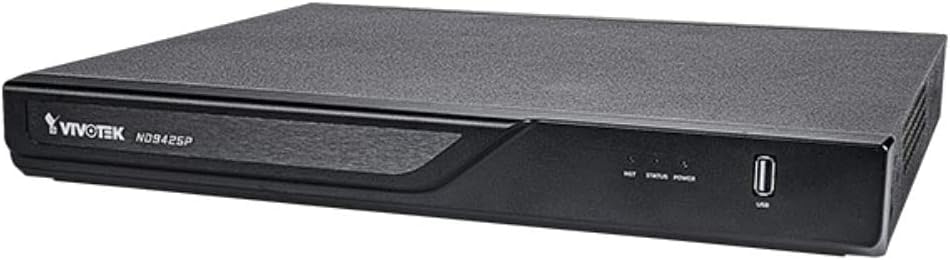
4.1. irudia: Vivotek ND9425P NVR Front Panel
The image displays the Vivotek ND9425P NVR unit, a compact black rectangular device. The front panel features the "VIVOTEK ND9425P" logo on the left, followed by three small indicator lights labeled "NET", "STATUS", and "POWER". On the far right of the front panel, there is a USB port, labeled "USB" below it. The top surface of the NVR has a textured finish.
4.1 Front Panel Indicators and Ports
- NET LED: Sareko jarduera adierazten du.
- EGOERA LED: Indicates system status (e.g., recording, error).
- ENERGIA LED: Potentzia-egoera adierazten du.
- USB ataka: For connecting a USB mouse, keyboard, or external storage devices for backup.
4.2 Atzeko paneleko atakak
The rear panel typically includes ports for power input, Ethernet (LAN), HDMI/VGA video output, audio input/output, and additional USB ports for peripheral connections.
5. Konfigurazioa
5.1 Hardwarearen instalazioa
- Disko gogorraren instalazioa (aurrez instalatuta ez badago):
Unscrew the NVR cover. Carefully slide the hard drive into the bay and secure it with the provided screws. Reattach the cover.
- Konektatu kamerak:
Connect your IP cameras to the NVR's PoE ports (if available) or to your network switch. Ensure all cameras are powered on and accessible on the network.
- Konektatu sarera:
Konektatu Ethernet kable bat NVRaren LAN atakatik zure bideratzailera edo sare-etengailura.
- Konektatu pantaila:
Konektatu monitore bat NVR-aren HDMI edo VGA irteera atakara.
- Konektatu periferikoak:
Konektatu USB sagua NVR-ko USB ataka batera.
- Piztu:
Konektatu korronte-egokitzailea NVRaren elikatze-sarrerara eta gero entxufe batera. NVRa automatikoki piztuko da.
5.2 Initial Configuration Wizard
Upon the first boot, the NVR will typically launch an initial configuration wizard. Follow the on-screen prompts to:
- Administratzailearen pasahitza ezarri.
- Konfiguratu sarearen ezarpenak (DHCP edo IP estatikoa).
- Bilatu eta gehitu konektatutako IP kamerak.
- Ezarri data eta ordua.
- Hasieratu disko gogorra grabaziorako.
6. NVRaren funtzionamendua
6.1 Bizi View
Hasierako konfigurazioaren ondoren, NVR-ak zuzeneko irudia bistaratuko du view konektatutako kameren artean alda dezakezu view eta kamera anitzeko sareta views.
6.2 Grabaketa-konfigurazioa
Access the recording settings through the main menu to configure recording schedules and modes:
- Grabaketa jarraitua: Erregistroak 24/7.
- Mugimendua detektatzeko grabazioa: Kamerak mugimendua detektatzen duenean bakarrik grabatzen du.
- Programatutako grabazioa: Eguneko edo asteko ordu zehatzetan grabaketak.
- Gertaeraren grabaketa: Records based on specific events (e.g., alarm input).
6.3 Erreprodukzioa eta babeskopia
Berrizview foo grabatuatage:
- Navigate to the "Playback" section from the main menu.
- Hautatu nahi dituzun kamera(k) eta data/ordu tartea.
- Erabili denbora-lerroa grabazioetan nabigatzeko.
- Janari-kopiak egitekotage, insert a USB drive into the NVR's USB port and follow the on-screen instructions for export.
6.4 Urruneko sarbidea
The Vivotek ND9425P NVR supports remote access via a web browser or dedicated mobile applications (e.g., VIVOCloud). Refer to the full user manual on the Resource CD for detailed instructions on setting up remote access, including port forwarding or P2P cloud services.
7. Mantentzea
7.1 Firmware eguneraketak
Regularly check for and install firmware updates to ensure optimal performance, security, and access to new features. Firmware updates can typically be performed via the NVR's web interface or through a USB drive.
7.2 Disko gogorraren kudeaketa
The NVR will automatically overwrite the oldest recordings when the hard drive is full. You can configure storage settings, check HDD health, and format the drive through the system settings.
7.3 Garbiketa
Keep the NVR unit clean by gently wiping its exterior with a dry, soft cloth. Ensure ventilation openings are free from dust and obstructions.
8. Arazoak
| Arazoa | Kausa posiblea | Irtenbidea |
|---|---|---|
| Botererik ez | Power cable disconnected; faulty power adapter; power outlet issue. | Check power cable connection; try a different power outlet; contact support if adapter is faulty. |
| Ez dago bideo irteerarik | HDMI/VGA cable loose; incorrect display input selected; NVR not booted. | Ensure display cable is secure; select correct input on monitor; wait for NVR to boot up. |
| Kamerak ez dira bistaratzen | Network issue; camera not powered; incorrect camera IP address; camera not added to NVR. | Check network cables; ensure cameras are powered; verify camera IP settings; add cameras via NVR interface. |
| Grabaketarik ez | Hard drive not initialized; recording schedule not set; HDD full. | Initialize HDD in settings; configure recording schedule; check HDD status. |
| Remote Access Fails | Network configuration issue; port forwarding not set up; firewall blocking. | Verify network settings; configure port forwarding on router; check firewall rules. |
For more detailed troubleshooting, refer to the comprehensive user manual provided on the Resource CD or visit the VIVOTEK support webgunea.
9. Zehaztapenak
| Ezaugarri | Xehetasuna |
|---|---|
| Modelo zenbakia | ND9425P |
| Fabrikatzailea | Vivotek USA |
| Produktuaren neurriak | 19.69 x 19.69 x 11.02 hazbete |
| Elementuaren pisua | 8.62 kilo |
| Konektibitate Teknologia | Ethernet |
| Gailu bateragarriak | Kamera |
| Memoria Biltegiratzeko Ahalmena | 64 GB (referring to internal flash/RAM, not HDD capacity) |
| Kanal kopurua | 16 |
| Bideo kodekak | H.265, H.264, MJPEG |
| Bereizmen maximoaren euskarria | 4K UHD (as per product title) |
10. Bermea eta Laguntza
For warranty information, please refer to the warranty card included with your product or visit the official VIVOTEK website. VIVOTEK provides technical support for its products. If you encounter issues that cannot be resolved using this manual or the troubleshooting section, please contact VIVOTEK customer support through their official website or designated support channels.
Official VIVOTEK Webgunea: www.vivotek.com


