1. Sarrera
This manual provides detailed instructions for the installation, operation, and maintenance of your DALY Smart BMS Li-ion 13S 48V 100A with Programmable Bluetooth Module. This Battery Management System is designed to protect lithium batteries, ensuring their safe and efficient operation.
Ezaugarri nagusiak hauek dira:
- Fully programmable smart BMS with Bluetooth connectivity for Android and iPhone applications.
- Common port for both charge and discharge, supporting up to 100A continuous discharge and 50A charge current.
- High-precision detection for over-charge, over-discharge, and voltage orekatzea.
- Protection against over-current, over-voltage, and low-temperature charging (down to -1°C).
- Precise State of Charge (SOC) calculation with automatic learning function.
- Automatic battery charging and static balance functions.
- Mobile phone software for monitoring battery status and parameter settings via Bluetooth.

Figure 1: DALY Smart BMS with Bluetooth module and connection cables.
2. Segurtasun informazioa
- Do not charge at temperatures below -1°C.
- Avoid over-charging or over-discharging the battery.
- Be aware of potential interference with other wireless devices when using the Bluetooth module.
- Ensure all wiring connections are secure and correct before powering on the system. Incorrect wiring can cause damage to the BMS or battery.
- Always follow local regulations and safety standards when working with lithium batteries.
3. Paketearen edukia
Egiaztatu elementu guztiak paketean daudela:
- SMART BMS unit (1)
- Balance wires (1 set)
- Bluetooth module (1) for Mobile APP (iOS & Android)
- UART cable (1) for PC connection
- English version wiring manual (1)
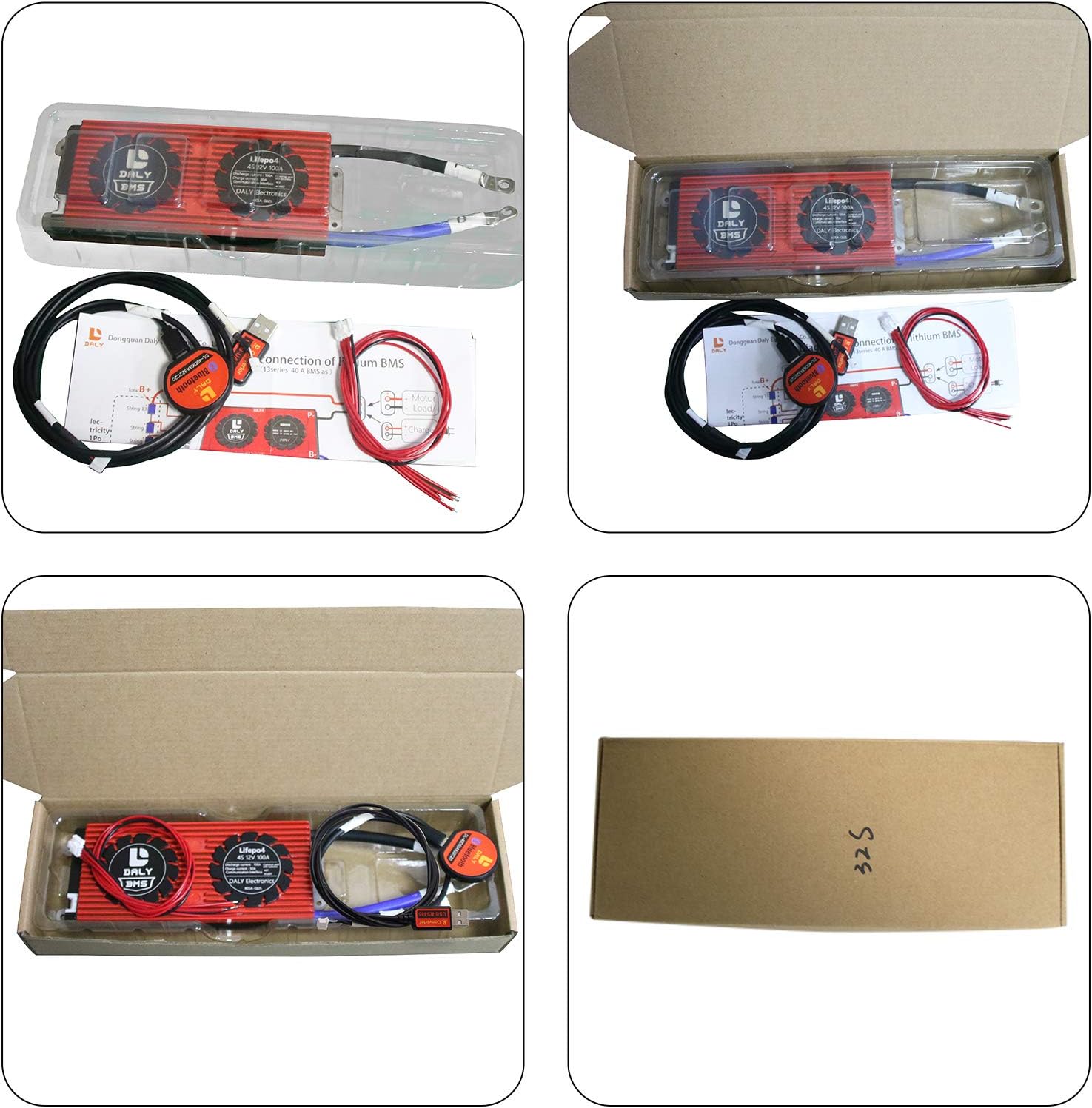
Figure 2: Typical package contents for the DALY Smart BMS.
4. Konfigurazioa eta instalazioa
4.1. Kableatuen Diagrama
Refer to the following diagram for correct wiring of the BMS to your battery pack, motor/load, and charger. Ensure all connections are made accurately to prevent damage.

Figure 3: DALY Smart BMS wiring diagram.
Kableatuari buruzko ohar garrantzitsuak:
- Balance Wires: Disconnect balance wires white end and BMS connection port before welding black and red balance wires on the battery pack. After confirming the balance wires are correctly welded and installed, connect them to the BMS.
- BMS Placement: Keep the BMS red cooling surface uncovered to ensure proper heat dissipation.
- Tresnak: Recommended tools include a soldering machine (suggested 662°F/350°C), scissors, double-sided tape, tin wire, and a multimeter.
4.2. Hasierako aktibazioa
After connecting all wires, activate the smart BMS using one of the following methods:
- Press the activation button on the Bluetooth module.
- Connect a charger to the battery pack.
The internal resistance of the BMS should be approximately 0Ω (multimeter deviation 0.1Ω when conducted).
Video 1: Demonstrates the connection process and initial activation of the DALY Smart BMS. This video shows how to measure voltage between adjacent cables, connect the BMS, and activate it via the Bluetooth module button.
5. Funtzionamendua
5.1. Mobile App (Bluetooth)
The DALY Smart BMS can be monitored and configured via a mobile application available for iOS and Android devices. Bilatu "Smart BMS" in your device's app store.
- Download and install the "Smart BMS" application.
- Open the app and connect to the corresponding Bluetooth device ID (e.g., DL-XXXXXXXX).
- Hasierako konfigurazioa: For the first power-on, the battery capacity must be set to the actual capacity of your battery pack. The initial password for parameter settings is 123456.
- Jarraipena: View real-time battery parameters such as total voltage, current, State of Charge (SOC), individual cell voltages, and temperature.
- Parametroen ezarpenak: Adjust protection parameters like over-charge/over-discharge voltage limits, over-current limits, and temperature protection settings.
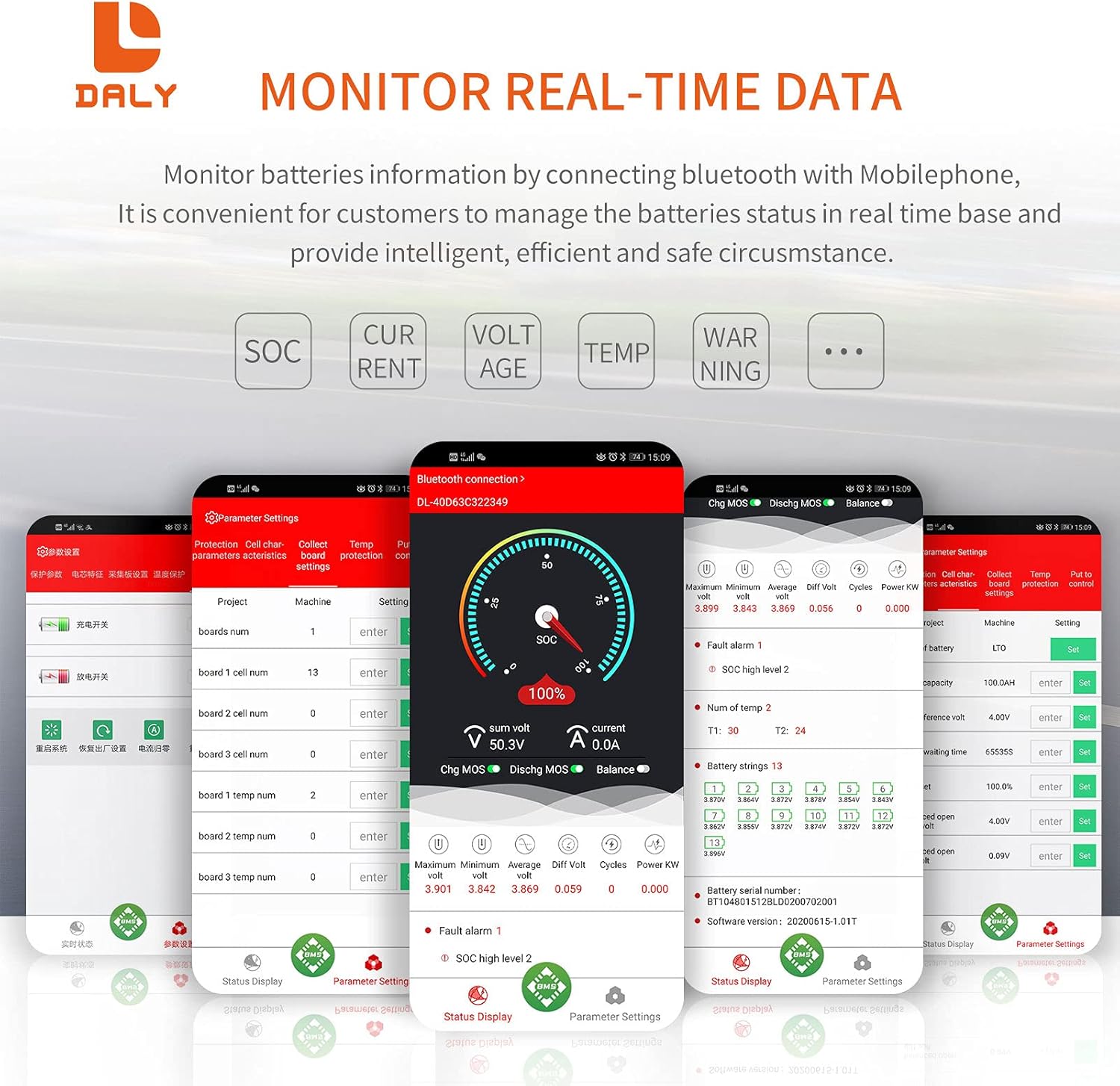
Figure 4: Mobile app displaying real-time battery data.

Figure 5: Mobile app displaying protection functions and settings.
5.2. PC Software (UART)
For more advanced monitoring and configuration, connect the BMS to a computer using the provided UART cable. The PC software allows for detailed parameter adjustments and data logging.
The PC software interface provides a comprehensive view of battery status, including individual cell voltages, temperatures, and protection settings. You can also perform calibration and reset functions through this interface.
6. Mantentzea
6.1. Battery Balancing
The DALY Smart BMS features an automatic static balance function for the battery system. This helps to equalize the voltage across individual cells, prolonging battery life and improving performance. The balancing function is typically active during charging.
6.2. Tenperaturaren kudeaketa
The BMS includes programmable temperature protection. Ensure the BMS is installed in a location that allows for adequate airflow, especially around the red cooling surface, to prevent overheating during high current operation.
7. Arazoak
This section addresses common issues you might encounter with your DALY Smart BMS.
| Arazoa | Kausa posiblea | Irtenbidea |
|---|---|---|
| BMS not activating / no power output. | Incorrect wiring, BMS not activated, low battery voltage. |
|
| Bluetooth app not connecting. | Bluetooth module not powered, incorrect app, interference. |
|
| BMS shuts down unexpectedly. | Over-charge, over-discharge, over-current, or temperature protection triggered. |
|
| Inaccurate State of Charge (SOC) reading. | Incorrect battery capacity setting. |
|
8. Zehaztapenak
The following table details the specifications for the DALY Smart BMS Li-ion 13S 48V 100A model:
| Ezaugarri | Xehetasuna |
|---|---|
| Produktu Mota | Li-ion 13S 48V 100A Smart BMS |
| Komunikazio Interfazea | UART, Bluetooth (Optional: CAN/RS485) |
| Deskarga etengabeko korrontea | 100A |
| Gehiegizko deskargako korronte babesa | 150A ± 15A (Programmable) |
| Karga etengabeko korrontea | 50A |
| Overcharge Current Protection | 150A ± 15A (Programmable) |
| Gehiegizko karga Voltage Protection (per string) | 4.25V ± 0.05V (Programmable) |
| Gehiegizko deskarga Voltage Protection (per string) | 2.7V ± 0.1V (Programmable) |
| Karga Voltage | 54.6V (Programmable) |
| Neurriak (L x W x H) | 166 mm x 65 mm x 24 mm (6.54 x 2.56 x 0.94 hazbete) |
| Elementuaren pisua | ~500g (1.27 pounds) |
| Output Wire Gauge | 7AWG |
| Balance Wires | 24AWG/350mm |
| Materiala | Metala, Plastikoa |
| Ezaugarri Berezia | Programmable Protections and Precise SOC Calculation |

Figure 6: DALY Smart BMS dimensions and key specifications.
9. Laguntza eta Bermea
For technical support, troubleshooting assistance, or warranty inquiries, please contact DALY customer service. Refer to the official DALY webgunean edo zure erosketa-dokumentazioan harremanetarako datuak lortzeko.
Gorde erosketa-agiria erosketaren frogagiri gisa, berme-erreklamazioetarako.


