1. Segurtasun informazio garrantzitsua
Please read all safety warnings, instructions, illustrations, and specifications provided with this power tool. Failure to follow all instructions listed below may result in electric shock, fire, and/or serious injury.
Gorde abisu eta argibide guztiak etorkizunean erreferentzia izateko.
Note: The product description did not provide specific safety warnings. Always refer to the complete safety manual included with your product for detailed safety guidelines before operation.
2. Produktua amaitu daview
The Parkside PRTA 20-Li C3 is a 20V cordless grass trimmer designed for efficient lawn edge trimming and light grass cutting. This tool offers cordless convenience for garden maintenance.
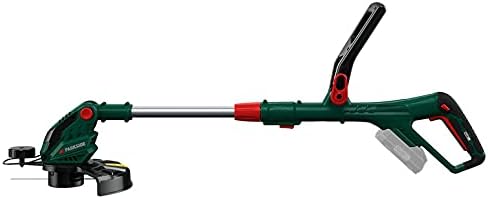
2.1 Irudia: Gainetikview of the Parkside PRTA 20-Li C3 Cordless Grass Trimmer. This image shows the complete assembled unit, highlighting its ergonomic design and cordless nature.
2.1 Osagaiak
- Helduleku nagusia etengailuarekin
- Helduleku osagarria
- Ardatz teleskopikoa
- Trimmer Head Line bobinarekin
- Babeslea
- Battery Slot (Battery and charger sold separately)

Figure 2.2: Illustration indicating that the battery and charger are not included with the grass trimmer and must be purchased separately.
3. Konfigurazioa eta Muntaketa
Before first use, ensure all components are present and undamaged. Follow these steps for assembly:
-
Babes-babeslea erantsi: Secure the protective guard to the trimmer head using the provided fasteners. Ensure it is firmly in place to prevent debris from being thrown towards the user.

3.1. irudia: hurbileko planoa view of the auxiliary handle and the protective guard attachment area, showing how the guard is positioned.
- Instalatu helduleku osagarria: Slide the auxiliary handle onto the shaft and adjust it to a comfortable working position. Tighten the locking mechanism.
-
Ardatzaren luzera doitu: Extend or retract the telescopic shaft to achieve an ergonomic working height. Lock the shaft in position.
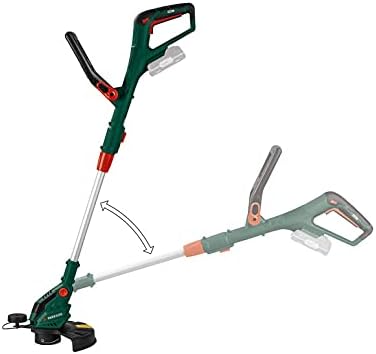
Figure 3.2: The trimmer shaft can be adjusted for angle, allowing for comfortable operation and versatile trimming positions.
-
Sartu bateria: Ensure the battery (not included) is fully charged. Slide the battery into the battery slot on the main handle until it clicks into place.
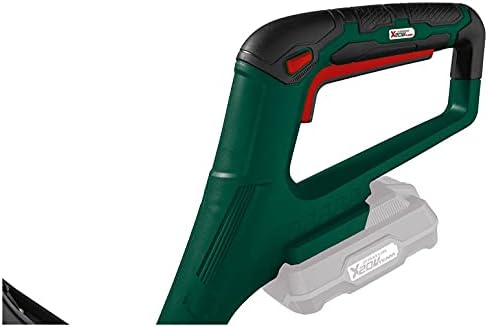
Figure 3.3: Detail of the main handle and the battery slot, where a 20V battery (sold separately) is inserted to power the trimmer.
4. Funtzionamendu-argibideak
4.1 Ebaketa-makina abiaraztea
- Ensure you are wearing appropriate personal protective equipment (PPE), including safety glasses, gloves, and sturdy footwear.
- Eutsi ebaki-makinari bi eskuekin ondo, bat helduleku nagusian eta bestea helduleku osagarrian.
- Sakatu segurtasun-blokeo-botoia (baldin badago) eta, ondoren, sakatu abiarazle-etengailua motorra martxan jartzeko.
4.2 Mozketa teknika
- Move the trimmer slowly and steadily across the area to be trimmed.
- Maintain a slight angle to the ground for effective cutting.
- Avoid hitting hard objects like stones, fences, or concrete, as this can damage the trimmer line and head.
- The cutting width is approximately 25 cm. Plan your passes accordingly.
4.3 Stopping the Trimmer
Release the trigger switch to stop the motor. The trimmer line will cease rotation.
5. Mantentzea
5.1 Garbiketa
- Kendu beti bateria garbitu edo mantentze-lanak egin aurretik.
- Clean the trimmer head and protective guard after each use to remove grass clippings and debris. Use a damp oihal; ez erabili produktu kimiko gogorrik.
- Ensure ventilation slots are clear of obstructions to prevent overheating.
5.2 Replacing the Trimmer Line Spool
When the trimmer line becomes too short or breaks, it needs to be replaced. This model uses a specific type of line spool.
- Kendu bateria mozgailutik.
- Locate the spool cover on the trimmer head.
- Press the tabs or twist the cover to remove it.
- Kendu bobina zaharra.
- Insert a new, pre-wound trimmer line spool, ensuring the line feeds through the eyelet.
- Jarri berriro bobinaren estalkia, ondo sartuta dagoela ziurtatuz.
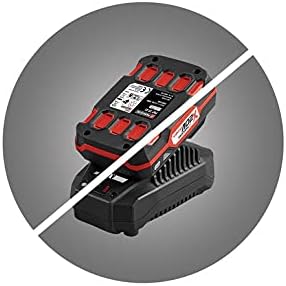

Figure 5.1: Images of replacement trimmer line spools, indicating the type of spool required for this model.
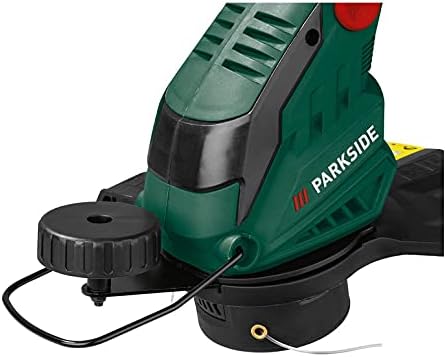
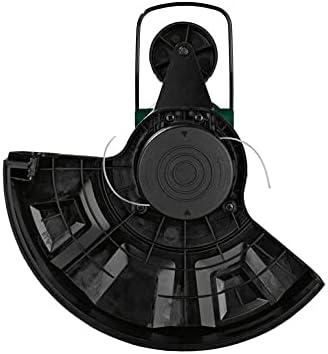
5.2. Irudia: Goiko eta beheko views of the trimmer head, showing the line exit points and the spool housing.
6. Arazoak
This section provides solutions to common issues you might encounter with your grass trimmer.
| Arazoa | Kausa posiblea | Irtenbidea |
|---|---|---|
| Trimmer ez da martxan jartzen | Bateria ez dago behar bezala sartuta edo deskargatuta. Segurtasun-etengailua ez dago aktibatuta. | Ensure battery is fully charged and correctly inserted. Press safety lock-off button before squeezing trigger. |
| Trimmer line ez da elikatzen | Spool tangled or empty. Debris in trimmer head. | Remove battery, then remove spool cover and check for tangles or replace spool. Clear any debris from the trimmer head. |
| Ebaketa-errendimendu murriztua | Trimmer line worn or too short. | Replace the trimmer line spool. |
| Gehiegizko bibrazioa | Damaged trimmer head or unbalanced line. | Inspect trimmer head for damage. Ensure line is properly wound and balanced. If problem persists, seek professional service. |
7. Zehaztapenak
| Ezaugarri | Zehaztapena |
|---|---|
| Ereduaren izena | PRTA 20-Li C3 |
| Modelo zenbakia | IAN-100375563 |
| Marka | Parkea |
| Energia iturria | Battery-powered (20V compatible) |
| Ebaketa-zabalera | 25 zentimetro |
| Produktuaren neurriak (L x W x H) | 5 x 2 x 12.7 cm |
| Elementuaren pisua | 2 kilogramo |
| Kolorea | Berdea, Beltza |
| Muntaia Beharrezkoa | Ez |
8. Bermea eta Laguntza
Information regarding product warranty and customer support was not available in the provided product details. Please refer to the official Parkside documentation included with your purchase or visit the manufacturer's website for warranty terms, registration, and support contact information.