1. Sarrera
Thank you for choosing the EDIS 40W Speakers, Model EA014. This manual provides essential information for the safe and efficient use of your new speaker system. Please read this manual thoroughly before installation and operation, and retain it for future reference.
2. Segurtasun informazioa
Funtzionamendu segurua bermatzeko eta kalteak saihesteko, jarraitu neurri hauek:
- Do not expose the speakers to water or moisture.
- Ez blokeatu aireztapen baoak.
- Place the speakers on a stable surface to prevent falling.
- Erabili unitatearekin hornitutako korronte-egokigailua soilik.
- Mantendu haurren eskura.
- Deskonektatu argindarra tximista-ekaitzetan edo denbora luzez erabili gabe zaudenean.
3. Paketearen edukia
Mesedez, egiaztatu elementu guztiak zure paketean daudela:
- EDIS 40W Speakers (2 units)
- Infragorrien urrutiko kontrola
- Elikatze-kablea
- Audio konexio kableak
- Erabiltzailearen eskuliburua (dokumentu hau)
4. Produktua amaitu daview
The EDIS 40W Speakers are designed to deliver clear audio. They feature a robust design with a steel grille for protection and offer multiple input options.
4.1 Speaker Units

1. irudia: Aurrealdea view of the EDIS 40W Speakers. Each speaker unit features two drivers and a protective steel grille.
4.2 Urruneko kontrola
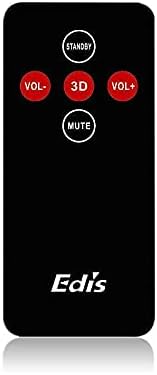
Figure 2: The infrared remote control for the EDIS 40W Speakers. It includes buttons for power, volume adjustment, 3D audio mode, and mute.
4.3 Media Player Panel

Figure 3: The integrated USB and SD Card Media Player panel. This panel allows direct playback from USB drives and SD/MMC memory cards.
5. Konfigurazioa
Follow these steps to set up your EDIS 40W Speakers:
- Lekua: Position the speakers on a flat, stable surface or mount them securely to a wall. Ensure adequate space for ventilation.
- Konektatu audio iturria: Connect your audio source (e.g., computer, TV, interactive whiteboard) to the speaker system using the appropriate audio cables.
- Potentzia-konexioa: Connect the power cable to the main speaker unit and then plug it into a standard electrical outlet.
- Piztu: Press the power button on the main speaker unit or the 'STANDBY' button on the remote control to turn on the speakers.
6. Funtzionamendu-argibideak
Your EDIS 40W Speakers can be operated using the integrated controls or the infrared remote control.
6.1 Urruneko agintea erabiltzea
- ITXARON: Press to turn the speakers on or off (standby mode).
- VOL+: Handitu bolumena.
- VOL-: Jaitsi bolumena.
- MUTU: Ezkutatu edo aktibatu audio irteera.
- 3D: Activate or deactivate the 3D audio effect.
6.2 Using the Media Player Panel
Insert a USB drive or SD/MMC card into the respective slot on the media player panel.
- JARRAIBIDEAK: Press to switch between input sources (e.g., AUX, USB, SD Card).
- PREVIOUS (◀◀): Joan aurreko pistara.
- PLAY/PAUSE (►▌▌): Erreproduzitu edo pausatu uneko pista.
- NEXT (►►): Joan hurrengo pistara.
- LEDa: Indicates power status or playback activity.
7. Mantentzea
Proper maintenance ensures the longevity of your speakers:
- Garbiketa: Erabili zapi leun eta lehor bat bozgorailuen gainazalak garbitzeko. Ez erabili garbitzaile likidorik edo material urratzailerik.
- Biltegiratzea: Bozgorailuak denbora luzez gordetzen badituzu, deskonektatu itzazu korrontetik eta gorde leku fresko eta lehor batean.
- Aireztapena: Ensure that the speaker's ventilation openings are not obstructed to prevent overheating.
8. Arazoak
If you encounter issues with your EDIS 40W Speakers, refer to the following common problems and solutions:
| Arazoa | Kausa posiblea | Irtenbidea |
|---|---|---|
| Botererik ez | Power cable not connected; power outlet not working | Egiaztatu kablearen konexioa; saiatu beste entxufe batekin. |
| Soinurik ez | Volume too low; incorrect input source; audio cable loose/faulty | Increase volume; press MODE to select correct input; check audio cable connections. |
| Urruneko kontrola ez dabil | Batteries depleted; obstruction between remote and speaker; remote not pointed correctly | Replace remote batteries; remove obstructions; point remote directly at the speaker's IR receiver. |
| USB/SD txartela ez da erreproduzitzen | Okerra file format; card/drive not inserted correctly; corrupted media | Ziurtatu files are compatible (e.g., MP3); reinsert media; try a different USB drive/SD card. |
9. Zehaztapenak
| Ezaugarri | Zehaztapena |
|---|---|
| Marka | EDIS |
| Modelo zenbakia | EA014 |
| Bozgorailuen irteerako potentzia maximoa | 40 Watt |
| Kolorea | Grisa |
| Elementuaren pisua | 8 kg |
| Kontrol-metodoa | Urrunekoa |
| Konektibitate Teknologia | Kableatua |
| Energia iturria | Kable elektrikoa |
| Audio irteera modua | Inguratu |
| Muntatze Mota | Zutikako eserlekua |
| Materiala | Egurra |
| Hizlari mota | Kanpoan |
| Ezaugarri bereziak | Ampbiziagoa |
| Gailu bateragarriak | Gailu guztiak |
| Inguruko soinu-kanalaren konfigurazioa | 2 |
10. Bermea eta Laguntza
Bermeari buruzko informazioa eta bezeroarentzako laguntza lortzeko, erosketa unean emandako dokumentazioa kontsultatu edo zure saltzailearekin harremanetan jarri. Gorde erosketaren frogagiria bermearen erreklamazioetarako.


