1. Sarrera
Thank you for choosing the AULA S606 Wired Gaming Headset. This manual provides detailed instructions for the proper setup, operation, maintenance, and troubleshooting of your new headset. Please read this manual thoroughly before using the product to ensure optimal performance and longevity.
2. Produktua amaitu daview
The AULA S606 is a wired over-ear gaming headset designed for clear audio communication and immersive sound. It features an omnidirectional microphone with active noise cancellation for clear voice pickup and reduced background noise.
2.1 Ezaugarri nagusiak
- Wired Connectivity via 3.5mm Jack
- Mikrofono omnidirekzionala
- Zarata Deuseztatze Aktiboa
- Over-Ear Design for Comfort
- Bolumen-kontrol integratua
- Plastikozko Eraikuntza Iraunkorra
2.2 Osagaiak
The package includes the AULA S606 Wired Gaming Headset with an integrated microphone and headband.
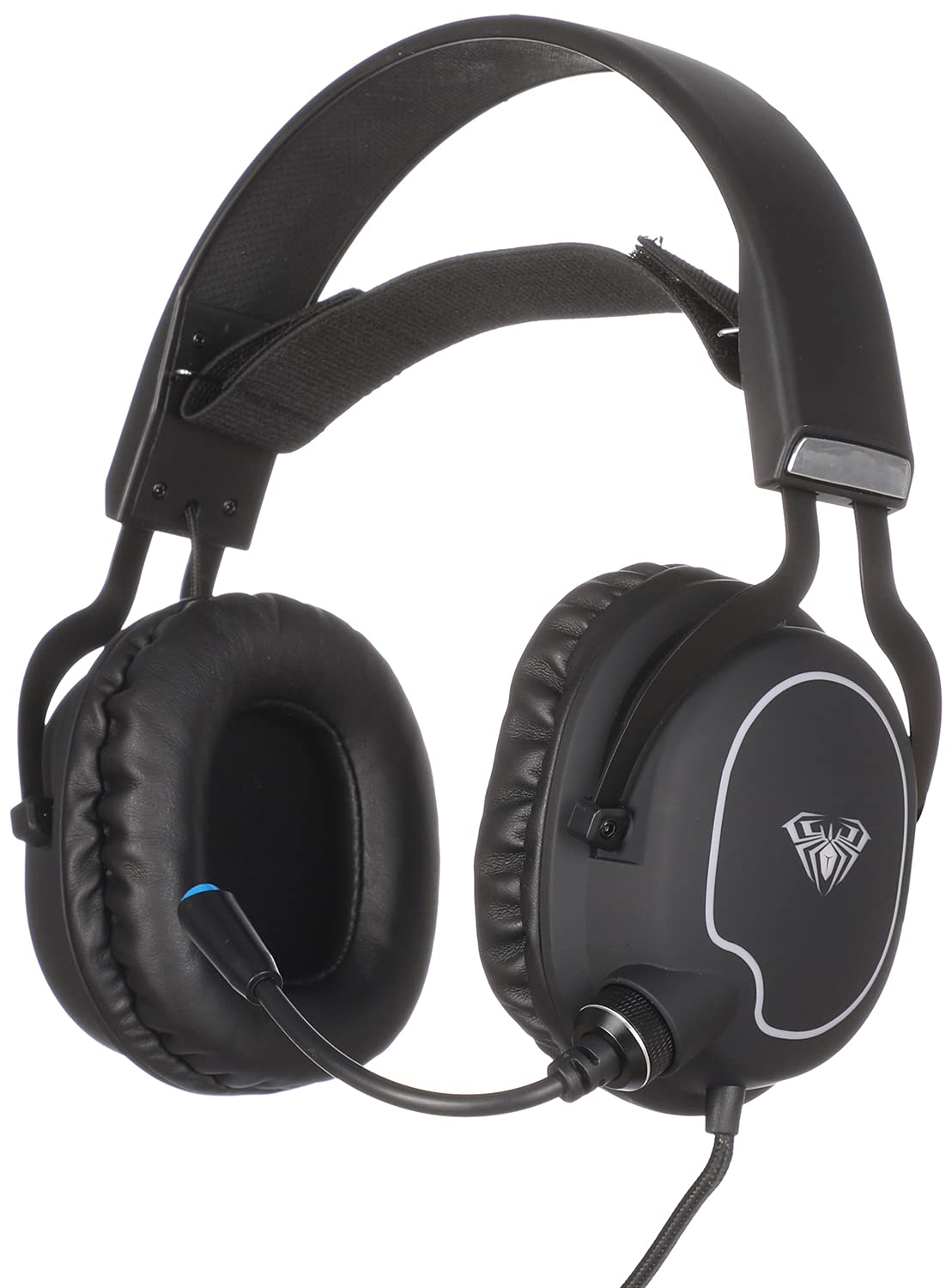
1. irudia: Aurrealdea view of the AULA S606 Wired Gaming Headset.

Figure 2: Close-up of the AULA S606 headset's earcup and flexible microphone.

3. irudia: Xehetasuna view of the AULA S606 headset's earcup, highlighting the volume control dial.
3. Konfigurazioa
Follow these steps to set up your AULA S606 headset:
- Konektatu entzungailuak: Plug the 3.5mm jack of the headset cable into the corresponding audio port on your device (PC, gaming console controller, smartphone, etc.). Ensure the connection is secure.
- Doitu buruko banda: Place the headset on your head and adjust the headband for a comfortable and secure fit. The earcups should fully cover your ears.
- Mikrofonoa kokatu: Adjust the flexible microphone boom to a position near your mouth, typically 2-3 centimeters away, for optimal voice clarity.
- Configure Audio Settings (if necessary): On your device, ensure the AULA S606 is selected as the default audio output and input device in your sound settings.
4. Funtzionamendu-argibideak
4.1 Bolumen kontrola
The AULA S606 headset features an integrated volume control dial located on one of the earcups (refer to Figure 3). Rotate the dial to increase or decrease the audio volume to your desired level.
4.2 Mikrofonoaren erabilera
The omnidirectional microphone captures sound from all directions, making it effective for voice communication. The active noise cancellation feature helps to reduce ambient background noise, ensuring your voice is heard clearly by others.
- Ezkutatu/Aktibatu: If your headset or device has a mute function, use it to temporarily disable the microphone.
- Posizionamendu optimoa: For best results, keep the microphone positioned consistently near your mouth.
5. Mantentzea
Behar bezalako zaintzak zure entzungailuen bizitza luzatuko du:
- Garbiketa: Erabili zapi leun eta lehor bat entzungailuak eta buruko zinta garbitzeko. Zikinkeria egoskorra bada, garbitu apur batamp Oihal bat erabil daiteke, baina ziurtatu hezetasunik ez dela sartzen bozgorailuen saretetan edo mikrofonoan. Ez erabili produktu kimiko gogorrik edo garbitzaile urratzailerik.
- Biltegiratzea: Store the headset in a clean, dry place away from extreme temperatures and direct sunlight. Avoid placing heavy objects on top of the headset.
- Kableen zainketa: Avoid sharp bends, twists, or excessive pulling on the cable. Always grasp the plug, not the cable, when disconnecting from a device.
- Mikrofonoaren zainketa: Mikrofonoaren beso malgua kontu handiz maneiatu. Saihestu gehiegi tolestea edo muturreko posizioetara behartzea.
6. Arazoak
If you encounter issues with your AULA S606 headset, refer to the following common problems and solutions:
| Arazoa | Kausa posiblea | Irtenbidea |
|---|---|---|
| Ez dago soinurik entzungailuetatik |
|
|
| Mikrofonoa ez dabil |
|
|
| Soinuaren distortsioa edo estatikoa |
|
|
7. Zehaztapenak
| Marka | AULA |
| Modelo zenbakia | S606 |
| Konektibitate Teknologia | Kableatua |
| Aurikularretarako Jack | 3.5 mm-ko jaka |
| Entzungailuen forma-faktorea | Belarri gainekoa |
| Mikrofonoa | Integrated, Omnidirectional |
| Zarata Kontrola | Zarata Deuseztatze Aktiboa |
| Kontrol mota | Bolumen kontrola |
| Gailu bateragarriak | All devices with a 3.5mm audio jack |
| Kolorea | Beltza |
| Materiala | Plastikoa |
| Dakarten osagaiak | Buruko zinta |
| Bidalketa neurriak | 24.6 x 21.2 x 13.2 cm |
| Pisua | 560 gramo |
8. Bermea eta Laguntza
Specific warranty information for the AULA S606 headset is not provided in this manual. For details regarding warranty coverage, technical support, or service inquiries, please refer to the documentation included with your purchase or contact your retailer or the manufacturer directly.


