Sarrera
This manual provides detailed instructions for the installation, operation, maintenance, and troubleshooting of your GIGABYTE GeForce RTX 3080 Vision OC 10G graphics card. This high-performance graphics card is designed for demanding visual tasks, powered by NVIDIA's Ampere architecture, featuring 2nd Generation RT Cores, 3rd Generation Tensor Cores, and 10GB GDDR6X memory. It incorporates the WINDFORCE 3X Cooling System for efficient thermal management and RGB Fusion 2.0 for customizable lighting.
Konfigurazioa eta Instalazioa
1. Sistemaren eskakizunak
- PCI Express bateragarria den motherboard zabalera bikoitzeko x16 zirrikitu grafiko batekin.
- Minimum 750W power supply with two 8-pin PCIe power connectors.
- Microsoft Windows 10 64-bit or Linux 64-bit operating system.
- 32GB system memory recommended for optimal performance.
- Internet connection for driver download.
2. Paketearen edukia
- GIGABYTE GeForce RTX 3080 Vision OC 10G Graphics Card
- Erabiltzailearen eskuliburua (dokumentu hau)
3. Instalazio fisikoa
- Prestatu zure sistema: Itzali ordenagailua eta deskonektatu kable guztiak. Ireki ordenagailuaren karkasa.
- Aurkitu PCIe zirrikitua: Identifikatu zure plaka basean PCI Express x16 zirrikitu libre bat.
- Kendu zirrikituen estalkiak: Remove the necessary expansion slot covers from the back of your computer case to accommodate the graphics card.
- Txartel grafikoa sartu: Carefully align the graphics card with the PCIe slot and press it firmly until it is securely seated. Ensure the retention clip on the PCIe slot locks into place.

Irudia: Aurrealdea view of the GIGABYTE GeForce RTX 3080 Vision OC 10G Graphics Card, showcasing the triple WINDFORCE fans and the white/silver shroud design.
- Txartela ziurtatu: Fasten the graphics card to the computer case using screws.
- Konektatu elikatze-kableak: Connect the two 8-pin PCIe power connectors from your power supply to the corresponding ports on the graphics card. Ensure a firm connection.
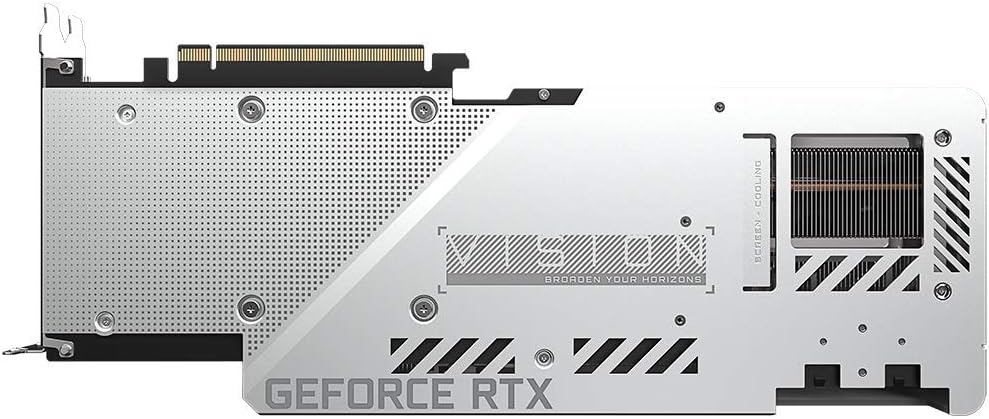
Irudia: Atzealdea view of the GIGABYTE GeForce RTX 3080 Vision OC 10G Graphics Card, highlighting the protective metal backplate with ventilation cutouts and the GeForce RTX branding.
- Itxi kasua: Ordenagailuaren karkasaren estalkia jarri eta kable guztiak berriro konektatu.
- Connect display: Connect your monitor to one of the display outputs (HDMI or DisplayPort) on the graphics card.
Funtzionamendu-argibideak
1. Gidariaren instalazioa
- Piztu: Turn on your computer. The system may boot into a lower resolution or use a generic display driver.
- Deskargatu kontrolatzaileak: Bisitatu GIGABYTE ofiziala webgunea (www.gigabyte.com) edo NVIDIAren ofiziala webgunea (www.nvidia.com/drivers).
- Select product: Navigate to the support section and locate the drivers for the GeForce RTX 3080 series.
- Instalatu gidariak: Download the latest recommended drivers and follow the on-screen instructions to complete the installation. A system restart may be required.
2. Softwarearen konfigurazioa
- GIGABYTE Kontrol Zentroa / AORUS Motorra: For advanced control over your graphics card, including fan speed adjustment, overclocking profiles, and RGB Fusion 2.0 lighting customization, download and install the GIGABYTE Control Center or AORUS Engine software from the GIGABYTE webgunea.
- NVIDIA GeForce Esperientzia: Install NVIDIA GeForce Experience for optimal game settings, driver updates, and access to features like ShadowPlay.
Mantentzea
- Hautsa kentzea: Garbitu hautsa txartel grafikoaren haizagailuetatik eta bero-hustugailutik aire konprimitua erabiliz aldizka. Ziurtatu sistema itzalita eta deskonektatuta dagoela garbitu aurretik.
- Fan ikuskapena: Periodically check the fans for any obstructions or unusual noises.
- Gidarien eguneraketak: Keep your graphics drivers updated to ensure optimal performance and stability.
Arazoak konpontzea
Ez dago pantaila-irteerarik
- Ziurtatu monitorearen kablea txartel grafikoari eta monitoreari ondo konektatuta dagoela.
- Egiaztatu txartel grafikoa PCIe zirrikituan guztiz sartuta dagoela.
- Check that all required PCIe power connectors are securely attached to the graphics card.
- Ahal bada, probatu beste pantaila-kable edo monitore batekin.
Sistemaren ezegonkortasuna edo kraskadurak
- Ziurtatu zure energia-iturriak gutxieneko potentzia betetzen duelatage requirement (750W).
- Eguneratu zure grafikoen kontrolatzaileak azken bertsiora.
- Monitor GPU temperatures using software like GIGABYTE Control Center to check for overheating.
- Check for conflicts with other installed drivers or software.
Errendimendu eskasa
- Ziurtatu gidariak behar bezala instalatuta eta eguneratuta daudela.
- Verify that the graphics card is running at its intended clock speeds (can be checked with monitoring software).
- Egiaztatu sistemaren baliabideak kontsumitzen ari diren atzeko planoan dauden aplikazioak.
- Ensure your system's BIOS/UEFI is updated.
Zehaztapenak
| Grafikoen Prozesatzeko Unitatea | NVIDIA GeForce RTX 3080 |
| Bideo Memoria | 10 GB GDDR6X |
| Memoria Interfazea | 320 bitekoa |
| Boost Erlojua | 1800 MHz |
| Memoria Abiadura | 19000 MHz |
| Irteera Portuak | DisplayPort, HDMI |
| Bereizmen digital maximoa | 7680x4320 (via DisplayPort 1.4a) |
| anitzekoview | 4 |
| Txartelaren neurriak (LxZxA) | 12.6 x 4.96 x 2.17 hazbete (320 x 126 x 55 mm) |
| Gomendatutako PSU | 750W |
| Potentzia-konektoreak | 2 x 8 pin |
| PCI Express | 4.0 x 16 |
| Modelo zenbakia | GV-N3080VISION OC-10GD 2.0 |
Bermearen informazioa
GIGABYTE products are covered by a limited warranty. The specific terms and duration of the warranty may vary by region and product. Please refer to the official GIGABYTE website or your product's packaging for detailed warranty information and registration procedures. Keep your proof of purchase for warranty claims.
Laguntza Teknikoa
For technical assistance, driver downloads, FAQs, and further support, please visit the official GIGABYTE support webgunea:
GIGABYTE bezeroarentzako arreta-zerbitzuarekin ere harremanetan jar zaitezke, haien webgunean emandako harremanetarako informazioaren bidez. webzure eskualde zehatzerako gunea.