1. Segurtasun informazio garrantzitsua
Matrix Fitness TF50 zinta-errota erabili aurretik, irakurri eta ulertu segurtasun-jarraibide guztiak. Jarraibide hauek ez jarraitzen badituzu, lesioak edo ekipamendua kaltetu daiteke.
- Kontsultatu medikuari: Ariketa programa berri bat hasi aurretik, kontsultatu beti osasun-profesional batekin.
- Gainbegiratzea: Tresna hau ez da gaitasun fisiko, sentsorial edo mental murriztua duten pertsonek edo esperientzia eta ezagutza falta duten pertsonek erabiltzeko, baldin eta haien segurtasunaz arduratzen den pertsona batek gailuaren erabilerari buruzko gainbegiratze edo jarraibiderik eman ez badu. Haurrak gainbegiratu behar dira aparatuarekin jolasten ez dutela ziurtatzeko.
- Larrialdi geldialdia: Segurtasun-giltza eta haren funtzioa ezagutu. Segurtasun-giltzaren klipa beti lotu arropari funtzionamenduan zehar. Larrialdi baten kasuan, segurtasun-giltza tiratzeak zinta-korrikalaria berehala geldituko du.
- Kokapen egokia: Jarri zinta-korrikalaria gainazal lau eta egonkor batean, inguruan nahikoa tarterekin (gutxienez 6 metro atzean eta 2 metro alde bakoitzean). Ez jarri alfonbra lodi baten gainean, aireztapena oztopatu baitezake.
- Elikatze kablea: Ziurtatu kablea ez dagoela estutu edo kaltetuta. Ez erabili luzapen-kablerik. Entxufatu zuzenean lurrera konektatutako entxufe batera.
- Mantentzea: Egin aldizkako mantentze-lanak eskuliburu honetan deskribatzen den bezala, funtzionamendu segurua bermatzeko.
OHARRA: Deskarga elektrikoaren, sutearen eta lesio larrien arriskua murrizteko, irakurri argibide guztiak ekipamendu hau erabili aurretik.
2. Produktua amaitu daview
Matrix Fitness TF50 zinta-errota XUR 22 hazbeteko ukipen-pantaila kontsolarekin etxean klub-kalitateko entrenamendu esperientzia eskaintzeko diseinatuta dago. Marko sendoa, korrika egiteko plataforma zabala eta entrenamendu aukera anitzak eskaintzen dituen kontsola interaktibo bat ditu.
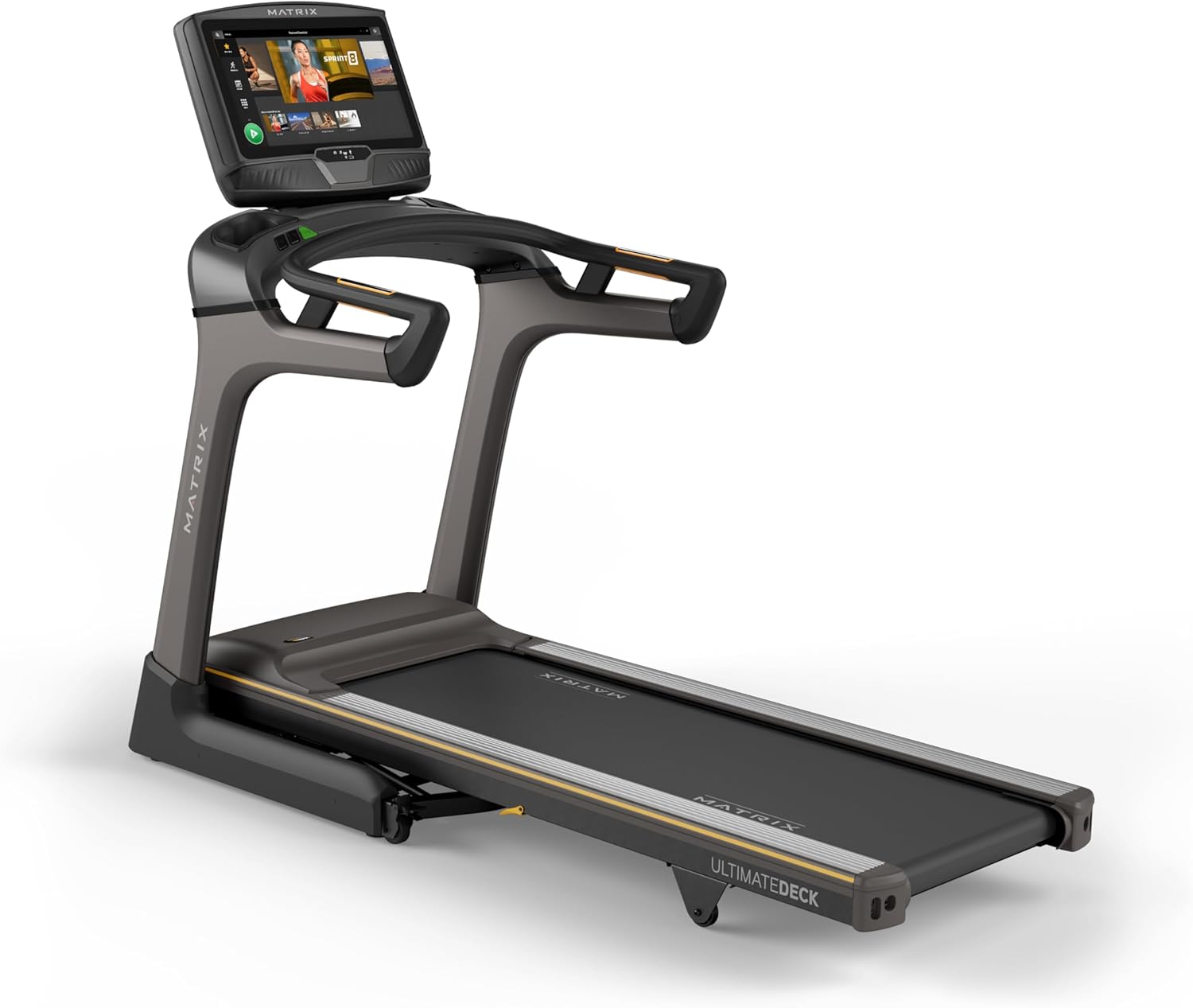
Irudia: Aurrealdea view Matrix Fitness TF50 zinta-errotaren erakustaldiaasin22 hazbeteko ukipen-pantaila kontsola eta korrika egiteko plataforma.
Ezaugarri nagusiak
- XUR 22 hazbeteko ukipen-pantaila kontsola: Streaming aplikazioak, iFIT integrazioa, programa aktibo birtualak eta errendimenduaren jarraipena eskaintzen ditu.
- Johnson Drive Sistema: Motor isila, iraunkorra eta erantzunkorra, errendimendu koherentea lortzeko.
- Azken karta-sorta sistema: Korrika egiteko esperientzia erosoa izateko, kalitate industrialeko kuxin-maila eskaintzen du.
- Diseinu tolesgarria: Ia 90 graduko tolestura, espazioa aurrezteko biltegiratze.
- Korrika egiteko azalera zabaldua: 20" x 60"-ko oholak hainbat urrats-luzerarako balio du.
- Abiadura eta malda: 0.5-12.5 mph abiadura-tartea eta % 0-15eko inklinazioa entrenamendu polifazetikoetarako.

Irudia: TF50 zinta-errotaren ezaugarri nagusiak nabarmentzen dituen diagrama, besteak beste, tolesgarri den diseinua, 20"x60" Ultimate Deck Systema, korronte zuzeneko motor isila, % 0-15eko inklinazio-tartea, 0.5-12.5 mph-ko abiadura-tartea eta industria-mailako kuxintzea.
3. Konfigurazioa eta Muntaketa
Matrix Fitness TF50 zinta-errotak muntaketa behar du. Osagaien tamaina eta pisua direla eta, bi pertsona egotea gomendatzen da muntaketa egiteko. Ziurtatu hardware-kitan zerrendatutako pieza guztiak daudela hasi aurretik.
3.1 Desontziratzea eta kokatzea
- Kontu handiz atera osagai guztiak ontzitik. Gorde ontziratzeko materialak muntaketa amaitu arte.
- Jarri zinta-korrikalaria gomendatutako tarte-baldintzak betetzen dituen leku batean: gutxienez 1.8 metro (6 oin) zinta-korrikalariaren atzean eta 0.6 metro (2 oin) alde bakoitzean.
- Ziurtatu gainazala maila berean eta egonkorrean dagoela. Saihestu aireztapena oztopatu dezakeen alfonbra lodiaren gainean jartzea.
3.2 Muntaketa urratsak
Ikusi barneko muntaketa-gida urratsez urratseko argibide eta diagramak ikusteko. Urrats orokorren artean hauek daude:
- Lotu zutikako mastak zinta-korrikalariaren markoari.
- Lotu kontsolaren oinarria eta eskulekuak mastei.
- Konektatu beharrezko kable guztiak kontsolaren eta markoaren artean.
- Jarri gainerako estalkiak edo osagarriak.
3.3 Energia-konexioa
- Ziurtatu zinta-korrikalaria itzalita dagoela konektatu aurretik.
- Entxufatu elikatze-kablea zuzenean lurrera konektatutako entxufe elektriko dedikatu batera. Ez erabili luzapen-kablerik edo egokitzailerik.
- Piztu etengailu nagusia, normalean zinta-korrikalariaren oinarriaren aurrealdean dagoena.
4. Funtzionamendu-argibideak
Atal honek zure Matrix Fitness TF50 zinta-errota nola erabili eta haren funtzioak nola erabili azaltzen du.
4.1 Kontsola gainetikview (XUR 22 hazbeteko ukipen-pantaila)
XUR kontsolak hainbat entrenamendu programa, entretenimendu aplikazio eta errendimendu datuetarako sarbidea ematen du.

Irudia: XUR 22 hazbeteko ukipen-pantaila kontsolaren plano hurbila, non HD pantaila handi-handia, streaming aplikazioen gaitasunak (Netflix, YouTube, Spotify), Virtual Active Sprint 8 eta iFIT integrazioa, Bluetooth FTMS, HDMI integratua, 13 metrika-programa eta Bluetooth HR uhalaren konexioa nabarmentzen diren.
- Piztu: Behin konektatu eta etengailu nagusia piztuta dagoenean, kontsola piztuko da.
- Hasierako konfigurazioa: Jarraitu pantailan agertzen diren argibideei Wi-Fi sarera konektatzeko, erabiltzaile-profila konfiguratzekofiles, eta aktibatu barne dauden harpidetzak, hala nola iFIT.
- Nabigazioa: Erabili ukipen-pantaila menuetan nabigatzeko, entrenamenduak hautatzeko eta aplikazioetara sartzeko.

Irudia: XUR kontsolaren entrenamendu-pantaila nagusia, hainbat entrenamendu-aukera eta 'Sprint 8' programaren teila erakusten dituena.

Irudia: XUR kontsolaren entretenimendu aplikazioen pantaila, Netflix, YouTube, Spotify, Facebook, Twitter eta Instagram-en ikonoak erakusten dituena.tagRAM eta beste aplikazio batzuk.
4.2 Entrenamendu bat hastea
- Segurtasun-giltza erantsi: Segurtasun-giltza arropari itsatsi. Zinta-korrikalariak ez du funtzionatuko segurtasun-giltza jarrita ez badago.
- Hautatu Programa/Modua: Kontsolatik, aukeratu abiarazte azkar bat, aurrez programatutako entrenamendu bat, iFIT entrenamendu bat edo ibilbide aktibo birtual bat.
- Hasi: Sakatu kontsolako START botoia. Zinta abiadura txikian mugitzen hasiko da.
- Abiadura eta inklinazioa doitzea: Erabili kontsolan edo eskulekuan dauden abiadura eta inklinazio botoiak entrenamenduaren intentsitatea doitzeko.

Irudia: Zinta-korrikalariaren eskulekuen hurbileko irudia, entrenamendu batean zehar doikuntza errazak egiteko abiadura eta inklinazio kontrol botoiak erakusten dituena.
4.3 Entrenamendu bat gelditzea
- Ohiko geldialdia: Sakatu kontsolako STOP botoia. Zinta pixkanaka motelduko da eta gelditu egingo da.
- Larrialdi geldialdia: Atera segurtasun-giltza kontsolatik. Zinta-korrikalariak berehala geldituko da.
4.4 Tolestura eta biltegiratzea
TF50 zinta-errotak erraz tolestu daitekeen diseinua du, eroso gordetzeko.
- Ziurtatu zinta-korrikalaria geldituta eta itzalita dagoela.
- Kontu handiz altxa korrika egiteko plataforma zutik gelditu arte.
- Zabaltzeko, astiro-astiro sakatu plataforma askatzeko palanka eta poliki-poliki jaitsi plataforma lurrera.

Irudia: Matrix TF50 zinta-errota tolestuta eta zutik erakusten da, espazioa aurrezteko diseinua erakutsiz.

Irudia: Emakume bat zinta-korrikalariaren tolestura-mekanismoa erakusten, korrika egiteko plataforma zutik gordetzeko posiziora altxatuz.
5. Mantentzea
Mantentze-lan erregularrak zure zinta-korrikalariaren iraupena eta errendimendu optimoa bermatzen ditu.
5.1 Garbiketa
- Egunero: Garbitu kontsola eta eskulekuak oihal leun batekinamp erabili ondoren zapi bat garbitu. Saihestu garbitzaile urratzaileak edo gehiegizko hezetasuna.
- Asteko: Xurgagailua pasa zinta-korrikalariaren inguruan eta azpian hautsa eta hondakinak pilatzea saihesteko.
5.2 Korrika egiteko zintaren mantentze-lanak
- Lubrifikazioa: Ultimate Deck System mantentze gutxi behar izateko diseinatuta dago. Lubrifikazio-egutegi espezifikoak ikusteko, kontsultatu produktuaren eskuliburu osoa. Gehiegi lubrifikatzeak kalteak eragin ditzake.
- Tentsioa eta lerrokatzea: Aldian-aldian egiaztatu korrika egiteko uhala tentsio eta lerrokadura egokia dela. Uhala irristatzen bada edo alde batera mugitzen bada, kontsultatu eskuliburu osoa doikuntza-prozedurei buruzko informazioa lortzeko edo jarri harremanetan bezeroarentzako arreta-zerbitzuarekin.

Irudia: Inpaktua xurgatzeko diseinatutako Ultimate Deck System-en geruza anitzeko kuxintzea ilustratzen duen diagrama moztua.
5.3 Motorraren konpartimentua
- Urteko egiaztapena: Urtero, edo behar den moduan, deskonektatu zinta-korrikalaria eta kendu motorraren estalkia kontu handiz. Xurgatu hautsa edo hondakinak motorraren eremutik. Ez ukitu osagai elektrikorik. Jarri estalkia ondo ondo.

Irudia: Mozketa bat view Johnson Drive System motorraren irudia, barne osagaiak eta funtzionamendu isila eta erantzunkorra lortzeko diseinua erakutsiz.
6. Arazoak
Atal honek zure TF50 zinta-korrikalariarekin izan ditzakezun arazo ohikoenei irtenbideak eskaintzen ditu. Arazo konplexuagoetarako, jarri harremanetan Matrix Fitness bezeroarentzako arreta-zerbitzuarekin.
| Arazoa | Kausa posiblea | Irtenbidea |
|---|---|---|
| Zinta-errotak ez du pizten. | Kablea ez dago konektatuta; etengailu nagusia itzalita; etengailu magnetotermikoa jauzi egin du. | Ziurtatu kablea ondo konektatuta dagoela. Piztu etengailu nagusia. Egiaztatu etxeko etengailua. |
| Korrika egiteko zinta ez da mugitzen. | Segurtasun-giltza ez dago lekuan; Larrialdi-geldialdia aktibatuta; Motorraren arazoa. | Ziurtatu segurtasun-giltza guztiz sartuta dagoela. Egiaztatu larrialdiko gelditzeko botoia sakatuta dagoen. Arazoak jarraitzen badu, jarri harremanetan laguntza-zerbitzuarekin. |
| Kontsolak ez du erantzuten edo blokeatuta dago. | Software akatsa; Aldi baterako arazo elektrikoa. | Itzali etengailu nagusia, itxaron 30 segundo eta piztu berriro. Arazoak jarraitzen badu, jarri harremanetan laguntza-zerbitzuarekin. |
| Korrika egiteko uhala irristatu edo zalantzan jartzen da. | Uhalaren tentsioa laxeegia da; Uhalaren lubrifikazioa beharrezkoa da. | Uhalaren tentsioa doitzeko eskuliburu osoa kontsultatu. Lubrifikazio-egutegia egiaztatu. |
Hemen zerrendatu ez den arazoren bat baduzu edo proposatutako irtenbideek arazoa konpontzen ez badute, jarri harremanetan Matrix Fitness bezeroarentzako arreta-zerbitzuarekin.
7. Zehaztapenak
Matrix Fitness TF50 zinta-korrikalariaren zehaztapen tekniko zehatzak XUR kontsola duena.

Irudia: Matrix TF50 zinta-errotaren neurriak erakusten dituen diagrama: 81 hazbete (S) x 35 hazbete (Z) x 62 hazbete (A).
| Ezaugarri | Zehaztapena |
|---|---|
| Marka | Matrizea |
| Ereduaren izena | Matrix Fitness TF50 zinta-korrikalaria |
| Kontsola | XUR 22 hazbeteko ukipen-pantaila |
| Produktuaren neurriak (LxWxH) | 81" x 35" x 62" |
| Tolestutako Tamaina | 42" x 35" x 76" |
| Elementuaren pisua | 310 kilo |
| Erabiltzaileen Gehieneko Pisua | 400 kilo |
| Korrika egiteko gainazala (plataformaren luzera x zabalera) | 60" x 20" |
| Gehienezko Abiadura | 12.5 Mila orduko |
| Gutxieneko Abiadura | 0.5 Mila orduko |
| Gehienezko inklinazioa ehunekotage | %15 |
| Motor Zaldia | 3.25 zaldi potentzia |
| Materiala | Altzairu aleazioa |
| Energia iturria | Kable elektrikoa |
| Konektibitate Teknologia | HDMI, USB, WiFi, Bluetooth |
| Neurtutako metrikak | Distantzia, Abiadura, Inklinazioa, Kaloriak, Denbora |
| Muntaia Beharrezkoa | Bai |
| UPC | 763165008938 |
8. Bermea eta Laguntza
Matrix Fitness-ek berme osoa eskaintzen du TF50 zinta-korrikalariarentzat.
8.1 Bermearen informazioa
- Markoa: Bizi osorako bermea
- Motorra eta amortiguazioa: Bizi osorako bermea
- Piezak (Kontsola): 5 urte
- Lana (Kontsola): 1 urte
- Piezak (Markoa): 7 urte
- Lan (Markoa): 2 urte
Gorde erosketaren egiaztagiria bermearen erreklamazioetarako. Bermearen baldintzak eskualdearen arabera alda daitezke. Xehetasun gehiago lortzeko, kontsultatu zure produktuarekin batera datorren berme-txartela edo bisitatu Matrix Fitness webgune ofiziala. webgunea.
8.2 Bezeroarentzako laguntza
Laguntza teknikoari, piezei edo zerbitzuei buruzko kontsultak egiteko, jarri harremanetan Matrix Fitness bezeroarentzako arreta-zerbitzuarekin. Zure modelo zenbakia (TF50 zinta-korrikalari XUR-rekin) eta serie zenbakia prest izan laguntza-zerbitzura deitzerakoan.
Bisitatu Matrix Fitness denda Amazonen informazio gehiago lortzeko edo harremanetarako datuak aurkitzeko.


