Sarrera
This manual provides comprehensive instructions for the setup, operation, and maintenance of your Doubc C8X Wireless Earbuds. Designed for comfort and high-fidelity audio, these earbuds offer a seamless listening experience for various activities. Please read this manual thoroughly to ensure optimal performance and longevity of your device.

Irudia: Gainetikview of the C8X True Wireless Earbuds, highlighting key features like Bluetooth 5.0, IPX7 Waterproofing, Super Stereo Sound, Crystal Clear Call, 48H Playtime, and Touch Control.
Kutxan dagoena
Egiaztatu osagai guztiak zure paketean daudela:
- Doubc C8X Wireless Earbuds (Left and Right)
- Kargatzeko kaxa
- USB-C kargatzeko kablea
- Erabiltzailearen eskuliburua
- Multiple Eartip Sizes (Small, Medium, Large)

Image: The complete package contents, including the charging case, earbuds, USB-C cable, user manual, and various eartip sizes.
Konfigurazioa
1. Entzungailuak eta zorroa kargatzea
Before first use, fully charge both the earbuds and the charging case. The charging case features a smart LED display that shows the battery percentage from 1% to 100%, reminding you when it needs to be charged to prevent unexpected shutdowns.
- Aurikularrak kargatzen: Place the earbuds into the charging case. They will automatically begin charging. The LED indicators on the earbuds will show charging status. A full charge for the earbuds typically takes 1-2 hours, providing up to 8 hours of listening time on a single charge.
- Kasua kargatzea: Connect the provided USB-C cable to the charging port on the back of the case and plug the other end into a compatible USB power source. The LED display will show the charging progress. The case takes approximately 1.5 hours to fully charge. A fully charged case provides up to 48 hours of total playtime for the earbuds.

Image: Illustration of the earbuds and charging case, highlighting the 8 hours of playtime on a single charge and 48 hours with the charging case.

Image: Close-up of the charging case's smart LED display showing battery percentage and the fast Type-C charging port.
2. Piztu/Itzaltzea
- Pizte automatikoa: Open the lid of the charging case. The earbuds will automatically power on, and the red and blue indicator lights will flash.
- Itzali automatikoa: Place the earbuds back into the charging case and close the lid. The earbuds will automatically power off and begin charging.
- Eskuzko piztea: Long press the touch control area on both earbuds for 3 seconds.
- Eskuz itzaltzea: Long press the touch control area on both earbuds for 5 seconds.

Image: Visual guide demonstrating how to boot up, use, and shut down the earbuds by interacting with the charging case.
3. Parekatzea
The earbuds support one-step pairing and will automatically connect to the last paired device when removed from the charging case. For first-time pairing or pairing with a new device:
- Ziurtatu entzungailuak kargatuta eta piztuta daudela.
- Open the Bluetooth settings on your device (smartphone, tablet, laptop).
- Bilatu “C8X” in the list of available devices and select it to connect.
- Behin konektatuta, ahots-abisu batek parekatzea behar bezala egin dela baieztatuko du.
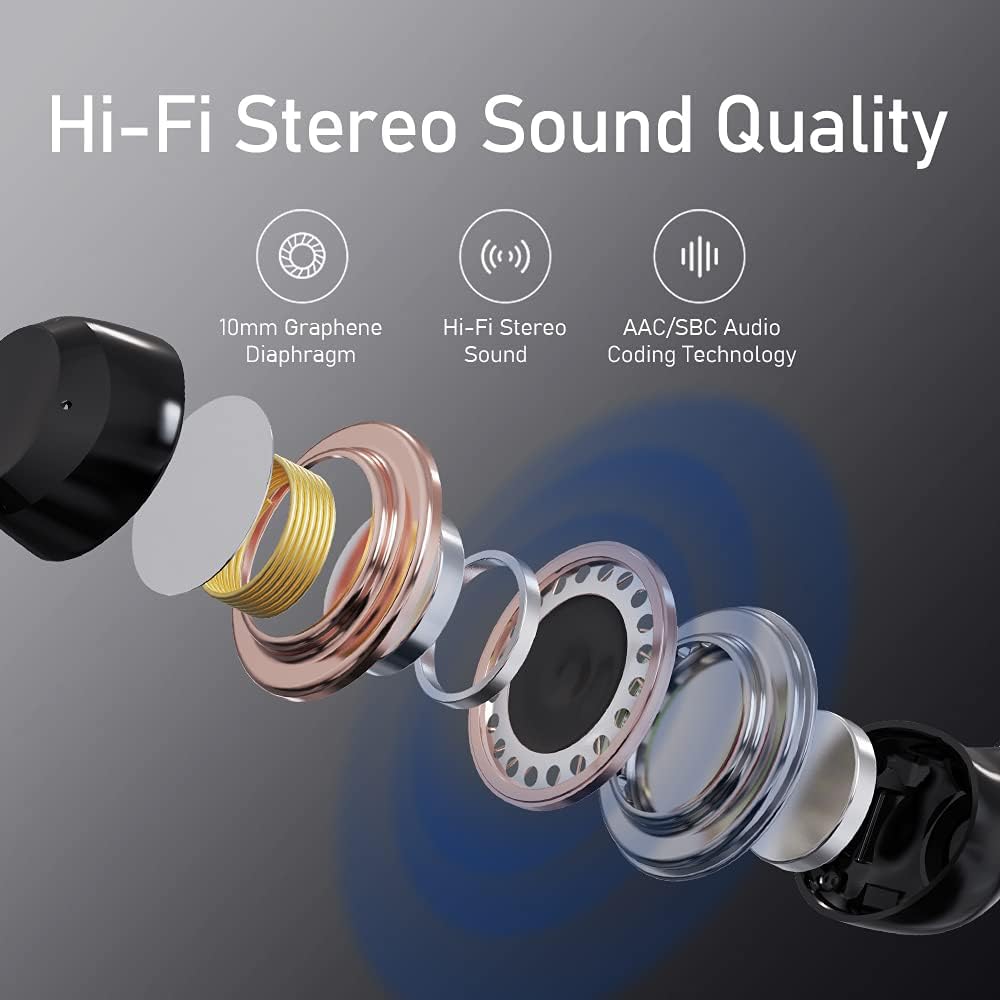
Image: Depiction of the earbuds and charging case next to a smartphone with Bluetooth settings open, showing the 'C8X' device ready for pairing.
Entzungailuak erabiltzea
1. Ukitu Kontrolak
The Doubc C8X earbuds feature intuitive touch controls for managing audio playback and calls:
- Erreproduzitu/Pausatu: Sakatu bakar batean entzungailu batean.
- Hurrengo ibilbidea: Sakatu bi aldiz eskuineko entzungailuan.
- Aurreko pista: Sakatu bi aldiz ezkerreko entzungailuan.
- Deia erantzun/amaitu: Sakatu behin entzungailuetako edozeinetan sarrerako dei batean edo dei aktibo batean zehar.
- Deia baztertu: Sakatu luze entzungailuetako edozeinetan 2 segundoz dei bat sartzen ari zarenean.
- Aktibatu Ahots Laguntzailea: Sakatu hiru aldiz entzungailuetako edozeinetan.

Image: Diagram illustrating the touch control functions for answering calls, ending calls, playing, and pausing audio.
2. Janzteko argibideak
For optimal sound quality and a secure fit, choose the eartip size that best suits your ears. The earbuds are ergonomically designed to fit snugly and stay secured in the ear canal, making them suitable for various activities including workouts and running.
- Sartu astiro-astiro aurikularra belarriko kanalean.
- Rotate it slightly until it feels secure and comfortable.
- Test the fit by gently shaking your head. If the earbud feels loose, try a different eartip size.

Image: A person wearing the earbuds, with diagrams showing the ergonomic design for a secure and comfortable in-ear fit.
3. Mono/Binaural Mode
The Doubc C8X earbuds can be used in either mono (single earbud) or binaural (both earbuds) mode:
- Mono modua: Use a single earbud for calls or listening while remaining aware of your surroundings. This is ideal for driving or working.
- Modu binaurala: Use both earbuds for a full stereo sound experience, perfect for music and immersive audio.

Irudia: Visual examples of using the earbuds in mono mode (single earbud for working/driving) and binaural mode (both earbuds for stereo sound enjoyment).
4. Hi-Fi Stereo Sound Quality
The earbuds deliver high-fidelity stereo sound quality, enhanced by a 10mm Graphene Diaphragm and AAC/SBC Audio Coding Technology, providing rich bass and clear audio across all frequencies.

Irudia: Lehertua view diagram showing the internal components contributing to the Hi-Fi Stereo Sound Quality, including the 10mm Graphene Diaphragm and AAC/SBC Audio Coding Technology.
Mantentzea
Proper care ensures the longevity and performance of your Doubc C8X earbuds:
- Garbiketa: Garbitu aldizka entzungailuak eta kargatzeko zorroa oihal leun eta lehor batekin. Ez erabili garbitzaile edo disolbatzaile urratzailerik.
- Belarri-orriak: Remove and clean the silicone eartips periodically with water and mild soap. Ensure they are completely dry before reattaching.
- Biltegiratzea: Erabiltzen ez dituzunean, gorde beti entzungailuak kargatzeko zorroan hautsetik, kalteetatik babesteko eta kargatuta mantentzeko.
- Uraren erresistentzia: The earbuds are IPX7 waterproof, meaning they can resist the penetration from splashes and water. However, they are not designed for swimming or prolonged submersion. Ensure the charging port is dry before charging.

Image: Visual representation of the earbuds being splashed with water, illustrating their IPX7 waterproof capability.
Arazoak konpontzea
If you encounter any issues with your Doubc C8X Wireless Earbuds, refer to the following common problems and solutions:
- Ez dago soinurik entzungailu bakarretik: Ensure both earbuds are properly charged. Place both earbuds back into the charging case, close the lid, wait a few seconds, then open the lid and try again. Check your device's Bluetooth settings to ensure both earbuds are connected.
- Entzungailuak ez dira parekatzen: Make sure Bluetooth is enabled on your device. Ensure the earbuds are powered on and in pairing mode (flashing red and blue lights). If issues persist, try forgetting the device in your Bluetooth settings and re-pairing.
- Kargatzeko arazoak: Verify the USB-C cable is securely connected to both the charging case and the power source. Check if the charging port is clean and free of debris. Ensure the power source is functioning correctly.
- Bolumen baxua/Soinu kalitate eskasa: Adjust the volume on both your device and the earbuds. Ensure the eartips are properly seated in your ear canal to create a good seal. Try different eartip sizes for a better fit.
- Earbuds Keep Disconnecting: Ensure the earbuds are within the effective Bluetooth range of your device (typically 10 meters/33 feet). Avoid obstacles or strong electromagnetic interference.
For further assistance, please consult the full user manual available as a PDF or contact Doubc customer support.
Zehaztapenak
| Ezaugarri | Zehaztapena |
|---|---|
| Marka | Doubc |
| Modelo zenbakia | C8X |
| Konektibitate Teknologia | Haririk gabekoa (Bluetooth 5.0) |
| Belarrien Kokatzea | Belarrian |
| Forma-faktorea | Belarrian |
| Uraren Erresistentzia Maila | IPX7 Iragazgaitza |
| Jolasteko denbora (karga bakarra) | Gehienez 8 ordu |
| Erreproduzitzeko denbora osoa (kargatzeko zorroarekin) | Gehienez 48 ordu |
| Kargatzeko ataka | C motakoa |
| Produktuaren neurriak | 0.79 x 0.39 x 0.79 hazbete |
| Elementuaren pisua | 4.2 ontza |
Bermea eta Laguntza
Your Doubc C8X Wireless Earbuds come with a standard manufacturer's warranty. For detailed information regarding warranty coverage, terms, and conditions, please refer to the full user manual PDF provided with your product or visit the official Doubc webgunea.
For technical support, troubleshooting assistance, or any product-related inquiries, please contact Doubc customer service through the channels specified in your user manual or on the Doubc brand store page on Amazon.
Erabiltzailearen eskuliburua (PDF): Deskargatu Hemen
