Sarrera
The SHOKZ OpenMove headphones offer an innovative open-ear listening experience, utilizing bone conduction technology to deliver audio through your cheekbones. This design ensures situational awareness by keeping your ears open to your surroundings, making them ideal for sports, workouts, and daily use. This manual provides essential information for setting up, operating, maintaining, and troubleshooting your OpenMove headphones.

Figure 1: SHOKZ OpenMove Pink Headphones
Kutxan dagoena
Upon unboxing your SHOKZ OpenMove headphones, you should find the following items:
- SHOKZ OpenMove Bone Conduction Sport Headphones
- USB-C kargatzeko kablea
- Garraio Poltsa
- Erabiltzailearen gida (eskuliburu hau)
- Sticker Pack (for customization)

Figure 2: Included components with SHOKZ OpenMove headphones.
Konfigurazioa
1. Zure entzungailuak kargatzen
Before initial use, fully charge your OpenMove headphones. A full charge takes approximately 2 hours.
- Locate the USB-C charging port on the right transducer arm.
- Konektatu emandako USB-C kargatzeko kablea atakara.
- Plug the USB-A end of the cable into a compatible USB power adapter (not included) or a computer's USB port.
- LED adierazlea gorriz agertuko da kargatzen ari den bitartean eta urdin bihurtuko da guztiz kargatzen denean.
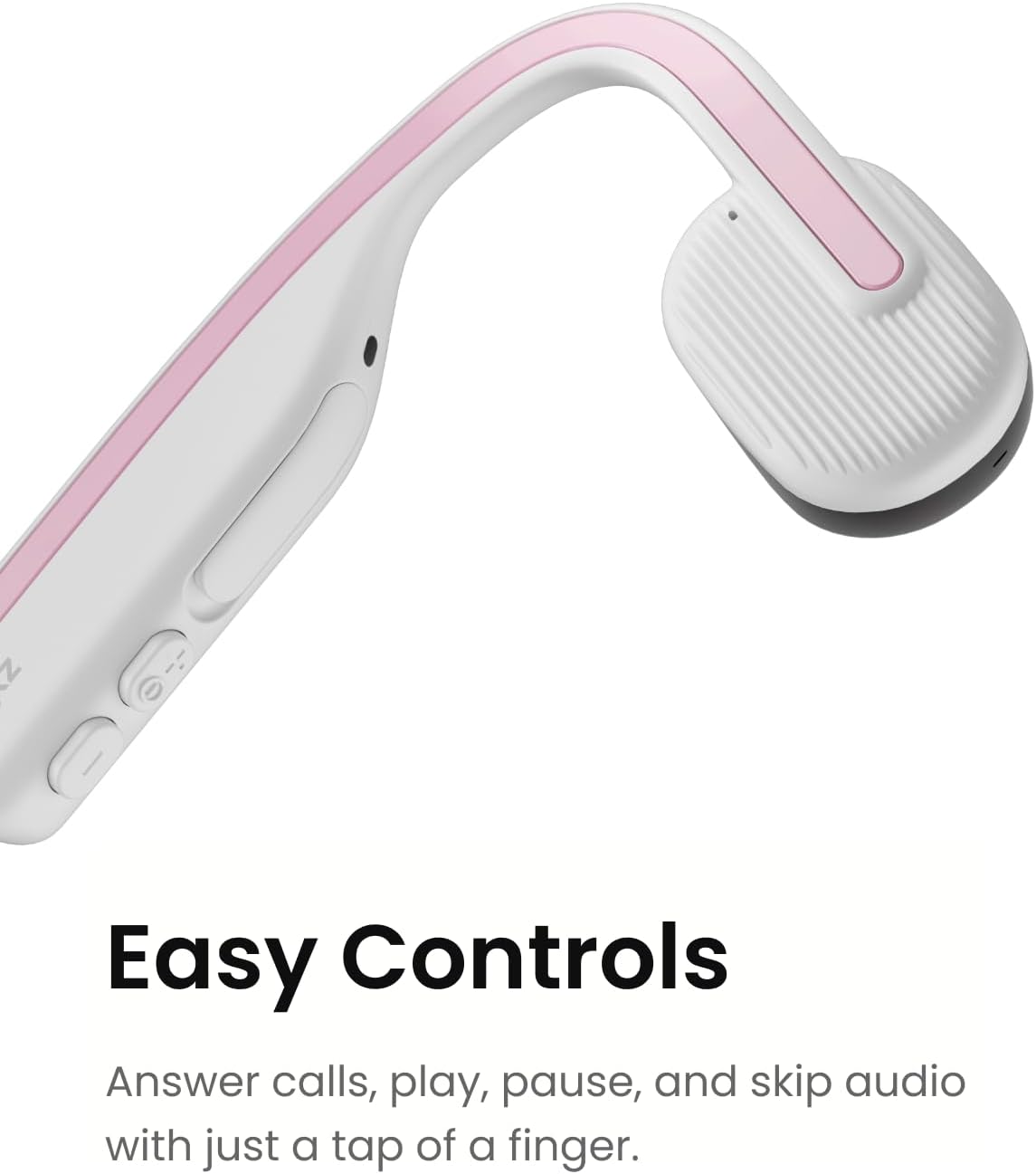
Figure 3: The control buttons and USB-C charging port.
2. Bluetooth parekatzea
Pair your OpenMove headphones with your Bluetooth-enabled device (smartphone, tablet, computer) to begin listening.
- Ziurtatu entzungailuak itzalita daudela.
- Press and hold the Power/Volume+ button for 5-7 seconds until the LED indicator flashes red and blue alternately, indicating pairing mode.
- Gailuan, gaitu Bluetootha eta bilatu eskuragarri dauden gailuak.
- Select "OpenMove by SHOKZ" from the list.
- Once connected, the LED indicator will flash blue once, and a voice prompt will confirm "Connected".
Funtzionamendu-argibideak
Entzungailuak jantzita
The OpenMove headphones are designed for comfort and stability. Place the transducers on your cheekbones, just in front of your ears, with the neckband resting comfortably behind your head.

Figure 4: Proper placement of OpenMove headphones for optimal comfort and sound.
Kontrolak
The OpenMove headphones feature intuitive controls for managing audio and calls:
- Piztu/Itzali: Press and hold the Power/Volume+ button for 2 seconds.
- Bolumena igo: Press the Volume+ button.
- Bolumena jaitsi: Press the Volume- button.
- Erreproduzitu/Pausatu: Press the Multi-function button (located on the left transducer).
- Hurrengo ibilbidea: Sakatu birritan funtzio anitzeko botoia.
- Aurreko pista: Sakatu hiru aldiz funtzio anitzeko botoia.
- Deia erantzun/amaitu: Press the Multi-function button during an incoming call or active call.
- Deia baztertu: Sakatu eta eutsi funtzio anitzeko botoia 2 segundoz sarrerako dei bat jasotzen ari zaren bitartean.
- Ahots laguntzailea: Press and hold the Multi-function button for 2 seconds (when not on a call).
Mantentzea
To ensure the longevity and optimal performance of your SHOKZ OpenMove headphones, follow these maintenance guidelines:
- Garbiketa: Garbitu entzungailuak leun batekin, damp oihal. Saihestu produktu kimiko gogorrak edo material urratzaileak erabiltzea.
- Biltegiratzea: When not in use, store the headphones in the provided carrying bag to protect them from dust and damage.
- Uraren erresistentzia: The OpenMove headphones are water-resistant (IP55 rated), meaning they can withstand sweat and light rain. Do not submerge them in water. Ensure the charging port cover is securely closed before exposure to moisture.
- Tenperatura: Saihestu entzungailuak muturreko tenperaturetan (beroan edo hotzean) jartzea, horrek bateriaren iraupenean eta errendimendu orokorrean eragina izan baitezake.
Arazoak konpontzea
If you encounter issues with your SHOKZ OpenMove headphones, try the following solutions:
- Potentziarik gabe: Ensure the headphones are fully charged. Connect them to the charger and check the LED indicator.
- Soinurik ez:
- Egiaztatu entzungailuen eta konektatutako gailuaren bolumen-maila.
- Ensure the headphones are properly placed on your cheekbones.
- Verify that the headphones are successfully paired and connected to your device.
- Parekatzeko arazoak:
- Itzali Bluetooth-a zure gailuan, eta gero piztu berriro.
- Forget the device in your device's Bluetooth settings and attempt to re-pair.
- Ziurtatu beste Bluetooth gailuek ez dutela konexioa oztopatzen.
- Soinu kalitate eskasa:
- Adjust the placement of the transducers on your cheekbones.
- Ensure there are no obstructions between the transducers and your skin.
- Check for any physical damage to the headphones.
Arazoak konpontzeko edo arazo iraunkorrak konpontzeko xehetasun gehiago lortzeko, jo SHOKZ laguntza-baliabide ofizialetara.
Zehaztapenak
| Ezaugarri | Xehetasuna |
|---|---|
| Ereduaren izena | OpenMove |
| Modelo zenbakia | S661 |
| Konektibitate Teknologia | Haririk gabekoa (Bluetooth 5.1) |
| Audio kontrolatzaile mota | Hezur-eroapenaren gidaria |
| Bateriaren iraupena | Gehienez 6 ordu |
| Kargatzeko Denbora | Gutxi gorabehera. 2 ordu |
| Uraren Erresistentzia Maila | Urarekiko erresistentea (IP55) |
| Elementuaren pisua | 29 gramo (1.02 ontza) |
| Produktuaren neurriak | 4.8 x 3.94 x 1.81 hazbete |
| Materiala | Plastikoa, Silikona |
| Ezaugarri bereziak | Lightweight, Microphone Included, Multipoint Pairing, USB-C Charging, Volume Control |
Bermea eta laguntza
SHOKZ Limited Corporation manufactures the OpenMove headphones. For detailed information regarding product warranty, returns, and technical support, please refer to the official User Guide PDF or visit the SHOKZ official webgunea.
You can download the complete User Guide (PDF) for comprehensive details and support information here: SHOKZ OpenMove User Guide (PDF)