1. Sarrera
The Sonel CMM 30 is an advanced industrial multimeter engineered for versatility, modern functionality, and exceptional durability. This device integrates 11 fundamental measurement functions along with additional features, providing a broad spectrum of applications for professionals. Its robust design includes drop protection and an IP67 rated casing, ensuring reliable performance even in challenging environments.
Key features include a smartphone application for remote reading and data saving via wireless communication, an automatically adjusting backlight for optimal screen visibility, and a built-in flashlight for illumination in dark conditions. This manual provides essential information for the safe and effective use of your CMM 30 multimeter.
2. Segurtasun informazioa
Always adhere to the following safety precautions to prevent electric shock, injury, or damage to the meter or equipment under test.
- Read and understand all instructions and safety information in this manual before operating the meter.
- Ez erabili neurgailua hondatuta dagoela dirudienez edo proba-kableen isolamendua hondatuta badago.
- Deskonektatu beti zirkuituaren korrontea eta deskargatu bolumen handiko karga guztiak.tage capacitors before making resistance, continuity, diode, or capacitance measurements.
- Kontuz ibili voltag30V AC RMS, 42V peak edo 60V DC-tik gorakoak. Bolumen hauektagshock arriskua dakar.
- Ez gainditu funtzio bakar baterako sarrera-muga maximoak.
- Ensure the function switch is in the correct position for the desired measurement before connecting the test leads to the circuit.
- Irakurketa zehatzak bermatzeko, aldatu bateriak bateria baxuaren adierazlea agertzen den bezain laster.
- Ez erabili neurgailua gas, lurrun edo hauts lehergarriak dauden inguruneetan.
3. Paketearen edukia
Verify that all items listed below are present and undamaged upon opening the package:
- Sonel CMM 30 Industrial Multimeter
- Proba-kableak (gorria eta beltza)
- Temperature Probe (K-type thermocouple)
- 4 x AAA Batteries (pre-installed or separate)
- Erabiltzailearen eskuliburua (dokumentu hau)
Elementuren bat falta bada edo hondatuta badago, jarri harremanetan zure hornitzailearekin berehala.
4. Produktua amaitu daview
Familiarize yourself with the components of your Sonel CMM 30 multimeter:
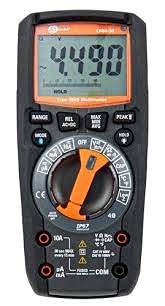
4.1. irudia: Aurrealdea view of the Sonel CMM 30 Industrial Multimeter. This image displays the device's main components, including the digital display, the central rotary function switch, and the various input terminals for test leads.
4.1. Pantaila
The large LCD shows measurement readings, units, function indicators, and battery status. It features an automatic backlight that adjusts to ambient light conditions for optimal visibility.
4.2. Funtzio etengailu birakaria
This central switch is used to select the desired measurement function (e.g., Voltage, Current, Resistance, Capacitance, Temperature, Frequency).
4.3. Funtzio botoiak
Various buttons provide additional controls and features:
- GAMA: Eskuzko eta automatikoko neurketaren artean txandakatzen du.
- JARRAIBIDEAK: Selects sub-functions within a main rotary switch position (e.g., AC/DC voltage, Diodoa/Jarraitutasuna).
- EUTSI: Uneko pantailaren irakurketa izozten du.
- MAX/MIN/BATEZ BESTEKOA: Records maximum, minimum, and average readings.
- REL: Relative mode, subtracts a stored value from subsequent measurements.
- Bluetooth/Light: Activates Bluetooth connectivity for the smartphone app and controls the built-in flashlight.
4.4. Sarrerako konektoreak
These are the connection points for the test leads:
- COM: Common terminal for the black test lead.
- VΩHzCAP°C: Bolumenerako sarreratage, resistance, frequency, capacitance, and temperature measurements (red test lead).
- mAµA: Milirako sarreraampere eta mikroampere current measurements (red test lead).
- 10A: Input for up to 10 Ampere current measurements (red test lead).
5. Konfigurazioa
5.1. Bateriaren instalazioa
The Sonel CMM 30 requires 4 AAA batteries. These may be pre-installed or included separately.
- Ziurtatu multimetroa itzalita dagoela.
- Bilatu bateriaren konpartimentua neurgailuaren atzealdean.
- Erabili bihurkin bat bateriaren estalkia lotzen duten torlojua(k) askatzeko.
- Kendu bateriaren estalkia.
- Insert the 4 AAA batteries, observing the correct polarity (+ and -) as indicated inside the compartment.
- Jarri berriro bateriaren estalkia eta estutu torlojua(k) ondo.
Oharra: Always use fresh batteries of the same type. Remove batteries if the meter is not used for an extended period to prevent leakage.
6. Funtzionamendu-argibideak
6.1. Piztu/Itzaltzea
Turn the rotary function switch from the OFF position to any desired measurement function to power on the meter. To power off, turn the switch back to the OFF position.
6.2. Basic Measurement Procedures
Before any measurement, ensure the test leads are correctly inserted into the appropriate input jacks for the selected function.
6.2.1. liburukiatage Neurketa (AC/DC)
- Insert the black test lead into the COM jack and the red test lead into the VΩHzCAP°C jack.
- Turn the rotary switch to the V~ (AC Voltage) edo V- (DC bolumenatage) position. If both are combined, use the MODE button to select AC or DC.
- Connect the test leads in parallel across the circuit or component to be measured.
- Irakurri liburukiatagPantailako balioa.
6.2.2. Korrontearen neurketa (AC/DC)
Kontuz: Never connect the meter in parallel for current measurement. Always connect in series with the circuit.
- Insert the black test lead into the COM jack. For currents up to 10A, insert the red test lead into the 10A jack. For smaller currents (mA/µA), insert the red test lead into the mAµA jack.
- Turn the rotary switch to the A~ (AC Current) or A- (DC Current) position, or the mA/µA position as appropriate. Use the MODE button to select AC or DC if needed.
- Open the circuit where current is to be measured and connect the meter in series.
- Irakurri uneko balioa pantailan.
6.2.3. Erresistentzia Neurketa
- Insert the black test lead into the COM jack and the red test lead into the VΩHzCAP°C jack.
- Biratu biraketa-etengailua Ω (Erresistentzia) posiziora.
- Ziurtatu zirkuitua edo osagaia deskonektatuta dagoela proba-kableak bertara konektatu aurretik.
- Irakurri erresistentziaren balioa pantailan.
6.2.4. Kapazitatearen Neurketa
- Insert the black test lead into the COM jack and the red test lead into the VΩHzCAP°C jack.
- Turn the rotary switch to the CAP (Capacitance) position.
- Ensure the capacitor is fully discharged before connecting the test leads across it.
- Irakurri kapazitantziaren balioa pantailan.
6.2.5. Tenperaturaren Neurketa
- Insert the temperature probe into the VΩHzCAP°C and COM jacks, observing polarity if applicable.
- Biratu biraketa-etengailua °C/°F (Tenperatura) posiziora.
- Jarri tenperatura-sendaren punta neurtu beharreko tenperatura duen objektuaren gainean edo haren ondoan.
- Irakurri tenperaturaren balioa pantailan.
6.3. Ezaugarri aurreratuak
6.3.1. Benetako RMS neurketa
The CMM 30 features True RMS for AC voltage and current measurements, providing accurate readings for non-sinusoidal waveforms.
6.3.2. Wireless Communication and Smartphone App
The CMM 30 can connect wirelessly to a smartphone application, allowing for remote reading and saving of measurements. This is particularly useful in hard-to-reach or hazardous locations.
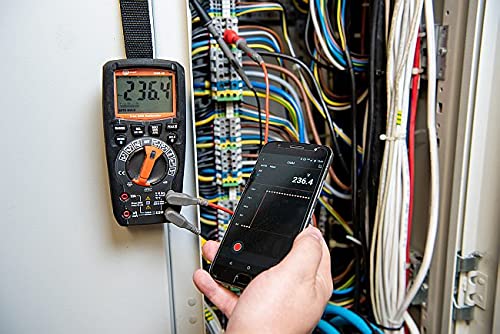
Figure 6.1: The Sonel CMM 30 Multimeter connected to an electrical panel, demonstrating its wireless communication feature. A smartphone displays the measurement reading remotely, highlighting the convenience for inaccessible areas.
Ezaugarri hau erabiltzeko:
- Download the official Sonel CMM app from your smartphone's app store.
- Gaitu Bluetootha zure telefonoan.
- Press the Bluetooth button on the multimeter to activate its wireless communication.
- Follow the app's instructions to pair with your CMM 30 and begin remote monitoring.
6.3.3. Linterna integratua
The integrated flashlight assists in illuminating measurement areas, especially in low-light conditions. Activate it by pressing the dedicated light button.
6.4. Durability and IP67 Rating
The CMM 30 is designed with an IP67 rating, signifying its protection against dust ingress and immersion in water up to 1 meter for 30 minutes. This makes it suitable for demanding industrial environments.
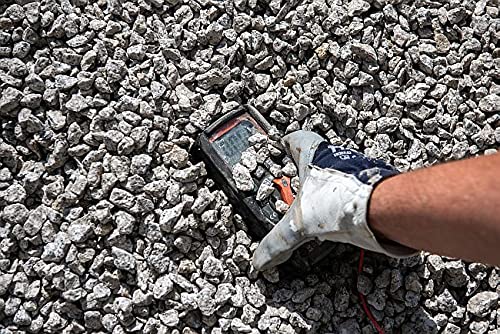
Figure 6.2: The Sonel CMM 30 Multimeter partially submerged in gravel, illustrating its robust construction and resistance to dust and debris, a testament to its IP67 rating.
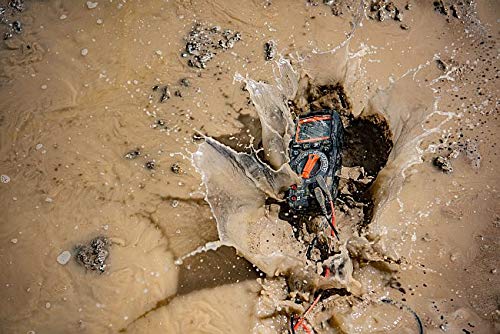
Figure 6.3: The Sonel CMM 30 Multimeter creating a splash as it impacts a muddy puddle, demonstrating its exceptional water resistance and ability to withstand harsh, wet conditions.
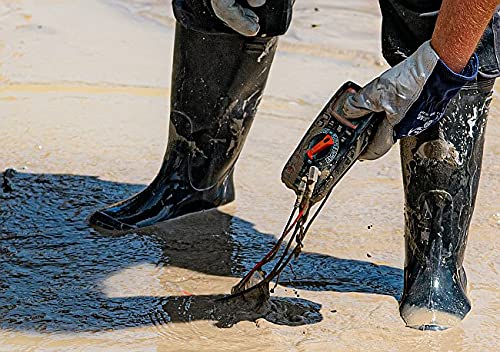
Figure 6.4: A person, wearing protective boots and gloves, retrieves the Sonel CMM 30 Multimeter from a muddy environment. This image emphasizes the device's resilience and ease of handling even after exposure to challenging conditions.
7. Mantentzea
7.1. Garbiketa
Garbitu neurgailuaren casiniragarkiarekin gamp oihal eta detergente leun batekin. Ez erabili urratzailerik edo disolbatzailerik. Ziurtatu neurgailua guztiz lehor dagoela erabili aurretik.
7.2. Bateria ordezkatzea
Ikusi 5.1 atala bateria ordezkatzeko argibideak lortzeko. Ordeztu bateriak berehala bateria baxuaren adierazlea pantailan agertzen denean.
7.3. Biltegiratzea
When not in use for extended periods, store the multimeter in a dry, cool place, away from direct sunlight and extreme temperatures. Remove the batteries to prevent leakage.
8. Arazoak
| Arazoa | Kausa posiblea | Irtenbidea |
|---|---|---|
| Neurgailua ez da pizten. | Bateriak hilda edo gaizki instalatuta. | Egiaztatu bateriaren polaritatea edo ordezkatu bateriak. |
| Ez da irakurketarik edo "OL" (gainkarga) bistaratzen da. | Incorrect function selected; open circuit; measurement exceeds range. | Select correct function; check circuit continuity; switch to a higher range or auto-range. |
| Irakurketa okerrak. | Low battery; dirty test leads/jacks; external interference. | Replace batteries; clean leads/jacks; move away from strong electromagnetic fields. |
| Bluetooth konexio arazoak. | Bluetooth not enabled on meter/phone; app issues; distance. | Ensure Bluetooth is on; restart app/phone; reduce distance between devices. |
9. Zehaztapenak
| Ezaugarri | Zehaztapena |
|---|---|
| Marka | Sonel |
| Modelo zenbakia | SON001 |
| Kolorea | Beltza |
| Elementuaren pisua | 418 g |
| Paketearen neurriak | 30 x 15 x 10 cm |
| Pilak | 4 AAA pila behar dira (barne) |
| Neurketa-funtzioak | AC / DC boltage, AC/DC Current, Resistance, Capacity, Temperature, Duty Cycle, Frequency |
| Sortzen | Eskuzkoa eta Automatikoa |
| Egiazko RMS | Yes (for AC voltage eta korrontea) |
| Sarrera babesteko (IP) balorazioa | IP67 |
| Konektibitatea | Wireless (Smartphone App) |
| Ezaugarri gehigarriak | HOLD function, Built-in flashlight, Backlight auto-adjustment |
10. Bermea eta Laguntza
10.1. Bermearen informazioa
Sonel products are manufactured to high standards and are warranted against defects in materials and workmanship for a period specified by your regional distributor from the date of purchase. This warranty does not cover damage caused by misuse, unauthorized modification, accident, or neglect. Please retain your proof of purchase for warranty claims.
10.2. Laguntza Teknikoa
For technical assistance, troubleshooting beyond this manual, or warranty inquiries, please contact your local Sonel distributor or the authorized service center. Contact information can typically be found on the Sonel official webgunearen bidez edo erosketa puntuaren bidez.
When contacting support, please have your product model number (SON001) and purchase date readily available.


