Sarrera
The Logitech POP Mouse is a compact, wireless mouse designed for enhanced productivity and personal expression. Featuring SilentTouch Technology for quiet clicks, a customizable top button for emojis or shortcuts, and a SmartWheel that shifts between precision and speed scrolling, it offers a versatile user experience. This mouse supports multi-device connectivity via Bluetooth, allowing seamless switching between up to three devices. It is built with durability in mind, offering up to 24 months of battery life and auto-sleep power-saving features.
Kutxan dagoena
- Logitech POP sagua
- 1 x AA bateria (aurrez instalatuta)
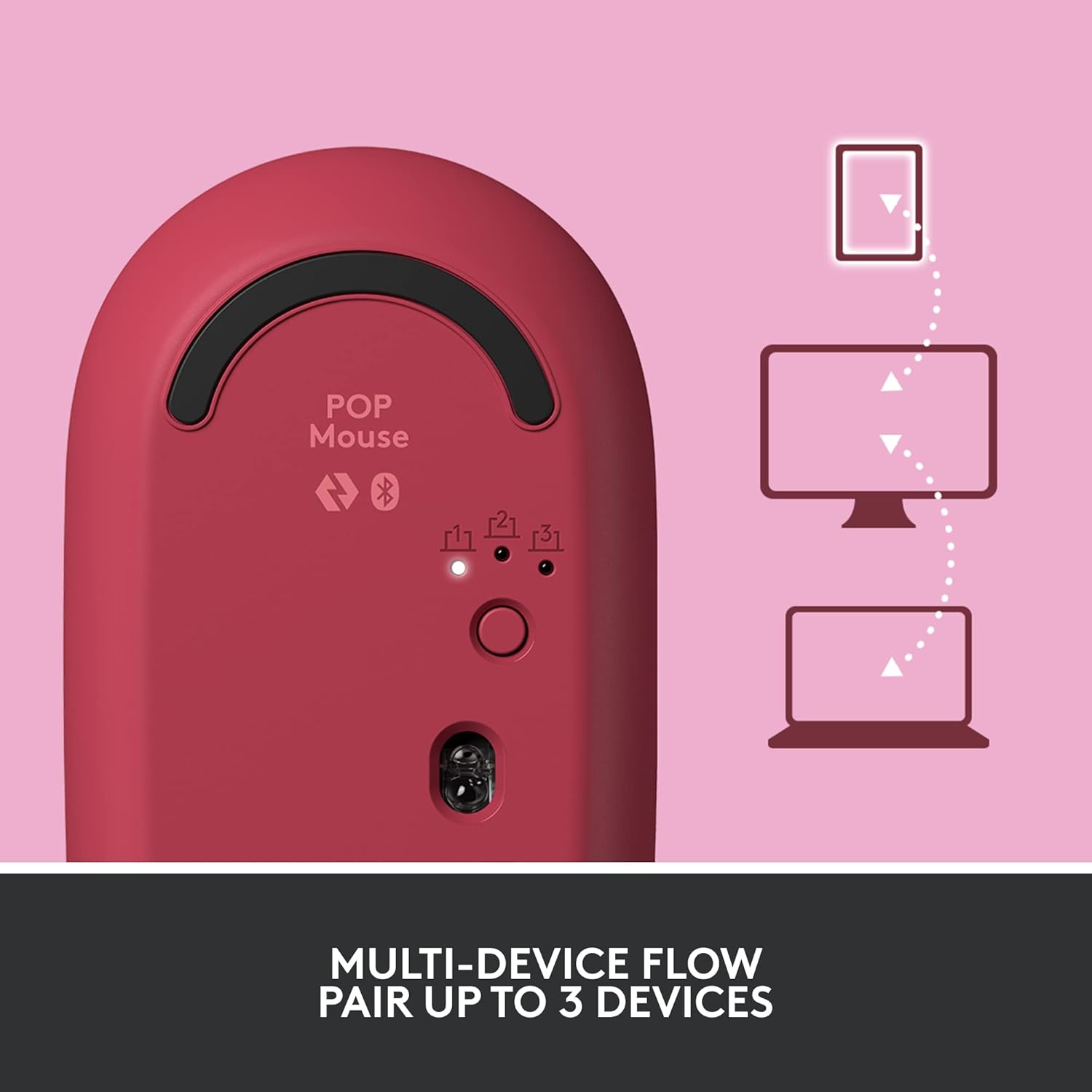
Image: The Logitech POP Mouse and an included AA battery, as typically found in the product packaging.
Konfigurazioa
1. Bateriaren instalazioa
- Kokatu bateriaren konpartimendua saguaren azpialdean.
- Gently slide the top cover of the mouse backward to remove it.
- Sartu barneko AA pila, polaritate zuzena (+/-) ziurtatuz.
- Replace the top cover by aligning it and sliding it forward until it clicks into place.
2. Piztu
- Flip the mouse over. Locate the On/Off switch on the bottom of the mouse.
- Slide the switch to the 'On' position (usually indicated by green color).
3. Gailuen parekatzea (Bluetooth)
- On the bottom of the mouse, press and hold the Easy-Switch button (labeled with 1, 2, or 3) for 3 seconds until the LED light starts blinking rapidly. This indicates pairing mode.
- On your computer, tablet, or phone, open your Bluetooth settings.
- Select "Logitech POP Mouse" from the list of available devices.
- Follow any on-screen prompts to complete the pairing process. The LED light on the mouse will turn solid for 5 seconds when connected.
4. Gailu anitzeko kommutazioa
- The POP Mouse can be paired with up to three devices. To switch between paired devices, simply press the Easy-Switch button on the bottom of the mouse. The corresponding LED (1, 2, or 3) will light up to indicate the active device.
Image: The Logitech POP Mouse can seamlessly connect and switch between up to three different devices, such as a tablet, desktop computer, and laptop.
Sagua erabiltzea
1. Oinarrizko funtzioak
- Ezkerreko klik: Primary selection and interaction.
- Egin klik eskuineko botoiarekin: Testuinguru-menuetara sartzen da.
- Korritzeko gurpila: Dokumentuetan bertikalki mugitzen da eta web orrialdeak.
2. SmartWheel Teknologia
- The SmartWheel automatically shifts between high-precision scrolling for detailed work and super-fast scrolling for quickly navigating long documents or web orrialdeak.

Image: The SmartWheel on the Logitech POP Mouse dynamically adjusts its scrolling mode for precision or speed.
3. SilentTouch Teknologia
- Enjoy a quiet working environment with SilentTouch Technology, which significantly reduces click noise without compromising tactile feedback.

Image: SilentTouch Technology ensures a quiet and comfortable user experience.
Pertsonalizazioa
1. Customizable Top Button
- The top button, located below the scroll wheel, is customizable. By default, it opens an emoji menu for quick access to your favorite emojis.

Image: The customizable top button allows for quick access to an emoji menu on your screen.
2. Logi Options+ App
- Deskargatu Logi Aukerak+ Aplikazioa (Windows and macOS only) to personalize your POP Mouse.
- You can reassign the top button to perform various shortcuts, such as Snip Screen, Mic Mute, Voice-to-Text, or any other function you desire.
- The app also allows you to adjust pointer speed, scroll speed, and enable Flow for cross-computer control.
Mantentzea
- Garbiketa: Erabili biguna, damp cloth to clean the exterior of the mouse. Avoid harsh chemicals or abrasive materials.
- Bateria ordezkatzea: Replace the AA battery when the low battery indicator light appears.
- Biltegiratzea: When not in use for extended periods, turn off the mouse using the On/Off switch to conserve battery life.
Arazoak konpontzea
- Sagua ez da konektatzen: Ensure the mouse is powered on and within range of your device. Check your device's Bluetooth settings to confirm it's enabled and the mouse is paired. Try re-pairing the mouse.
- Atzerapena edo mugimendu irregularra: Replace the battery if it's low. Ensure there are no obstructions between the mouse and your device. Avoid using the mouse on highly reflective or uneven surfaces.
- Custom button not working: Verify that the Logi Options+ App is installed and running on your computer. Check the button assignments within the app.
Zehaztapenak
| Marka | Logitech |
| Modelo zenbakia | 910-006545 |
| Konektibitate Teknologia | Bluetooth 5.1 |
| Wireless Range | 32.81 oin (10 m) |
| Sensor Teknologia | Logitech High Precision Optical Tracking |
| Botoi kopurua | 4 (Left/Right click, Scroll wheel click, Top button) |
| Pertsonaliza daitekeen botoia | Yes (Top button, via Logi Options+ App) |
| Bateria mota | 1 x AA bateria |
| Bateriaren iraupena | 24 hilabete arte (erabileraren arabera alda daiteke) |
| Sistema eragileen bateragarritasuna | Windows 10 edo berriagoa, macOS 10.15 edo berriagoa, iPadOS, Chrome OS, Android |
| Elementuaren pisua | 2.89 ontza |
| Produktuaren neurriak (LxWxH) | 4.3 x 2.6 x 1.7 hazbete |
| Materiala | Plastic parts include certified post-consumer recycled plastic (Heartbreaker Rose: 29%) |
Bermea eta Laguntza
Bermeari buruzko informazioa eta laguntza teknikoa lortzeko, bisitatu Logitech-en laguntza ofiziala. website or refer to the warranty card included with your product. You can find detailed FAQs, troubleshooting guides, and contact options for customer service.
- Lineako laguntza: Bisitatu support.logi.com
- Produktuen erregistroa: Erregistratu zure produktua eguneraketak eta laguntza jasotzeko.


