Sarrera
This manual provides detailed instructions for the setup, operation, maintenance, and troubleshooting of your ECHTPower Wireless Bluetooth Ergonomic Vertical Mouse. Please read this manual thoroughly before using the device to ensure proper functionality and longevity.

Image: The ECHTPower Wireless Bluetooth Ergonomic Vertical Mouse, showing its vertical design and the included USB receiver.
Produktuaren Ezaugarriak
- Diseinu bertikal ergonomikoa: Designed to reduce wrist and forearm strain, promoting a natural hand posture.
- Hiru moduko konexioa: Supports dual Bluetooth 5.0 connections and a 2.4GHz wireless USB connection, allowing control of up to three devices.
- DPI erregulagarria: Switch between 1000, 1600, and 2400 DPI settings for precise cursor control.
- Bateria kargagarria: Built-in 700mAh battery provides up to 150 hours of continuous use on a 2-hour charge via Type-C port.
- Klik isilaren botoiak: Main left and right click buttons are designed for quiet operation, reducing noise by 90% compared to traditional mice.
- 7 Botoiak: Includes left click, right click, scroll wheel, DPI switch, forward, back, and device switch buttons.

Image: Comparison showing the natural wrist posture with the ergonomic vertical mouse versus the bent wrist posture with a traditional mouse.

Image: The mouse demonstrating its ability to connect to three different devices simultaneously via 2.4G and dual Bluetooth modes.
Paketearen edukia
- ECHTPower Wireless Bluetooth Ergonomic Vertical Mouse
- USB hargailua (saguaren beheko konpartimentuan gordeta)
- USB-C kargatzeko kablea
- Erabiltzailearen eskuliburua (dokumentu hau)
Konfigurazio Gida
1. Sagua kargatzea
Before first use, it is recommended to fully charge the mouse. Connect the provided USB-C charging cable to the Type-C port on the front of the mouse and the other end to a USB power source (e.g., computer USB port, USB wall adapter).
- The LED light will indicate charging status.
- Karga osoak 2 ordu behar ditu gutxi gorabehera.
- The mouse can be used for up to 150 hours on a full charge (with lights off state).
- If the battery is low, the indicator light will blink.

Image: The mouse being charged via its Type-C port, highlighting the 700mAh battery capacity and 2-hour charging time.
2. Sagua konektatzea
The ECHTPower mouse supports three connection modes: 2.4GHz Wireless USB and two Bluetooth 5.0 channels (BT1 and BT2).
- Piztu: Locate the power switch on the bottom of the mouse and slide it to the "ON" position.
- Hautatu konexio modua: Press the "Device Switch Button" on the bottom of the mouse to cycle through the modes:
- 2.4 GHz modua: The indicator light will show a specific color (refer to troubleshooting if not). Insert the USB receiver into an available USB port on your computer. The mouse should connect automatically.
- Bluetooth 1 (BT1) Mode: The indicator light will show a specific color. Press and hold the device switch button for 3-5 seconds until the indicator light flashes rapidly, indicating pairing mode.
- Bluetooth 2 (BT2) Mode: The indicator light will show a specific color. Press and hold the device switch button for 3-5 seconds until the indicator light flashes rapidly, indicating pairing mode.
- Pairing via Bluetooth (for BT1/BT2 modes):
- On your device (PC, Laptop, Mac, Tablet), go to Bluetooth settings.
- Bilatu gailu berriak.
- Select "ECHTPower Mouse" (or similar name) from the list of available devices.
- Confirm pairing. The indicator light on the mouse will stop flashing and remain solid once connected.
To switch between connected devices, simply press the "Device Switch Button" on the bottom of the mouse.

Irudia: Xehetasun handikoa view of the mouse's underside, indicating the location of the power switch, device switch button, optical lens, and the compartment for the USB receiver.
Funtzionamendu-argibideak
Botoiaren funtzioak
| Botoia | Funtzioa |
|---|---|
| Ezkerreko botoia | Standard left mouse click. Silent operation. |
| Egin klik eskuineko botoian | Standard right mouse click. Silent operation. |
| Korritzeko gurpila | Gora/behera joan, erdiko botoiarekin klik egin. |
| DPI aldatzeko botoia | Cycles through DPI settings: 1000, 1600, 2400. |
| Aurrera Botoia | Aurrera nabigatzen du web nabigatzaileak edo file esploratzaileak. |
| Atzera botoia | Barrura nabigatzen du berriro web nabigatzaileak edo file esploratzaileak. |
| Device Switch Button (bottom) | Switches between 2.4GHz, Bluetooth 1, and Bluetooth 2 modes. Long press to enter Bluetooth pairing mode. |

Irudia: Aurrealdea eta albokoa views of the mouse with labels for the DPI switch button, roller, left button, right button, forward button, back button, and LED light.
DPI doitzea
Press the DPI switch button located on the top of the mouse, behind the scroll wheel, to cycle through the available DPI settings: 1000, 1600, and 2400. Each press will change the cursor sensitivity, allowing you to select the speed that best suits your needs.

Image: A visual representation of the DPI adjustment feature, indicating the three selectable DPI levels.
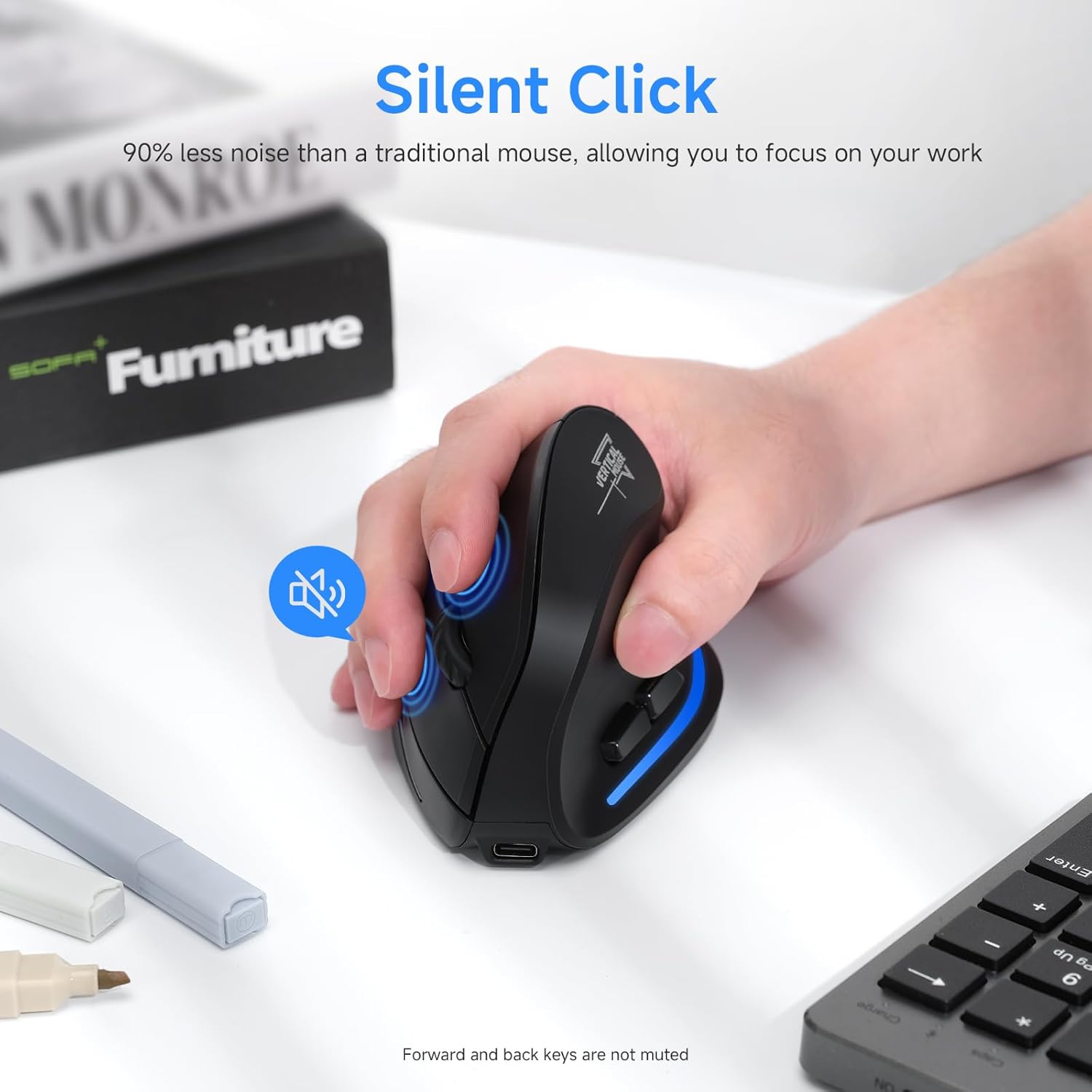
Image: A user's hand on the mouse, highlighting the silent click functionality of the main buttons. Note that forward and back keys are not muted.
Mantentzea
- Garbiketa: Erabili zapi leun eta lehor bat sagua garbitzeko. Zikinkeria egoskorra bada, garbitu zapi pixka bat.amp oihal bat erabil daiteke, baina ziurtatu hezetasunik ez sartzen gailuan. Ez erabili produktu kimiko gogorrik edo garbitzaile urratzailerik.
- Biltegiratzea: When not in use for extended periods, store the mouse in a cool, dry place. It is recommended to turn off the mouse to conserve battery life.
- Bateria zaintzea: Bateriaren iraupena luzatzeko, saihestu sagua maiz erabat deskargatzea. Kargatu bateria baxuaren adierazlea keinuka hasten denean.
- USB hargailua: When transporting the mouse, store the USB receiver in its designated compartment on the bottom of the mouse to prevent loss.
Arazoak konpontzea
| Arazoa | Kausa posiblea | Irtenbidea |
|---|---|---|
| Sagua ez du erantzuten | Low battery; Mouse is off; Incorrect connection mode; USB receiver not properly inserted (2.4GHz mode); Bluetooth not paired (BT mode). | Charge the mouse; Turn on the mouse; Switch to the correct connection mode (2.4GHz, BT1, BT2); Re-insert USB receiver; Re-pair Bluetooth. |
| Kurtsorearen mugimendua irregularra edo motela da | Low battery; Dirty optical sensor; Surface not suitable for optical mouse; DPI setting too low. | Charge the mouse; Clean the optical sensor with a soft cloth; Use a mouse pad or a non-reflective, opaque surface; Increase DPI setting. |
| Ezin da Bluetooth bidez konektatu | Mouse not in pairing mode; Bluetooth on device is off; Interference; Already connected to another device. | Ensure mouse is in BT pairing mode (flashing light); Turn on Bluetooth on your device; Move closer to the device; Disconnect from other devices. |
| Botoiek ez dute funtzionatzen | Software conflict; Mouse malfunction. | Restart your computer; Try the mouse on another device; If problem persists, contact customer support. |
Zehaztapenak
- Eredua: SB-F35B
- Konektibitatea: 2.4GHz Wireless, Bluetooth 5.0 (BT1, BT2)
- DPI ezarpenak: 1000/1600/2400
- Bateriaren edukiera: 700mAh litiozko bateria kargagarria
- Kargatzeko denbora: 2 ordu gutxi gorabehera
- Lanaldia: Up to 150 hours (with lights off)
- Botoi kopurua: 7 (Left, Right, Scroll Wheel, DPI, Forward, Back, Device Switch)
- Eskuen orientazioa: Left (Note: Product images depict a right-handed mouse design.)
- Elementuaren pisua: 6.2 ontza
- Neurriak (LxWxH): Gutxi gorabehera 4.33 x 2.83 x 2.95 hazbete (110 mm x 72 mm x 75 mm)
- Bateragarritasuna: PC, Laptop, Mac, Windows (and other Bluetooth-enabled devices)
Irudia: Xehetasun handikoa view of the mouse's underside, indicating the location of the power switch, device switch button, optical lens, and the compartment for the USB receiver.
Irudia: Aurrealdea eta albokoa views of the mouse with labels for the DPI switch button, roller, left button, right button, forward button, back button, and LED light, along with dimensions.
Bermea eta Laguntza
ECHTPower products are designed for reliability and performance. For warranty information and technical support, please refer to the official ECHTPower webgunera edo jarri harremanetan zuzenean bezeroarentzako arreta-zerbitzuarekin.
Harremanetarako informazioa:
- Webgunea: Visit the ECHTPower Store on Amazon
- For further assistance, please consult the product listing page or contact the seller directly through Amazon's messaging system.


