1. Sarrera
This manual provides essential instructions for the safe and efficient use of your Xiaomi Mi Portable Bluetooth Speaker. Please read this manual thoroughly before using the product and retain it for future reference. The speaker features high-quality sound, True Wireless Stereo (TWS) capability, Bluetooth 5.0 connectivity, and IPX7 waterproofing, making it suitable for various environments.

Irudia: Angelua view of the Xiaomi Mi Portable Bluetooth Speaker, highlighting its compact design and control panel.
2. Paketearen edukia
Ziurtatu elementu guztiak paketean daudela:
- Xiaomi Mi Portable Bluetooth Speaker x1
- Charging Cable x1 (USB-C)
- Erabiltzailearen eskuliburua x1
3. Produktuaren ezaugarriak
- Kalitate handiko soinua: Delivers clear and balanced audio.
- Wireless Wireless Stereo (TWS): Connect two speakers for an immersive stereo experience.
- Bluetooth 5.0: Haririk gabeko konexio egonkorra eta eraginkorra.
- IPX7 iragazgaitza: Protected against immersion in water up to 1 meter for 30 minutes.
- Joko luzea: Approximately 13 hours of playback at 50% volume.
- Mikrofono integratua: Esku libreko deiak egiteko.
- AUX sarrera: Kable bidezko audio konexiorako.
4. Kontrolak eta adierazleak
Familiarize yourself with the speaker's control buttons and indicators:
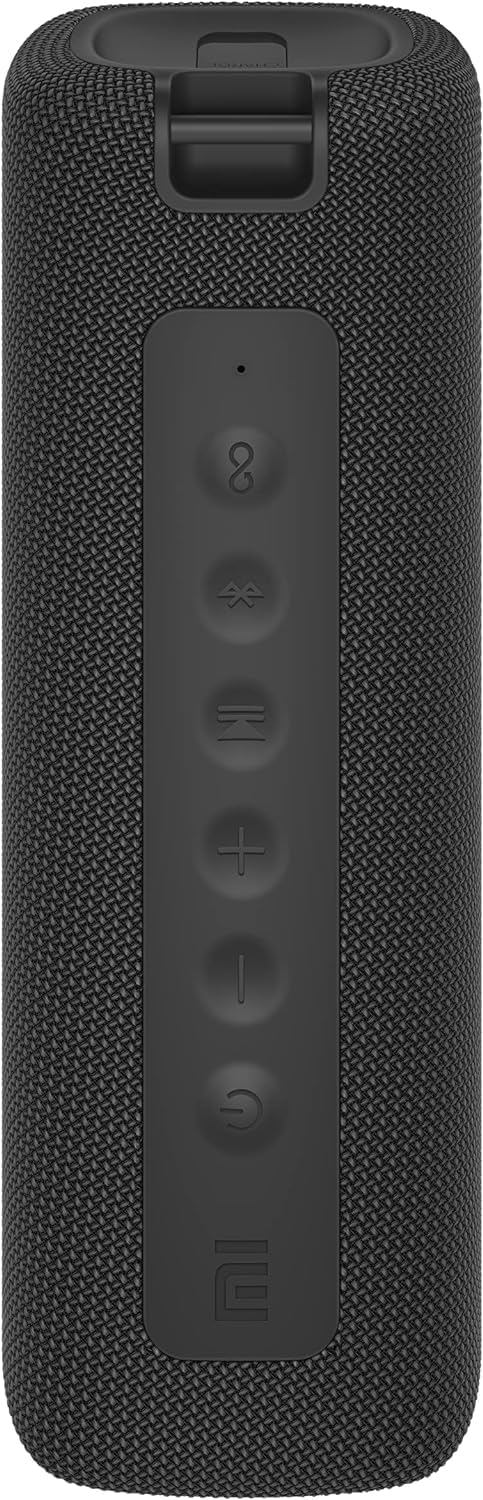
Irudia: Aurrealdea view of the speaker with clearly visible control buttons.
| Botoia / adierazlea | Funtzioa |
|---|---|
| Pizteko botoia (⏻) | Press and hold for 2 seconds to power on/off. Short press to play/pause music or answer/end calls. |
| Bolumena jaitsi (−) | Sakatu labur bolumena jaisteko. Sakatu eta eutsi aurreko abestirako. |
| Bolumena igo (+) | Sakatu labur bolumena igotzeko. Sakatu eta eutsi hurrengo abestirako. |
| Bluetooth botoia (Ⓑ) | Sakatu labur, Bluetooth parekatze moduan sartzeko. |
| TWS botoia (∞) | Press to initiate True Wireless Stereo pairing with another Mi Portable Bluetooth Speaker. |
| LED adierazlea | Indicates power status, charging status, and Bluetooth pairing status. |
5. Konfigurazioa
5.1 Bozgorailua kargatzea
- Konektatu emandako USB-C kargatzeko kablea bozgorailuaren kargatzeko atakara.
- Connect the other end of the cable to a 5V 1A USB power adapter (not included) or a computer's USB port.
- LED adierazleak kargatze-egoera erakutsiko du (adibidez, gorria kargatzen ari den bitartean, itzalita guztiz kargatuta dagoenean).
- Karga osoak 4 ordu behar ditu gutxi gorabehera.
5.2 Piztu/Itzali
- Pizteko: Press and hold the Power button for 2 seconds. You will hear an audible prompt, and the LED indicator will light up.
- Itzaltzeko: Press and hold the Power button for 2 seconds. You will hear an audible prompt, and the LED indicator will turn off.
5.3 Bluetooth parekatzea
- Ensure the speaker is powered on. The LED indicator will flash blue, indicating it's in pairing mode.
- Zure gailuan (telefono adimenduna, tableta, ordenagailua), gaitu Bluetooth eta bilatu eskuragarri dauden gailuak.
- Select "Mi Portable Bluetooth Speaker" from the list of devices.
- Once paired, the LED indicator will turn solid blue, and you will hear a confirmation sound.
- The speaker will automatically connect to the last paired device when powered on, if within range.
5.4 Benetako Haririk gabeko Estereoa (TWS) Parekatzea
To pair two Xiaomi Mi Portable Bluetooth Speakers for stereo sound:
- Ziurtatu bi bozgorailuak piztuta daudela eta ez daudela beste Bluetooth gailu batera konektatuta.
- On one speaker (this will be the primary speaker), short press the TWS button (∞). The LED indicator will flash.
- On the second speaker, short press the TWS button (∞).
- The two speakers will automatically connect to each other. You will hear a confirmation sound, and the LED indicators on both speakers will turn solid blue.
- Now, connect your device to the primary speaker via Bluetooth as described in section 5.3. The sound will play in stereo through both speakers.
5.5 AUX konexioa
Kable bidezko audio erreprodukziorako:
- Connect a 3.5mm audio cable (not included) from your audio source to the AUX IN port on the speaker.
- Bozgorailua automatikoki aldatuko da AUX modura.
- Control playback and volume from your audio source device.
6. Funtzionamendu-argibideak
6.1 Musika erreproduzitzea
- Erreproduzitu/Pausatu: Sakatu labur pizteko botoia.
- Bolumena igo: Sakatu labur bolumena igotzeko botoia (+) botoia.
- Bolumena jaitsi: Short press the Volume Down (−) botoia.
- Hurrengo ibilbidea: Press and hold the Volume Up (+) botoia.
- Aurreko pista: Press and hold the Volume Down (−) botoia.
6.2 Deien kudeaketa
- Deia erantzun/amaitu: Short press the Power button when a call comes in or during a call.
- Deia baztertu: Press and hold the Power button for 2 seconds when a call comes in.
7. Mantentzea
- Garbiketa: Garbitu bozgorailua leun batekin, damp oihal. Ez erabili garbitzaile edo disolbatzaile urratzailerik.
- Biltegiratzea: Gorde bozgorailua leku fresko eta lehor batean, eguzki-argitik eta muturreko tenperaturetatik babestuta.
- Uraren erresistentzia: The speaker is IPX7 waterproof. Ensure the charging port cover is securely closed before exposure to water. Do not submerge the speaker for extended periods or beyond specified depths.
- Bateria zaintzea: To prolong battery life, avoid fully discharging the speaker frequently. Charge it regularly, even if not in use for long periods.
8. Arazoak
| Arazoa | Irtenbide posiblea |
|---|---|
| Bozgorailuak ez du pizten. | Ziurtatu bateria kargatuta dagoela. Konektatu energia-iturri batera eta saiatu berriro. |
| Ezin da Bluetooth bidez parekatu. |
|
| Soinurik ez edo bolumen baxua. |
|
| TWS parekatzeak huts egin du. |
|
| Soinu kalitate txarra. |
|
9. Zehaztapenak

Irudia: Behealdea view of the speaker, displaying model number and certifications.
| Parametroa | Balioa |
|---|---|
| Eredua | MDZ-36-DB |
| Produktuaren neurriak | W 213 x D 74 x H 74 mm (approx. 8 x 3 x 3 inches) |
| Konektibitatea | Bluetooth 5.0, 3.5mm AUX IN |
| Irteera baloratua | 2 x 8W (16W guztira) |
| Seinaleen eta zarataren arteko erlazioa | ≥ 70 dB |
| TWS Connection Range | ≤ 5m |
| Iragazgaitzaren balorazioa | IPX7 |
| Bateria mota | Litio-ioi, 3.7 V |
| Bateria Edukiera | 2600mAh |
| Bateria kargatzeko denbora | Gutxi gorabehera. 4 ordu |
| Erreprodukzio-denbora | Gutxi gorabehera. 13 ordu (% 50eko bolumenean) |
| Maiztasun barrutia | 80Hz-tik 20KHz-ra |
| Inpedantzia nominatua | 4 Ω |
| Transmisio Distantzia | 15 m |
| Sarrera baloratua | 5V 1A |
| Elementuaren pisua | 500 gramo (1.1 libra) |
10. Bermea eta Laguntza
Bermeari buruzko informazio zehatza lortzeko, kontsultatu zure produktuarekin batera datorren berme-txartela edo bisitatu Xiaomi-ren webgune ofiziala. webgunea.
If you encounter any issues not covered in this manual, please contact Xiaomi customer support or visit their official support channels for assistance.